Welcome Guest ( Log In | Register )

Bump Topic Topic Closed RSS Feed
128 Pages « < 30 31 32 33 34 > » Bottom

Outline · [ Standard ] · Linear+

Hardware Apple iPad Discussion Thread | V2, Everything about iPad

views
     
zwanvedder
post May 27 2010, 05:22 PM

Rock For Choice
******
Senior Member
1,589 posts

Joined: Sep 2008


QUOTE(lasersharp @ May 27 2010, 05:13 PM)
All bros with iPad.. am considering getting one.  What's your experience using it - I am looking for casual surfing and reading.

1) do you find the inability to open different web pages in tab problematic?

2) are you able to read PDFs - which i intend to do a lot.
Any form of feedback would be helpful.
*
just go for it bro...u'll never regret it
keyven
post May 27 2010, 05:29 PM

Casual
***
Junior Member
373 posts

Joined: Jan 2009
From: lado oeste de Malasia


QUOTE(lasersharp @ May 27 2010, 05:13 PM)
All bros with iPad.. am considering getting one.  What's your experience using it - I am looking for casual surfing and reading.

1) do you find the inability to open different web pages in tab problematic?


You can d/l an application called "atomic browser" for multi tabbed kind from app store.. just 99c only

QUOTE(lasersharp @ May 27 2010, 05:13 PM)
2) are you able to read PDFs - which i intend to do a lot.
Any form of feedback would be helpful.

*


There are free applications like Cloud reader and paid application like Good Reader which can open anything... biggrin.gif

Dont think.. just buy an iPad... you will never regret it. icon_idea.gif


lasersharp
post May 27 2010, 06:03 PM

New Member
*
Junior Member
16 posts

Joined: Aug 2008
Thanks for feedback - key question - how do you transfer pdfs across from PC to the iPad since there is no sd card slot etc?

It's a hassle to redownload all the large pdfs on the iPad.

I am also considering macbook pro 13 but this it's overkill for my surfing and reading activities. Ipad sounds good!


rx330
post May 27 2010, 06:29 PM

10k Club
********
All Stars
11,809 posts

Joined: Jun 2006
string, it makes u wet thinking abt it, eh? tongue.gif

buy buy buy, everybody get an ipad, u suit urself to it, not the other way round
u dun need one, buy u desire/want one thumbup.gif
Edoras
post May 27 2010, 06:37 PM

Regular
******
Senior Member
1,134 posts

Joined: Jan 2003
QUOTE(lasersharp @ May 27 2010, 06:03 PM)
Thanks for feedback - key question - how do you transfer pdfs across from PC to the iPad since there is no sd card slot etc?

It's a hassle to redownload all the large pdfs on the iPad.

I am also considering macbook pro 13 but this it's overkill for my surfing and reading activities.  Ipad sounds good!
*
Download GoodReader app. You can drag and drop the PDF files in iTunes (GoodReader window) then Sync it. Voila!
iamsobloodysick
post May 27 2010, 06:41 PM

Look at all my stars!!
*******
Senior Member
2,006 posts

Joined: Mar 2005
From: Truly Malaise
QUOTE(Edoras @ May 27 2010, 06:37 PM)
QUOTE(lasersharp @ May 27 2010, 06:03 PM)

Thanks for feedback - key question - how do you transfer pdfs across from PC to the iPad since there is no sd card slot etc?

It's a hassle to redownload all the large pdfs on the iPad.

I am also considering macbook pro 13 but this it's overkill for my surfing and reading activities.  Ipad sounds good!
*
Download GoodReader app. You can drag and drop the PDF files in iTunes (GoodReader window) then Sync it. Voila!
*
Alternatively, you can use an online storage service such as Dropbox to sync your files to iPad.
beavis68
post May 27 2010, 06:57 PM

I want my chicken Picata!! r u threatening me?
******
Senior Member
1,020 posts

Joined: Oct 2006
From: Lake Titicaca


QUOTE(Edoras @ May 27 2010, 06:37 PM)
Download GoodReader app.  You can drag and drop the PDF files in iTunes (GoodReader window) then Sync it. Voila!
*
got goodreader window in itune? i cann't find it......
zwanvedder
post May 27 2010, 07:08 PM

Rock For Choice
******
Senior Member
1,589 posts

Joined: Sep 2008


im using cloudreader to read my all my comics...great...
btw just bot Capdase Screen Guard that is anti glare n finger print at Sunway Pyramid - RM78 only....so far im really like it
stringfellow
post May 27 2010, 08:28 PM

Ultrawide | 4K | VR
********
Senior Member
11,305 posts

Joined: Jan 2003
After looking at the Mactalk forums, JB HiFi will be carrying the iPad at launch. The hotel I'm staying in downtown Brisbane is mere 5 minutes walk from the closest JB HiFi. If all goes to plan, I may not even have to go to Chermside to get one.

Fingers crossed. I've a feeling that tomorrow's going to be a glorious day. biggrin.gif
stringfellow
post May 27 2010, 08:36 PM

Ultrawide | 4K | VR
********
Senior Member
11,305 posts

Joined: Jan 2003
QUOTE(Eralus @ May 27 2010, 08:32 PM)
wah bro..are you going to buy one more iPad??
*
For my bro. He deserves it after giving me his Maxis 3G account for free.

The plan: buy the iPad at JB HiFi with whatever necessary accessories I can get there then just visit the Apple Store leisurely watching the madness there. LOL!

I'm just curious if they're imposing the "2 iPad Orr person" limit or not, along with the Apple iPad case and Cam Kit.
syzwn
post May 28 2010, 12:18 AM

Casual
***
Junior Member
358 posts

Joined: Dec 2009
From: bolehland


i juz bought an iPad..it was cool man biggrin.gif
zwanvedder
post May 28 2010, 12:23 AM

Rock For Choice
******
Senior Member
1,589 posts

Joined: Sep 2008


QUOTE(syzwn @ May 28 2010, 12:18 AM)
i juz bought an iPad..it was cool man biggrin.gif
*
Welcome to d club n enjoy... rclxms.gif
MrHoh
post May 28 2010, 12:39 AM

New Member
*
Junior Member
16 posts

Joined: May 2010


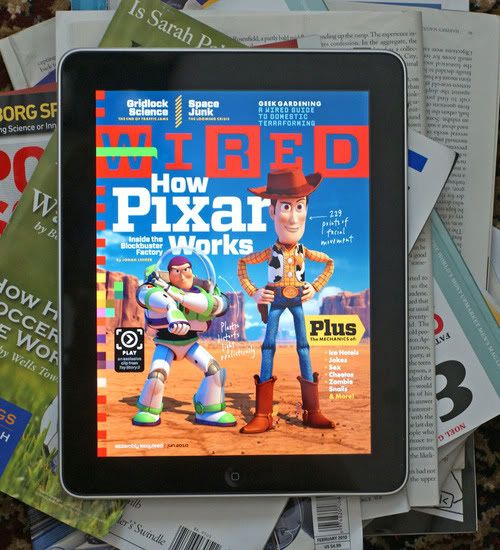
user posted image

Anyone got the WIRED app? Can give a review please? It's really tempting. smile.gif
theoutdoorzone
post May 28 2010, 12:43 AM

Getting Started
**
Junior Member
73 posts

Joined: Oct 2006
QUOTE(zwanvedder @ May 27 2010, 07:08 PM)
im using cloudreader to read my all my comics...great...
btw just bot Capdase Screen Guard that is anti glare n finger print at Sunway Pyramid - RM78 only....so far im really like it
*
Hi,

Which shop did you buy your screen protector from? Any charges for installation. Tq
zwanvedder
post May 28 2010, 01:06 AM

Rock For Choice
******
Senior Member
1,589 posts

Joined: Sep 2008


QUOTE(theoutdoorzone @ May 28 2010, 12:43 AM)
Hi,

Which shop did you buy your screen protector from? Any charges for installation. Tq
*
Hiro Digital World - Lot F1-40, F Floor Sunway Pyramid... icon_rolleyes.gif free installation charges n quite professional fella
theoutdoorzone
post May 28 2010, 01:37 AM

Getting Started
**
Junior Member
73 posts

Joined: Oct 2006
QUOTE(zwanvedder @ May 28 2010, 01:06 AM)
Hiro Digital World - Lot F1-40, F Floor Sunway Pyramid... icon_rolleyes.gif free installation charges n quite professional fella
*
Thanks for the quick reply. Another question. How is the clarity of the screen protector ? I am using the free screen protector that came with the switcheasy casing but I can't stand all the fingerprints. Tq biggrin.gif
little ice
post May 28 2010, 02:54 AM

PROFESSIONAL TROLL
*******
Senior Member
3,242 posts

Joined: Apr 2008
From: From: From: From: From: From: From: From: From:
QUOTE(lasersharp @ May 27 2010, 05:13 PM)
All bros with iPad.. am considering getting one.  What's your experience using it - I am looking for casual surfing and reading.

1) do you find the inability to open different web pages in tab problematic?

2) are you able to read PDFs - which i intend to do a lot.
Any form of feedback would be helpful.
*
my experience of netbook/notebook vs ipad:

1) different web pages in tab isn't that difficult, atomic browser or iCab do the job wonderfully. however, you might want to consider more than just tab thingy on browsing webpage on ipad. 256MB on the ipad is so little, i tried loading a single webapge, but it's an image intensive webpage and guess what? iCab can't even load it completely before it quit (iCab will quit if RAM is fully used and exploded).

the mobile safari, in comparison is much better in handling the RAM, but it'll be very annoying when you opened a webpage, leave it open, and surf other webapge on another page. when you come back to the previous webpage, it'll automatically refresh, because the cache already finished and it'll need to dump the oldest cache which is the first page you opened (and very annoying if you want to keep the webpage in its state without refresh or the page will change/updated). and like the above scenario, it'll load the image intensive webpage fine, but expect it to dump the first half of the webpage when you continue to scroll down. if you want to scroll back up again, it'll reload the images, means more battery consumption for data transfer over wifi, or ever worse for 3G where it's more battery intensive and you waste some bandwidth (not that once or twice will make significant difference, but what if you do it often?)...

then, the mobile safari can't support all kinds of encoding, you might end up funny characters even on some chinese webpages. some of the layout are off too, but in general 80%~90% should display correctly.

lacking of flash. hmm. this one depends on you, but i do find lacking flash is a major problem when i try to browse some webpage to acquire important information but they never displayed, and no basic html version available, but that'll be not so common.

also, expect to get frustrated if you're windows explorer based organizer. ipad rely mostly on propriatery library database on each application. some of the playable formats still can play/run if you use iFile (like windows explorer), but some unsupported ones it's quite a hit and miss.

web browsing isn't yet on par with regular full version browser on desktop/laptop, not even close, very sorry to say that. however, checking mail and surfing forums are basically 99.9% problem free.


2) cloud reader is good, and easy to sync via itunes (drag and drop). reading pdf on ipad (if every pages are images) will be slow on page flipping, but no big deal since you'll be stopping on one page for some time (manga, ebook), but zooming won't be smooth and if you just want to flip through the pages, it ain't that fast, kinda sluggish.

however, nothing beats reading ebook/manga on the wonderful screen of the ipad, can't do that on laptops and you wouldn't want to read it on tablets cause they're heavy! the 10inch'ish screen is just nice.


---------------------------------------------------------------------------

by the way, i got myself a vaio netbook, size/weight is comparable to ipad, battery is 20%~30% less than ipad (gonna miss that monster battery life!), but still a fantastic mobile device for light task/web surfing. but i still keep my ipad though, and would like to give some comparison/personal views on this for those who cannot decide to get a netbook or ipad like me:

netbook:
+ it's a full OS! virtually, you can do whatever you can do on desktop, given that the netbook has got the power to handle it. playing all sorts of media format, editing files, you name it. can't do that much on ipad!
+ applications are, well, unlimited. i bought a netbook after using the ipad for a while simply because ipad cannot provide the important applications i need for my teaching life. don't get me wrong, ipad is great, but you know, sometimes when you miss an application or two it'll make you want to go back to windows/Mac and how you wish you can install them on ipad. wink.gif
+ accessories are a bunch for you to choose, from cheapo chaplang brand to high end, deviced from A to Z, you name it.
- not as convenient and straight forward on ipad, but not much of a problem if you're a geek'ish user.
- cannot read in portrait view! you'll have to deal with landscape with *everything*. i tried rotating the view, but some of the laptop screen might look awful in that viewing angle.
- touch screen, yes, unless you're getting tablet, regular netbook/laptop doesn't have touch screen. some of the application like map/GPS is so much easier with touch screen...

ipad:
+ straight forward, and easy to use, perfect for user who love one click install/use that doesn't need to deal with all sorts of installation junks. if you've used itouch/iphone, it's the same.
+ monster battery life! especially for video/web, very rare a netbook come close to that battery life *at the size of ipad*, in fact, none i've seen.
+ fun experiences on ipad games, which some can't be matched using mouse or keyboard.
+ probably your best ebook reader, and portable video player. maybe not so much of a music player as it doesn't last that long, apple said 10 hours battery life is for *anything* you do, so i think you get maybe slightly more than 10 hours of music playback but maybe never more than 15 hours.
+ best light web surfing device. you can surf web while you're lying on the bed, try that with your netbook!
+ highly reasonable price. try to find a device that can have such wonderful screen, can have as long battery life, and still powerful for regular use.
- closed OS, but plenty to cover regular user need. geek'ish user please look else where...
- you can't just stuck a pendriver or hook up a CD driver to transfer medias (camerakit + jailbreak can handle external HDD, though) and you can NEVER manage the itunes library without a computer. you can argue that you can use the above camerakit thingy to do the job and not consider this as disadvantage, but sorry, it's just too much hassle to do just to play some mp3s/video.
- expensive accessories (although there're cheaper althernatives). limited accessory choices too.

to summarize it, get an ipad if you want to have mobile entertainment/light task on the go - manga, ebook, videos, music, some games, organizer etc for extra long battery life. get a netbook/laptop if you want to install various kind of application, and want to have your desktop working environment on the go, and willing to sacrifice battery life (or pay up to 3 times of the price of iPad 3G for ultra portable laptops with long battery life).

so buyers beware of what you're getting, you might end up disappointed like me with such a pretty device at hand and yet cannot do what you want. many people get ipad as an web surfing device which IMVHO a WRONG move. web surfing is only about 10% if what ipad can do. if you buy ipad just to surf web anywhere and never/seldom use other function, think twice. a netbook will do the job much better. and there's a reason why people said ipad is an expensive toy, because very often you're paying quite a bit for something that's half as useful.

that said, iPad is a fantastic mobile device. what it can be done, nothing can touch it yet. but it's just not for everybody...


PS: i don't care if you hate me or my post, if you do, let me know and i shall keep my mouth shut. tongue.gif
Edoras
post May 28 2010, 07:17 AM

Regular
******
Senior Member
1,134 posts

Joined: Jan 2003
Great review little ice!

However people tend to forget there are many iPad apps that can increase yr productivity.
Although web browsing is the main usage but the ease of replacing yr pen and paper, no more diary or notebook to carry around during mtgs. Email and calendar is a breeze with ipad.
Playing Games and watching movies on ipad are much better experience.

This post has been edited by Edoras: May 28 2010, 07:18 AM
lasersharp
post May 28 2010, 07:37 AM

New Member
*
Junior Member
16 posts

Joined: Aug 2008
Good feedback! My tasks will be mainly surfing and reading pdfs - moving around the house doing that. Surfing the web is important so the limitation of iPad doesnt help. Looks like i need a proper macbook pro 13!!


QUOTE(little ice @ May 28 2010, 02:54 AM)
my experience of netbook/notebook vs ipad:

1) different web pages in tab isn't that difficult, atomic browser or iCab do the job wonderfully. however, you might want to consider more than just tab thingy on browsing webpage on ipad. 256MB on the ipad is so little, i tried loading a single webapge, but it's an image intensive webpage and guess what? iCab can't even load it completely before it quit (iCab will quit if RAM is fully used and exploded).

the mobile safari, in comparison is much better in handling the RAM, but it'll be very annoying when you opened a webpage, leave it open, and surf other webapge on another page. when you come back to the previous webpage, it'll automatically refresh, because the cache already finished and it'll need to dump the oldest cache which is the first page you opened (and very annoying if you want to keep the webpage in its state without refresh or the page will change/updated). and like the above scenario, it'll load the image intensive webpage fine, but expect it to dump the first half of the webpage when you continue to scroll down. if you want to scroll back up again, it'll reload the images, means more battery consumption for data transfer over wifi, or ever worse for 3G where it's more battery intensive and you waste some bandwidth (not that once or twice will make significant difference, but what if you do it often?)...

then, the mobile safari can't support all kinds of encoding, you might end up funny characters even on some chinese webpages. some of the layout are off too, but in general 80%~90% should display correctly.

lacking of flash. hmm. this one depends on you, but i do find lacking flash is a major problem when i  try to browse some webpage to acquire important information but they never displayed, and no basic html version available, but that'll be not so common.

also, expect to get frustrated if you're windows explorer based organizer. ipad rely mostly on propriatery library database on each application. some of the playable formats still can play/run if you use iFile (like windows explorer), but some unsupported ones it's quite a hit and miss.

web browsing isn't yet on par with regular full version browser on desktop/laptop, not even close, very sorry to say that. however, checking mail and surfing forums are basically 99.9% problem free.
2) cloud reader is good, and easy to sync via itunes (drag and drop). reading pdf on ipad (if every pages are images) will be slow on page flipping, but no big deal since you'll be stopping on one page for some time (manga, ebook), but zooming won't be smooth and if you just want to flip through the pages, it ain't that fast, kinda sluggish.

however, nothing beats reading ebook/manga on the wonderful screen of the ipad, can't do that on laptops and you wouldn't want to read it on tablets cause they're heavy! the 10inch'ish screen is just nice.
---------------------------------------------------------------------------

by the way, i got myself a vaio netbook, size/weight is comparable to ipad, battery is 20%~30% less than ipad (gonna miss that monster battery life!), but still a fantastic mobile device for light task/web surfing. but i still keep my ipad though, and would like to give some comparison/personal views on this for those who cannot decide to get a netbook or ipad like me:

netbook:
+ it's a full OS! virtually, you can do whatever you can do on desktop, given that the netbook has got the power to handle it. playing all sorts of media format, editing files, you name it. can't do that much on ipad!
+ applications are, well, unlimited. i bought a netbook after using the ipad for a while simply because ipad cannot provide the important applications i need for my teaching life. don't get me wrong, ipad is great, but you know, sometimes when you miss an application or two it'll make you want to go back to windows/Mac and how you wish you can install them on ipad. wink.gif
+ accessories are a bunch for you to choose, from cheapo chaplang brand to high end, deviced from A to Z, you name it.
- not as convenient and straight forward on ipad, but not much of a problem if you're a geek'ish user.
- cannot read in portrait view! you'll have to deal with landscape with *everything*. i tried rotating the view, but some of the laptop screen might look awful in that viewing angle.
- touch screen, yes, unless you're getting tablet, regular netbook/laptop doesn't have touch screen. some of the application like map/GPS is so much easier with touch screen...

ipad:
+ straight forward, and easy to use, perfect for user who love one click install/use that doesn't need to deal with all sorts of installation junks. if you've used itouch/iphone, it's the same.
+ monster battery life! especially for video/web, very rare a netbook come close to that battery life *at the size of ipad*, in fact, none i've seen.
+ fun experiences on ipad games, which some can't be matched using mouse or keyboard.
+ probably your best ebook reader, and portable video player. maybe not so much of a music player as it doesn't last that long, apple said 10 hours battery life is for *anything* you do, so i think you get maybe slightly more than 10 hours of music playback but maybe never more than 15 hours.
+ best light web surfing device. you can surf web while you're lying on the bed, try that with your netbook!
+ highly reasonable price. try to find a device that can have such wonderful screen, can have as long battery life, and still powerful for regular use.
- closed OS, but plenty to cover regular user need. geek'ish user please look else where...
- you can't just stuck a pendriver or hook up a CD driver to transfer medias (camerakit + jailbreak can handle external HDD, though) and you can NEVER manage the itunes library without a computer. you can argue that you can use the above camerakit thingy to do the job and not consider this as disadvantage, but sorry, it's just too much hassle to do just to play some mp3s/video.
- expensive accessories (although there're cheaper althernatives). limited accessory choices too.

to summarize it, get an ipad if you want to have mobile entertainment/light task on the go - manga, ebook, videos, music, some games, organizer etc for extra long battery life. get a netbook/laptop if you want to install various kind of application, and want to have your desktop working environment on the go, and willing to sacrifice battery life (or pay up to 3 times of the price of iPad 3G for ultra portable laptops with long battery life).

so buyers beware of what you're getting, you might end up disappointed like me with such a pretty device at hand and yet cannot do what you want. many people get ipad as an web surfing device which IMVHO a WRONG move. web surfing is only about 10% if what ipad can do. if you buy ipad just to surf web anywhere and never/seldom use other function, think twice. a netbook will do the job much better. and there's a reason why people said ipad is an expensive toy, because very often you're paying quite a bit for something that's half as useful.

that said, iPad is a fantastic mobile device. what it can be done, nothing can touch it yet. but it's just not for everybody...
PS: i don't care if you hate me or my post, if you do, let me know and i shall keep my mouth shut. tongue.gif

*
stringfellow
post May 28 2010, 07:37 AM

Ultrawide | 4K | VR
********
Senior Member
11,305 posts

Joined: Jan 2003
Bad outing from JB HiFi in town, only WiFi models and poor selections of accessories. Heading to Apple Store Chermside, from the Mactalk forum, the line is 150+ deep! sweat.gif


Added on May 28, 2010, 8:07 amAt Apple Store Chermside now. 16GB of all versions are sold out. Myers also selling them but again, no 3G models. Getting 32GB 3G for my bro.

Interestingly no restrictions on accessories. You can buy as many as you want. hmm.gif


Added on May 28, 2010, 8:13 amPic up on my tweet!

This post has been edited by stringfellow: May 28 2010, 08:13 AM

128 Pages « < 30 31 32 33 34 > » Top
Topic ClosedOptions
 

Change to:
| Lo-Fi Version
0.0279sec    0.29    6 queries    GZIP Disabled
Time is now: 9th December 2025 - 10:02 PM