

The nvidia driver, the optimus is included, you got A52Jc with 310M right?
This post has been edited by lee_what2004: Aug 9 2010, 11:39 AM
Asus A42J/A52J (C/K/R/V) Versatile Performance, Review n discussion
Asus A42J/A52J (C/K/R/V) Versatile Performance, Review n discussion
|
|
 Aug 9 2010, 11:38 AM Aug 9 2010, 11:38 AM
Return to original view | Post
#301
|
 
Elite
14,813 posts Joined: Nov 2006  
|
The nvidia driver, the optimus is included, you got A52Jc with 310M right?
This post has been edited by lee_what2004: Aug 9 2010, 11:39 AM |
|
|
|
|
|
Aug 9 2010, 03:21 PM
Return to original view | Post
#302
|
|
Elite
14,813 posts Joined: Nov 2006
|
QUOTE(kevyeoh @ Aug 9 2010, 10:07 AM) Added on August 9, 2010, 10:08 amguys... especially sifu leewhat.... got one question here...usually there's a battery icon at the lower right side of our taskbar...where all the icon status is.... my problem is..that battery icon disappear sometimes...i check my settings already...i put the battery setting as 'show icon and notification'...means should appear...but it's not appearing....what's the problem? thanks.  Can try right click the taskbar, properties, customize, then click "turn system icon on or off", then press "restore default icon behaviour"... or perhaps check on the power4gear, maybe got settings to hide the battery icon when charged full.... |
|
|
Aug 9 2010, 03:48 PM
Return to original view | Post
#303
|
|
Elite
14,813 posts Joined: Nov 2006
|
Better make a list what games can be played and what games can not be played?
|
|
|
Aug 9 2010, 04:34 PM
Return to original view | Post
#304
|
|
Elite
14,813 posts Joined: Nov 2006
|
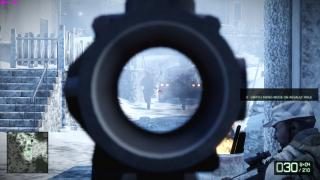
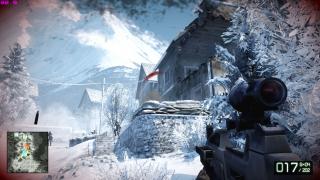
Last time tested L4D, L4D2, Assassin's Creed 2, Battlefield BC2, CoD:MW2...
works fine except some texture problem on L4D2.... Seems like I still got the screenshot for BF:BC2, everything is on high if not mistaken... This post has been edited by lee_what2004: Aug 9 2010, 04:47 PM Attached thumbnail(s) 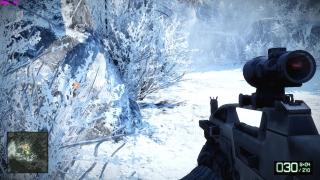




|
|
|
Aug 9 2010, 05:14 PM
Return to original view | Post
#305
|
|
Elite
14,813 posts Joined: Nov 2006
|
90C+, but with OC CPU and GPU...
|
|
|
Aug 9 2010, 05:44 PM
Return to original view | Post
#306
|
|
Elite
14,813 posts Joined: Nov 2006
|
Why the post process is medium?
 |
|
|
|
|
|
Aug 9 2010, 07:15 PM
Return to original view | Post
#307
|
|
Elite
14,813 posts Joined: Nov 2006
|
change the language to Chinese(PRC)...
|
|
|
Aug 9 2010, 11:12 PM
Return to original view | Post
#308
|
|
Elite
14,813 posts Joined: Nov 2006
|
QUOTE(verdangilte @ Aug 9 2010, 10:03 PM) guys i need a help , why my windows office 2010 will show this when i wan print some thign ?? You choose to print via network? |
|
|
Aug 9 2010, 11:59 PM
Return to original view | Post
#309
|
|
Elite
14,813 posts Joined: Nov 2006
|
QUOTE(murv90 @ Aug 9 2010, 11:35 PM)  gt 335m supports dx11? i tought 10 only? gt 335m supports dx11? i tought 10 only?QUOTE(murv90 @ Aug 9 2010, 11:54 PM) yup it runs better on quad core. overclock the CPU  too bad i5 has only 2 cores. too bad i5 has only 2 cores. |
|
|
Aug 10 2010, 12:04 AM
Return to original view | Post
#310
|
|
Elite
14,813 posts Joined: Nov 2006
|
For CPU, can use SetFSB
 |
|
|
Aug 10 2010, 12:53 AM
Return to original view | Post
#311
|
|
Elite
14,813 posts Joined: Nov 2006
|
QUOTE(murv90 @ Aug 10 2010, 12:42 AM) hmm. how come i run dxdiag it shows dx version 11? It just show what's installed...even the HD4670 in SXPS 16 also shown DX11.. QUOTE(iv'N @ Aug 10 2010, 12:46 AM) does the A42JV has an express card slot? Don't have.... |
|
|
Aug 10 2010, 02:06 AM
Return to original view | Post
#312
|
|
Elite
14,813 posts Joined: Nov 2006
|
You choose the correct printer?
|
|
|
Aug 10 2010, 02:23 AM
Return to original view | Post
#313
|
|
Elite
14,813 posts Joined: Nov 2006
|
Why you need GT335M if you intend to do ViDock?
This post has been edited by lee_what2004: Aug 10 2010, 02:26 AM |
|
|
|
|
|
Aug 10 2010, 01:34 PM
Return to original view | Post
#314
|
|
Elite
14,813 posts Joined: Nov 2006
|
Only black...
|
|
|
Aug 10 2010, 09:23 PM
Return to original view | Post
#315
|
|
Elite
14,813 posts Joined: Nov 2006
|
1. uninstall the driver
2. boot to safe mode 3. use driversweeper to delete the nvidia driver 4. restart 5. boot normally 6. install the driver.... |
|
|
Aug 11 2010, 12:02 AM
Return to original view | Post
#316
|
|
Elite
14,813 posts Joined: Nov 2006
|
QUOTE(verdangilte @ Aug 10 2010, 10:49 PM) can more details on it ? how to delete it >?? choose the nvidia display and physx and press scan then delete then restart...i after uninstall it , boot safe mode , then i see driver sweeper have many thing , which should i delete ?? |
|
|
Aug 11 2010, 07:50 PM
Return to original view | Post
#317
|
|
Elite
14,813 posts Joined: Nov 2006
|
Its 1.7GB
|
|
|
Aug 11 2010, 09:58 PM
Return to original view | Post
#318
|
|
Elite
14,813 posts Joined: Nov 2006
|
No other way to recreate the partition unless the Asus technician do it for you...
Windows is 8GB+ since its Win 7..... |
|
|
Aug 11 2010, 10:10 PM
Return to original view | Post
#319
|
|
Elite
14,813 posts Joined: Nov 2006
|
The eSupport and preload was used on the first time you configure the Windows
It installed the driver, preinstalled apps, etc.. You can find your driver inside it, you can copy it to other place if you are lazy to download the driver.. Can't check the disk management, the A42Jv not in my hand anymore.... This post has been edited by lee_what2004: Aug 11 2010, 10:11 PM |
|
|
Aug 11 2010, 10:21 PM
Return to original view | Post
#320
|
|
Elite
14,813 posts Joined: Nov 2006
|
what design?
|
|
Topic ClosedOptions
|
| Change to: |  0.0629sec 0.0629sec
 0.38 0.38
 7 queries 7 queries
 GZIP Disabled GZIP Disabled
Time is now: 9th December 2025 - 12:45 AM |
 Quote
Quote