

QUOTE(sa10 @ Aug 21 2010, 11:14 PM)
temp problem ba....but mine dont have such problem...i always play sc2 more than 1hr

then how wo ? how to fix it ?Asus A42J/A52J (C/K/R/V) Versatile Performance, Review n discussion
|
|
 Aug 22 2010, 12:54 AM Aug 22 2010, 12:54 AM
Return to original view | Post
#21
|
 
Junior Member
67 posts Joined: Jul 2010 
|
QUOTE(sa10 @ Aug 21 2010, 11:14 PM) temp problem ba....but mine dont have such problem...i always play sc2 more than 1hr then how wo ? how to fix it ? |
|
|
|
|
|
Aug 22 2010, 01:12 AM
Return to original view | Post
#22
|
|
Junior Member
67 posts Joined: Jul 2010
|
QUOTE(lee_what2004 @ Aug 22 2010, 01:02 AM) Can try run the game in window mode? and put cpu-z(main tab) and gpu-z (sensor tab) and hwmonitor cannot, but i try use alt + tabsee whether during the slowdown, does the CPU multiplier goes down or the GPU core clock/memory/ going down suddenly..... i go dl those thing now |
|
|
Aug 22 2010, 02:40 AM
Return to original view | Post
#23
|
|
Junior Member
67 posts Joined: Jul 2010
|
i took the ss before n after
when i solo ( only me in the screen ) after 30 min the everything started to lag oh ya.. if i party with ppl which means there are 7-8 ppl in my screen then after few min it lags. then about 15 min then it freeze 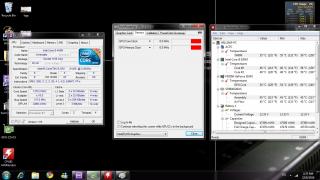
before, forgot to take ss before i login to game, so i restart my comp and take it. (tested, i login and its smooth n perfect ) 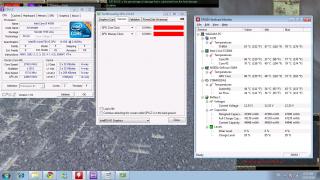
after This post has been edited by liamx: Aug 22 2010, 02:42 AM |
|
|
Aug 23 2010, 12:42 AM
Return to original view | Post
#24
|
|
Junior Member
67 posts Joined: Jul 2010
|
ok i take the ss again
sorry for the late reply coz my housemate download like mega =.= cant even login 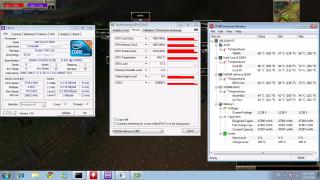
this i taken when i play for 30 min, lag !!! 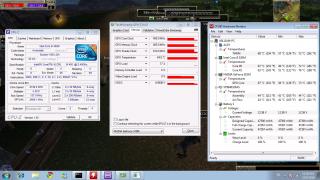
then i log off the game n login again. then everything is smooth no more lags. |
|
|
Aug 23 2010, 01:36 AM
Return to original view | Post
#25
|
|
Junior Member
67 posts Joined: Jul 2010
|
no.. if i solo / i playing myself
then i will lag after 30 min + if i party up with ppl ( about 8 ppl in the screen n hitting together ) it lags after 5 min n freeze in about 15 min i took some ss dat i play juz now uber lag i using the driver from asus webbie, coz the nvidia webbie got gameguard prob. the driver from asus website ( latest one ) works fine 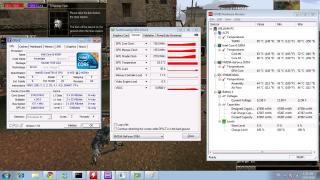
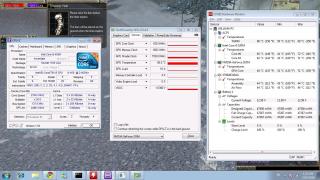
Added on August 23, 2010, 1:38 am QUOTE(gstoh @ Aug 23 2010, 01:33 AM) i can see ur GPU self-throttled? no idea.. i took some new ss take a look.why both gpu core and memory speed clocked down to 405Mhz? This post has been edited by liamx: Aug 23 2010, 01:38 AM |
|
|
Aug 23 2010, 01:44 AM
Return to original view | Post
#26
|
|
Junior Member
67 posts Joined: Jul 2010
|
QUOTE(lee_what2004 @ Aug 23 2010, 01:39 AM) Now from that screenshot, your GPU is throttled.... what means throttled ? |
|
|
|
|
|
Aug 23 2010, 01:47 AM
Return to original view | Post
#27
|
|
Junior Member
67 posts Joined: Jul 2010
|
QUOTE(lee_what2004 @ Aug 23 2010, 01:45 AM) Means the GPU is forced to run significantly slower clock/memory to prevent overheating.... anyway to fix it ??Usually triggered when reach certain temperature, but yours is still in normal range... |
|
|
Aug 23 2010, 01:55 AM
Return to original view | Post
#28
|
|
Junior Member
67 posts Joined: Jul 2010
|
QUOTE(lee_what2004 @ Aug 23 2010, 01:53 AM) Does this occur with older driver? duno , coz i only try this driverbtw.. it goes the same when i use integrated graphics.. |
|
|
Aug 23 2010, 02:01 AM
Return to original view | Post
#29
|
|
Junior Member
67 posts Joined: Jul 2010
|
QUOTE(lee_what2004 @ Aug 23 2010, 01:57 AM) Never seen Intel GMA can throttle as well error .. haha.. coz if i switch directly to intel n login to the game then the graphics actually still remain nvidia Sure running in intel mode? Using what nvidia driver? 257.41? hehe mistake. i need to restart pc and it will completely run in intel i think so coz i d/l from asus webbie its 8.17.12.5741 forceware 257.41 This post has been edited by liamx: Aug 23 2010, 02:02 AM |
|
|
Aug 23 2010, 02:05 AM
Return to original view | Post
#30
|
|
Junior Member
67 posts Joined: Jul 2010
|
never try.. coz no game for me to try
btw.. is there any solution ? |
|
|
Aug 23 2010, 02:10 AM
Return to original view | Post
#31
|
|
Junior Member
67 posts Joined: Jul 2010
|
QUOTE(lee_what2004 @ Aug 23 2010, 02:07 AM) The one I can think of is either nvidia driver update/downgrade or bios update if its really throttling or its the game's bug.... i dun think its game bug.. coz i play with my previous desktop, it has no prob.. my frens laptop also have no probso , i have to go into safe mode n delete it wif cc cleaner ? bios update ? |
|
|
Aug 23 2010, 02:16 AM
Return to original view | Post
#32
|
|
Junior Member
67 posts Joined: Jul 2010
|
QUOTE(lee_what2004 @ Aug 23 2010, 02:13 AM) Uninstall the driver in normal mode, then restart go to safe mode, use DriverSweeper to remove the leftover nvidia driver, then restart back to normal mode, start installing the driver.... ok i try.. let u know tomorrowAs for bios update, don't see any new on Asus webpage... thanks |
|
|
Aug 23 2010, 04:32 PM
Return to original view | Post
#33
|
|
Junior Member
67 posts Joined: Jul 2010
|
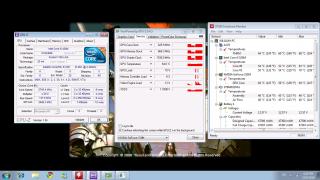
still the same

|
|
|
|
|
|
Aug 23 2010, 04:46 PM
Return to original view | Post
#34
|
|
Junior Member
67 posts Joined: Jul 2010
|
QUOTE(lee_what2004 @ Aug 23 2010, 04:39 PM) installed which version? what is furmark ?Can you try to run Furmark while watching the GPU-Z? See when it run until what temperature then it start to throttling.... i observe already.. the temperature is always 60+ hardly go over and below |
|
|
Aug 23 2010, 05:42 PM
Return to original view | Post
#35
|
|
Junior Member
67 posts Joined: Jul 2010
|
how to use furmark ? i press Go then my screen become blank ( dark )
|
|
|
Aug 23 2010, 06:14 PM
Return to original view | Post
#36
|
|
Junior Member
67 posts Joined: Jul 2010
|
then ?
i think so, coz wat i see from the webbie, current compatible is vista 32 bit any other solution ? already clean with driver sweeper |
|
|
Aug 23 2010, 09:40 PM
Return to original view | Post
#37
|
|
Junior Member
67 posts Joined: Jul 2010
|
QUOTE(lee_what2004 @ Aug 23 2010, 08:20 PM) I mean maybe got problem with Optimus, not the OS problem since I can run it in Win 7 64-bit... Return of warrior http://row.cibmall.net/Will try with my friend A42Jv, but most likely after 1-2 weeks since busy week... Can tell what game you are playing? Maybe later I try if its free.... Asus U43Jc/U33Jc or N82Jq, all around RM3.8K-4K... |
|
|
Aug 24 2010, 11:37 AM
Return to original view | Post
#38
|
|
Junior Member
67 posts Joined: Jul 2010
|
QUOTE(gstoh @ Aug 24 2010, 02:56 AM) i think your problem is due to your laptop thinks the game is "lightweight" games( which can be handled well using gma), hence it automatically switch to intel gma instead using gt 330m how to force it?i guess u need to force ur laptop to run using nvidia when playing that game to fix the problem |
|
|
Aug 24 2010, 02:47 PM
Return to original view | Post
#39
|
|
Junior Member
67 posts Joined: Jul 2010
|
wats the normal temperature for gpu ?
mine is running 76 celsius now kinda hot, but the weather here is hot as well |
|
Topic ClosedOptions
|
| Change to: |  0.0463sec 0.0463sec
 0.73 0.73
 7 queries 7 queries
 GZIP Disabled GZIP Disabled
Time is now: 5th December 2025 - 03:14 AM |
 Quote
Quote