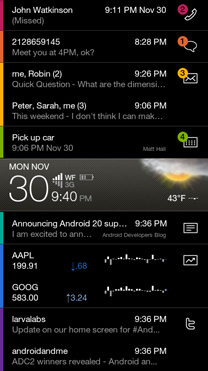
I personally use Home++. What home replacement you guys use?
What home screen replacement do you use?, Home++, aHome, Open Home, GDE, etc.
What home screen replacement do you use?, Home++, aHome, Open Home, GDE, etc.
|
|
 Apr 24 2010, 10:48 AM, updated 16y ago Apr 24 2010, 10:48 AM, updated 16y ago
Show posts by this member only | Post
#1
|
 
Senior Member
551 posts Joined: Nov 2009 
|
I personally use Home++. What home replacement you guys use?
|
|
|
|
|
|
Apr 24 2010, 12:42 PM
Show posts by this member only | Post
#2
|

Senior Member
673 posts Joined: Nov 2007 
|
How come there's no SenseUI in the poll?
 |
|
|
Apr 24 2010, 12:52 PM
Show posts by this member only | Post
#3
|

Senior Member
2,239 posts Joined: Jun 2006 From: K.L
|
using Pandahome for my HTC Dream...
so far the only one i used, not bad, a lot of customization but don't have a update for quite some time now... i think the new pandahome2 is out |
|
|
Apr 25 2010, 05:39 PM
Show posts by this member only | Post
#4
|

Senior Member
1,515 posts Joined: Dec 2005
|
After 2.1 upgrade the Milestone default is pretty good, can do 7 screens, power widget on main screen better than Home++ which once put phone in restart loop so I've deleted it. Extra features not worth the trouble.
111 |
|
|
Apr 25 2010, 05:41 PM
Show posts by this member only | Post
#5
|

Senior Member
857 posts Joined: Oct 2005 From: Moe's Tavern
|
argghh how come i never know all these cool screens?
would appreciate if you post screenshots of each!  tq! |
|
|
Apr 26 2010, 04:11 AM
Show posts by this member only | Post
#6
|
|
Junior Member
61 posts Joined: Jan 2003
|
Using slidescreen. Well worth it.
|
|
|
|
|
|
Apr 26 2010, 02:46 PM
Show posts by this member only | Post
#7
|

Junior Member
149 posts Joined: Jul 2005
|
Like double tap for quick switching screen on Helix Launcher.
Now Helix Launcher 2 available on market which look SenseUI feel, but slower. |
|
|
Apr 28 2010, 01:32 AM
Show posts by this member only | Post
#8
|

Senior Member
1,094 posts Joined: Mar 2009 
|
lets post some screen shot to poison all.hehe
|
|
|
Apr 28 2010, 08:12 AM
Show posts by this member only | Post
#9
|
|
Junior Member
47 posts Joined: Feb 2009
|
I've used Home++, GDE, Sweeter Home and SlideScreen. In the end, my personal preference goes back to the default Nexus Launcher
|
|
|
Apr 28 2010, 10:52 AM
|
|
Senior Member
551 posts Joined: Nov 2009
|
Home++
http://hpp.intuitit.mobi/home/compare_web.jpg? PandaHome http://www.androidfreeware.net/img2/pandahome_android_1.jpg SlideScreen http://slidescreenhome.com/images/slide1.jpg GDE http://www.androlib.com/appscreenmax/qqiA.u.cs.png SweeterHome http://www.sweeterhome.com/attachments/dow...8/SHheader2.jpg Helix Launcher http://gadgetsdna.com/wp-content/uploads/2...-03-281x500.jpg Open Gesture http://www.freedownload3g.com/applications...Gesture-Pro.jpg aHome http://www.androidtapp.com/wp-content/uplo...-os-x-theme.jpg Open Home http://www.androidtapp.com/wp-content/uplo...main-screen.jpg Kewl OS http://jp.androlib.com/appscreenmax/jqqi.u.cs.png Sorry for this but then I have an image extension problem. This post has been edited by pziv2: Apr 28 2010, 11:37 AM |
|
|
 Apr 28 2010, 11:12 AM Apr 28 2010, 11:12 AM
|
|
Senior Member
673 posts Joined: Nov 2007
|
umm, I think you need to close your IMG tags.
Added on April 28, 2010, 4:31 pmI mean like this.  Home++ » Click to show Spoiler - click again to hide... « PandaHome » Click to show Spoiler - click again to hide... « SlideScreen » Click to show Spoiler - click again to hide... « GDE » Click to show Spoiler - click again to hide... « SweeterHome » Click to show Spoiler - click again to hide... « Helix Launcher » Click to show Spoiler - click again to hide... « Open Gesture » Click to show Spoiler - click again to hide... « aHome » Click to show Spoiler - click again to hide... « Open Home » Click to show Spoiler - click again to hide... « Kewl OS » Click to show Spoiler - click again to hide... « This post has been edited by cleave: Apr 28 2010, 04:31 PM |
|
|
May 21 2010, 01:35 AM
|
|
Junior Member
18 posts Joined: Apr 2010
|
do u need to root your phone to install the themes??plz help..
|
|
|
May 21 2010, 10:06 AM
|
|
Senior Member
551 posts Joined: Nov 2009
|
No these are not themes. These are home replacements, basically they are apps.
|
|
|
|
|
|
May 21 2010, 10:11 AM
|
|
Junior Member
436 posts Joined: Jan 2009
|
please try launcherpro=)
i gv 4.5 stars out of 5... i comfirm u will love the smoothness n it's spec=) now...it's free in beta version!=) u cn find it in the market |
|
|
May 21 2010, 12:52 PM
|
|
Senior Member
551 posts Joined: Nov 2009
|
LauncherPro is only for Android 2.0+. I'm running at 1.6 HTC Dream, I can't support D:
|
|
|
May 21 2010, 01:13 PM
|

Senior Member
1,239 posts Joined: Jan 2003 From: PJ/Malacca
|
Yes LauncherPro is silky smooth
 Loving it Loving it |
|
|
May 21 2010, 01:18 PM
|
|
Senior Member
551 posts Joined: Nov 2009
|
I heard of its performance in xda-developers. Haven't got the chance to try it out yet.
|
|
|
May 23 2010, 11:29 AM
|
|
Junior Member
25 posts Joined: Dec 2006
|
I use Home++ mainly because it has landscape mode for the home screen. It's useful when using the Nexus One in the car dock!
|
|
|
May 23 2010, 09:55 PM
|

Senior Member
754 posts Joined: Sep 2007 From: klang
|
|
|
|
Jun 18 2010, 11:17 AM
|
|
Senior Member
1,239 posts Joined: Jan 2003 From: PJ/Malacca
|
LauncherPro should be added to the poll! Just look at the new features, awesomeness!
QUOTE The new LauncherPro Beta v0.6.0 is here and it brings the goodies! It includes a few bugfixes and some exciting new features. Here’s what’s new: Fixed the bug where the app drawer’s home button would show for a second after coming back from an application. Fixed screen previews when choosing to have 2 homescreens Fixed some folder-related bugs when 5-row option is selected. New screen indicator (optional). If you’re not using the homescreen dots in your dock, you can choose do display a small indicator at the bottom of the screen to know on which homescreen you are. You can enable it in the preferences New: The app drawer button is now a regular dock shortcut. That means you can change its position, change its icon, or remove it entirely. New: The dock has grown! Swipe the dock to the left (down in landscape) to reveal 5 additional shortcut spaces. Now swipe it again for 5 more! That makes a total of 15 shortctus. You can add the app drawer button on the new dock spaces by long-pressing on one and choosing “App Drawer”. New: Option to keep LauncherPro in memory. When you’re running low on memory, the system usually kills LauncherPro, so next time you open it, it has to reload all widgets and icons which takes a few seconds. This option should keep the system from killing LauncherPro. If you experience any troubles with it, please disable it on the settings. How about that? I hope you like these new features as much as I do. This post has been edited by scpt: Jun 18 2010, 11:18 AM |
|
|
Jun 20 2010, 09:40 PM
|

Junior Member
50 posts Joined: May 2010
|
i juz use launcherpro and really luv it..must try!
|
|
|
Jun 21 2010, 11:29 PM
|

Junior Member
227 posts Joined: Apr 2007 From: Penang
|
Launcherpro FTW~
|
|
|
Jun 22 2010, 09:17 AM
|

Senior Member
1,570 posts Joined: Nov 2005
|
tried Launcherpro, HTC SenseUI became #2 liao.
|
|
|
Jun 22 2010, 10:02 AM
|
|
Senior Member
551 posts Joined: Nov 2009
|
I prefer ADWLauncher now. Too bad I can't edit the poll
|
|
|
Jun 22 2010, 10:15 AM
|

Junior Member
469 posts Joined: Jan 2003 From: Ampang
|
I have use Launcherpro at the moment, how do I change back to normal HTC Sense UI?
|
|
|
Jun 22 2010, 04:28 PM
|

Junior Member
479 posts Joined: Jul 2007
|
i also using Launcher Pro. Simply loving it!
|
|
|
Jun 22 2010, 10:25 PM
|

Junior Member
70 posts Joined: Mar 2009
|
launcherPro ftw..but my milestone kinda laggy..dunnoe related to it or bcuz internal memory space..
|
|
|
Jun 23 2010, 01:11 AM
|

Junior Member
30 posts Joined: Jun 2005
|
QUOTE(rad @ Jun 22 2010, 10:15 AM) I have use Launcherpro at the moment, how do I change back to normal HTC Sense UI? Cant you uninstall the launcherpro app?or you mean you want to keep the app? |
|
|
Jun 23 2010, 01:42 AM
|
|
Junior Member
469 posts Joined: Jan 2003 From: Ampang
|
QUOTE(wing48 @ Jun 23 2010, 01:11 AM) Cant you uninstall the launcherpro app?or you mean you want to keep the app? I want to keep the app, just want to change back to HTC Sense UI. How to?  |
|
|
Jun 23 2010, 09:41 AM
|
|
Senior Member
1,239 posts Joined: Jan 2003 From: PJ/Malacca
|
go to applications>launcherpro>clear default
or dl home switcher app This post has been edited by scpt: Jun 23 2010, 09:42 AM |
|
|
Jun 23 2010, 10:37 AM
|
|
Junior Member
469 posts Joined: Jan 2003 From: Ampang
|
QUOTE(scpt @ Jun 23 2010, 09:41 AM) go to applications>launcherpro>clear default Thank you! or dl home switcher app  |
|
|
Jun 23 2010, 12:53 PM
|

Senior Member
1,566 posts Joined: Jun 2007 From: Subang Jaya
|
ADW....FTW
|
| Change to: |  0.0497sec 0.0497sec
 0.29 0.29
 6 queries 6 queries
 GZIP Disabled GZIP Disabled
Time is now: 7th December 2025 - 02:12 PM |
 Quote
Quote ?
?