


Attached thumbnail(s)

Hardware The New MacBook/MacBook Pro/Air Users Thread v5, Share your joy and your pain here ;)
|
|
 Jun 19 2010, 09:25 PM Jun 19 2010, 09:25 PM
|
 
Junior Member
67 posts Joined: Jun 2009 
|
mine ady 91% now..will try to send to srvice cntre this monday..will them replace my batt?? scare if them dnt want to replace it, sia2 i dtg jauh2..mine is MBP 13" april 2010..
Attached thumbnail(s)
|
|
|
|
|
|
Jun 20 2010, 03:55 AM
|

Senior Member
1,097 posts Joined: Oct 2009 
|
mine 2months..but 50% loadcycles..
95% |
|
|
Jun 20 2010, 11:31 AM
|

Senior Member
787 posts Joined: Jan 2003 From: KL 
|
QUOTE(aceejay @ Jun 18 2010, 06:21 PM) hey guys ! i wanna get the mbp.. but im torn between this two I am in the same situation 3 weeks back and i went for mbp 15" 2.4 ghz1. mbp 13 2.66GHz (high spec of 13" ) OR 2. mbp 15 2.4GHz (lowest spec of 15 ") my budget just between this two only..i cant afford to go upper more due to limitation of budget. Btw, how bout the software and stuff ? does this software such as final cut already installed or have to get it separate? What do you guys reckon?Which one i should get ?any extra stuff that i should get aswell ? thanks !  If u travel a lot with your mbp u should consider 13" |
|
|
Jun 20 2010, 11:57 AM
|

Senior Member
2,003 posts Joined: Sep 2008 From: Lowyat.NET
|
Ever since i used up 13", i'd found that it's small for my web surfing + photo editin. But anyway, with 13" is easier for traveling and i'd add up an external LCD for better view at home
 |
|
|
Jun 20 2010, 01:13 PM
|

Senior Member
561 posts Joined: Apr 2009
|
QUOTE(Jing-leBelle @ Jun 20 2010, 11:57 AM) Ever since i used up 13", i'd found that it's small for my web surfing + photo editin. But anyway, with 13" is easier for traveling and i'd add up an external LCD for better view at home Yup, that's what I do too.  The 13" is great for portability and I leave any heavy duty image editing when I'm home with the 24" LCD. The 13" is great for portability and I leave any heavy duty image editing when I'm home with the 24" LCD. |
|
|
Jun 20 2010, 04:42 PM
|

Senior Member
3,952 posts Joined: Apr 2005 From: Sector 1921B, Delta Quadrant
|
I've got this weird problem off my MBP yesterday... It sometimes happens when I unplug my mini-DP adaptor off the MBP.
Try googling, came out a rather common blue tint screen problem...  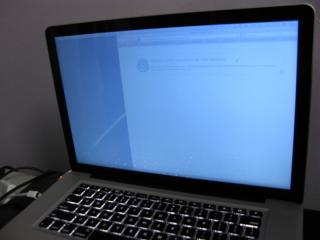
Anyone here with an external display via mini-DP adaptor experienced this before...? |
|
|
|
|
|
Jun 20 2010, 06:30 PM
|
|
Senior Member
561 posts Joined: Apr 2009
|
Congratulations, you have found the elusive Blue Screen of Mac Death.
j/k. Never had this problem with iBook G4 (mini-display to VGA) or 2010 13" MBP (mini-display to DVI) |
|
|
Jun 20 2010, 06:40 PM
|

Senior Member
7,916 posts Joined: Jul 2005 From: Kuala Lumpur
|
QUOTE(Eithanius @ Jun 20 2010, 04:42 PM) I've got this weird problem off my MBP yesterday... It sometimes happens when I unplug my mini-DP adaptor off the MBP. did it freeze like that, or u can still use ur mac? looks like it got stuck during the transition from the blue screen to ur normal desktopTry googling, came out a rather common blue tint screen problem...
Anyone here with an external display via mini-DP adaptor experienced this before...? |
|
|
Jun 20 2010, 08:14 PM
|

Senior Member
2,642 posts Joined: Jan 2005 From: Penang
|
QUOTE(Eithanius @ Jun 20 2010, 04:42 PM) I've got this weird problem off my MBP yesterday... It sometimes happens when I unplug my mini-DP adaptor off the MBP. nope, never had this beforeTry googling, came out a rather common blue tint screen problem...
Anyone here with an external display via mini-DP adaptor experienced this before...? |
|
|
Jun 20 2010, 08:35 PM
|
|
Senior Member
3,952 posts Joined: Apr 2005 From: Sector 1921B, Delta Quadrant
|
QUOTE(dvlzplayground @ Jun 20 2010, 06:40 PM) did it freeze like that, or u can still use ur mac? looks like it got stuck during the transition from the blue screen to ur normal desktop still can use...see next time if this happens again, I'm gonna try messing with Color Adjustment, read somewhere it's the culprit here... otherwise the mbp's fine... PS: just notice another software bug, whenever I receive SMSes via BluePhoneElite, the backlit keyboard goes off... |
|
|
Jun 20 2010, 10:55 PM
|

Junior Member
69 posts Joined: Dec 2008
|
I have a Question here,
If I go for the 15' 2.4Ghz, and priced RM5899. But with all the customization, I only include the ACPP and Microsoft Office edi. As I am just a student and not knowing anything about editing photos or using those sort of function. Is it really enough just for an average use? And for those using the lowest 13' inch model, do you guys add further customization? For this model I just added with the HD at 500, MOffice and ACPP. I am looking for a laptop that I could work on my thesis and research nothing much, maybe watching some good movies thats all Any comments would be helpful..Cheersss |
|
|
Jun 20 2010, 11:04 PM
|
|
Senior Member
3,952 posts Joined: Apr 2005 From: Sector 1921B, Delta Quadrant
|
QUOTE(LAZZIBaoY @ Jun 20 2010, 10:55 PM) I have a Question here, You don't game, you don't do graphics intensive apps...?If I go for the 15' 2.4Ghz, and priced RM5899. But with all the customization, I only include the ACPP and Microsoft Office edi. As I am just a student and not knowing anything about editing photos or using those sort of function. Is it really enough just for an average use? And for those using the lowest 13' inch model, do you guys add further customization? For this model I just added with the HD at 500, MOffice and ACPP. I am looking for a laptop that I could work on my thesis and research nothing much, maybe watching some good movies thats all Any comments would be helpful..Cheersss Even basic 13" with 4GB will do fine for Office, customise a 500GB 5400rpm... save up the rest of the money for more RAM later i.e. 6GB or 8GB if need arises... 13" is portable to carry around your school... Else order stock 250GB 5400rpm, then perhaps later you can upgrade to 500GB 7200rpm drive... bear in mind that ACPP will not cover any parts upgraded outside of Apple... or if you break anything as a result of a self-upgrade... If you insist on 15" 2.4GHz, better still, it gets to last you longer, better graphics in case you become a game or photogenic freak later...  This post has been edited by Eithanius: Jun 20 2010, 11:28 PM |
|
|
Jun 20 2010, 11:19 PM
|
|
Junior Member
69 posts Joined: Dec 2008
|
QUOTE(Eithanius @ Jun 20 2010, 11:04 PM) You don't game, you don't do graphics intensive apps...? YES, thx for your advice...mind asking which model are u using? And your specs? Even basic 13" with 4GB will do fine for Office, customise a 500GB 5400rpm... save up the rest of the money for more RAM later i.e. 6GB or 8GB if need arises... 13" is portable to carry around your school... Else order stock 250GB 5400rpm, then perhaps later you can upgrade to 500GB 7200rpm drive... bear in mind that ACPP will not cover any parts upgraded outside of Apple... If you insist on 15" 2.4GHz, better still, it gets to last you longer, better graphics in case you become a game or photogenic freak later... But the ACPP really does make me think is it really that necessary? |
|
|
|
|
|
Jun 20 2010, 11:23 PM
|
|
Senior Member
3,952 posts Joined: Apr 2005 From: Sector 1921B, Delta Quadrant
|
QUOTE(LAZZIBaoY @ Jun 20 2010, 11:19 PM) YES, thx for your advice...mind asking which model are u using? And your specs? My spec's on my siggy....But the ACPP really does make me think is it really that necessary? And yes ACPP is always recommended as it may come in handy - laptop components are expensive to replace out of warranty... However ACPP is not necessary to be purchased at the same time if you're tight on budget... You have a duration of 1 year to buy ACPP from your date of purchase of your MBP, but not after.... But if you can afford to buy ACPP at the same time, go ahead... who knows, you might need ACPP phone support as original Apple limited warranty that comes with any mac only provides phone support for first 90 days... This post has been edited by Eithanius: Jun 20 2010, 11:25 PM |
|
|
Jun 20 2010, 11:26 PM
|
|
Junior Member
69 posts Joined: Dec 2008
|
QUOTE(Eithanius @ Jun 20 2010, 11:23 PM) My spec's on my siggy.... Ah...all right i will keep that in mindAnd yes ACPP is always recommended as it may come in handy - laptop components are expensive to replace out of warranty... However ACPP is not necessary to be purchased at the same time if you're tight on budget... You have a duration of 1 year to buy ACPP from your date of purchase of your MBP, but not after.... But if you can afford to buy ACPP at the same time, go ahead... who knows, you might need ACPP phone support as original Apple limited warranty that comes with any mac only provides phone support for first 90 days... Thx again |
|
|
Jun 20 2010, 11:30 PM
|
|
Senior Member
3,952 posts Joined: Apr 2005 From: Sector 1921B, Delta Quadrant
|
QUOTE(LAZZIBaoY @ Jun 20 2010, 11:26 PM) Ah...all right i will keep that in mind one more thing... if you're not in a hurry to buy, pay a visit to any apple resellers, play with both the 13" and 15" MBP, see which one suits you most...Thx again |
|
|
Jun 20 2010, 11:47 PM
|
|
Junior Member
267 posts Joined: Jan 2003
|
problem over here. how come my macbook pro showing 97% only when i plug in power and is fully charged?
did my macbook pro battery got problem? This post has been edited by olly: Jun 20 2010, 11:56 PM Attached thumbnail(s) 
|
|
|
Jun 21 2010, 12:00 AM
|

Senior Member
1,262 posts Joined: Aug 2005 From: Mars
|
try calibrate
|
|
|
Jun 21 2010, 12:12 AM
|

Senior Member
596 posts Joined: Sep 2004
|
QUOTE(olly @ Jun 21 2010, 12:47 AM) problem over here. how come my macbook pro showing 97% only when i plug in power and is fully charged? It not a problem, just ignore it. It will be recharge back once below 95%. It will be drop until 95% before recharge back and do calibration once in a month..did my macbook pro battery got problem? |
|
|
Jun 21 2010, 12:52 AM
|
|
Junior Member
267 posts Joined: Jan 2003
|
QUOTE(esssymanex @ Jun 21 2010, 12:12 AM) It not a problem, just ignore it. It will be recharge back once below 95%. It will be drop until 95% before recharge back and do calibration once in a month.. thanks a lot  |
|
Topic ClosedOptions
|
| Change to: |  0.0479sec 0.0479sec
 0.86 0.86
 6 queries 6 queries
 GZIP Disabled GZIP Disabled
Time is now: 9th December 2025 - 02:00 PM |
 Quote
Quote