


-pWs-
Lenovo ideapad Y460/Y560 Thread, Gaming nerd in a business package
|
|
 Apr 15 2010, 05:42 PM Apr 15 2010, 05:42 PM
Return to original view | Post
#1
|
 
Elite
8,545 posts Joined: Aug 2006 From: 224.0.0.6  
|
PCH is the one hot in this laptop. Dunno how to cool it.
-pWs- |
|
|
|
|
|
Apr 18 2010, 04:32 AM
Return to original view | Post
#2
|
|
Elite
8,545 posts Joined: Aug 2006 From: 224.0.0.6
|
How come your ram capacity around 2GB+ only?
-pWs- |
|
|
Apr 20 2010, 11:40 PM
Return to original view | Post
#3
|
|
Elite
8,545 posts Joined: Aug 2006 From: 224.0.0.6
|
Agreed w bro synz
The laptop is very hot when stress. Even idle, also not so comfortable w the heat. -pWs- |
|
|
Apr 21 2010, 09:46 AM
Return to original view | Post
#4
|
|
Elite
8,545 posts Joined: Aug 2006 From: 224.0.0.6
|
You try to check on PCH temperature. The temp will freak u out.
   -pWs- |
|
|
Apr 21 2010, 09:49 AM
Return to original view | Post
#5
|
|
Elite
8,545 posts Joined: Aug 2006 From: 224.0.0.6
|
QUOTE(gstoh @ Apr 21 2010, 09:47 AM) that is due to the passive cooling i assume Most probably. That is why I only open the laptop in aircond environment.   -pWs- |
|
|
Apr 21 2010, 09:56 AM
Return to original view | Post
#6
|
|
Elite
8,545 posts Joined: Aug 2006 From: 224.0.0.6
|
QUOTE(miahahaha @ Apr 21 2010, 09:52 AM) So, still got quite a problem with the cooling?? Using any cooler pad does any different?? No difference for me. QUOTE(gstoh @ Apr 21 2010, 09:52 AM) if not mistaken that is the south bridge of HM55, it is really hot Ya. We can assume that way. But we need to get the H55 alike laptop to compare w for the real comparison. if what i say is true, then i guess all the laptop with HM55 will also get the same temp as y460  -pWs- |
|
|
|
|
|
Apr 21 2010, 10:00 AM
Return to original view | Post
#7
|
|
Elite
8,545 posts Joined: Aug 2006 From: 224.0.0.6
|
Which temp your are referring to bro?
-pWs- |
|
|
Apr 21 2010, 10:45 AM
Return to original view | Post
#8
|
|
Elite
8,545 posts Joined: Aug 2006 From: 224.0.0.6
|
@jotaro12
How come your Windows come w Ultimate "flavour" one? -pWs- |
|
|
Apr 23 2010, 03:25 PM
Return to original view | Post
#9
|
|
Elite
8,545 posts Joined: Aug 2006 From: 224.0.0.6
|
Disable the ALS (Ambient Light Sensor) will do.
 -pWs- |
|
|
May 5 2010, 12:31 AM
Return to original view | Post
#10
|
|
Elite
8,545 posts Joined: Aug 2006 From: 224.0.0.6
|
What do you meant by that bro?
-pWs- |
|
|
May 5 2010, 12:41 AM
Return to original view | Post
#11
|
|
Elite
8,545 posts Joined: Aug 2006 From: 224.0.0.6
|
I see. Which floor is that? Seldom go to Lowyat.
-pWs- |
|
|
May 7 2010, 09:38 AM
Return to original view | Post
#12
|
|
Elite
8,545 posts Joined: Aug 2006 From: 224.0.0.6
|
Just use CPU-z to check on your laptop BIOS.
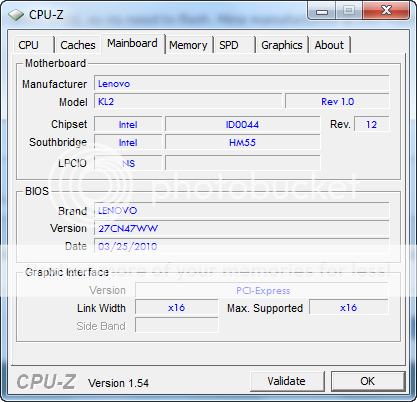 27CN47WW This should be the latest BIOS.  -pWs- |
|
|
May 7 2010, 01:40 PM
Return to original view | Post
#13
|
|
Elite
8,545 posts Joined: Aug 2006 From: 224.0.0.6
|
@ ALeUNe
Will the warranty void after we change using SSD? -pWs- |
|
|
|
|
|
May 7 2010, 01:52 PM
Return to original view | Post
#14
|
|
Elite
8,545 posts Joined: Aug 2006 From: 224.0.0.6
|
How bout Lenovo? Any idea?
-pWs- |
|
|
May 7 2010, 03:12 PM
Return to original view | Post
#15
|
|
Elite
8,545 posts Joined: Aug 2006 From: 224.0.0.6
|
Pros & Cons between SSD & HDD.
See which one you prefer. -pWs- |
|
|
May 7 2010, 11:35 PM
Return to original view | Post
#16
|
|
Elite
8,545 posts Joined: Aug 2006 From: 224.0.0.6
|
QUOTE(ALeUNe @ May 7 2010, 03:45 PM) I have used 2.5" 7200rpm HDD. If change to SSD, how to clone the HDD data to SSD? Any recommended software to do so?The performance is no where near the SSD. For notebook, upgrading to SSD will give you excellent performance gain. I can't resist to SSD now. I even upgraded to SSD for my netbook. http://forum.lowyat.net/topic/830613/+1267 With SSD, your notebook is no longer notebook. It's running like high performance desktop. With SSD, your netbook is no longer netbook. It's running like notebook. Get what I mean? -pWs- |
|
|
May 13 2010, 10:39 PM
Return to original view | Post
#17
|
|
Elite
8,545 posts Joined: Aug 2006 From: 224.0.0.6
|
Anyone can confirm that changing to SSD will not void warranty in this particular laptop?
-pWs- |
|
|
May 18 2010, 04:33 PM
Return to original view | Post
#18
|
|
Elite
8,545 posts Joined: Aug 2006 From: 224.0.0.6
|
QUOTE(jotaro12 @ May 14 2010, 01:36 AM) @-pWs- Thanks bro.There's no warranty sticker on HDD part so it's safe. Just to remind you that if there's human error happened during your swapping HDD process causing system faulty, Lenovo will/can void your warranty also. I still have one question here. How to clone the HDD to SSD ar? Any guide? -pWs- |
|
|
May 18 2010, 06:06 PM
Return to original view | Post
#19
|
|
Elite
8,545 posts Joined: Aug 2006 From: 224.0.0.6
|
I already get used to it. No big issue.
Btw, thanks for the software recommendation. -pWs- |
|
|
May 18 2010, 06:53 PM
Return to original view | Post
#20
|
|
Elite
8,545 posts Joined: Aug 2006 From: 224.0.0.6
|
So bro jotaro12. If cannot, then what software will do the job nicely?
-pWs- |
| Change to: |  0.0362sec 0.0362sec
 0.61 0.61
 7 queries 7 queries
 GZIP Disabled GZIP Disabled
Time is now: 10th December 2025 - 12:53 PM |
 Quote
Quote