Outline ·
[ Standard ] ·
Linear+
Lenovo ideapad Y460/Y560 Thread, Gaming nerd in a business package
|
leng2
|
 Apr 30 2010, 02:38 PM Apr 30 2010, 02:38 PM
|

|
QUOTE(jotaro12 @ Apr 30 2010, 01:38 PM) @leng2 That will destroy the purpose of replacing a chiclet keyboard lol. I'm considering a wireless backlit keyboard now bcoz I wanna play games while on bed hehe but so far limited choices. can replace meh? i've been scouting wireless keyboard & mice too, for backlit ones got, but cost like rm200+. This post has been edited by leng2: Apr 30 2010, 03:55 PM |
|
|
|
|
|
marky
|
Apr 30 2010, 04:29 PM
|
|
|
when u guys reformat did you change the partition of the drive as well?
|
|
|
|
|
|
leng2
|
Apr 30 2010, 04:35 PM
|
|
|
QUOTE(marky @ Apr 30 2010, 04:29 PM) when u guys reformat did you change the partition of the drive as well? i did... remove all and repartition (including the system/oem/etc partition) |
|
|
|
|
|
marky
|
Apr 30 2010, 04:37 PM
|
|
|
and the one key recovery and all the add-ons still works?
This post has been edited by marky: Apr 30 2010, 04:38 PM
|
|
|
|
|
|
leng2
|
Apr 30 2010, 05:12 PM
|
|
|
i didn't want the okr... so i didn't install the okr. i reinstalled the touch buttons and most of them worked except for the slidenav. still couldn't figure out what is missing.
|
|
|
|
|
|
TSjotaro12
|
Apr 30 2010, 05:32 PM
|
|
|
QUOTE(leng2 @ Apr 30 2010, 05:12 PM) i didn't want the okr... so i didn't install the okr. i reinstalled the touch buttons and most of them worked except for the slidenav. still couldn't figure out what is missing. The SlideNav is the tricky one. I'll let you know after I got back from work(Don't really remember the steps atm)... Or you can try your luck on the SlideNav folder  |
|
|
|
|
|
samlee860407
|
Apr 30 2010, 06:38 PM
|
|
|
Yea I download the slidenav driver from the website but when click nothing happens. Can't install at all.
|
|
|
|
|
|
wztech
|
Apr 30 2010, 07:23 PM
|
|
|
how to use the double-finger scrolling on the touch pad??
|
|
|
|
|
|
samlee860407
|
Apr 30 2010, 07:34 PM
|
|
|
eh another question, i connect my notebook to a plasma TV using HDMI cable
picture is great, but i cant let the TV to play the sound, sound only come out from my lappy speaker. how to configure to let the TV play sound instead of my lappy ar?
i try googling, they say set HDMI to default sound playback, but when i do so, still no sound eh
|
|
|
|
|
|
Eugene91
|
Apr 30 2010, 07:40 PM
|
|
|
maybe the ATi HDMI drivers not there?
|
|
|
|
|
|
samlee860407
|
Apr 30 2010, 07:45 PM
|
|
|
oh, yes, i think thats the one. thanks , downloading now  |
|
|
|
|
|
TSjotaro12
|
Apr 30 2010, 09:19 PM
|
|
|
QUOTE(wztech @ Apr 30 2010, 07:23 PM) how to use the double-finger scrolling on the touch pad?? The vertical line on your touch pad is the scroll slider. About the SlideNav, if you've installed the software, try go to Loacl Disk C: > Drivers > Lenovo SlideNav > Installation > Installation.exe Run it and I think it should solve the problem. P/S: A nice gadget if you need one for us ATI fans. GPU Observer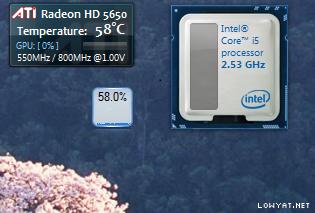 |
|
|
|
|
|
samlee860407
|
Apr 30 2010, 10:02 PM
|
|
|
QUOTE(jotaro12 @ Apr 30 2010, 09:19 PM) The vertical line on your touch pad is the scroll slider. About the SlideNav, if you've installed the software, try go to Loacl Disk C: > Drivers > Lenovo SlideNav > Installation > Installation.exe Run it and I think it should solve the problem. P/S: A nice gadget if you need one for us ATI fans. GPU Observerthanks!!! slide nav can use liao btw, i still cant let my TV to have sound  all sound come from my lappy speakers, although the speakers are not bad la |
|
|
|
|
|
Maverick_Neutron
|
Apr 30 2010, 10:11 PM
|
|
|
QUOTE(leng2 @ Apr 30 2010, 02:38 PM) can replace meh? i've been scouting wireless keyboard & mice too, for backlit ones got, but cost like rm200+. Theres a wireless backlit keyboard out there? Holy shit.. I always wanted one!1 Where?! |
|
|
|
|
|
TSjotaro12
|
Apr 30 2010, 10:14 PM
|
|
|
QUOTE(samlee860407 @ Apr 30 2010, 10:02 PM) thanks!!! slide nav can use liao btw, i still cant let my TV to have sound all sound come from my lappy speakers, although the speakers are not bad la This one should be Right click volume icon > Playback Devices > Right click Realtek HDMI output > Set as default device Make sure you've connect your HDMI cable to your TV before performed the above steps. |
|
|
|
|
|
samlee860407
|
Apr 30 2010, 10:26 PM
|
|
|
QUOTE(jotaro12 @ Apr 30 2010, 10:14 PM) This one should be Right click volume icon > Playback Devices > Right click Realtek HDMI output > Set as default device Make sure you've connect your HDMI cable to your TV before performed the above steps. hm....try liao but still cannot eh |
|
|
|
|
|
TSjotaro12
|
Apr 30 2010, 10:36 PM
|
|
|
You're using your TV's sound or output to speakers?
|
|
|
|
|
|
samlee860407
|
Apr 30 2010, 10:47 PM
|
|
|
QUOTE(jotaro12 @ Apr 30 2010, 10:36 PM) You're using your TV's sound or output to speakers? i use HDMI cable to connect my laptop to TV ma, picture got, but sound tarak (if i select realtek digital output as my default sound) if i select speakers as my default sound, then the sound will come from my laptop speakers |
|
|
|
|
|
TSjotaro12
|
Apr 30 2010, 10:56 PM
|
|
|
QUOTE(samlee860407 @ Apr 30 2010, 10:47 PM) i use HDMI cable to connect my laptop to TV ma, picture got, but sound tarak (if i select realtek digital output as my default sound) if i select speakers as my default sound, then the sound will come from my laptop speakers I meant did you hook up any speaker system/HiFi to your TV? If no, you need to check the settings on your TV too in order to receive audio signal thru HDMI. |
|
|
|
|
|
samlee860407
|
May 1 2010, 06:36 AM
|
|
|
QUOTE(jotaro12 @ Apr 30 2010, 10:56 PM) I meant did you hook up any speaker system/HiFi to your TV? If no, you need to check the settings on your TV too in order to receive audio signal thru HDMI. oh I see. Nope no speakers was hook up to the tv. Ok, let me try try to check properly and see how  thanks! You are most helpful |
|
|
|
|



 Quote
Quote





 0.0234sec
 0.52
0.52
 6 queries
 GZIP Disabled