Outline ·
[ Standard ] ·
Linear+
Nokia 5800 XpressMusic a.k.a "TUBE" v.27
|
xKAIZERUx
|
 May 26 2010, 12:25 PM May 26 2010, 12:25 PM
|

|
I just bought a secondhand 5800xm few days ago, I'm just a normal user, but heavy user. What next? I have the Custom version 31.0.101.
which is better, v50 via nokia updater or the custom XFW Xploit machine posted here?
|
|
|
|
|
|
xKAIZERUx
|
May 26 2010, 01:56 PM
|
|
|
QUOTE(XiuKeong @ May 26 2010, 12:37 PM) Either update to v50 or v50 cfw. any reccommendation on CFW v50? i found just one that is by Gabika. |
|
|
|
|
|
xKAIZERUx
|
May 26 2010, 04:48 PM
|
|
|
just updated mine though WIFI. quite fast, 20mb update in less than 20 mins.
Add my name to blue user please!
|
|
|
|
|
|
xKAIZERUx
|
May 29 2010, 10:47 PM
|
|
|
QUOTE(more2teayap @ May 29 2010, 09:34 PM) Did you guys tried the new Orange Tsunami Homescreen by whiskyy? Looks like N97, I'm using it right now, thought of sharing it...  original post: http://forum.dailymobile.se/index.php/topic,23477.80.htmlAnd here's some screenshot » Click to show Spoiler - click again to hide... « looks great, gonna try it, thanks for sharing. |
|
|
|
|
|
xKAIZERUx
|
May 30 2010, 05:29 PM
|
|
|
tap or press the screen long time. then you will get the remove menu.
if want to arrange, in the remove menu, tap the thing you want to arrange long time also. until the box surround the widget turns yellow dotted, then without releasing the tap, move to your desired place. but be patient, this thing quite strange, and will test your patience level.
This post has been edited by xKAIZERUx: May 30 2010, 05:32 PM
|
|
|
|
|
|
xKAIZERUx
|
May 30 2010, 08:15 PM
|
|
|
neat! now I can have 2 clock in my homescreen! haha. talk about redundancy.
I'm using XTE ultimate II cfw now, jumping from unpatched v50. feels a lot of improvements, wether I like it or not. will be back to post some screenis.
|
|
|
|
|
|
xKAIZERUx
|
May 30 2010, 08:22 PM
|
|
|
rm600 ta least. try go for rm650. more than that, ppl will search for first hand AP set. mah screenis of XTE BLAZE ULTIMATE II homescreen. quite boring. 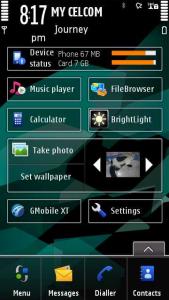
|
|
|
|
|
|
xKAIZERUx
|
Jun 2 2010, 09:07 AM
|
|
|
QUOTE(carrot_milk @ May 31 2010, 09:10 PM) Hey guys, been quite some time i visited this thread and the amount of information currently available is great! Probably the most comprehensive Nokia 5800 XM Manual Guide on the Net  Just a small question in case you guys faced the same issue before. I just bought B-Speech Calypso SP Bluetooth Headset which supports A2DP profile and paired it with my Nokia 5800. The Volume Up, Down and Play buttons on the headset work fine with my Nokia 5800, but the Next and Previous Track buttons do not work at all. There is just a beep when pressed, but the track does not move forward or backwards. My phone's firmware is already updated to the latest. Hope somebody can offer a solution as it's a good headset, but this small issue is really, really annoying. Thanks a lot guys and have a nice day i also have this same headset and the same prob. I though maybe that after upgrading to CFW or v50 disables the A2DP profile, but glad to hear that the prob is not my BT HS. for now my only solution is to use wired headphone. before this you use what version? |
|
|
|
|
|
xKAIZERUx
|
Jun 2 2010, 01:18 PM
|
|
|
when formatting, make sure you dont have your data (like image, music, installers, backup file etc..)that you want remain inside the media you want to format. formatting destroys all the data inside the media.
copy them to somewhere else first then format. after that, restore as needed. like if you want just music file, copy the backed-up music to the media again.
|
|
|
|
|



 Quote
Quote


 0.0455sec
 0.48
0.48
 7 queries
 GZIP Disabled