

This baby only have 3 hours battery life? Any idea hwo can we extend teh battery life? like buy a new 6 cell battery?
The Official HP Mini 210 Netbook Thread, Join The Big Family of HP Mini 210
The Official HP Mini 210 Netbook Thread, Join The Big Family of HP Mini 210
|
|
 Apr 8 2010, 11:35 AM Apr 8 2010, 11:35 AM
Return to original view | Post
#1
|
 
Senior Member
1,849 posts Joined: Sep 2007  
|
This baby only have 3 hours battery life? Any idea hwo can we extend teh battery life? like buy a new 6 cell battery?
|
|
|
|
|
|
May 1 2010, 01:59 AM
Return to original view | Post
#2
|
|
Senior Member
1,849 posts Joined: Sep 2007
|
Guys, anyway to create backup disc without using DVD burner..
If I wan to reformat, which give better performance, XP lite or Windows 7 home premium. |
|
|
May 1 2010, 10:58 AM
Return to original view | Post
#3
|
|
Senior Member
1,849 posts Joined: Sep 2007
|
Guys, XP lite or Windows 7 Home premium run faster in this netbook? Thx ^^
|
|
|
May 1 2010, 11:12 AM
Return to original view | Post
#4
|
|
Senior Member
1,849 posts Joined: Sep 2007
|
QUOTE(weikeat90 @ May 1 2010, 11:02 AM) i am using W7 professional. my opinion is running ultimate is ok too.. juz dun let too much of background processes running.. esp intel and synaptics tray icon. i even remove the IDT audio icon from start up list. U got run aero? U upgrade or reformat?btw. add me to the list. using hp mini from streamyx.   |
|
|
May 1 2010, 11:16 AM
Return to original view | Post
#5
|
|
Senior Member
1,849 posts Joined: Sep 2007
|
QUOTE(weikeat90 @ May 1 2010, 11:14 AM) i'm not sure. since haven open n see inside. coz the cover is a bit tight. weikeat, did u enable aero and thumbnail? U refromat using thumb drive or External DVD drive?yup. reformat. coz i wanna get rid of all the HP software. they are eating too much resources. only installed hp quicklauch buttons. |
|
|
May 1 2010, 11:41 AM
Return to original view | Post
#6
|
|
Senior Member
1,849 posts Joined: Sep 2007
|
QUOTE(weikeat90 @ May 1 2010, 11:18 AM) i use 4g pendrive. cheap solution. no need buy ext drive. ya.. both. juz disabled tablet pc features.. not necessary for me So u din make a recovery disc lo? BTW, mind send me the link for installing windows 7 using pendrive-tutorial. I know I can search, but since you ahve successfully do it without any bug, ur solution should be bestThis post has been edited by the100308: May 1 2010, 11:43 AM |
|
|
|
|
|
May 1 2010, 07:40 PM
Return to original view | Post
#7
|
|
Senior Member
1,849 posts Joined: Sep 2007
|
Guys, afetr reformat to home premium.. I dun have 7 loading screen.. How to solve?
|
|
|
May 1 2010, 10:48 PM
Return to original view | Post
#8
|
|
Senior Member
1,849 posts Joined: Sep 2007
|
QUOTE(weikeat90 @ May 1 2010, 07:58 PM) izit the windows logo with the aura shining in and out?? wat came out was the vista loading bar instead?? no loading bar and no windows with aura, just black screen suddenly jump to login screen |
|
|
May 1 2010, 11:54 PM
Return to original view | Post
#9
|
|
Senior Member
1,849 posts Joined: Sep 2007
|
QUOTE(weikeat90 @ May 1 2010, 11:48 PM) now tats weird.. u do clean format or upgrade only? yes, clean reformat from thumbdrive, isit becasue I din install any driver except grpahic driver and chipset driver?yup. desktop got the flag.. but netbook no. both from same installation disc. maybe HP did something to the bios? This post has been edited by the100308: May 2 2010, 12:08 AM |
|
|
May 2 2010, 12:56 AM
Return to original view | Post
#10
|
|
Senior Member
1,849 posts Joined: Sep 2007
|
QUOTE(weikeat90 @ May 2 2010, 12:12 AM) shouldnt be.. try install all the drivers and see.. or maybe update the bios.. or is thr 1 to update?? lolz.. Haiz.. Dun care about that, as long as I can load can edy.. BTW, whats the sim card thingy at battery for? Can anyone slot sim card in? And whats the indicator for the LED on touch pad? |
|
|
May 2 2010, 01:21 PM
Return to original view | Post
#11
|
|
Senior Member
1,849 posts Joined: Sep 2007
|
Guys, how to open the RJ45 cover? Can HP Mini 210 support LAN?
|
|
|
May 2 2010, 07:51 PM
Return to original view | Post
#12
|
|
Senior Member
1,849 posts Joined: Sep 2007
|
Dam, after reformat no bluetooth device detected.. Why? Cant install the driver oso
|
|
|
May 2 2010, 08:40 PM
Return to original view | Post
#13
|
|
Senior Member
1,849 posts Joined: Sep 2007
|
QUOTE(weikeat90 @ May 2 2010, 08:24 PM) tats weird too.. BT auto install in W7.. did not install any driver for BT.. Or mayb got, how to turn it on? I dun wan install HP wireless mangaer, once install that one, I need to install wireless adpater driver again.. Sien |
|
|
|
|
|
May 2 2010, 11:27 PM
Return to original view | Post
#14
|
|
Senior Member
1,849 posts Joined: Sep 2007
|
QUOTE(satriakid @ May 2 2010, 10:43 PM) Hey, I too join here. Got my netbook a few weeks back, been tinkering with it alot, even taking it apart (till a certain extend only to see the insides). Lucky using 2.5" hdd. Not 1.8" one. Can upgrade next time. I did enable wifi ah, the light is white somemore, but when wan to install bluetooth driver from swsetup it say bluetooth not turn on or not found.. sien  Tada~  Press the wifi button. The bluetooth will activate. Wait a while. If nothing happens, press it again. Make sure the light is on. |
|
|
May 2 2010, 11:59 PM
Return to original view | Post
#15
|
|
Senior Member
1,849 posts Joined: Sep 2007
|
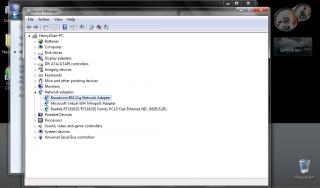
Still No..This is the screenshot from the Device Manager of Netbook
|
|
|
May 3 2010, 07:47 AM
Return to original view | Post
#16
|
|
Senior Member
1,849 posts Joined: Sep 2007
|
QUOTE(weikeat90 @ May 3 2010, 12:06 AM) faulty bluetooth module?? after installing win7 it will auto detect and install driver for it. Wa.. am I so Lucky?since cant detect now.. probably a faulty unit.. QUOTE(satriakid @ May 3 2010, 12:37 AM) OK. Do this. Turn off the netbook. Turn on. Let it idle a while, then press the wireless button once. If nothing still, press till the light goes off, then press again. If still nothing, press again. If nothing again, go device manager see if its inside. OK, thx satria, will do this later.. or tonightIt should be there, just, disabled. Else, go into bios check. |
|
|
May 3 2010, 01:35 PM
Return to original view | Post
#17
|
|
Senior Member
1,849 posts Joined: Sep 2007
|
QUOTE(xk2 @ May 3 2010, 01:22 PM) Win7 will not automatic detect the bluetooth module for mini210, and device manager oso wont show a yellow question mark for it, u need to install the bluetooth software from HP by urself.. I download the drivers here : http://h10025.www1.hp.com/ewfrf/wc/product...t&lang=lt&cc=ltBut when I insatll the driver, it say bluetooth device not found.. |
|
|
May 3 2010, 03:00 PM
Return to original view | Post
#18
|
|
Senior Member
1,849 posts Joined: Sep 2007
|
Oh no, dun tell me its true that I have faulty bluetooth. But before I reformat I remember I can detect BT
This is the pictire 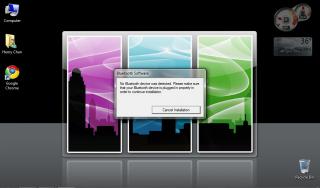
Added on May 3, 2010, 3:05 pm QUOTE(xk2 @ May 3 2010, 01:38 PM) makesure it is SP45578 How to check bluetooth via BIOS btw?Added on May 3, 2010, 1:40 pmif u still cannot , u might get a faulty bluetooth module, this is not surprise at all coz ytd my housemate who just receive her netbook , comes with cracked LCD  This post has been edited by the100308: May 3 2010, 03:05 PM |
|
|
May 3 2010, 07:25 PM
Return to original view | Post
#19
|
|
Senior Member
1,849 posts Joined: Sep 2007
|
QUOTE(satriakid @ May 3 2010, 06:17 PM) Weird. Try this. Open your device manager, then press the wireless button. See if the bluetooth pops out. Nothing come out.. But keep on got USB not regconized.. DOnou what is it. Windows Home Premium BTWWhich win7 version are you on? QUOTE(weikeat90 @ May 3 2010, 06:26 PM) make sure u install bluetooth tat time wifi is turned on.. wifi on = bt on.. Yes, I install when wifi on. |
|
|
May 3 2010, 07:56 PM
Return to original view | Post
#20
|
|
Senior Member
1,849 posts Joined: Sep 2007
|
QUOTE(satriakid @ May 3 2010, 07:32 PM) Disable all the fancy stuff. Then you can get a few minutes back. I'm using 7 Ultimate, usage was about 3 hours on heavy gmaing (CS) through wifi, just on battery at highest brightness and loudest setting (well, comfortable loudness lar.) I did manual install, but it pop out say blutooth device not plugged properlyMight be the bluetooth. Try using manual install. Update the driver then navigate to where you extracted the bt driver. I took all off wo on my netbook. Now look very generic.  http://forum.lowyat.net/index.php?act=Atta...post&id=1558565 |
| Change to: |  0.1061sec 0.1061sec
 0.46 0.46
 7 queries 7 queries
 GZIP Disabled GZIP Disabled
Time is now: 8th December 2025 - 01:20 AM |
 Quote
Quote