

Yes. It happens with Lumagen test pattern and AVSHD test pattern. This is on PY800.
Display Calibration Fundamentals : My Take, Display Calibration
Display Calibration Fundamentals : My Take, Display Calibration
|
|
 Oct 18 2011, 01:50 PM Oct 18 2011, 01:50 PM
Return to original view | Post
#21
|
 
Senior Member
1,308 posts Joined: Oct 2004 From: Penang & Ipoh  
|
Yes. It happens with Lumagen test pattern and AVSHD test pattern. This is on PY800.
|
|
|
|
|
|
Oct 18 2011, 05:04 PM
Return to original view | Post
#22
|
|
Senior Member
1,308 posts Joined: Oct 2004 From: Penang & Ipoh
|
Well, it depends on the test pattern size. From the Lumagen test patterrn windows medium size, I can get around 26.7ft/L. Small size can go up to 35ft/L. You can see the fluctuation by leaving the test pattern on around 5 seconds for 10 IRE and below or 85 IRE and above. I check out in avsforum and seems like some of them also face the same issue on ABL (Dynamic Contrast that can't be defeated). Some suggest using APL windows to maintain the brightness level across the IRE but no conclusive result yet.
This post has been edited by pierreye: Oct 18 2011, 05:07 PM |
|
|
Oct 19 2011, 08:20 PM
Return to original view | Post
#23
|
|
Senior Member
1,308 posts Joined: Oct 2004 From: Penang & Ipoh
|
Redo the greyscale and gamma with Calman 4.4 RC1. 4.3.2 had a bug when using OEMi1D. Now the greyscale tint is no longer an issue except somewhere around 40 IRE. Will re-measure from 30 IRE to 50 IRE with i1Pro to verify the greyscale. Using smaller windows no longer trigger the ABL in higher IRE but the auto dimming at 10 IRE and below still happening.
This post has been edited by pierreye: Oct 19 2011, 08:21 PM |
|
|
Nov 1 2011, 07:30 AM
Return to original view | Post
#24
|
|
Senior Member
1,308 posts Joined: Oct 2004 From: Penang & Ipoh
|
The problem with DIY kit is there is no gurantee a colorimeter will be accurate unless you can profile against a spectrometer. If you have few displays and had the time and money to invest in DIY calibration, then in the long run it would be economical.
But if you don't want to spend time to study on calibration then I would get someone with the skill and equipment to do it. You know who to contact, right? |
|
|
Dec 4 2012, 07:10 PM
Return to original view | Post
#25
|
|
Senior Member
1,308 posts Joined: Oct 2004 From: Penang & Ipoh
|
My experience with several display show that using digital HDMI, most likely the Tint and Color at default is accurate. Also, some projector such as BENQ and Optoma allow you to turn on blue only so you don't need a blue filter.
|
|
|
Dec 8 2012, 12:31 PM
Return to original view | Post
#26
|
|
Senior Member
1,308 posts Joined: Oct 2004 From: Penang & Ipoh
|
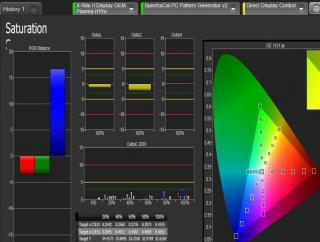
Just done the 65ST50 calibration after 100 hours usage. I could hit higher light output but as the panel is still new, I only set the contrast up to 70 to prevent burn in. Anyway, the calibration show that the grayscale and cms is really good able to hit delta 2000 less than 3. If you look at Pantone color checker, all color is under delta 2. Gamma is not super smooth with slight bump moving to brighter greyscale but still not bad. Overall I highly recommend Panny ST50 as the price is reasonable for the PQ you get. Black level is measure around 0.008 cdm. Skin tone is natural and color had a nice pop to it without oversaturation effect.


This post has been edited by pierreye: Dec 8 2012, 12:40 PM |
|
|
Dec 8 2012, 03:17 PM
Return to original view | Post
#27
|
|
Senior Member
1,308 posts Joined: Oct 2004 From: Penang & Ipoh
|
QUOTE(anfieldude @ Dec 8 2012, 01:49 PM) That's my observation as well. Its has excellent post calibration image. I suspect the gamma ramp up is due to ABL. Will try using small APL test pattern for gamma measurement as I remember the same behaviour if measure projector with dynamic iris turn on. This post has been edited by pierreye: Dec 8 2012, 03:32 PM |
|
|
Dec 10 2012, 10:29 AM
Return to original view | Post
#28
|
|
Senior Member
1,308 posts Joined: Oct 2004 From: Penang & Ipoh
|
Try out 3D calibration yesterday. I try to use the method recommend by Sotti from Spectracal, that is using a iD3 without 3D glasses to profile against i1Pro with 3D glasses. The profile give me an error something about the XYZ out of range. I ignore the error and try to do a 100% white reading with i1Pro with 3D glasses and iD3 which is profiled. The reading is slightly different, red is similar but blue and green are not similar between both sensor. I had no problem with 2D reading as both probe read similarly after profile. In the end, I use i1Pro with 3D glasses to do the calibration. The 100% white read around 120 cdm before glasses and around 22 cdm after the glasses which is around 80% brightness drop using Panny 3D RF glasses. The Samsung 3D RF glasses drop to around 20cdm. Also, the tint on both glasses is slightly different but still acceptable.
This post has been edited by pierreye: Dec 10 2012, 10:30 AM |
| Change to: |  0.0261sec 0.0261sec
 0.49 0.49
 7 queries 7 queries
 GZIP Disabled GZIP Disabled
Time is now: 3rd December 2025 - 07:42 AM |
 Quote
Quote