

QUOTE(subrok007 @ Apr 24 2010, 05:32 PM)
anyone here dy buy x6??

I just bought it. Currently setting up. Will post CPUz screen when I get the rig up and running.AMD Phenom II X6, amd already started the shipping
|
|
 Apr 25 2010, 08:38 AM Apr 25 2010, 08:38 AM
Return to original view | Post
#1
|
 
Staff
5,568 posts Joined: Jan 2003 From: the lack of sleep  
|
QUOTE(subrok007 @ Apr 24 2010, 05:32 PM) anyone here dy buy x6?? I just bought it. Currently setting up. Will post CPUz screen when I get the rig up and running. |
|
|
|
|
|
Apr 25 2010, 10:39 AM
Return to original view | Post
#2
|
|
Staff
5,568 posts Joined: Jan 2003 From: the lack of sleep
|
QUOTE(excel_saga @ Apr 25 2010, 10:19 AM) 1090T or 1055T..if the 1090T is better than then i5..i might opt to change 1055T. Lets see how far this baby can go when it comes to overclocking.Added on April 25, 2010, 10:45 am QUOTE(mitodna @ Apr 25 2010, 10:20 AM) How much you got it? Which MB you pairing with? Thanks. Paired with Gigabyte 770T-USB3.This post has been edited by sleepwalker: Apr 25 2010, 10:45 AM |
|
|
Apr 25 2010, 04:42 PM
Return to original view | Post
#3
|
|
Staff
5,568 posts Joined: Jan 2003 From: the lack of sleep
|
QUOTE(Avex @ Apr 25 2010, 02:05 PM) i got the 1055T, and pair it up with gigabyte 890GPA-UD3H motherboard, not the best board. That is why I didn't choose this board. The build-in graphics card is a waste. The only USB3 motherboard from Gigabyte that I can find is the 770. The cooler is definitely noisy. Will have to change that next.Forget about using stock cooling, noisy as hell, and don't bother getting a big chucky cooling when you decide to choose this gigabyte board, depending on ur casing, can be quite troublesome adjusting CPU cooling fan. Max i get for pushing it is 3.57GHz from the stock 2.8GHz. I did it using cheap rams. Beyond this is unstable for me. Get better rams if you want to overclock over 3.5GHz mark |
|
|
Apr 26 2010, 09:29 AM
Return to original view | Post
#4
|
|
Staff
5,568 posts Joined: Jan 2003 From: the lack of sleep
|
QUOTE(excel_saga @ Apr 25 2010, 11:33 PM) I think should be around RM1k+ Actually 1K Nett... |
|
|
Apr 27 2010, 12:31 PM
Return to original view | Post
#5
|
|
Staff
5,568 posts Joined: Jan 2003 From: the lack of sleep
|
QUOTE(Cubex01 @ Apr 27 2010, 12:25 PM) AMD Phenom X6 1055T 2.8ghz/9mb/125W RM655 Stok Arrived! You can get it for less at Lowyat. I got mine from PCZone at RM630.http://forum.lowyat.net/index.php?showtopic=1118302&hl=1055T extremely sweet price for a six cores processor.. Sure will get diabetes...  |
|
|
Apr 27 2010, 12:53 PM
Return to original view | Post
#6
|
|
Staff
5,568 posts Joined: Jan 2003 From: the lack of sleep
|
QUOTE(Cubex01 @ Apr 27 2010, 12:42 PM) I think to have this X6 but, it is too cheap for 6 c0res... Coz it's AMD. Yes.. there is no way for it to fight with Intels 6 core I7 980 extreme but the price difference is like heaven and earth.kinda curious. Why s0 cheeapppp?????  |
|
|
|
|
|
Apr 27 2010, 02:19 PM
Return to original view | Post
#7
|
|
Staff
5,568 posts Joined: Jan 2003 From: the lack of sleep
|
QUOTE(Cubex01 @ Apr 27 2010, 12:56 PM) From the review, the benchmarks on crysis between X6 and 980X, That's because the graphics card was the limitation. If you look at lower resolution, the Intel is still king but at a price. At least for the next 1 year, I can say the X6 should not be a limitation in any gaming setup. Unlike graphics card, CPU power should not be a limitation for at least 2-3 years.there is no really far difference.. http://www.guru3d.com/article/phenom-ii-x6...1090t-review/16 |
|
|
Apr 27 2010, 10:07 PM
Return to original view | Post
#8
|
|
Staff
5,568 posts Joined: Jan 2003 From: the lack of sleep
|
One thing is for sure.. it runs cool... this taken just now at room temp with original AMD heatsink.
This post has been edited by sleepwalker: Apr 27 2010, 10:14 PM Attached thumbnail(s) 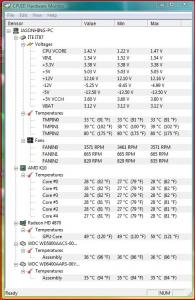
|
|
|
Apr 27 2010, 11:09 PM
Return to original view | Post
#9
|
|
Staff
5,568 posts Joined: Jan 2003 From: the lack of sleep
|
QUOTE(8tvt @ Apr 27 2010, 10:11 PM) what about load? That was idle..This one is while playing DragonAge Origins.. which is actually still running in the background while I'm posting this. Still cool... Attached thumbnail(s) 
|
|
|
Apr 28 2010, 12:05 AM
Return to original view | Post
#10
|
|
Staff
5,568 posts Joined: Jan 2003 From: the lack of sleep
|
QUOTE(8tvt @ Apr 27 2010, 11:54 PM) ya that's why reviewer said got one problem.. Stock heatsink is copper base with 4 heat-pipes. Top down fan.it's running cool.. lol.. if better cooler the load should lesser.. @sleepwalker is the heatsink copper base? |
|
|
Apr 28 2010, 03:27 PM
Return to original view | Post
#11
|
|
Staff
5,568 posts Joined: Jan 2003 From: the lack of sleep
|
QUOTE(sora90 @ Apr 28 2010, 02:43 PM) Several comments have stated that AMD stock fan is noisy, so does that mean it has great cooling capabilities with loud noise as penalty? It's noisy because it is spinning at max speed, 4000 rpm, all the time. I need to check why the motherboard is not reducing the speed of the fan when the cpu is idle and cool. It should be spinning no more than 2500-3000rpm for it to be quiet. |
|
|
Apr 29 2010, 10:29 AM
Return to original view | Post
#12
|
|
Staff
5,568 posts Joined: Jan 2003 From: the lack of sleep
|
QUOTE(tuonn @ Apr 29 2010, 01:48 AM) +1..from review i read..this amdx6 have advantages at application like CS4,adobe and so on... This is where most people have a slight misunderstanding. If you have a game that runs on 4 core and you only have 4 cores, therefore your game cannot run at 100% because you have left no core for your OS, your antivirus, I/O systems, firewall, bittorrent, etc etc. They will have to share the 4 cores with your game.but in real n gaming is not very impressive...still 1090T performance is par on i7 860 with almost same price... but still amd have 6 core n game start to utilize 4 core now...maybe by the end of next year,game we utilize full six core...  This is where the additional cores come in handy, for now and the future. We are not asking people to change from 4 cores to 6. If you are looking to build a new system, like I did, then no point going for 4 when 6 is about the same price. This is the same issue when dual core CPUs first came out. People were screaming NO POINT having 2 cores when games can't use it. Well, if the game use one, the other one can service the OS. Later the same people are the ones asking for MORE than 2 cores. |
|
|
Apr 30 2010, 09:08 AM
Return to original view | Post
#13
|
|
Staff
5,568 posts Joined: Jan 2003 From: the lack of sleep
|
QUOTE(Irishcoffee @ Apr 30 2010, 05:38 AM) i dun think so You do not need to fully load a core to slow it down. Anybody who used a single core CPU for servers 10 years ago can tell you that. Background process still have to run otherwise you can't run your game. I/O still gets top priority no matter what, OS still gets top priority in order to load your game or any application that runs in the foreground. BT will utilise I/O as it reads and writes to hdd and that puts a drain on a single core. If you have extra idle cores for the OS to assign a thread to it, then it would not interfere with your other applications.OS is the one that give resources to app , it doesnt give priority to background program plus , antivirus , bt , msn etc is not a heavy program tat will occupied a core fully load even games doesnt Here is the deal, if it is a background process that can be slowed down, the OS would do it. If it cannot be slowed down, then it will drain the foreground process if you do not have sufficient CPU power to process. |
|
|
|
|
|
Apr 30 2010, 12:44 PM
Return to original view | Post
#14
|
|
Staff
5,568 posts Joined: Jan 2003 From: the lack of sleep
|
QUOTE(lex @ Apr 30 2010, 09:29 AM) That's not entirely true at all... Most background process runs on interrupts (and events triggered), meaning they do not run all the time. There's also operating system's pre-emptive scheduling to handle background task prioirty (e.g. allocating the amount of time slice to each process). I/O stuff also runs on interrupts (for example, the timer) while stuff like HDD read/write uses the PCI bus mastering (similar to Ultra DMA) which is transparent to the system. Even simple I/O such as audio playback uses that, also (Directsound) audio mixing involves some CPU usage (ie. nowadays CPUs are so fast that sound mixing can be done by software rather than hardware, and takes up very little resource). Let me rephrase background task. Anything that is not running below Normal priority is not considered as background task. Just because it's not running in the foreground window, it does not make it a background task. Antivirus are not background, they are actually foreground task running hidden from view but that does not make them background task either. Since they all have the same priority, when they require a the CPU to allocate a time-slice to their process, they are going to get it. BT does not use a lot of resources, even on a single core. As for the HDD read/writes.. it is pretty much transparent (as mentioned above) and does not write to the HDD all the time (due to the operating system's write behind caching).  [attachmentid=1553444] That is why most people would report that any installation of an antivirus with active file scanning will always slow down the machine, unless you have sufficient CPUs to run it. I run Jackie Chan Internet Security 2010 and it slowed to a crawl on my dual core last time, exactly the same issue that most people complained about. Funny thing is that I don't have that problem anymore on my X6. |
|
|
Apr 30 2010, 02:36 PM
Return to original view | Post
#15
|
|
Staff
5,568 posts Joined: Jan 2003 From: the lack of sleep
|
QUOTE(lex @ Apr 30 2010, 01:11 PM) Again, not true at all... Anti-virus uses operating system hooks, thus whenever some programs starts running (e.g. starting an application), generates a (child) process, read/write to HDD (e.g. modify files) and/or does something unexpected (such as trying to invoke or modify a operating system function) then the anti-virus programs springs into action. Otherwise its relatively idle (not running most of the time). Correct but it is when you perform and operation that reads files and invokes scanning that slows down the system. When the antivirus is idle, so is the system and it also means I'm not using it. Any read write operations that involves most files are scanned by any active antivirus system and that usually happens when you use the machine. That is why game/apps loading time is always increased with anti-virus running Active file scanning? That's HDD bottleneck... very little to do with the processor actually. Everyone will experience the same thing whenever the anti-virus starts a scheduled file scan (an annoyance which I usually turn off  ), unless using SSD of course. Anyway, I've used lots of anti-malware stuff before including Kapersky (your Jackie Chan thingy), AVG, Avast, Norton Security Suite, etc.. and all of them more or less slows down most systems, including 8-core (dual processor) servers. Currently settled on Avira due to its small memory footprint and less resource hogging. ), unless using SSD of course. Anyway, I've used lots of anti-malware stuff before including Kapersky (your Jackie Chan thingy), AVG, Avast, Norton Security Suite, etc.. and all of them more or less slows down most systems, including 8-core (dual processor) servers. Currently settled on Avira due to its small memory footprint and less resource hogging. Yes, the antivirus slows down but the more the more core you can feed it, the faster it will run. Loading Vista on my dual core and X6 is about the same speed without the antivirus running. With the antivirus running, I hardly feel any difference on the X6 while the dual core takes a much longer time to load up. Furthermore, all 6 cores are being utilised with the OS distributing threads across it. Heck, even when I'm surfing the internet I have activity across all 6 cores. I'm not talking about scheduled scans. I'm talking about the usual read/write file scanning and whatever heuristics thrown in to detect unknown virus. Those will always run, scanning the network and hdd, even when idle. This post has been edited by sleepwalker: Apr 30 2010, 02:46 PM |
|
|
May 1 2010, 09:39 AM
Return to original view | Post
#16
|
|
Staff
5,568 posts Joined: Jan 2003 From: the lack of sleep
|
QUOTE(Irishcoffee @ Apr 30 2010, 06:33 PM) yes true , anti virus is not really resource hogging , most anti virus slow down cause by slow hdd read performance , current cpu is more than enuf to scan your pc 2 types of Jackie Chan antivirus.. one is just an antivirus and the other is the internet security. Internet security is more than just an antivirus and it integrates into your browser and network drivers to provide firewall protection too. So it is always scanning when you are just even clicking on internet pages or having any sort of network access.if not , im sure jackie chan having trouble running on atom netbook This post has been edited by sleepwalker: May 1 2010, 09:40 AM |
| Change to: |  0.0271sec 0.0271sec
 0.52 0.52
 7 queries 7 queries
 GZIP Disabled GZIP Disabled
Time is now: 5th December 2025 - 11:51 AM |
 Quote
Quote