

QUOTE(bakry @ Jul 25 2013, 03:01 PM)
haha ya, but was thinking, if i am to upgrade, might as well go all the way

if you often play fps, consider stay in 22'' to 24''. larger the tv/monitor, the larger u need to focus eg. map, ammo.Technical LCD TV/Display Discussion Thread | V2, technical discussion on LCD TV/Monitor
|
|
 Jul 25 2013, 11:44 PM Jul 25 2013, 11:44 PM
|
 
Junior Member
95 posts Joined: Apr 2013  
|
QUOTE(bakry @ Jul 25 2013, 03:01 PM) haha ya, but was thinking, if i am to upgrade, might as well go all the way if you often play fps, consider stay in 22'' to 24''. larger the tv/monitor, the larger u need to focus eg. map, ammo. |
|
|
|
|
|
Jul 26 2013, 06:15 PM
|

Junior Member
160 posts Joined: Nov 2006 From: planet Earth(it's kl)
|
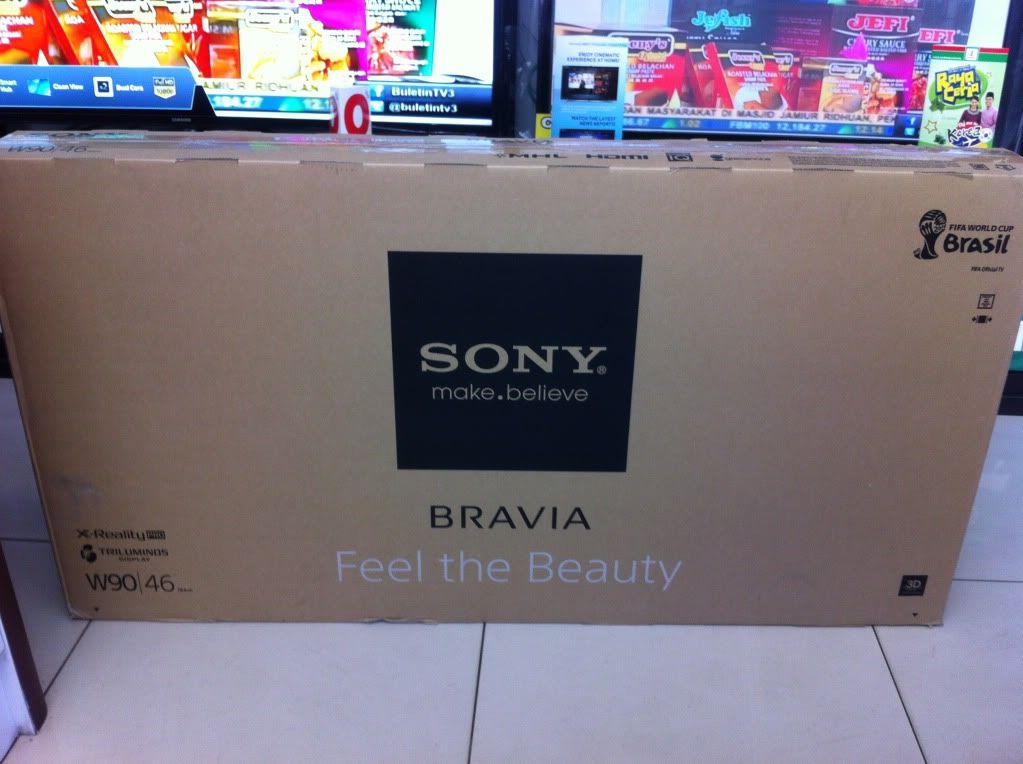
Just received my new tv for gaming,2013 Bravia W904a
 |
|
|
Jul 27 2013, 01:07 AM
|

Senior Member
1,378 posts Joined: Dec 2009
|
QUOTE(kabuto rider kick @ Jul 26 2013, 06:15 PM) Just received my new tv for gaming,2013 Bravia W904a Bkn ko bru beli LG ke?Show more pics lepas da bkk kotak tu |
|
|
Jul 27 2013, 01:38 AM
|
|
Junior Member
160 posts Joined: Nov 2006 From: planet Earth(it's kl)
|
QUOTE(shark7 @ Jul 27 2013, 01:07 AM) Bkn ko bru beli LG ke? LG tu tv lama aku,Sony ni lah gantinya,ko tgk jer kt fb aku pic aku dh psg,picture quality superb Show more pics lepas da bkk kotak tu  |
|
|
Jul 27 2013, 03:21 AM
|
|
Junior Member
247 posts Joined: Aug 2007
|
QUOTE(kabuto rider kick @ Jul 26 2013, 06:15 PM) Just received my new tv for gaming,2013 Bravia W904a huaa 3D tv..question.. can we control the freq/hz for 3D tv? I've read that 3D tv need higher freq to produce the 3D effect, twice as much frames as the normal tv for the left and right eyes, so they 'add' more frame/sec to normal video.. whenever i went to home theater shop and saw 3D tv showing 2D blu ray movies, it always look 'super smooth', ie; movement etc. With the superb quality/details of blu ray movies + superb picture quality + this smooth thing, i can't enjoy the movie at all. it feels like, to me, watching a 'making of' rather than a movie. ~_~ i wonder how the game will look like. |
|
|
Jul 27 2013, 04:55 AM
|
|
Junior Member
160 posts Joined: Nov 2006 From: planet Earth(it's kl)
|
QUOTE(dOtcOm @ Jul 27 2013, 03:21 AM) huaa 3D tv.. Haha yes u can control the Hz aka Motionflow(in Sony term) so that bluray movies can either look super smooth like the "making of" or normal or even make the picture quality looks just like u are watching in cinema,there are couple more levels to choose just for the Motionflow alone,for videogaming the Motionflow is set to OFF by default,u can turn it on but not recommended as it'll make the picture flicking,and yes games look superb!plus the new Triluminos color tech of Bravia W90 series somemore the picture again looks superb question.. can we control the freq/hz for 3D tv? I've read that 3D tv need higher freq to produce the 3D effect, twice as much frames as the normal tv for the left and right eyes, so they 'add' more frame/sec to normal video.. whenever i went to home theater shop and saw 3D tv showing 2D blu ray movies, it always look 'super smooth', ie; movement etc. With the superb quality/details of blu ray movies + superb picture quality + this smooth thing, i can't enjoy the movie at all. it feels like, to me, watching a 'making of' rather than a movie. ~_~ i wonder how the game will look like. I wanna post a pic of The Last of Us on it but my handphone camera dont do justice  |
|
|
|
|
|
Jul 27 2013, 11:51 AM
|

Senior Member
4,522 posts Joined: Apr 2006
|
W904 = one of the best TV for gaming out there now, amazingly low input lag.
@kabuto Please check your set for any excessive backlight clouding, I've seen lots of reports about it. |
|
|
Jul 27 2013, 01:28 PM
|

Junior Member
385 posts Joined: Feb 2007
|
QUOTE(kwbaka @ Jul 25 2013, 11:44 PM) if you often play fps, consider stay in 22'' to 24''. larger the tv/monitor, the larger u need to focus eg. map, ammo. More rpg and adventure games for me..Hmmmm |
|
|
Jul 27 2013, 04:23 PM
|

Senior Member
1,709 posts Joined: Jan 2003 From: Kedah Khap Khoun Khap (4K)
|
How much is the sony tv bro?
|
|
|
Jul 27 2013, 05:04 PM
|

Junior Member
514 posts Joined: Jan 2006
|
QUOTE(kabuto rider kick @ Jul 27 2013, 04:55 AM) Haha yes u can control the Hz aka Motionflow(in Sony term) so that bluray movies can either look super smooth like the "making of" or normal or even make the picture quality looks just like u are watching in cinema,there are couple more levels to choose just for the Motionflow alone,for videogaming the Motionflow is set to OFF by default,u can turn it on but not recommended as it'll make the picture flicking,and yes games look superb!plus the new Triluminos color tech of Bravia W90 series somemore the picture again looks superb Somehow both my visual & audio personal senses can't differentiate minute differences in TV visual qualities. Am using a Samsung Smart 51" 3D Plasma TV and found that the 3D experience is just as good as anything I've seen (played AC series & watched some movies like Spider-man).I wanna post a pic of The Last of Us on it but my handphone camera dont do justice Unless I'm rich to buy everything to compare side by side, I'd go for best value for money and brands I'm comfortable with  |
|
|
Jul 27 2013, 11:16 PM
|
|
Junior Member
160 posts Joined: Nov 2006 From: planet Earth(it's kl)
|
QUOTE(SSJBen @ Jul 27 2013, 11:51 AM) W904 = one of the best TV for gaming out there now, amazingly low input lag. Yup agreed about the input lag,there's a review on the net mentioned the same,btw about the excessive backlight clouding,so far nothing funny with the tv or its pic quality,but still how to check?or where to look?@kabuto Please check your set for any excessive backlight clouding, I've seen lots of reports about it. QUOTE(Zaryl @ Jul 27 2013, 04:23 PM) How much is the sony tv bro? Rm7499 for 46" |
|
|
Jul 27 2013, 11:25 PM
|
|
Senior Member
4,522 posts Joined: Apr 2006
|
QUOTE(kabuto rider kick @ Jul 27 2013, 11:16 PM) Yup agreed about the input lag,there's a review on the net mentioned the same,btw about the excessive backlight clouding,so far nothing funny with the tv or its pic quality,but still how to check?or where to look? Get a totally black background and just look at the lighting. If you see excessive patches of grays, those are clouding. I'm only asking because I've heard quite a few reports on it,. |
|
|
Jul 28 2013, 04:15 AM
|
|
Junior Member
160 posts Joined: Nov 2006 From: planet Earth(it's kl)
|
Didnt noticed any gray clouds on games loading screen before,but i'll look again,thanks for the heads up
btw just got Avatar 3D bluray,amazing!while games like GOW Ascension and The Last of Us really transformed beautifully |
|
|
|
|
|
Jul 28 2013, 05:46 AM
|
|
Junior Member
56 posts Joined: Dec 2010
|
QUOTE(kabuto rider kick @ Jul 28 2013, 04:15 AM) Didnt noticed any gray clouds on games loading screen before,but i'll look again,thanks for the heads up Pictures please! btw just got Avatar 3D bluray,amazing!while games like GOW Ascension and The Last of Us really transformed beautifully |
|
|
Sep 13 2013, 06:12 PM
|
|
Junior Member
75 posts Joined: Feb 2012
|
 solution found solution foundThis post has been edited by WhyNotYouTeachMe: Sep 13 2013, 06:25 PM |
|
|
Sep 13 2013, 06:28 PM
|

Senior Member
5,893 posts Joined: Jun 2006
|
guys got any tv price around 2k and nice for gaming and movie?
|
|
|
Sep 13 2013, 07:36 PM
|
|
Senior Member
4,522 posts Joined: Apr 2006
|
QUOTE(silrave @ Sep 13 2013, 06:28 PM) guys got any tv price around 2k and nice for gaming and movie? Sony 40"R452a, goes for about RM1.9k. Lowest input lag for a TV under the RM2k mark, ranging around 25ms which is very, very good.Quite a good TV across all ranges though — from blacks, to whites, to decent color accuracy. There are some issues with uniformity, but that's to expect for LCD LED TVs as all of them suffer inbalancing in screen uniformity. Blacks are pretty good, but can sometimes crush shadow detail a little bit. Whites are usually on a redder tint out of the box, so you'll have to calibrate a little bit but shouldn't be an issue. Downsides? Motion blur on the R452 is quite subpar. So if you're sensitive to blurring images in fast scenes, you might be irritated. Viewing angles are also quite poor, so don't expect a wide field of viewing. If you're using this TV for a bedroom, that shouldn't be an issue though. Finally, if you can step up another RM300-400 in your budget then your choices open up to the better Sony W674, Panasonic E6 and Samsung E5500. |
|
|
Sep 13 2013, 08:52 PM
|
|
Senior Member
5,893 posts Joined: Jun 2006
|
wow so many model
last time i go senheng those place they tell me smart tv sony around 1.9k hmm for 40 inch gaming tv got smart function and no smart function is it a big difference? i check r452 only rm 1.7k o This post has been edited by silrave: Sep 13 2013, 08:53 PM |
|
|
Sep 13 2013, 08:52 PM
|

Junior Member
8 posts Joined: Dec 2008 From: Outer Haven 
|
QUOTE(SSJBen @ Sep 13 2013, 07:36 PM) Sony 40"R452a, goes for about RM1.9k. Lowest input lag for a TV under the RM2k mark, ranging around 25ms which is very, very good. I just bought Sony W674 42" for my room last week. Loving it so far; though I don't know what's the best setting for games. Quite a good TV across all ranges though — from blacks, to whites, to decent color accuracy. There are some issues with uniformity, but that's to expect for LCD LED TVs as all of them suffer inbalancing in screen uniformity. Blacks are pretty good, but can sometimes crush shadow detail a little bit. Whites are usually on a redder tint out of the box, so you'll have to calibrate a little bit but shouldn't be an issue. Downsides? Motion blur on the R452 is quite subpar. So if you're sensitive to blurring images in fast scenes, you might be irritated. Viewing angles are also quite poor, so don't expect a wide field of viewing. If you're using this TV for a bedroom, that shouldn't be an issue though. Finally, if you can step up another RM300-400 in your budget then your choices open up to the better Sony W674, Panasonic E6 and Samsung E5500.  
|
|
|
Sep 13 2013, 09:07 PM
|
|
Senior Member
4,522 posts Joined: Apr 2006
|
QUOTE(lovehatesmisery @ Sep 13 2013, 08:52 PM) I just bought Sony W674 42" for my room last week. Loving it so far; though I don't know what's the best setting for games. My settings for a bedroom:
Game Mode Backlight: 6 or 7 (6 if I turn off all the lights) Contrast: 93 Brightness: 49 Color temp: Warm 1 Sharpness: 50 Gamma: -1 White Balance All default except blue gain at -2, this is to account for setting Clear White at Low Post process settings All disabled except - Clear White (Low) and Smooth Gradation (Medium) Using these settings, I've managed to get delta errors to less than 3 which is the optimal limit for a mid-range LCD LED TV. Measured gamma point is at 2.38 which is just 0.2 point away from the standard set by ITU and THX as a reference level. Input lag with these settings is at 19ms (+4ms from an everything disabled 14.5ms W6). Rule of thumb, anything under 30ms is optimal for games, under 20ms is exceptional in today's standards. Many SF4, Blazblue, GG, MvC3 pros play on 40ms HDTVs. *Note* You can choose to enable Reality Creation (limit it to no more than 35 though) if you want on games which aren't natively at 720p (which sadly, is a lot of PS3 games). This sharpens images across live polys and textures as well, but it does make aliasing pop more. Reality Creation adds about 15ms of input lag as well. I really only enable it in games where there's an excessive use of AA (again, not many PS3 games sadly). Hope that helps. This post has been edited by SSJBen: Sep 13 2013, 09:23 PM |
| Change to: |  0.0269sec 0.0269sec
 0.56 0.56
 6 queries 6 queries
 GZIP Disabled GZIP Disabled
Time is now: 2nd December 2025 - 09:20 PM |
 Quote
Quote