Welcome Guest ( Log In | Register )

Outline · [ Standard ] · Linear+

 HTPC V2, Home Theater PC Setup, HOWTO and Guides

views
     
netherlord
post Apr 10 2010, 01:53 PM

Getting Started
**
Junior Member
118 posts

Joined: Mar 2008
Hi guys,

Just a question on XBMC,

is there any site like IMDB.com to scrape info off for Chinese/Korean movies as IMDB.com is only for English Movies cry.gif

Almost half of my collection is Chinese Korean Japanese Movies/TV Drama/Anime and i cant get it to list into Movies/Tv Shows in XBMC

Now iam only playing them thru Videos section.

Iam using my lappy on Windows Vista Home Premium 32bit to run XBMC.
netherlord
post Apr 28 2010, 03:18 PM

Getting Started
**
Junior Member
118 posts

Joined: Mar 2008
QUOTE(ck_mon @ Apr 26 2010, 05:54 PM)
for 1080p i think yes, because i've tried to stream over 100mbps network got lagging, but for 720p, running fine

CMIIW
*
Well i think it depends on your current setup more, i.e is the cables running fine? are they close to some power cord/source? are they tangle up?

LAN cables are very sensitive to those as they can pickup unwanted noise/disruptions from neighboring cables/equipment.

I have my LAN cables separated from the rest of my cables (power, vga, hdmi, and all the rest) and are able to stream 90% problem free (except for the jiterring/stutter when something runs at the background)

But different people may have different situation all together,

My advice is try and free those LAN cable from the cluster and use them as straight as possible, and also to keep them from going too near other power sources (i.e anything that has electricity running thru them), you might be able to see some improvement.

Another forum has a discussion on it --> http://forums.macrumors.com/archive/index....3C/t-29136.html

Good Cable Mamangement is your freind ^^

Qoute from Matt Simmons
"Keep power cables as far from ethernet cables as possible Power cables, especially clumps of power cables, cause ElectroMagnetic Interference (EMI aka radio frequency interference (or RFI)) on any surrounding cables, including CAT-* cables (unless they're shielded, but if you're using STP cables in your rack, you're probably doing it wrong). Run your power cables away from the CAT5/6. And if you must bring them close, try to do it at right angles."

Taken from --> http://serverfault.com/questions/26462/how...s-in-your-racks

This post has been edited by netherlord: Apr 28 2010, 03:41 PM
netherlord
post Apr 29 2010, 01:25 PM

Getting Started
**
Junior Member
118 posts

Joined: Mar 2008
QUOTE(kopking10 @ Apr 29 2010, 08:56 AM)
Guys, i am planning to build a htpc, would you guys look at my list.

Video:
32" LCD HDTV

Audio:
Maybe Pioneer Home Theater System (Is it possible to connect the wires to HTPC??? )

HTPC:
Processor = AMD Athlon II X2 250 3.0Ghz
Mobo = Gigabye A785GMT (Integrated HDMI)
Ram = Corsair DDR3 Ram 2GbB
HDD = 1TB Western Digital
DVD-Rom

Casing = ?? Please advise and where to get
S/card = ?? Do i need one
Graphic Card = ?? Do i need one since the Mobo already have.

I hope to connect the audio to those HOME THEATER from pioneer my existing. Is it possible with my setup?

THanks for all the help!
*
1. Whats your pioneer HT model, need to know what inputs you have to pass audio to it.

2. From the spec of the HTPC i can say the specs is enough to handle most HD content but iam not sure about BDMV and BD iso as those are more CPU intensive rather than GPU.

3. For casings i think you have to either browse from the net or go to low yat plaza yourself cause aesthetics is really a personal thing. What i like maybe not up to your taste.

4. For soundcard i think your spec already are capable for passing 5.1 DD/DTS to a receiver thru HDMI/SPDIF but if you want to pass 7.1 lossless DTS-MA/DD TrueHD thru HDMI i think you need something like a Asus Sonar HDA 1.3 ( http://www.dvhardware.net/article27745.html ) which is around RM700 ( Needs TMT Player to passthru thou ).

5. If you want better performance from your HTPC, of course another better Graphic Card will help, plus if you get the higher range of card like ATI 58XX series you can skip using the Sound card as it is capable of doing a 5.1 or 7.1 passthru (but the cheapest one i could find atm is around RM900) or take a look at this http://www.avsforum.com/avs-vb/showthread.php?t=1179134 which explain alot on how to pass audio thru ATI 5XXX series card.

Hope my explanation is good enough icon_idea.gif

This post has been edited by netherlord: Apr 29 2010, 02:14 PM
netherlord
post Apr 29 2010, 10:56 PM

Getting Started
**
Junior Member
118 posts

Joined: Mar 2008
1. Havent really look into the models yet. What inputs should i look for?
ANS: Well depends whether you have an existing old Pioneer which accepts SPDIF / Coaxial connection or you planning to buy a new one with HDMI, all supports 5.1

2. In order to run BDMV and BD iso, what are the minimum CPU spec that u recommend?
Ans: Like what Bart-man suggested, a Core 2 Duo or Athlon II X2 should be sufficient but try and get i3 to future-proof your mb should you plan to later on upgrade to a better proc.

3. I cant agree more.
ANS: There are many nice cases for HTPC design but most of them are quite costly unless you go for those normal ATX. Price ranges from RM300 - RM700 for those really nice ones like Silverstone and Coolermaster

4. For sound, im glad to maintain 5.1 at the moment.
ANS: Then your MB SPDIF and HDMI should be sufficient to output DD / DTS to your chosen HT AVR

5. Ill stay with the integrated graphic with the mobo then.
ANS: Do note you need to do some tweaking to the On-Board ATI GPU in order to fully utilise it for HD playback, take note on the model and driver, and also get the latest codec to ensure smooth playback.

If you provide what the on-board GPU is i might be able to scrounge up some guide in how to set it up for HD playback. biggrin.gif

All the best to your HTPC build rclxms.gif
netherlord
post Apr 30 2010, 03:28 AM

Getting Started
**
Junior Member
118 posts

Joined: Mar 2008
QUOTE(kapultek @ Apr 30 2010, 02:09 AM)
how about atom n ION combo...
like acer revo....do u all recommend to buy it
*
Not to say not recommending it, but you need to have some technical knowledge/skill to make it into a proper HTPC, there are ppl using it for XBMC Media Center [LiveCD Version] and have done so successfully.

Link --> http://forum.xbmc.org/showthread.php?t=538...light=acer+revo

If you like a simple HTPC ( Just to play HD SD contents ) then Acer Revo might be an option but do take note of the hardware limitation hmm.gif .

HTPC with C2D/Athlon are more capable in handling BD iso, BDMV and also Blu-Ray disc playback, not mentioning games and other stuff. Depending on what you want or expect from your HTPC, Specs may vary like Day and Night drool.gif .

Deciding what you want from your HTPC will eventually decide on what component goes into your HTPC. Just remember the choice is in your hands and don't regret afterward blush.gif .
netherlord
post Apr 30 2010, 10:34 PM

Getting Started
**
Junior Member
118 posts

Joined: Mar 2008
QUOTE(ycs @ Apr 30 2010, 08:53 AM)
just wanna ask if there's a way to use both cores in my C2D E8400 to play BDMV.

currently, it only max out 1 core using MPC and sometimes the sound stutters a bit.
*
1. Bring up Task Manager (CTRL + ALT + DEL and click Start Task Manager)
2. Browse to the PROCESSES Tab
3. Look for the MPC.exe file (mine is mpc-hc.exe), highlight and Right Click
4. Select SET AFFINITY
5. Make sure to tick BOTH CPU0 and CPU1 to make it run on both cores (or more if you have quad core or Intel i5,i7)
6. Click OK and restart MPC and start Step 1-5 to make sure the settings was applied.

If it still is running on 1 core i guess its either the software or settings that causing the problems. If that's the case, you can try the link below

Link --> http://www.tomshardware.com/forum/251947-3...1080p-8800ultra

QUOTE(kapultek @ Apr 30 2010, 03:00 PM)
What are acer revo limitations
*
Well here are the specs :

Aspire Revo specs

* CPU: Intel Atom N230, at 1.6GHz
* RAM: from 2GB DDR2
* HDD: from 160GB, at 5400rpm
* Graphics: nVidia ION (Geforce 9400)
* Ports: 6 x USB 2.0, eSATA
* Memory card reader: SD/SDHC/MMC/XD/Memory Stick
* Output: HDMI, VGA
* Networking: Ethernet, WiFi
* Dimensions: 7,1″ x 7,1″ x 1,2″ (18cm x 18cm x 3cm)
* OS: Windows Vista
* Monitor mount: VESA 80 to 120 standard

Since processing BD.iso, BDMV and Blu-ray disc needs more CPU power rather than GPU for file processing (i.e loading the file and such into RAM) the bottleneck is already apparent on the CPU. Intel Atom cpu arent too famous for their processing power. Neither is Windows Vista that was installed on it.

Quoted form the website
"The only downside of the Aspire Revo the operating system. If you want to play a video on your TV, waiting two minutes and a half to boot your computer is a pain. Depending on your country, you may be able to request a refund on Windows Vista."

Link --> http://www.eeextra.com/nettops/acer-aspire-revo.html

While the GPU no doubt is capable of handling HD contents but with the CPU bottleneck i doubt it will be a very good BD.iso, BDMV or Blu-ray disc player.
This is what i can see from the specs alone but i maybe wrong cause i haven't got a chance to play with one of them.

Hope my explanations are good enough rclxms.gif
netherlord
post May 1 2010, 02:30 PM

Getting Started
**
Junior Member
118 posts

Joined: Mar 2008
QUOTE(kapultek @ May 1 2010, 01:38 AM)
thanks...how about gaming...can it play games like dirt2
*
Ermmm.... Atom CPU aren't graded for those kind of games. The only games i heard ppl run on Acer Revo are like emulator games (SNES, Megadrive, MAME)

Link --> http://forum.xbmc.org/showthread.php?t=72656

To run the more newer games in the market (Dirt2, Need for speed, Starcraft II so on) i think a C2D/Athlon with nvidia 96xx serries/ ATI 47xx series is required for a smooth gameplay (albeit at lower resolution).

That's why in my previous post i said the Acer Revo has some limitations compared to a full fledged custom HTPC (which usually contain a better CPU/GPU combination).

Acer Revo is more suited for ppl who just wanna play HD mkv's streamed/stored on the HDD or Network.

netherlord
post May 2 2010, 02:08 AM

Getting Started
**
Junior Member
118 posts

Joined: Mar 2008
QUOTE(kapultek @ May 1 2010, 07:47 PM)
thanks for the info netherlord
*
NP tongue.gif Glad to be of assistance laugh.gif
netherlord
post May 3 2010, 02:20 AM

Getting Started
**
Junior Member
118 posts

Joined: Mar 2008
QUOTE(skyliner66 @ May 3 2010, 12:26 AM)
hi all sifu, need some help from u all here...does anyone facing any problem when using LG BD-ROM or writer to watch blu ray disc on power dvd ultra software? mine will always freeze 1 minutes after playing the disc...i update my driver to the latest firmware and the problem still occur...is it my pc problem? LG drive problem or the power dvd software problem?

really appreciate any helps here...thx a lot... smile.gif
*
Iam using my Acer laptop to play blu-ray disc with its own player (Acer Arcade Deluxe) atm, but at first when i playback some disc, windows did prompt me to unblock the application for internet access (BD Live function i guess) but the player was full screen and was covering the pop up window and it would freeze the player and disc. I had to Alt+Tab to the pop-up and unblock it and it went smooth afterward. Maybe your having the same problem?


Added on May 3, 2010, 2:34 am
QUOTE(kopking10 @ May 2 2010, 07:57 AM)
thanks netherlord and many others, went Lowyat yest. got quoted for i3 and still within budget but the catch is the Audio. Sales guy from Desa HT Kepong on Ground floor recommended me to use YAMAHA AVR - rx-v365 combo with ns-p280 satelite w/ sub. With a budget of 1.5k for a decent sound system? Shoould i try luck on 2nd hand or any recommendation?
*
Why not go a step up and get Yamaha RX-V465 or similiar range product? (Pioneer VSX-819 or Onkyo SR507) cause they support 5.1 and also DTS/MA and DD TrueHD. Having those might be able to help you save on upgrades later (AVR are very costly to upgrade).

On the speakers side i think the Yamaha NS-P280 are sub standard speaker set. Its okay to use them for the moment (cash constrains maybe?) but you'll be looking for upgrades very soon. Maybe give the Onkyo SKF-330 a try? Pucca selling them for RM100 for 5 speaker set and so far no complain from the buyers.

On the subwoofer side i think you can get a pretty cheap nice one by searching the LYN forums, Mudah.my or Hifi4sale blog (will include the links later).

I think its best you go check out some other brands for comparison as there is alot of selection out there.

Pucca's Onkyo Speaker Thread --> http://forum.lowyat.net/index.php?showtopic=1341807&hl=

Mudah.my --> http://www.mudah.my/

Hihi4sale --> http://hifi4salesmalaysia.blogspot.com/

Hope i did not complicate things for you but i think you should really find a set that you prefer and fully satisfy with, rather than go into impulse buying and regret later. Just my 2 cents biggrin.gif

This post has been edited by netherlord: May 3 2010, 02:34 AM
netherlord
post May 3 2010, 06:01 PM

Getting Started
**
Junior Member
118 posts

Joined: Mar 2008
QUOTE(kapultek @ May 3 2010, 01:11 PM)
how much to build pc with i3 and mobo...wihout lcd surely


Added on May 3, 2010, 3:58 pmAMD Phenom FX5000 Quad Core 6MB L3 cache(3 year warranty)
GIGA MA74GM-S2 motherboard (3 year warranty)
Kingston 2GB 800 DDR2 ram (lifetime warranty) - can be upgrade to 4gb by adding RM130
WD 640GB HDD
Saphire 4670 1GB DDR3 128 bit GPU (till 26th Dec 2010)
Powerlogic Azzura 3000 Casing + PSU (1 year warranty)
if with al, these specs..is it good for hd movies
*
If Atom + Ion can do HD mkv, then surely your set mention above is overkill tongue.gif (Ignore the pun blush.gif ) but for BD iso, BDMV and also Blu-ray disc i suppose your gonna add in a blu-ray drive? then you should have no problem getting anything running on it (but be sure to get all the correct codecs).

Just take note that BD content (iso, BDMV) consumes alot of space (around 35-45GB per disc), your 640GB HDD might not last you a long time if you tend to collect movies alot (13 show max) maybe upgrade to a 1.5TB might be better in the long run.

A rough note on a i3 spec pc is around RM1.2K, was last quoted by me by a shop in LYP (sorry couldn't remember the parts blush.gif i3 Processor, mobo, 4GB ram, 1.5TB HDD, normal ATX, 400w Power supply, ATI 5850)
netherlord
post May 4 2010, 10:11 AM

Getting Started
**
Junior Member
118 posts

Joined: Mar 2008
thanks, really appreciate ur effort, i have also came across one of ur thread that u were setting up HT system as well. Mind telling me what AVR u chose in the end? TQVM. How much is the pioneer VSX-819, RX-V465, Onkyo SR507 or Marantz 5003 which i came across. For Marantz 5003 only cost around 1.3k i can still grab Puccas Sat speaker rm100 and still make myself within 2k budget.


I'm using Pioneer VSX-919AH-K with Onkyo SKF-330 and Infinity Servo SSW-10 Subwoffer. All in all cost me RM2250 (RM1800 for AVR, RM100 for Speaker, RM350 for Sub)
All are 2nd hand except the speaker (might get another set to make it 7.1). Always remember to test 2nd hand units or ask for 5-7 days of personal warranty if the original warranty is over for testing period.

Last i asked, Yamaha RX-V465 was RM1.5K in Legend Jalan Klang Lama, i guess you should allocate RM1.5K to 1.8K for all the choices mention above. Yamaha, Pioneer, Onkyo are the more popular brands while Denon and Marantz are available at more specialized shops (Popular as in shop carrying them). Try to look around Harvey Norman to get an idea on how much those are, but they usually come bundle with speaker set so you have to dig abit deeper for the AVR price.

I been to Desa HT in Kepong and got quoted RM1.8K for Onkyo SR507 with an Onkyo Subwoofer (forgot the model).

To whichever model you chosen, i hope that your fully satisfied with your purchase. Never regret and make the best of what you got biggrin.gif .


Added on May 4, 2010, 10:15 am
QUOTE(kapultek @ May 4 2010, 09:59 AM)
thanks netherlord...
are u sure rm1200 with ATI5850..... which shop
*
Ops doh.gif . haha not ATI 5850 but ATI 4850 hehe sorry blush.gif for the mistake

I kinda forgot which shop was that. Was just running around like a headless chicken getting quotes for my freind. I guess all the pricing should be similar (except for the diff of RM10-30).

This post has been edited by netherlord: May 4 2010, 10:15 AM
netherlord
post May 4 2010, 09:49 PM

Getting Started
**
Junior Member
118 posts

Joined: Mar 2008
QUOTE(qwerty79 @ May 4 2010, 09:19 PM)
What model is that?
*
I think the model is Silverstone LC 17, there one display on C-Zone Level 2 at LYP but i didn't see the price for it.


Added on May 4, 2010, 10:08 pm
QUOTE(Elanges @ May 4 2010, 02:08 PM)
yeap...its cctv file, im out of luck on getting it work.  but weirdly one of my office pc can play this file without problem. as i know every pc in my office  i only install klite codec.  but other pcs canot work.  been a week im trying to settle this.
*
Whats the extension of the file? i know some cctv files can only be read if you installed their software or use their USB Key something. MY freind has one of those CCTV, very troublesome. In order to view the cctv footage from another pc, you have to purchase extra license or their USB thingy.


Added on May 4, 2010, 11:04 pm
QUOTE(kapultek @ May 4 2010, 11:33 AM)
the price full set with casing or not??
*
The whole CPU excluding Monitor, Keynoard/Mouse. Casing is normal china RM80 casing i think lol.

Sorry for the late reply, missed that one doh.gif

This post has been edited by netherlord: May 4 2010, 11:04 PM
netherlord
post May 5 2010, 01:20 PM

Getting Started
**
Junior Member
118 posts

Joined: Mar 2008
QUOTE(kopking10 @ May 5 2010, 08:43 AM)
Couldnt agree more, studied on some of the models. And yeah Pioneer 919AHK has 7.1 ch as well as Marantz SR5003 that narrows down compared to Yamaha RX-V465...thing is price is little steep for new models and will be looking for a 2nd for those who are upgrading. Speakers wise Pucca's speaker is one of the target and sub i think i cant go wrong with KEF.
Marantz for RM1.3k is used and has already been sold!!! too late...anyways i am planning for August. THanks for all the comment s and opiionion will get back for an update!
*
LOL August its way bit off since AVR upgrades are coming along like freak trains on steroids (From DD / DTS to DD TrueHD / DTS-MA to 3D). By August i think you can get a 2nd hand 3D AVR drool.gif .

QUOTE(paskal @ May 5 2010, 10:11 AM)
them cheap Onkyo can't be beaten for the price. but they also can't be improved with external amplification. i tried plugging them to my power amp and they sound more or less the same haha

even my old aiwa mini hifi speaker improves with amplification. guess for the price i bought them onkyos for, i can't complain much. laugh.gif
anyway they're now discarded delegated as test speakers for my amp. blown one on the first day of test. biggrin.gif
*
True but if he were to plan so far ahead (getting AVR with pre-out and getting amps for his speakers) would blow him way out of his budget. Let him get his 1st AVR, then we can poison him kau kau rclxm9.gif


Added on May 7, 2010, 1:26 amBTW since this is HTPC thread, I have a question. blush.gif

Is anyone here using XBMC? if so have you tried running BD iso, BVMV on it?

I was only successful in running M2TS file (if the whole show is under 1 file). Running index file seem to cause problems.

If there is anyone who is successful in running the files, can you share your experience here and also steps on how to configure XBMC for it? icon_idea.gif

This post has been edited by netherlord: May 7 2010, 01:26 AM
netherlord
post May 10 2010, 11:15 PM

Getting Started
**
Junior Member
118 posts

Joined: Mar 2008
QUOTE(tolorati @ May 10 2010, 07:47 PM)
what? at this time and age, nvidia.... lol...
*
Well think of it like Ferari and Lamboghini blush.gif , Its either the Agile Horse or the Angry Bull, Neither one would be a bad choice if the steering wheel is in your hands. rclxms.gif

Nivida has more supporters (Games and such) and ATI has more functionality (Bitstream). Neither would be a bad choice in a HTPC. Iam pretty happy with the 9600M GT in my laptop that iam using as a Part-Time HTPC. Although i wouldn't mind having a 58xx inside my Desktop for actual DD TrueHD / DTS-MA bitstreaming.

Just my dua cent icon_idea.gif
netherlord
post May 11 2010, 10:05 PM

Getting Started
**
Junior Member
118 posts

Joined: Mar 2008
QUOTE(accs_centre @ May 11 2010, 02:43 PM)
My mobo in HTPC just got burnt.. Now Downgrading my spec to Core i5 + H55 Based Mobo. Sound and Graphic will be on its Intel HD Graphic and Bitstream to AVR..

Previous Spec is Xeon 3110 + Xonar HDAV 1.3 + Radeon 4650

  sweat.gif
*
Atm iam running a C2D with Gigabyte MB + Nvidia 8800 GT so buying a new proc/mb isn't a good choice for me but upgrading my GC to ATI is rclxms.gif , so far i converted my rig into a NAS server for my laptop so i can bring it out to the living and back into my room easily. If i can get bitstream from 58xx then i'll set my laptop to my living room and use my desktop as a full time HTPC rig fpor my bedroom.
netherlord
post May 12 2010, 12:13 PM

Getting Started
**
Junior Member
118 posts

Joined: Mar 2008
QUOTE(chewkl @ May 12 2010, 11:06 AM)
I have read reviews that say core i3/i5 has a bug in 24p playback. Any of U experience that?
*
Seems to me that problem might be a software/codec problem don't vmad.gif me on that thought blink.gif

I found in anandtech forum the link in AVS for discussing the i3, i5 and i7 processor and H55 (HD + Bitstream), but too long for me to read thru now blush.gif

http://www.avsforum.com/avs-vb/showthread.php?t=1172451

Anyone who need more info on Core i and H55 will get more than enough info from that link i think icon_idea.gif but beware, alot of technical jargon inside rclxub.gif

Have fun thumbup.gif
netherlord
post May 12 2010, 08:14 PM

Getting Started
**
Junior Member
118 posts

Joined: Mar 2008
QUOTE(accs_centre @ May 12 2010, 04:50 PM)
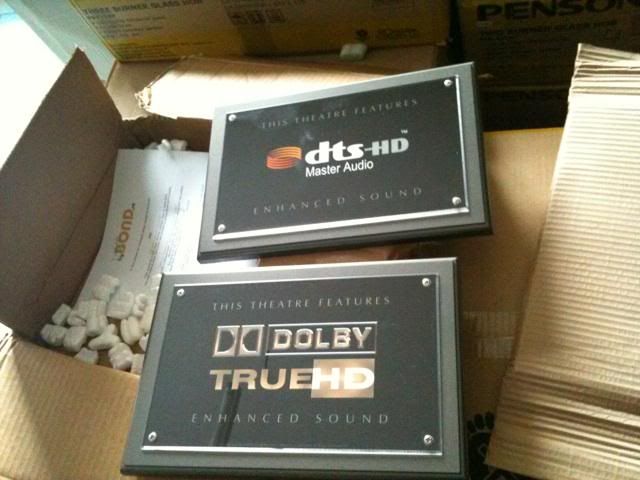
Dolby HT not really useful since we bitstream to AVR but SYOK to see.. haha

DVI n HDMI works as dual display..
Just received these plaques as wall decoration for my Room Theater & HTPC..  blush.gif

user posted image
*
Wahh nice ones, the only plague i have for my HT room is stuck to my teeth tongue.gif

Back to topic, have you notice any difference when using normal platter HDD with SSD? i.e Loading of movie files mkvs exceeding 25GB

I notice some different when i borrowed my freind SSD to play around for a day (Starting up the XBMC and loading of the movie) and was impress with the performance, but put off for the price. Might consider it later on for my new HTPC once my room have finish renovating.

My "Planned" build (Don't laugh pls tongue.gif )

Intel Core i5 650
Gigabyte H55M-S2H
4 GB RAM
CoolerMaster 500W Extreme Power
Carbon Black Chieftec Dragon (This has been lying unused for over a year already)
4 GB RAM
2 X 1.5TB Seagate (For My HTPC Media)
1 X 1TB W.D. Green (64MB) (For Other PC stuff)
1 X 500GB Samsung (For OS Win7 and Ubuntu XBMC) or 1 X Intel X25-V SSD 40GB (Ubuntu XBMC)

Hope to get this done in 1 month's time when i move into my newly re-designed room sweat.gif
netherlord
post May 13 2010, 12:13 PM

Getting Started
**
Junior Member
118 posts

Joined: Mar 2008
QUOTE(qwerty79 @ May 13 2010, 09:43 AM)
Why need to laugh, you have good setup there but my suggestion, get a better PSU.
Last time, I use the same PSU as yours with my old setup (E8400+HD4650) and my electric bill was so high for 24/7 torrent/htpc. At first I thought it is normal but after a few months, I bought CM 550w real power, somehow my bill decrease a lots. Like from RM80-90 to RM60-RM70.

Also planning to buy SSD but the price still too expensive. Waiting for 80Gb to drop below RM500.
*
Thanks for the suggestion, will look into CM 550W later. Yeah SSD still too expensive to get now, but if only used for Loading OS and Application then i think 40GB is enough but still abit expensive at RM400++ for 40GB. Will see how my budget go when i actually go get the items. For now i can only look and drool looking at accs_center pics drool.gif
netherlord
post May 14 2010, 09:57 PM

Getting Started
**
Junior Member
118 posts

Joined: Mar 2008
QUOTE(accs_centre @ May 13 2010, 01:18 PM)
It is around RM350 per piece..
I oledi graduated quite some time.. sweat.gif


Added on May 13, 2010, 1:20 pm

No sneak preview of your newly redesigned room 1st?  drool.gif


Added on May 13, 2010, 1:22 pm

No need to drool..mine is not high end system anyway..

SSD is not a must if for HTPC purchase.. But i cant stop myself after use my 1st Intel X25 SSD..hehe
*
Ops sorry for the late reply, has a little accident yesterday, fell and dislocated my ankle. Today after proper X-Ray doctor says there's a hairline fracture found and my leg would need casting once the swell is gone. So i guess the sneak preview would have to wait. Will be back in action within 6-8 weeks

Attached Image

My sneak Preview for now cry.gif
netherlord
post May 16 2010, 04:40 PM

Getting Started
**
Junior Member
118 posts

Joined: Mar 2008
QUOTE(lee82gx @ May 14 2010, 10:10 PM)
get well soon netherlord
*
Thanks i hope so too icon_rolleyes.gif

2 Pages  1 2 >Top
 

Change to:
| Lo-Fi Version
0.0469sec    0.35    7 queries    GZIP Disabled
Time is now: 2nd December 2025 - 03:54 AM