Welcome Guest ( Log In | Register )

101 Pages « < 46 47 48 49 50 > » Bottom

Outline · [ Standard ] · Linear+

 HTPC V2, Home Theater PC Setup, HOWTO and Guides

views
     
paskal
post Nov 20 2010, 10:20 PM

armchair commando couch potato
*******
Senior Member
2,801 posts

Joined: Jan 2003
From: Darul Aman
QUOTE(squall_12 @ Nov 20 2010, 09:56 PM)
hi bro,

no u cant use dvi to hdmi dongle which u still cant get truehd or dtsma sound from avr, so my suggestion is get from brand like sapphire for ati 5 series which i did for mine that i have hdmi port.
*
the link he put is for the sapphire card. SAPPHIRE HD 5570 1GB DDR3 DP
AFAIK, there's usually 2 models of the card, one with VGA, DVI and HDMI and the other model comes with VGA, DVI and Display Port.

the one that you put the link to is the latter. notice the DP in the model name. should point to Display Port.
get one with HDMI and you should be bitstreaming in no time
nakata101
post Nov 20 2010, 10:34 PM

*******(PES&WE)******* Play Like Champion
*******
Senior Member
2,423 posts

Joined: Jan 2003
From: Alor Star & Changlun


QUOTE(squall_12 @ Nov 20 2010, 09:56 PM)
hi bro,

no u cant use dvi to hdmi dongle which u still cant get truehd or dtsma sound from avr, so my suggestion is get from brand like sapphire for ati 5 series which i did for mine that i have hdmi port.
*
QUOTE(paskal @ Nov 20 2010, 10:20 PM)
the link he put is for the sapphire card. SAPPHIRE HD 5570 1GB DDR3 DP
AFAIK, there's usually 2 models of the card, one with VGA, DVI and HDMI and the other model comes with VGA, DVI and Display Port.

the one that you put the link to is the latter. notice the DP in the model name. should point to Display Port.
get one with HDMI and you should be bitstreaming in no time
*
So i better to get the HDMI version one.... thx guys.
calvin_ng
post Nov 20 2010, 10:38 PM

TeamCity | HCC | Insighters
******
Senior Member
1,583 posts

Joined: Mar 2007
From: KEPONG


get HDMI as it is future proof too
echoesian
post Nov 22 2010, 12:19 AM

Look at all my stars!!
*******
Senior Member
3,294 posts

Joined: Dec 2005


if you guys are using ReClock, what is the media adaption that you are using? I have tried to set my display freq to 50Hz, AVR input to 50Hz, and if I set the ReClock to 50Hz, it will become green but it will stutter a lot ... if I set to Auto or original refresh rate, it will become yellow but playback not so smooth...
paskal
post Nov 22 2010, 09:39 AM

armchair commando couch potato
*******
Senior Member
2,801 posts

Joined: Jan 2003
From: Darul Aman
QUOTE(echoesian @ Nov 22 2010, 12:19 AM)
if you guys are using ReClock, what is the media adaption that you are using? I have tried to set my display freq to 50Hz, AVR input to 50Hz, and if I set the ReClock to 50Hz, it will become green but it will stutter a lot ... if I set to Auto or original refresh rate, it will become yellow but playback not so smooth...
*
media adaptation should be left at auto. that's what the manual (and other people are suggesting).
i'm personally using auto.
jchue73
post Nov 22 2010, 11:07 AM

Look at all my stars!!
*******
Senior Member
2,496 posts

Joined: Nov 2006
QUOTE(minimize @ Nov 19 2010, 10:10 PM)
Just buy one la  laugh.gif
Mostly all latest AVR nowdays already have a TrueHD/DTS-HD feature.
*
Wah... Very easy to say buy buy buy. rclxub.gif What about speakers? sweat.gif

How much lah?


Added on November 22, 2010, 11:07 am
QUOTE(paskal @ Nov 20 2010, 07:19 AM)
i reckon he said he don't even have speakers for it. probably no HT setup yet.
Yup. No decent speakers too. I'm currently using analog out to my old Pioneer AIO HT system.


Added on November 22, 2010, 11:10 am
QUOTE(paskal @ Nov 20 2010, 11:13 AM)
motion judder are largely more noticeable on bigger screen. more area for the unresolved lines to appear.
*
Definitely. It takes both sides to make a smooth playback. PC hardware and display. The bigger the screen, any small judder is amplified.


Added on November 22, 2010, 11:12 am
QUOTE(paskal @ Nov 20 2010, 10:20 PM)
the link he put is for the sapphire card. SAPPHIRE HD 5570 1GB DDR3 DP
AFAIK, there's usually 2 models of the card, one with VGA, DVI and HDMI and the other model comes with VGA, DVI and Display Port.
I'm actually also looking for a decent card to replace my aging 2600. Would a ATI 6xxx series be better? I'm actually looking into future proofing the system till 3D. rclxms.gif


Added on November 22, 2010, 11:28 am
QUOTE(echoesian @ Nov 22 2010, 12:19 AM)
if you guys are using ReClock, what is the media adaption that you are using? I have tried to set my display freq to 50Hz, AVR input to 50Hz, and if I set the ReClock to 50Hz, it will become green but it will stutter a lot ... if I set to Auto or original refresh rate, it will become yellow but playback not so smooth...
*
I set the media adaptation to original speed (for 23.976Hz source) with my Sony Bravia at 59.98 Hz. ReClock icon is green. Of course, I output to analog so the settings are different.

For those who bitstream to AVR, their settings should be different. You should use "select original speed", check the "locked" and "slave reference to audio" boxes. This will give you WASAPI exclusive-bitexact. The ReClock icon in this case will be yellow.


This post has been edited by jchue73: Nov 22 2010, 11:28 AM

SUSchokia
post Nov 22 2010, 11:42 AM

Chartered Member
*******
Senior Member
3,617 posts

Joined: Oct 2010
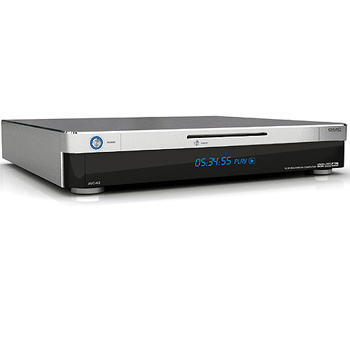
this GMC AVC S7 is really gorgeous

user posted image

Even the black one is nice
user posted image

Anyone using them?
echoesian
post Nov 22 2010, 12:40 PM

Look at all my stars!!
*******
Senior Member
3,294 posts

Joined: Dec 2005


QUOTE(jchue73 @ Nov 22 2010, 11:07 AM)
Wah... Very easy to say buy buy buy.  rclxub.gif What about speakers? sweat.gif

How much lah?


Added on November 22, 2010, 11:07 am

Yup. No decent speakers too. I'm currently using analog out to my old Pioneer AIO HT system.


Added on November 22, 2010, 11:10 am

Definitely. It takes both sides to make a smooth playback. PC hardware and display. The bigger the screen, any small judder is amplified.


Added on November 22, 2010, 11:12 am

I'm actually also looking for a decent card to replace my aging 2600. Would a ATI 6xxx series be better? I'm actually looking into future proofing the system till 3D.  rclxms.gif


Added on November 22, 2010, 11:28 am

I set the media adaptation to original speed (for 23.976Hz source) with my Sony Bravia at 59.98 Hz. ReClock icon is green. Of course, I output to analog so the settings are different.

For those who bitstream to AVR, their settings should be different. You should use "select original speed", check the "locked" and "slave reference to audio" boxes. This will give you WASAPI exclusive-bitexact. The ReClock icon in this case will be yellow.
*
Is there anyway to set the ReClock media adaption setting automatically each time a movie is played?
jchue73
post Nov 22 2010, 01:24 PM

Look at all my stars!!
*******
Senior Member
2,496 posts

Joined: Nov 2006
QUOTE(echoesian @ Nov 22 2010, 12:40 PM)
Is there anyway to set the ReClock media adaption setting automatically each time a movie is played?
*
I may be wrong but I believe it's at the Video Settings tab in the Reclock Properties?
SUSchokia
post Nov 22 2010, 02:12 PM

Chartered Member
*******
Senior Member
3,617 posts

Joined: Oct 2010
QUOTE(calvin_ng @ Nov 20 2010, 10:38 PM)
get HDMI as it is future proof too
*
Yeah HDMI ftw!

RCA, RGB, VGA DVI, Optical, S-video all are evil and should just die. vmad.gif


user posted image
See what they did when they are together?

QUOTE(jchue73 @ Nov 22 2010, 11:07 AM)
Wah... Very easy to say buy buy buy.  rclxub.gif What about speakers? sweat.gif

How much lah?


Added on November 22, 2010, 11:07 am

Yup. No decent speakers too. I'm currently using analog out to my old Pioneer AIO HT system.
Buy HTiB lorr less headache to find speakers and more cheaper

user posted image
jchue73
post Nov 22 2010, 04:56 PM

Look at all my stars!!
*******
Senior Member
2,496 posts

Joined: Nov 2006
QUOTE(chokia @ Nov 22 2010, 02:12 PM)
Yeah HDMI ftw!

RCA, RGB, VGA DVI, Optical, S-video all are evil and should just die. vmad.gif
That's a very organised mess !

QUOTE(chokia @ Nov 22 2010, 02:12 PM)
Buy HTiB lorr less headache to find speakers and more cheaper
Yeah, during pre-HDMI days, I was actually looking at Onkyo's HTIBs. They were very well recommended but couldn't find them anywhere here. sad.gif
echoesian
post Nov 22 2010, 05:59 PM

Look at all my stars!!
*******
Senior Member
3,294 posts

Joined: Dec 2005


QUOTE(jchue73 @ Nov 22 2010, 01:24 PM)
I may be wrong but I believe it's at the Video Settings tab in the Reclock Properties?
*
No, it's not there, the video settings only have percentage
djlah
post Nov 23 2010, 03:31 PM

Look at all my stars!!
*******
Senior Member
7,723 posts

Joined: Jan 2005
QUOTE(chokia @ Nov 22 2010, 02:12 PM)
.
.
.
.
Buy HTiB lorr less headache to find speakers and more cheaper

user posted image
*
how much the onkyo HTiB, nice feature, got HDMI 1.4 support...
calvin_ng
post Nov 23 2010, 08:57 PM

TeamCity | HCC | Insighters
******
Senior Member
1,583 posts

Joined: Mar 2007
From: KEPONG


nice stuff.... Malaysia too expensive... US no warranty..... hard to decide....
mirakim
post Nov 23 2010, 11:50 PM

New Member
*
Junior Member
45 posts

Joined: Apr 2008


just received my Dell ZINO HD! smile.gif
calvin_ng
post Nov 24 2010, 08:21 AM

TeamCity | HCC | Insighters
******
Senior Member
1,583 posts

Joined: Mar 2007
From: KEPONG


nice...........................
SUSchokia
post Nov 24 2010, 08:32 AM

Chartered Member
*******
Senior Member
3,617 posts

Joined: Oct 2010
I wish Dell Zino HD doesnt have AMD inside but Intel instead, for me to turn it to multiboot with osx htpc.
calvin_ng
post Nov 24 2010, 09:40 AM

TeamCity | HCC | Insighters
******
Senior Member
1,583 posts

Joined: Mar 2007
From: KEPONG


well you can buy Mac Mini insted... and multiboot into Win7 it is the same except for the size and price kekeke
jutamind
post Nov 24 2010, 03:15 PM

Look at all my stars!!
*******
Senior Member
2,429 posts

Joined: Jul 2007
QUOTE(mirakim @ Nov 23 2010, 11:50 PM)
just received my Dell ZINO HD! smile.gif
*
how long for delivery?
calvin_ng
post Nov 24 2010, 04:26 PM

TeamCity | HCC | Insighters
******
Senior Member
1,583 posts

Joined: Mar 2007
From: KEPONG


approx 1-2 weeks

101 Pages « < 46 47 48 49 50 > » Top
 

Change to:
| Lo-Fi Version
0.0345sec    0.48    6 queries    GZIP Disabled
Time is now: 2nd December 2025 - 10:19 PM