Welcome Guest ( Log In | Register )

101 Pages « < 6 7 8 9 10 > » Bottom

Outline · [ Standard ] · Linear+

 HTPC V2, Home Theater PC Setup, HOWTO and Guides

views
     
ronaldjoe
post Mar 27 2010, 09:29 AM

Look at all my stars!!
*******
Senior Member
3,569 posts

Joined: Apr 2007
QUOTE(shuto1 @ Mar 27 2010, 09:23 AM)
Thanks guys for all the responses and advice! Appreciate it. I might just go exchange the sound card, top up some $$ and do a 4 HDD Raid 5 config in exchange.
Right now I'm just trying to get the bit streaming to work (wanna see that sweet sweet DTS-MA/TrueHD word on my AVR). I've got TMT3 with 170 patch working. Tried playing a movie file with DTS-MA on it but can only get PCM.

Anyone knows what's wrong? Been pressing every button on the AVR and tried every option/settings in TMT/Win7 but still can't seem to get it right  shakehead.gif
*
thumbup.gif

Choose original mixing in the sound output of TMT.
If it does not work, you need to do a clean install of ATI CC 10.3.

1) Uninstall all previous AIT driver by clicking current ATI CC driver update.
2) Restart pc
3) Reinstall 10.3 CC.
4) Restart pc
DTS MA should work fine then. If TrueHD does not work, you would need EDID override from Tulli in AVS.
shuto1
post Mar 27 2010, 09:37 AM

Getting Started
**
Junior Member
233 posts

Joined: Nov 2006
QUOTE(ronaldjoe @ Mar 27 2010, 09:29 AM)
thumbup.gif

Choose original mixing in the sound output of TMT.
If it does not work, you need to do a clean install of ATI CC 10.3.

1) Uninstall all previous AIT driver by clicking current ATI CC driver update.
2) Restart pc
3) Reinstall 10.3 CC.
4) Restart pc
DTS MA should work fine then. If TrueHD does not work, you would need EDID override from Tulli in AVS.
*
Thanks a lot Ronaldjoe notworthy.gif , will try it out and see how it goes smile.gif hopefully, I'll get to enjoy HD Audio this weekend rclxm9.gif


Added on March 27, 2010, 3:46 pmAiya, looks like the driver updates didn't work. I'll have to go the EDID Override route. Haihhh.. spent like 10 hours trying to figure this thing out icon_question.gif

This post has been edited by shuto1: Mar 27 2010, 03:46 PM
CSin
post Mar 27 2010, 11:09 PM

Getting Started
**
Junior Member
194 posts

Joined: Nov 2004
My fren HTPC paired with TOSHIBA regza 32'' LCD shows colour over saturated.

The black text with red, blue, or green at the side..

any solution?

Bart-man
post Mar 27 2010, 11:16 PM

Getting Started
**
Junior Member
73 posts

Joined: Feb 2010
QUOTE(CSin @ Mar 27 2010, 11:09 PM)
My fren HTPC paired with TOSHIBA regza 32'' LCD shows colour over saturated.

The black text with red, blue, or green at the side..

any solution?
*
Change resolution to native resolution (should be 1366x768 assuming the 32" is only hd ready and not fullhd)

Then set the picture mode to "PC" instead of movie, game etc.
hilk
post Mar 27 2010, 11:29 PM

Getting Started
**
Junior Member
86 posts

Joined: Jun 2006
QUOTE(hilk @ Mar 27 2010, 01:18 AM)
hi to all sifu..Noob question here

i plan to buit HTPC and NAS for movie storage.. planning stream the movie files from nas to HTPC thru wired and watch from tv.
question:
1)what network cable recomend? cat5e ot cat 6?
2)can i cabling the cat5e/cat 6 with my ceiling lighting point in paraller?or sharing casing? if not? what is the range to seperate them??

thanks
*


look like no one wanna to help!!.. thanks
CSin
post Mar 27 2010, 11:31 PM

Getting Started
**
Junior Member
194 posts

Joined: Nov 2004
QUOTE(Bart-man @ Mar 27 2010, 11:16 PM)
Change resolution to native resolution (should be 1366x768 assuming the 32" is only hd ready and not fullhd)

Then set the picture mode to "PC" instead of movie, game etc.
*
All done. stil cant fix it

my fren even brought to toshiba service center, tested with all the LCD, all with the same problem..

but the HTPC is working fine with sony and samsung
Bart-man
post Mar 28 2010, 12:06 AM

Getting Started
**
Junior Member
73 posts

Joined: Feb 2010
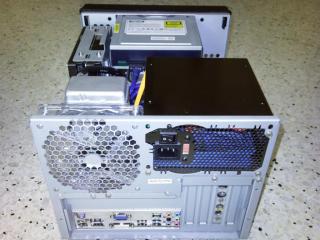
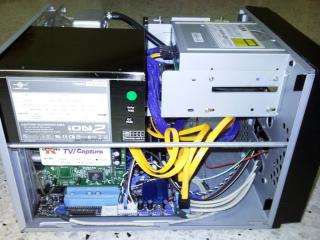
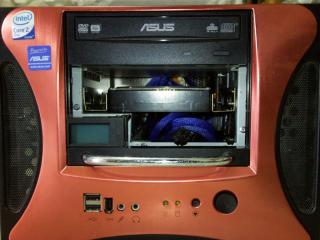
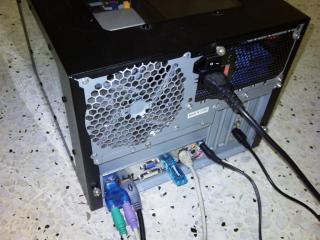
Just wanna share some photos of the HTPC I built for my hometown at KL, connecting to my dad's 42LG53FR and our old-but-faithful Sony Mini Hi-fi blush.gif

Our hall have no space for 5.1/7.1 setup so it's stereo all the way for us sweat.gif

Specs:
Intel Core 2 Duo E8400
Asus P5G43T-M PRO HDMI
2x2GB ADATA XPG DDR3-1333 CL8
3x500GB Samsung HD501LJ HDD
Asus DRW-201451T DVD Writer
K-World TV878 PCI TV Tuner
Vantec ION2+ 450W ATX PSU
Cooler Master Aquagate Mini R80 (self-contained water cooling kit)
XQbox X-Cube HTPC Case

Water cooling + silent fan + silent PSU = silent HTPC cool.gif

Attached Image
Attached Image
Attached Image
Attached Image
Attached Image
Attached Image
Attached Image
Attached Image
Attached Image
Attached Image
Attached Image
Attached Image
Attached Image
Attached Image
Attached Image
Attached Image

AV connection is on-board G43 => HDMI => LG TV => RCA audio => Sony Hi-fi

Other connections:
Astro decoder (RCA video) => LG TV
Astro decoder (S-video) => TV Tuner
Astro decoder (RCA audio) => splitter => LG TV + on-board sound line-in
Wii => YPbPr component video + RCA audio => LG TV


Added on March 28, 2010, 12:20 am
QUOTE(hilk @ Mar 27 2010, 11:29 PM)
look like no one wanna to help!!.. thanks
*
Not no one wanna help, more like nobody know how to help!! (maybe you also posted in the wrong section) tongue.gif

As far as I know only genuine AMP-brand Cat5e cable can run gigabit reliably, or go for other brand Cat6 brows.gif

I dunno how to answer your question about the idea of putting network cable and power line together, perhaps it's okay? Dun blame me if it doesn't work blush.gif

Since this is network related question, try asking it in the appropriate section of the forum wink.gif


Added on March 28, 2010, 12:22 am
QUOTE(CSin @ Mar 27 2010, 11:31 PM)
All done. stil cant fix it

my fren even brought to toshiba service center, tested with all the LCD, all with the same problem..

but the HTPC is working fine with sony and samsung
*
What connection are you using? VGA? DVI? HDMI? icon_question.gif

This post has been edited by Bart-man: Mar 28 2010, 12:22 AM
TSstan001
post Mar 28 2010, 01:31 AM

On my way
****
Senior Member
623 posts

Joined: Jan 2003
From: Kuala Lumpur


QUOTE(hilk @ Mar 27 2010, 01:18 AM)
hi to all sifu..Noob question here

i plan to buit HTPC and NAS for movie storage.. planning stream the movie files from nas to HTPC thru wired and watch from tv.
question:
1)what network cable recomend? cat5e ot cat 6?
2)can i cabling the cat5e/cat 6 with my ceiling lighting point in paraller?or sharing casing? if not? what is the range to seperate them??

thanks
*
Don't really understand your question...

Cat 5E or Cat6 is for Gigabit Ethernet.. read the details here http://en.wikipedia.org/wiki/Category_6_cable


I hv similar setup as I store all my content in a DNS-323 NAS...

To prevent from doing ugly wiring, I use a pair HomePlug Powerline Adapter ( 85Mbps or higher ) and connect to the NAS via mounted network drive..

With minimal power adaptors in between the two power points, I can get somewhere like 15Mbps pure speed, enuf to stream the HD movies content from the NAS to my HTPC.. no need speed until Gigabit Ethernet...

Just google for HomePlug.. I think there are newer models with 200Mbps or options with wireless...

I am using the Aztech brand.. my model 85Mbps is selling for like RM110 per unit in a lelong.com.my posting.


Added on March 28, 2010, 1:38 am
QUOTE(Bart-man @ Mar 28 2010, 12:06 AM)
Other connections:
Astro decoder (RCA video) => LG TV
Astro decoder (S-video) => TV Tuner
Astro decoder (RCA audio) => splitter => LG TV + on-board sound line-in
Wii => YPbPr component video + RCA audio => LG TV
Nice pics and HTPC setup!!!

I tried both Astro RCA Video and S-video to TV and TV Tuner card..

I find the picture quality is much better for S-video goes to the TV and RCA Video to the PCI card TV Tuner ..

Picture quality, especially the text on the TV is much sharper using S-Video cable to the TV.


Added on March 28, 2010, 1:46 am
QUOTE(DarkNite @ Mar 21 2010, 09:54 AM)
hmm.gif
Are you using the i3+h55 to build a NAS? Can give tips on building a NAS with transfer rate more than 70 megabytes/sec over a gigabit LAN, for storing movies, music collections, photos and BlueRay rips?
*
Hi, on my Dlink DNS-323 NAS, to achieve transfer of like 150-200Mbps , set both the NAS and the PC network card to use Jumbo frames ( 9000MTU ).

It will force yr PC or NAS to use 9000 MTU instead of the default of 1500 MTU when doing tranfer...

Read more about it here http://en.wikipedia.org/wiki/Jumbo_frame


This post has been edited by stan001: Mar 28 2010, 01:46 AM
Bart-man
post Mar 28 2010, 04:54 PM

Getting Started
**
Junior Member
73 posts

Joined: Feb 2010
QUOTE(stan001 @ Mar 28 2010, 01:31 AM)

Added on March 28, 2010, 1:38 am

Nice pics and HTPC setup!!!

I tried both Astro RCA Video and S-video to TV and TV Tuner card..

I find the picture quality is much better for S-video goes to the TV and RCA Video to the PCI card TV Tuner ..

Picture quality, especially the text on the TV is much sharper using S-Video cable to the TV.
*
Thanks! smile.gif

Yes, S-video is better quality than RCA video. That is why I connect it to TV Tuner coz I prefer to record in higher quality laugh.gif
sKyWiR3pT3lTd
post Mar 28 2010, 06:10 PM

Spirits Of Shankly
*******
Senior Member
6,059 posts

Joined: Feb 2010
From: Cheras, Kuala Lumpur


» Click to show Spoiler - click again to hide... «


Awesome HTPC setup. This must have cost you fortune. thumbup.gif
pierreye
post Mar 28 2010, 07:21 PM

Regular
******
Senior Member
1,308 posts

Joined: Oct 2004
From: Penang & Ipoh


Homeplug might not have enough bandwidth for Blu-ray movie. Note that 200Mbps is theoretical speed and depends on noise in your power line and if it is in the same gang. You would be lucky to get consistent 30Mbps out from Homeplug and remember it is share network. If you are doing from ground up, best go for Cat5e (up to 30m) and Cat 6 (100m) for gigabit network. I do a copy from network for large file and the speed is almost as fast as eSATA HDD local copy. Also get a gigabit switch instead of hub.

Regarding power line and network cable, normal recommendation is to cross the cable instead of running parallel. Normally UTP cable is quite good at noise rejection due to twisted pair. If you are paranoid, go for STP (shielded twisted pair).

This post has been edited by pierreye: Mar 28 2010, 07:24 PM
hilk
post Mar 28 2010, 07:30 PM

Getting Started
**
Junior Member
86 posts

Joined: Jun 2006
Cat 5E or Cat6 is for Gigabit Ethernet.. read the details here http://en.wikipedia.org/wiki/Category_6_cable
I hv similar setup as I store all my content in a DNS-323 NAS...

To prevent from doing ugly wiring, I use a pair HomePlug Powerline Adapter ( 85Mbps or higher ) and connect to the NAS via mounted network drive..

With minimal power adaptors in between the two power points, I can get somewhere like 15Mbps pure speed, enuf to stream the HD movies content from the NAS to my HTPC.. no need speed until Gigabit Ethernet...

Just google for HomePlug.. I think there are newer models with 200Mbps or options with wireless...

I am using the Aztech brand.. my model 85Mbps is selling for like RM110 per unit in a lelong.com.my posting.


thanks... that help! icon_rolleyes.gif


Added on March 28, 2010, 7:41 pm
QUOTE(pierreye @ Mar 28 2010, 07:21 PM)
Homeplug might not have enough bandwidth for Blu-ray movie. Note that 200Mbps is theoretical speed and depends on noise in your power line and if it is in the same gang. You would be lucky to get consistent 30Mbps out from Homeplug and remember it is share network. If you are doing from ground up, best go for Cat5e (up to 30m) and Cat 6 (100m) for gigabit network. I do a copy from network for large file and the speed is almost as fast as eSATA HDD local copy. Also get a gigabit switch instead of hub.

Regarding power line and network cable, normal recommendation is to cross the cable instead of running parallel. Normally UTP cable is quite good at noise rejection due to twisted pair. If you are paranoid, go for STP (shielded twisted pair).
*
thanks.. you are helping me alot!!!.. icon_rolleyes.gif icon_rolleyes.gif

This post has been edited by hilk: Mar 28 2010, 07:41 PM
ronaldjoe
post Mar 28 2010, 08:02 PM

Look at all my stars!!
*******
Senior Member
3,569 posts

Joined: Apr 2007
QUOTE(shuto1 @ Mar 27 2010, 09:37 AM)
Thanks a lot Ronaldjoe  notworthy.gif , will try it out and see how it goes smile.gif hopefully, I'll get to enjoy HD Audio this weekend  rclxm9.gif


Added on March 27, 2010, 3:46 pmAiya, looks like the driver updates didn't work. I'll have to go the EDID Override route. Haihhh.. spent like 10 hours trying to figure this thing out  icon_question.gif
*
Shuto, use driver sweeper to clean up all the ex-ati driver + realtek driver (if any)
Restart pc. Then reinstall 10.3 CC. Bitstream should work fine with TMT3 (with 0.170 patch update). nod.gif

shuto1
post Mar 29 2010, 12:50 AM

Getting Started
**
Junior Member
233 posts

Joined: Nov 2006
QUOTE(ronaldjoe @ Mar 28 2010, 08:02 PM)
Shuto, use driver sweeper to clean up all the ex-ati driver + realtek driver (if any)
Restart pc. Then reinstall 10.3 CC. Bitstream should work fine with TMT3 (with 0.170 patch update).  nod.gif
*
Thanks for the advice, will run that Driver Sweeper. Never heard of it. Sounds like a great idea. After about 15 hours of wrestling with my HTPC, I've finally sorted out my HD Audio. GOODNESS! So much work but I'm glad it's all settled.

Best program for me in getting HD bit streamed is PowerDVD 10 Ultra. I use TMT3 for BDMV. MPC for mkv for movies that require subtitles and misc files.

Now my final HTPC spec is WITHOUT the Asus Xonar HDAV 1.3 (Thanks guys, you saved me some money smile.gif
And is as follows:-

Intel Core I5 750
Gigabyte GA-P55-UD6
Sapphire ATI Radeon HD5670 1GB
5x Samsung 1.5TB 5400rpm SATA HDD
Win 7 Home Premium
Sony DRU-870S DVDRW
TP-Link TL-WN951N Wireless
Xigmatek PSU 650watts NRP-MC651
Silverstone ATX LC20B-M

Time to enjoy the movies/music icon_rolleyes.gif thumbup.gif rclxm9.gif rclxms.gif


ronaldjoe
post Mar 30 2010, 09:18 AM

Look at all my stars!!
*******
Senior Member
3,569 posts

Joined: Apr 2007
QUOTE(shuto1 @ Mar 29 2010, 12:50 AM)
Thanks for the advice, will run that Driver Sweeper. Never heard of it. Sounds like a great idea. After about 15 hours of wrestling with my HTPC, I've finally sorted out my HD Audio. GOODNESS! So much work but I'm glad it's all settled.

Best program for me in getting HD bit streamed is PowerDVD 10 Ultra. I use TMT3 for BDMV. MPC for mkv for movies that require subtitles and misc files.

Now my final HTPC spec is WITHOUT the Asus Xonar HDAV 1.3 (Thanks guys, you saved me some money smile.gif
And is as follows:-

Intel Core I5 750
Gigabyte GA-P55-UD6
Sapphire ATI Radeon HD5670 1GB
5x Samsung 1.5TB 5400rpm SATA HDD
Win 7 Home Premium
Sony DRU-870S DVDRW
TP-Link TL-WN951N Wireless
Xigmatek PSU 650watts NRP-MC651
Silverstone ATX LC20B-M

Time to enjoy the movies/music  icon_rolleyes.gif  thumbup.gif  rclxm9.gif  rclxms.gif
*
Taukeh, good specs you have drool.gif
How do you install all hdds in a htpc?
I can only have my hdds lying external and mount them on external dock.

Personally I prefer TMT3 over PDVD. nod.gif

geforce1999
post Mar 30 2010, 02:54 PM

Movie Lover.
******
Senior Member
1,336 posts

Joined: Jan 2009
From: Battown in Johor


What is TMT3 and PDVD?
Dannyoski
post Mar 30 2010, 03:13 PM

Getting Started
**
Junior Member
226 posts

Joined: Oct 2008


QUOTE(shuto1 @ Mar 29 2010, 12:50 AM)
Thanks for the advice, will run that Driver Sweeper. Never heard of it. Sounds like a great idea. After about 15 hours of wrestling with my HTPC, I've finally sorted out my HD Audio. GOODNESS! So much work but I'm glad it's all settled.

Best program for me in getting HD bit streamed is PowerDVD 10 Ultra. I use TMT3 for BDMV. MPC for mkv for movies that require subtitles and misc files.

Now my final HTPC spec is WITHOUT the Asus Xonar HDAV 1.3 (Thanks guys, you saved me some money smile.gif
And is as follows:-

Intel Core I5 750
Gigabyte GA-P55-UD6
Sapphire ATI Radeon HD5670 1GB
5x Samsung 1.5TB 5400rpm SATA HDD
Win 7 Home Premium
Sony DRU-870S DVDRW
TP-Link TL-WN951N Wireless
Xigmatek PSU 650watts NRP-MC651
Silverstone ATX LC20B-M

Time to enjoy the movies/music  icon_rolleyes.gif  thumbup.gif  rclxm9.gif  rclxms.gif
*
Wah ! only the casing "Silverstone ATX LC20B-M" itself oledi cost >rm700.

Can show some picture here? Really interested to see how you fit 5 Hdd into this casing.

ronaldjoe
post Mar 30 2010, 03:37 PM

Look at all my stars!!
*******
Senior Member
3,569 posts

Joined: Apr 2007
QUOTE(geforce1999 @ Mar 30 2010, 02:54 PM)
What is TMT3 and PDVD?
*
Boss,
TMT3 is total media theatre 3 from Arcsoft
PDVD is Power DVD Ultra from Cyberlink

Both are media player (software) for BD playback.
geforce1999
post Mar 30 2010, 03:54 PM

Movie Lover.
******
Senior Member
1,336 posts

Joined: Jan 2009
From: Battown in Johor


Hahaha, got it. Thansk for the explaination. I tot there were the HW part, silly me.
yonggoh
post Mar 30 2010, 04:16 PM

Regular
******
Senior Member
1,314 posts

Joined: Dec 2008
From: Kuching, Sarawak


Silverstone ATX LC20B-M is overkill....

Silverstone KL01 or KL02 allows for 5 hard drive bays and is about RM400+ nia...

hot swap is elite! *thumbs up*

user posted image

This post has been edited by yonggoh: Mar 30 2010, 04:17 PM

101 Pages « < 6 7 8 9 10 > » Top
 

Change to:
| Lo-Fi Version
0.0298sec    0.45    6 queries    GZIP Disabled
Time is now: 2nd December 2025 - 02:09 PM