


The Official HDPro Media Player Owner's Thread, All about the HDPro Media Player
The Official HDPro Media Player Owner's Thread, All about the HDPro Media Player
|
|
 Apr 9 2011, 08:38 PM Apr 9 2011, 08:38 PM
Return to original view | Post
#1
|
 
Junior Member
458 posts Joined: Nov 2004  
|
gonna get my hdpro+ next tuesday!! hope will get what is expected!
|
|
|
|
|
|
Apr 12 2011, 12:02 PM
Return to original view | Post
#2
|
|
Junior Member
458 posts Joined: Nov 2004
|
still waiting for my new toy to arrive!!!
|
|
|
Apr 12 2011, 04:02 PM
Return to original view | Post
#3
|
|
Junior Member
458 posts Joined: Nov 2004
|
item received
wonder's the firmware version of this... should i install BT samba or transmission or both?? any feedback for this: New Firmware http://www.4shared.com/file/5A270K3e/Hdpro_20110406_oem.html Ver. Date : 28/3/2011 - New U.I - Add Vsftpd , Transmission , MLDonkey - Dan lain-lain Only For Hdpro+ , Hdpro Mini , Mini+ Transmission BT http://www.transmissionbt.com/ Vsftpd http://vsftpd.beasts.org/ MLDonkey http://mldonkey.sourceforge.net/Main_Page This post has been edited by yangxi: Apr 6 2011, 09:43 PM |
|
|
Apr 13 2011, 09:58 AM
Return to original view | Post
#4
|
|
Junior Member
458 posts Joined: Nov 2004
|
tried to play MP4 with subtitle (srt), unfortunately hdpro+ cannot load the subtitle. The subtitle can be seen if I play it from my PC. Anything I need to set to enable the subtitle? As I clicked on remote subtitle button it only show
SUBTITLE OFF only. |
|
|
Apr 13 2011, 11:27 AM
Return to original view | Post
#5
|
|
Junior Member
458 posts Joined: Nov 2004
|
QUOTE(yangxi @ Apr 13 2011, 10:05 AM) try rename filename I did.*.mp4 *.srt (not *.*.srt)  the file name for both the mp4 and srt is the same with different extension. The subtitle can be view if I run the file from my PC. |
|
|
Apr 13 2011, 12:16 PM
Return to original view | Post
#6
|
|
Junior Member
458 posts Joined: Nov 2004
|
QUOTE(yangxi @ Apr 13 2011, 11:33 AM) yangximusic@gmail.com i will email you the file tonight as I am now at my office... can't access to my house desktop due to max download... lol..email me srt file . will check later. i will remote back again later once the download finish (hopefully) Added on April 13, 2011, 7:14 pmsrt file send liao Added on April 13, 2011, 9:51 pmi know what the problem liao. file played from UPNP won't load the subtitle i tried to play it from NETWORK or HDD then subtitle shown.. any fix for this?? This post has been edited by ckboon: Apr 13 2011, 09:51 PM |
|
|
|
|
|
Apr 14 2011, 03:00 PM
Return to original view | Post
#7
|
|
Junior Member
458 posts Joined: Nov 2004
|
how to use the DVD rom since it's listed on the menu.
do we need to purchase a proprietary Rom like the wireless? |
|
|
Apr 14 2011, 04:09 PM
Return to original view | Post
#8
|
|
Junior Member
458 posts Joined: Nov 2004
|
QUOTE(yangxi @ Apr 14 2011, 04:03 PM) for external usb dvd drive. converted dvd drive can be use? |
|
|
Apr 14 2011, 04:48 PM
Return to original view | Post
#9
|
|
Junior Member
458 posts Joined: Nov 2004
|
QUOTE(neb @ Apr 14 2011, 04:34 PM) if you got a internal DVD drive, just buy an usb enclosure box from computer shop, usually the box can accommodate either SATA or PATA(IDE) dvd drive have u tried it out? i got a lot of burnt dvd... if confirm can use then i will go and grab the box..then i no need to copy from share drive through my pc. |
|
|
Apr 15 2011, 12:28 AM
Return to original view | Post
#10
|
|
Junior Member
458 posts Joined: Nov 2004
|
sure HDD is better right now, but when bluray getting cheaper, than that's another alternative.
by the way i got a lot of rmvb which were burnt to dvd to save up my HDD space so i still need a dvd rom to access to the file. |
|
|
Apr 16 2011, 07:51 PM
Return to original view | Post
#11
|
|
Junior Member
458 posts Joined: Nov 2004
|
i've downloaded an avi file which is embedded with subtitle. PC's media player classic can enable/disable the subtitle but hdpro+ can't show the subtitle at all. At solution for this?
|
|
|
Apr 17 2011, 09:56 PM
Return to original view | Post
#12
|
|
Junior Member
458 posts Joined: Nov 2004
|
QUOTE(yangxi @ Apr 16 2011, 11:05 PM) ?? it's avi.only MKV can embedded subtitle. should be avi+srt press subtitle-button on remote to select the subtitle during playback off the movie . subtitle button show OFF i don't understand "during playback off the movies" pause the movies? or... |
|
|
Apr 17 2011, 10:11 PM
Return to original view | Post
#13
|
|
Junior Member
458 posts Joined: Nov 2004
|
QUOTE(yangxi @ Apr 17 2011, 10:07 PM) during playback press subtitle button. can select subtitle? 1 avi only, no srt file.AVI embedded subtitle might not support. if avi+Srt , can no subtitle to select from hdpro+. From PC can on/off using media player classic. haiz.. any support on this format in future?? |
|
|
|
|
|
Apr 17 2011, 10:39 PM
Return to original view | Post
#14
|
|
Junior Member
458 posts Joined: Nov 2004
|
QUOTE(yangxi @ Apr 17 2011, 10:25 PM) sorry, still no support since SDK V1 -> V4 how to convert?Hdpro supports .SUB/.IDX files for subtitles, some subtitle files that are bundled with Divx or Xvid vidoes may be incompatible. Specifically, AVI files that are bundled with .SUB and .IDX files for the subtitles. A recommended solution to use them with Hdpro is to convert the .SUB to an .SRT file. |
|
|
Apr 18 2011, 09:58 AM
Return to original view | Post
#15
|
|
Junior Member
458 posts Joined: Nov 2004
|
QUOTE(yangxi @ Apr 18 2011, 09:41 AM) old batch still can update latest march firmware. I tested ok. new batch got what IMS? 29/12/2010 ver so many IMS can't open.don't know why some customer got problem. weird . FYI, Realtek 1073DD+ chipset already stopped production ... soon replace new 1185. after upgrade still can downgrade? |
|
|
Apr 18 2011, 10:28 AM
Return to original view | Post
#16
|
|
Junior Member
458 posts Joined: Nov 2004
|
QUOTE(yangxi @ Apr 18 2011, 10:20 AM) yes, can up/downgrade which is china 3rd party channel? youku? voolo?but new march firmware don't have 3rd party china online channel. |
|
|
Apr 18 2011, 04:01 PM
Return to original view | Post
#17
|
|
Junior Member
458 posts Joined: Nov 2004
|
can hdpro+ play 2 different subtitle at the same time?
|
|
|
Apr 25 2011, 09:11 AM
Return to original view | Post
#18
|
|
Junior Member
458 posts Joined: Nov 2004
|
yangxi,
is 29 dec 2010 ver having problem decoding some rmvb files? i tried to play 2 rmvb file and the unit will rebooted itself after sometimes. I have no problem when played those file from my PC. |
|
|
Apr 28 2011, 02:21 PM
Return to original view | Post
#19
|
|
Junior Member
458 posts Joined: Nov 2004
|
yangxi,
how to check the disc space left on the hdpro? |
|
|
Apr 29 2011, 10:55 AM
Return to original view | Post
#20
|
|
Junior Member
458 posts Joined: Nov 2004
|
QUOTE(burdiespooler @ Apr 29 2011, 10:23 AM) Yangxi bro this happen to me too when i play GUESS variety shows... hdpro will just auto restartI am the guy called you last nite from Kuching, my rmvb is similar to others. My fren HDPRO+ got IO error and cannot played rmvb file (mp4/mkv no problem, with same hdd) My HDPRO+ Mini can played most of the rmvb files but go following problem with recent rmvb files. The error is that it can play for a while then suddenly screen go blank and i thought i played nitendo without display as i heard supermario theme song. Then it will either (i) restart (ii) continue to play with no display but got sound. The same rmvb file is playing ok if using preview at browser stage (well, size too small) I also got Diyomate K3+ from Yangxi and the same rmvb file played with no problem. So suspect may be the firmware issue. Anyway, i attached the video info General Complete name : F:\犀利人妻\犀利人妻11.rmvb Format : RealMedia File size : 409 MiB Duration : 1h 15mn Overall bit rate : 731 Kbps Video ID : 1 Format : RealVideo 4 Codec ID : RV40 Codec ID/Info : Based on AVC (H.264), Real Player 9 Duration : 1h 15mn Bit rate : 667 Kbps Width : 720 pixels Height : 540 pixels Display aspect ratio : 4:3 Frame rate : 29.970 fps Bits/(Pixel*Frame) : 0.057 Stream size : 362 MiB (88%) Audio ID : 0 Format : Cooker Codec ID : cook Codec ID/Info : Based on G.722.1, Real Player 6 Duration : 1h 15mn Bit rate : 64.1 Kbps Channel(s) : 2 channels Sampling rate : 44.1 KHz Bit depth : 16 bits Stream size : 34.8 MiB (8%) * forgot to mention the firmware is december 2010 one running on 29 Dec 2010 ver.. Added on April 29, 2011, 10:56 am QUOTE(yangxi @ Apr 29 2011, 02:07 AM) New firmware bro,Hdpro+ , Mini , Mini+ add more online TV. (xunlei cannot use, and please help me test PPS ) http://www.megaupload.com/?d=8MOEYOVJ 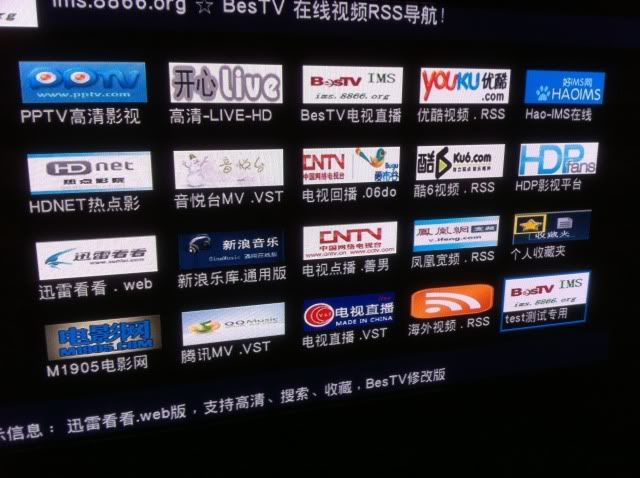 this version got more online tv than 29 dec 2010 ver? This post has been edited by ckboon: Apr 29 2011, 10:56 AM |
| Change to: |  0.0240sec 0.0240sec
 0.25 0.25
 7 queries 7 queries
 GZIP Disabled GZIP Disabled
Time is now: 3rd December 2025 - 05:27 AM |
 Quote
Quote