

I have never seen audio RCA cable using cable in twisted pair fashion
 , it really not suitable
The Official HDPro Media Player Owner's Thread, All about the HDPro Media Player
|
|
 Jul 5 2010, 02:12 PM Jul 5 2010, 02:12 PM
|
 
Senior Member
2,234 posts Joined: Feb 2007 
|
all RCA cables I have encountered are all in coaxial format, but for audio RCA its impedance may be in 50Ω
I have never seen audio RCA cable using cable in twisted pair fashion , it really not suitable |
|
|
|
|
|
Jul 5 2010, 02:13 PM
|

Junior Member
108 posts Joined: Jun 2010 
|
QUOTE(azbro @ Jul 5 2010, 12:23 PM) RCA cables: Very interesting information. Thanks bro Azbro. Coaxial cables  As you can see, the difference is shielding...signals from Digital Audio is prone to interference...thats why they use Coaxial or toslinks. It can also handle more energy than those pasar malam RCA cables for optimum digital transfer. Difference between normal coaxial RG6U Vs a Monster coaxial RM100 one is the material they used, branding and how many shielding it has. I once DIY a triple shielding Coaxial, but later found out, a single shield was good enough. For DIY: http://forum.lowyat.net/topic/1209686 I swear by Coaxial cables over RCA cause I have experience of major interference cause i need to bundle up my cable due to space constrain.  |
|
|
Jul 5 2010, 05:43 PM
|

Senior Member
4,403 posts Joined: Jan 2007 From: Johor Bahru
|
QUOTE(neb @ Jul 5 2010, 02:12 PM) all RCA cables I have encountered are all in coaxial format, but for audio RCA its impedance may be in 50Ω Well, thats one method (haha..some ppl swear by twisted or braided).I have never seen audio RCA cable using cable in twisted pair fashion , it really not suitableIn the pictures above case, there is a third wire so called 'Drain Wire' . But normally, RM5 RCA what you'll get is this:  Very seldom you'll see RCA with copper/silver braided like Coaxials. Here is an example of RCA Cables with shielding like those Coaxial cables have...but they are not cheapo stuff 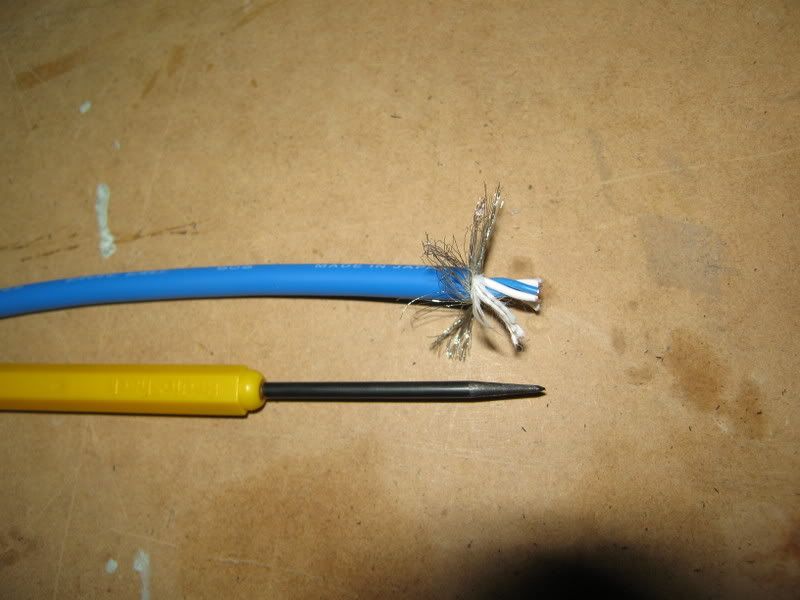 In this case the braided wasn't even used as a shielding. Again you can see clearly the difference of the inner wires that sets RCA and Coaxial cables apart. Sorry...going off topic oledi..haha This post has been edited by azbro: Jul 5 2010, 05:46 PM |
|
|
Jul 5 2010, 06:11 PM
|
|
Senior Member
2,234 posts Joined: Feb 2007
|
twisted pair cable impedance is 100Ω, not suitable to use as a audio/video cable
|
|
|
Jul 6 2010, 02:43 PM
|

Junior Member
265 posts Joined: Jan 2003
|
QUOTE(azbro @ Jul 5 2010, 12:23 PM) RCA cables: azbro,Coaxial cables As you can see, the difference is shielding...signals from Digital Audio is prone to interference...thats why they use Coaxial or toslinks. It can also handle more energy than those pasar malam RCA cables for optimum digital transfer. Difference between normal coaxial RG6U Vs a Monster coaxial RM100 one is the material they used, branding and how many shielding it has. I once DIY a triple shielding Coaxial, but later found out, a single shield was good enough. For DIY: http://forum.lowyat.net/topic/1209686 I swear by Coaxial cables over RCA cause I have experience of major interference cause i need to bundle up my cable due to space constrain. Tks a million for the useful info. I will try the normal coaxial RG6U(leftover from Astro). What RCA connector do you recommend? Is gold plated connector necessary? TQ |
|
|
Jul 6 2010, 03:11 PM
|
|
Senior Member
4,403 posts Joined: Jan 2007 From: Johor Bahru
|
QUOTE(helob @ Jul 6 2010, 02:43 PM) azbro, Most of the time...ppl will use RG59 for Astro instead of RG6 to keep the cost down...usually RG6 has a larger diameter core for better digital signal transfer...but you can try with what you have first.Tks a million for the useful info. I will try the normal coaxial RG6U(leftover from Astro). What RCA connector do you recommend? Is gold plated connector necessary? TQ Abt the connectors, No need to get RM30~40 connectors...just those RM6~8 should be OK.....most important is the cable diameter can go through the cables....no point buying fat cables that dun fit into the connector hole at the back. Most important is you need a soldering iron. Before you solder, make sure the Iron is at its optimum temperature. Also, use a sharp object to scratch the connector soldering area so it will stick better. To make both wire and connector to stick with the solder...both need to be hot. If you only heat the wires, than it become dry solder. And to be on the safe side, have some allowance on the cable length. Check the thread I gave to DIY a coaxial cable. |
|
|
|
|
|
Jul 6 2010, 07:43 PM
|

Junior Member
132 posts Joined: Dec 2004
|
bros, is it possible to view the contents of the hdd in the hdpro from our pc/laptop running windows xp/vista? tq
|
|
|
Jul 6 2010, 08:24 PM
|

All Stars
10,475 posts Joined: Jan 2003 From: Sarawak
|
QUOTE(myst @ Jul 6 2010, 07:43 PM) bros, is it possible to view the contents of the hdd in the hdpro from our pc/laptop running windows xp/vista? tq yes, you can. make sure you link them up using mini-USB connector. |
|
|
Jul 6 2010, 08:42 PM
|
|
Junior Member
132 posts Joined: Dec 2004
|
can view through network?
|
|
|
Jul 6 2010, 08:57 PM
|

Senior Member
2,664 posts Joined: Jan 2005 From: Puchong
|
QUOTE(myst @ Jul 6 2010, 08:42 PM) can view through network? Yes, using Samba. The HDPro hard disk is accessible from win explorer. |
|
|
Jul 6 2010, 09:09 PM
|
|
Junior Member
108 posts Joined: Jun 2010
|
QUOTE(myst @ Jul 6 2010, 08:42 PM) can view through network? Samba must be running first. Then you need to know the IP address of your Hdpro.Type the same IP in the window explorer and you should be able to access the hdd of Hdpro. This work for me for winxp. No sure vista work the same. |
|
|
Jul 7 2010, 12:35 AM
|
|
Junior Member
132 posts Joined: Dec 2004
|
oh ok.. i have not install samba yet.. will try it out.. thx guys.
|
|
|
Jul 7 2010, 10:38 AM
|

Junior Member
503 posts Joined: Aug 2006 From: CatCity
|
I hope future firmware update for HDPro will include movie cover selection for easier navigation instead of scrolling. Support for external BDROM wil b a plus oso.
|
|
|
|
|
|
Jul 7 2010, 03:06 PM
|
|
Junior Member
194 posts Joined: May 2006
|
I have few movies(mp4) with AAC that play ok but no sound. Connected through optical out to AVR. Yangxi, any idea on this.
I have Celine Dion concert with dual audio of TrueHD and stereo. The player can output stereo but no TrueHD. Unknown format shown. YES, if the new firmware can support external BDROM would be great. |
|
|
Jul 7 2010, 06:17 PM
|
|
All Stars
10,475 posts Joined: Jan 2003 From: Sarawak
|
QUOTE(yltan @ Jul 7 2010, 03:06 PM) I have few movies(mp4) with AAC that play ok but no sound. Connected through optical out to AVR. Yangxi, any idea on this. dunno how many times i've repeatedly answering the same question. and yet no firmware update has fixed this. I have Celine Dion concert with dual audio of TrueHD and stereo. The player can output stereo but no TrueHD. Unknown format shown. YES, if the new firmware can support external BDROM would be great.  if you're using spdif raw digital audio out, there is no sound for aac or mp3 audio unless change you to analog audio. the player itself does support aac and mp3 & can decode them, thus plays back fine on analog out. but, when you use raw digital output, the aac audio (as an example) is not decoded internally in the player. this compressed audio is sent directly out to your avr, and let your avr to do the decoding. if your avr cannot decode aac audio, you won't be able to hear any sound from it. the same goes to mkv/mp4 movies with aac audio. if you want the aac in the video to be heard without changing the player's setting to analog audio, re-encode your movies that have AAC audio to Dolby Digital. i use popcorn mkv audio converter for this job. for 5.1 aac audio, i'll re-encode them to at least 384 kbps dd5.1. if your aac is stereo, it'll be re-encode to 192kbps dd2.0. previous 1073dd cannot play dolby trueHD audio. This post has been edited by Skylinestar: Jul 7 2010, 06:18 PM |
|
|
Jul 7 2010, 08:23 PM
|

Senior Member
4,189 posts Joined: Jan 2003 From: Age Quod Agis 
|
QUOTE(yltan @ Jul 7 2010, 03:06 PM) I have few movies(mp4) with AAC that play ok but no sound. Connected through optical out to AVR. Yangxi, any idea on this. I also tested Celine Dion source can't play truehd sound.. , I have Celine Dion concert with dual audio of TrueHD and stereo. The player can output stereo but no TrueHD. Unknown format shown. YES, if the new firmware can support external BDROM would be great. some movie is ok.. weird ~ still checking =.= Added on July 7, 2010, 8:34 pm QUOTE(Skylinestar @ Jul 7 2010, 06:17 PM) dunno how many times i've repeatedly answering the same question. and yet no firmware update has fixed this. thanks explain if you're using spdif raw digital audio out, there is no sound for aac or mp3 audio unless change you to analog audio. the player itself does support aac and mp3 & can decode them, thus plays back fine on analog out. but, when you use raw digital output, the aac audio (as an example) is not decoded internally in the player. this compressed audio is sent directly out to your avr, and let your avr to do the decoding. if your avr cannot decode aac audio, you won't be able to hear any sound from it. the same goes to mkv/mp4 movies with aac audio. if you want the aac in the video to be heard without changing the player's setting to analog audio, re-encode your movies that have AAC audio to Dolby Digital. i use popcorn mkv audio converter for this job. for 5.1 aac audio, i'll re-encode them to at least 384 kbps dd5.1. if your aac is stereo, it'll be re-encode to 192kbps dd2.0. previous 1073dd cannot play dolby trueHD audio. This post has been edited by yangxi: Jul 7 2010, 08:34 PM |
|
|
Jul 8 2010, 10:24 AM
|
|
Junior Member
20 posts Joined: Sep 2009
|
Hi Yangxi
Remember me ? I am the guy who bought another 2 docks + hdpros from you. My set's version is March. I followed your advise to update to May version, the menu screen became Chinese version, is that correct? Then I restore to default setting & instal the June version last night, so far only one movie ( Blue Plannet no sound, showing 0 kph), i am not sure this is movie or player's problem as my friend's may version can play it fine. Other movies seem ok. Besides that, just after installed may version when the player restart itself, the was message "bad disk eject" pop up, is that something wrong with the player? 1st time encountered !( by that time I didn't unplug the usb drive) Please clarify! My conlcusion, who are using version earlier than may, please update, the picture really improve very significantly. details , colours, shapeness etc appear so much difference, why I know? Because I compare with my friend's same movie. Anyway, do you still need the spoiled dock ( i found leakage inside ) return to you? |
|
|
Jul 9 2010, 03:20 PM
|
|
Junior Member
51 posts Joined: May 2007
|
Hi all owner of HDPro,
Does anyone encounter this problem?? After switch off the hdpro and switch it back on, the hdd and wifi were not detected. I have to unplug the power and plug back so the player can find the wifi and hdd. Anyone know how to solve this prob? thx |
|
|
Jul 10 2010, 09:00 AM
|

Senior Member
1,467 posts Joined: Oct 2007 From: ✪Candy Land✪
|
My set's version is March too. is it compulsory to update to May version?
|
|
|
Jul 10 2010, 09:28 AM
|
|
Junior Member
20 posts Joined: Sep 2009
|
QUOTE(Damonzero @ Jul 10 2010, 09:00 AM) My set's version is March too. is it compulsory to update to May version? If you are happy with the performance right now then it should be fine to keep it on march version.I personally feel that update should do, as my friend also having march version, he also realised that his friend's june version's performance in term of video quality really different ! |
| Change to: |  0.0266sec 0.0266sec
 1.05 1.05
 6 queries 6 queries
 GZIP Disabled GZIP Disabled
Time is now: 9th December 2025 - 12:26 PM |
 Quote
Quote