Outline ·
[ Standard ] ·
Linear+
The Official HDPro Media Player Owner's Thread, All about the HDPro Media Player
|
cybersim2
|
 Sep 6 2011, 03:15 PM Sep 6 2011, 03:15 PM
|

|
QUOTE(yangxi @ Sep 4 2011, 11:25 PM) Hdpro+ / Hdpro Mini (Hdpfans Mod version) 1/9/2011 (core March 2011 SDK) http://goo.gl/j2BHh"Casablanca" Menu. Add more online channel. (chinese) *Youtube not fix Disclaimer: This firmware is for advance user only. I’m not responsible for any loss of important data or malfunctioning of your player [attachmentid=2419207] [attachmentid=2419210] Anyone upgrade oredi ?  got any bugs o not ? |
|
|
|
|
|
yangxi
|
Sep 6 2011, 04:07 PM
|
|
|
they just update new channel.
core sdk still on march 2011
This post has been edited by yangxi: Sep 12 2011, 02:38 PM
|
|
|
|
|
|
yangxi
|
Sep 12 2011, 02:39 PM
|
|
|
Hdpro V6T, Hdpro Mini discontinue replace this new model (Realtek 1185 chipset) new model arrive ~ 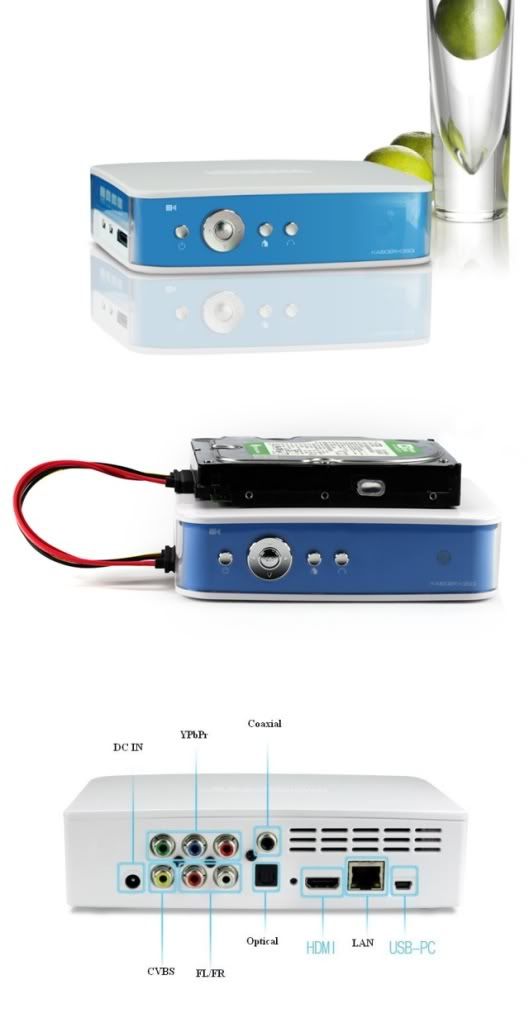 |
|
|
|
|
|
gin&tonic
|
Sep 13 2011, 01:45 PM
|
|
|
Bro pls PM me price of this new model..... Thx
|
|
|
|
|
|
king_kenny
|
Sep 20 2011, 07:56 PM
|
Getting Started

|
im still using my old & trusted HD PRO +.
but Yangxi, i got this problem.
my player, when playing MP4 files, consecutively,
the 2nd or 3rd files or so on, will have no sound, i have to stop, and replay again.
I'm using Firmware YG Apr 13 2010.
|
|
|
|
|
|
yangxi
|
Sep 20 2011, 08:50 PM
|
|
|
need update.. at least upgrade to Dec 2010 version. http://www.4shared.com/file/3rmcXoCL/Hdpro_20110108.htmlany problem, please call me ~ |
|
|
|
|
|
weesiong78
|
Oct 2 2011, 06:06 PM
|
New Member
|
hello yanxi brother, I downloaded transformer 3 1080 Remux (36gb ), when it play as 8 channel, the screen as like lag lag, when i switch to aac 5 channel, then it smooth back. It is player problem? I have updated to Mar 2011 filmware.
|
|
|
|
|
|
yangxi
|
Oct 2 2011, 07:48 PM
|
|
|
u use int sata or ext usb hdd ?
|
|
|
|
|
|
weesiong78
|
Oct 3 2011, 07:41 PM
|
New Member
|
QUOTE(yangxi @ Oct 2 2011, 07:48 PM) u use int sata or ext usb hdd ? ext usb hdd |
|
|
|
|
|
wong01
|
Oct 4 2011, 08:35 AM
|
New Member
|
What would be the ideal hd pro resolution setting (720p, 1080p, etc) for a hd ready (not full hd) lcd tv?. Anyone? Thanks.
|
|
|
|
|
|
PoorMan
|
Oct 8 2011, 10:58 AM
|
|
|
QUOTE(wong01 @ Oct 4 2011, 08:35 AM) What would be the ideal hd pro resolution setting (720p, 1080p, etc) for a hd ready (not full hd) lcd tv?. Anyone? Thanks. I think the resolution of your play content would be more relevant. Ultimately, the TV will scale it according to its default resolution (which is HD ready (720p) resolution). |
|
|
|
|
|
mrchloo
|
Oct 18 2011, 04:55 PM
|
Getting Started
|
first time play hdpro bittorrent after add torrent file then click yes for comfirm it shows error "mkdir: Cannot create directory `/tmp/btdownload': No such file or directory" btw i'm use win7 , harddisk installed and work well anybody help..... remark: i can see hdpro hdd in network can copy n paste in pc settled...............
Added on October 18, 2011, 11:11 pmchange port forward is it available for our hdpro? i follow the instruction it could no be done seen the path different with acryan http://www.shadowandy.net/2009/09/bittorre...an-playonhd.htmThis post has been edited by mrchloo: Oct 18 2011, 11:13 PM |
|
|
|
|
|
yangxi
|
Oct 23 2011, 08:55 PM
|
|
|
not sure.. transmission firmware no official version. u can visit this site.. http://www.hdpfans.com/forum-26-1.html |
|
|
|
|
|
numbertwo
|
Oct 24 2011, 01:13 PM
|
|
|
Hi all,
on my hdpro r1055, the subtitles text code is always defaulted as 'english', and I've to change it to display 'chinese simplified' everytime i play the same movie. Is there a way to get the player to auto-select the language pack correctly to show the correct subtitle (in chinese) ?
I'm on the latest fw 201101xx..
Rgrds
|
|
|
|
|
|
yangxi
|
Oct 24 2011, 01:49 PM
|
|
|
QUOTE(numbertwo @ Oct 24 2011, 01:13 PM) Hi all, on my hdpro r1055, the subtitles text code is always defaulted as 'english', and I've to change it to display 'chinese simplified' everytime i play the same movie. Is there a way to get the player to auto-select the language pack correctly to show the correct subtitle (in chinese) ? I'm on the latest fw 201101xx.. Rgrds realtek common problem (no sure is bug). i can't save coding setting. |
|
|
|
|
|
numbertwo
|
Oct 24 2011, 02:13 PM
|
|
|
Ok...thansk for your feedback.
I found the way to solve this is to set the system language to 'chinese' in the system setup.. By doing this way, the chinese subtitle will display correctly without having me to change it every time i play the movies with chinese .srt.
|
|
|
|
|
|
yangxi
|
Nov 7 2011, 09:53 PM
|
|
|
New HDPRO+ / HDPRO mini firmwareofficial Version Date : 23/9/2011 fix youtube last 1073/1283 SDK (June 2011) *no 3rdparty HDPFANS channel. http://dl.dropbox.com/u/10146363/Hdpro_20110923.rarafter update, please reset language to ENGLISH. ~ Own risk ~. this model no more warranty. if any problem ..can't help  This post has been edited by yangxi: Nov 7 2011, 09:56 PM This post has been edited by yangxi: Nov 7 2011, 09:56 PM
|
|
|
|
|
|
yltan
|
Nov 8 2011, 04:26 PM
|
Getting Started
|
Anyone managed to update this? QUOTE(yangxi @ Nov 7 2011, 09:53 PM) New HDPRO+ / HDPRO mini firmwareofficial Version Date : 23/9/2011 fix youtube last 1073/1283 SDK (June 2011) *no 3rdparty HDPFANS channel. http://dl.dropbox.com/u/10146363/Hdpro_20110923.rarafter update, please reset language to ENGLISH. ~ Own risk ~. this model no more warranty. if any problem ..can't help |
|
|
|
|
|
ben3003
|
Nov 9 2011, 12:53 PM
|
|
|
any good player for around rm200? can play mkv and .srt subtitle.. if can download or stream from those chinese website better..
|
|
|
|
|



 Quote
Quote


 0.0272sec
 0.82
0.82
 6 queries
 GZIP Disabled