


Technical Help on Using LCD monitor
Technical Help on Using LCD monitor
|
|
 Mar 4 2010, 11:06 PM, updated 16y ago Mar 4 2010, 11:06 PM, updated 16y ago
Show posts by this member only | Post
#1
|
 
Senior Member
529 posts Joined: Oct 2006 
|
Hie there, just got my xbox. Using my pc lcd monitor to play using a DVI cable to connect.. Then i realize my monitor do not have speaker.... thus no sound.. So can anyone teach me how to connect to speaker or headphone?.. Thank to all in advance. Sorry still noob in this...
|
|
|
|
|
|
Mar 4 2010, 11:12 PM
Show posts by this member only | Post
#2
|

Senior Member
3,174 posts Joined: Jan 2003
|
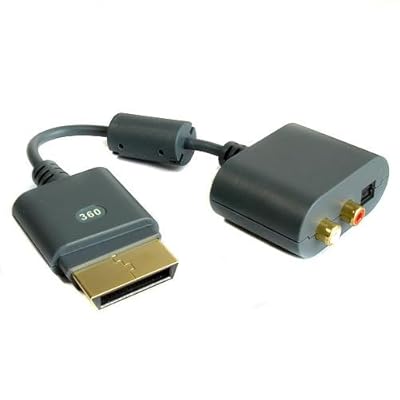
use something like this:
 |
|
|
Mar 4 2010, 11:14 PM
Show posts by this member only | Post
#3
|
|
Senior Member
529 posts Joined: Oct 2006
|
May i know where can i get it and how much?? Thank you.
|
|
|
Mar 4 2010, 11:36 PM
Show posts by this member only | Post
#4
|
|
Senior Member
3,174 posts Joined: Jan 2003
|
^i'm not so sure. original from microsoft is expensive. try find third party product.
|
|
|
Mar 4 2010, 11:40 PM
Show posts by this member only | Post
#5
|
|
Senior Member
529 posts Joined: Oct 2006
|
Oh Thank you very much! Will try to find it tmr... Btw wat do you call that thing?
|
|
|
Mar 5 2010, 09:05 PM
Show posts by this member only | Post
#6
|

Senior Member
1,468 posts Joined: Jun 2009 From: Karakura Town
|
go get VGA HD AV Cable dude. Then buy an adapter for vga to dvi to connect ur xbox with monitor. Or, u can buy HDMI Cable for xbox 360, it will include the cable above that shown by bro figue8.
 Attached thumbnail(s) 

|
|
|
|
|
|
Mar 8 2010, 04:43 PM
Show posts by this member only | Post
#7
|

Junior Member
121 posts Joined: Jul 2008 From: KL 
|
if using hdmi cable..no need sound cable right?..since the lcd already got speaker..
and if im not mistaken HDMI cable support video and sound thru hdmi cable..is it right?? thanks |
|
|
Mar 8 2010, 05:53 PM
Show posts by this member only | Post
#8
|

Junior Member
469 posts Joined: Jul 2009
|
QUOTE(kriss120 @ Mar 8 2010, 04:43 PM) if using hdmi cable..no need sound cable right?..since the lcd already got speaker.. but ts monitor dont have speaker. sor for an alternative, either he use vga hd cable or hdmi cable, then use adapter to DVI for his monitor.and if im not mistaken HDMI cable support video and sound thru hdmi cable..is it right?? thanks  |
|
|
Apr 1 2010, 03:17 PM
Show posts by this member only | Post
#9
|

Junior Member
97 posts Joined: Dec 2005
|
So is there anybody in lowyat selling these kind of cables? i'd like to get 1 too
 |
|
|
Apr 4 2010, 11:47 AM
|

Junior Member
126 posts Joined: Feb 2009 From: deep inside damansara.....
|
im looking for this cable too..can anybody tell which shop selling this item..thanks
|
|
|
Apr 7 2010, 08:32 PM
|

Senior Member
2,693 posts Joined: Jul 2006
|
Hello!
Wanna ask can i get a real nice quality if i just use a 3rd party VGA cable to connect the 360 to my Dell ST Series ST2410? If not, then which cable do i need? Am using external speakers too. |
|
|
Apr 8 2010, 01:19 PM
|

Junior Member
131 posts Joined: Dec 2009 From: I from cstorie.com
|
First you need this
 Second you need this  Third you need this.  Then figure yourself how connect it. I'm using it, and it works like charm. |
|
|
Apr 11 2010, 09:41 AM
|
|
Junior Member
126 posts Joined: Feb 2009 From: deep inside damansara.....
|
mine using vga hd cable......(buy at digital mall for rm65) then for audio mine using sonic gear evo 3...got rca input at back....
 |
|
|
|
|
|
Apr 30 2010, 09:05 AM
|

Junior Member
217 posts Joined: Nov 2007
|
iLucky my monitor got speaker ....jz plug in hdmi and PLAY !! ^^
|
|
|
Apr 30 2010, 09:31 AM
|

Junior Member
375 posts Joined: Oct 2004 From: Desa Petaling, Kay El
|
I butchered my original HD connector for coax digital sound & HDMI. hahahahaha!
|
|
|
May 17 2010, 03:08 AM
|
|
Junior Member
211 posts Joined: Nov 2008
|
my monitor have no speaker, but lucky have 3.5 green audio jack,so just connect to my Logitech speaker.
at first i pening too, then only realize the the audio jack at the back. chris : mind telling me where'd u bought the 3rd item (red-white to female connector thingy) and how much.. thanxs.. |
|
|
Jun 18 2010, 08:33 PM
|

Newbie
2 posts Joined: Sep 2009 From: Gelugor,Penang + Banting,Selangor
|
my LCD speakers that support HDMI doesn't satisfy me~~
wanna use ma baby altec lensing=( but still can not find the connector=( |
|
|
Jul 6 2010, 10:47 AM
|
|
Senior Member
974 posts Joined: Aug 2005 From: Petaling Jaya 
|
Try this cable:


Monster® Gamelink™ HDMI for Xbox 360 http://forum.lowyat.net/index.php?act=ST&f...&t=1186293&st=0 It comes with Gamelink HDMI cable and AV to optical adapter. Using the red and white rca cable will give you stereo analogue sound only. If you using Optical cable, it can produce up to 7.1 surround sound. This cable is specially made by Monster for Xbox game console. It is exclusively licensed for Xbox 360. This post has been edited by DigitalTech: Jul 6 2010, 10:48 AM |
|
|
Jul 6 2010, 10:50 AM
|

Senior Member
1,450 posts Joined: Jun 2008 From: KK
|
QUOTE(DigitalTech @ Jul 6 2010, 10:47 AM) Try this cable: The Monster's mumbo jumbo Monster® Gamelink™ HDMI for Xbox 360 http://forum.lowyat.net/index.php?act=ST&f...&t=1186293&st=0 It comes with Gamelink HDMI cable and AV to optical adapter. Using the red and white rca cable will give you stereo analogue sound only. If you using Optical cable, it can produce up to 7.1 surround sound. This cable is specially made by Monster for Xbox game console. It is exclusively licensed for Xbox 360.  |
|
|
Jul 8 2010, 11:04 AM
|

Junior Member
89 posts Joined: Apr 2007 From: Johor-Kinrara
|
if u dare to crack up ur original connector,then go ahead. im using LCD tv,so,what i do is,open/crack up the male connector of the audio/video from xbox,to make room for my hdmi cable.so,i got 2 output from my xbox.
problem solve. p/s:im not guarantee that this will not make ur xbox broken. |
|
|
Jul 27 2010, 02:28 AM
|

Senior Member
3,807 posts Joined: Jan 2003 
|
QUOTE(aureliux @ Mar 4 2010, 11:06 PM) Hie there, just got my xbox. Using my pc lcd monitor to play using a DVI cable to connect.. Then i realize my monitor do not have speaker.... thus no sound.. So can anyone teach me how to connect to speaker or headphone?.. Thank to all in advance. Sorry still noob in this... I also tot i have that problem. But i found out thet my monitor have audio out. I just connect hdmi to my monitor. If youe monitor got dvi only den have to use the another adapter loQUOTE(figure8 @ Mar 4 2010, 11:12 PM) use something like this: |
|
|
Jul 28 2010, 03:19 AM
|

Senior Member
1,453 posts Joined: Jan 2003 From: Sibu,Sarawak
|
just asking here.. If I am using a LCD tv Sony BX300 http://www.sony.com.my/product/klv-32bx300
can i connect my ALTEC LANSING speaker(3.5mm jack) to PS3 or XBOX to play the sound through my altec Lansing?? |
|
|
Sep 1 2010, 12:41 AM
|
|
Junior Member
161 posts Joined: Jun 2006
|
QUOTE(pitok235149 @ Jul 8 2010, 11:04 AM) if u dare to crack up ur original connector,then go ahead. im using LCD tv,so,what i do is,open/crack up the male connector of the audio/video from xbox,to make room for my hdmi cable.so,i got 2 output from my xbox. wanna ask here...problem solve. p/s:im not guarantee that this will not make ur xbox broken. i wanna play xbox with my dvi monitor... i plug in hdmi cable to my xbox & dvi(converter) to my monitor to get the image.. for the sound, i break the the casing of the RCA cable casing and plug into my xbox too...then use the rca to 3.5mm cableto plug in my speaker to get sound? am i right? 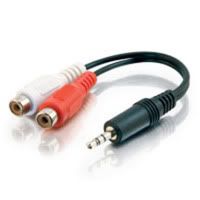 |
|
|
Sep 15 2010, 04:23 AM
|
|
Junior Member
217 posts Joined: Nov 2007
|
Hw to plug headphones ~ ?? im using a hdmi cable plug to my hdmi monitor....sound comes frm monitor aso ~ bt nw i wan use headphones ..
|
|
|
Sep 15 2010, 09:24 PM
|
Senior Member
4,331 posts Joined: Jan 2007
|
try to find if ur monitor comes with audio output for head phones and speakers..
|
|
|
Sep 25 2010, 06:28 PM
|
|
Junior Member
217 posts Joined: Nov 2007
|
I found one 3.5 mm audio output .......i connect the headphones to it ~~ bt i tried playing my xbox the sound still comes out of my monitor speakers ? any settings i should do ?
This post has been edited by williamxd: Sep 25 2010, 06:29 PM |
|
|
Sep 26 2010, 10:59 PM
|

Junior Member
86 posts Joined: Oct 2009
|
final solution: buy a built in speaker,hdmi monitor
|
|
|
Sep 28 2010, 01:21 PM
|

All Stars
10,859 posts Joined: Jan 2003 From: Sarawak
|
Anyone know where can I get the female rca to female rca in penang? So hard to find at here..
|
|
|
Oct 1 2010, 10:54 PM
|
|
Junior Member
217 posts Joined: Nov 2007
|
i have a hdmi monitor with speakers lol ! ~ nw i wanna use my headphones ....thats y i wan a 2 female rca to 3.5mm female jack ~ i crack open the av cable case ....thats y can fit both ~
|
| Change to: |  0.0218sec 0.0218sec
 0.51 0.51
 6 queries 6 queries
 GZIP Disabled GZIP Disabled
Time is now: 22nd December 2025 - 01:29 AM |
 Quote
Quote