

still wonder how to manual flash and still confuse the instruction on FP. anyone can guide me?
really want to try to hack phone.
This post has been edited by megatdotnet: Feb 17 2010, 04:53 PM
Nokia 5800 XpressMusic a.k.a "TUBE" v.25
Nokia 5800 XpressMusic a.k.a "TUBE" v.25
|
|
 Feb 17 2010, 04:51 PM Feb 17 2010, 04:51 PM
Return to original view | Post
#1
|
 
Junior Member
49 posts Joined: Jan 2010  
|
still wonder how to manual flash and still confuse the instruction on FP. anyone can guide me?
really want to try to hack phone. This post has been edited by megatdotnet: Feb 17 2010, 04:53 PM |
|
|
|
|
|
Feb 17 2010, 05:04 PM
Return to original view | Post
#2
|
|
Junior Member
49 posts Joined: Jan 2010
|
QUOTE(JustinLFJ @ Feb 17 2010, 04:56 PM) Hey, which hack do you want to flash? which 1 better and easy for me, noob. oredi dload the Phoenix and other file at FP but seem like not same with the video tutor. anyway with new tube, is it ok to flash? gamble la kan? |
|
|
Feb 17 2010, 05:33 PM
Return to original view | Post
#3
|
|
Junior Member
49 posts Joined: Jan 2010
|
QUOTE(JustinLFJ @ Feb 17 2010, 05:12 PM) I only know the first one, first one easier too, but only have ROM Patcher, FPSX 2.0 got more stuff, but a bit more complicated to flash. FPSX 2.0 needs JAF, and i dont know anything about JAF at all... For FPSX 1.0, just follow the guide on FP, make sure you download the .exe file on that page which extracts the ORIGINAL v40 Firmware files. Then get the HACKED ROM ( .fpsx file) New tube? You firmware version? and yes, its a bit of a gamble, but the phone wont brick easily as stated by XM.. Unless is user fault / electrical blackouts while flashing and battery empty... already try to follow the step on FP,1. Phoenix (full) 2. Ori V40 FW 3. ROM patcher but is seem not same the image in step 1 that have 8 files. new tube with V40. |
|
|
Feb 17 2010, 05:36 PM
Return to original view | Post
#4
|
|
Junior Member
49 posts Joined: Jan 2010
|
QUOTE(JustinLFJ @ Feb 17 2010, 05:34 PM) The Ori v40 came in an .exe file right? yup. then? |
|
|
Feb 17 2010, 06:01 PM
Return to original view | Post
#5
|
|
Junior Member
49 posts Joined: Jan 2010
|
QUOTE(JustinLFJ @ Feb 17 2010, 05:39 PM) Install it... Dont alter the path of the installation... After install, conenct the phone via PC SUITE MODE, launch Phoenix, File> Scan Product, and click on Firmware Update... Whats the problem now? i was stuck from here. already install the Ori V40 EXE file but not know what to do NEXT? QUOTE(Xploit Machine @ Feb 17 2010, 05:50 PM) original v40 comes in an EXE file, if u use the FP version 1.0 no need original firmware, read wat i titled there "Download v40.0.005 Firmware + Hacked ROM" so BLUR. do know why but hardly trying to understand.means it has 8 files .. its the same package i flashed into my phone ..  means, if i use the PNHT1, no need ori V40 EXE file right? |
|
|
Feb 17 2010, 06:15 PM
Return to original view | Post
#6
|
|
Junior Member
49 posts Joined: Jan 2010
|
QUOTE(Xploit Machine @ Feb 17 2010, 06:05 PM) the PNHT 1.0 has 8 files .. 7 + 1 hacked FPSX, 1st copy all to the path, 2nd ly edit the FPSX in Phoenix and change to hacked FPSX, see the video .. how i edit n change to hacked FPSX before flashing .. so blur, now i got it where the 8 files come from  now move to step 2.  |
|
|
|
|
|
Feb 21 2010, 01:39 AM
Return to original view | Post
#7
|
|
Junior Member
49 posts Joined: Jan 2010
|
didn't hack my tube yet maybe due to my don't have GUTS (ha3).
but i try to understand the information around to make myself confident to manual flash. anyone can guide me step by step event there is video guide on FP2? still not understand on the technical part. if i didn't flash yet, could i just manual format with this method by XM? http://forum.lowyat.net/index.php?showtopi...post&p=31967817 |
|
|
Feb 21 2010, 03:01 PM
Return to original view | Post
#8
|
|
Junior Member
49 posts Joined: Jan 2010
|
QUOTE(Xploit Machine @ Feb 21 2010, 01:13 PM) Its still need flashing yeah still try to understand the steps and technical part. thanks XM! .. no escape method .. no escape method  |
|
|
Feb 21 2010, 05:32 PM
Return to original view | Post
#9
|
|
Junior Member
49 posts Joined: Jan 2010
|
oredi use the step with JAF on FP2 (totally).
when tick INI there is a popup window should have product list. but to me it's just BLANK. totally white page. any missing STEP? i think JAF doesn't find any product folder? Added on February 21, 2010, 5:44 pm QUOTE(Xploit Machine @ Feb 21 2010, 04:23 PM) XM Edition - CFW v1.1 wah! CFQ v1.1 oredi? with bahasa melayu. Removed - All Help Related. - Mobile Search. - Mail For Exhange. - Standard Sound Waves Effect. - Nokia Factory Welcome SMS. Added - Embedded Nokia Maps 3.03. - Embedded Kill Me. - Embedded YouTube - Spin Slide Effects. - Silent Camera. - High Quality Camera Shots. - Improved & Fast Kinetic Scrolling. - Moved Cache from C to E (Please Create Folder E:\Sys\Cache) - FrancoPhilsans Font. - Improved Cache in C, D and Z and RAM. - Six (6) Icon Home Screen. - Satio Home Screen. Others - English, Chinese and Bahasa Melayu. - Startup Remains Original. - Very Fast CFW from XM Edition. Download: http://www.4shared.com/file/226521399/e30f..._-_CFW_v11.html Thanks to all the people guided me in embed this firmware ! still not pass the hacking method (hu3) This post has been edited by megatdotnet: Feb 21 2010, 05:44 PM Attached thumbnail(s) 
|
|
|
Feb 21 2010, 09:15 PM
Return to original view | Post
#10
|
|
Junior Member
49 posts Joined: Jan 2010
|
QUOTE(arfaie @ Feb 21 2010, 07:14 PM) ooo ic..maybe my JAF installation corrupt. when i tick use ini, only show empty list. seems like what happen to me oso (hu3)  |
|
|
Feb 21 2010, 10:46 PM
Return to original view | Post
#11
|
|
Junior Member
49 posts Joined: Jan 2010
|
QUOTE(Xploit Machine @ Feb 21 2010, 10:05 PM) none of the new CFW working properly CFW not working? which 1? what happen to me!? during flash it's stop & they is error messege! 
This post has been edited by megatdotnet: Feb 21 2010, 11:01 PM |
|
|
Feb 22 2010, 07:58 PM
Return to original view | Post
#12
|
|
Junior Member
49 posts Joined: Jan 2010
|
QUOTE(Xploit Machine @ Feb 22 2010, 04:26 PM) Xploit Machine Edition XFW v1.0 - Nokia 5800 XpressMusic like it. want to try as soon as possible!Basic » Click to show Spoiler - click again to hide... « Removed » Click to show Spoiler - click again to hide... « Applications Added » Click to show Spoiler - click again to hide... « Features Added » Click to show Spoiler - click again to hide... « Review » Click to show Spoiler - click again to hide... « Project Amendments » Click to show Spoiler - click again to hide... « Additional In Progress » Click to show Spoiler - click again to hide... « BETA Test Result » Click to show Spoiler - click again to hide... « XFW v1.0 Status » Click to show Spoiler - click again to hide... « Screenshots » Click to show Spoiler - click again to hide... « still try to flash with xm's video guide! thanks for your effort xm! my flash before is FAIL! and make my memory card have password. how i want to back to normal? |
|
|
Feb 22 2010, 08:20 PM
Return to original view | Post
#13
|
|
Junior Member
49 posts Joined: Jan 2010
|
QUOTE(Xploit Machine @ Feb 22 2010, 08:02 PM) if can, when flash take out memory card, i can recover MMC password if ure fone is hacked later, dont worry, watch my youtube channel got everything thanks XM! u are my HERO. lucky me, i not yet buying new MMC. i will follow ur video guide and pray for me (ha3)  Added on February 22, 2010, 8:39 pmoredi copy ORI FW and overrite with XFW file and COPY to ..\nokia\phoenix\product\RM-356 folder. OFF my tube & DO tick MANUAL FLASH, DEAD USB & use INI but looks like nothing appear at the SELECT PHONE MODEL popup windows. please HELP me! anything wrong when i install JAF or with my flash step? This post has been edited by megatdotnet: Feb 22 2010, 08:39 PM |
|
|
|
|
|
Feb 23 2010, 12:56 AM
Return to original view | Post
#14
|
|
Junior Member
49 posts Joined: Jan 2010
|
still hopeless
can't flash neither with phoenix or JAF. try many time with the video guide for the whole day. quite simple to understand the guide but it's weird when it can't pass the product option part. phoenix - when flashing there is no sign about the product. JAF - no model listing when tick INI. won't flash & MMC can't use (password). please help me! |
|
|
Feb 23 2010, 01:25 AM
Return to original view | Post
#15
|
|
Junior Member
49 posts Joined: Jan 2010
|
QUOTE(Xploit Machine @ Feb 23 2010, 01:04 AM) something wrong with ure INI, copy this http://www.2shared.com/file/11586793/3375f...nok4models.html still same like before. into C:\Program Files\ODEON\JAF and restart JAF .. after u tick INI, dont do anything, wait for the model list box to appear  |
|
|
Feb 23 2010, 01:48 AM
Return to original view | Post
#16
|
|
Junior Member
49 posts Joined: Jan 2010
|
QUOTE(Xploit Machine @ Feb 23 2010, 01:34 AM) is your firmware copy path C:\Program Files\Nokia\Phoenix\Products\RM-356 ? .. please check is the box appear? but empty rite? 
checked! 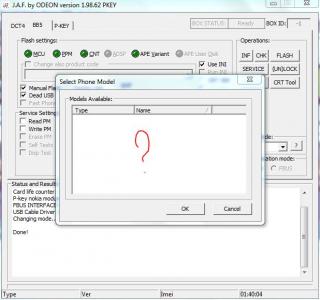
see, it's happen even i'm waiting for 20 min. thanks in advance. i need to have this flash after my MMC blocked (password)  This post has been edited by megatdotnet: Feb 23 2010, 01:48 AM |
|
|
Feb 23 2010, 02:09 AM
Return to original view | Post
#17
|
|
Junior Member
49 posts Joined: Jan 2010
|
QUOTE(Xploit Machine @ Feb 23 2010, 02:04 AM) abang .. RM-356 duh .. bukan RM-386 adui bodo aku (ha3). see, little mistake can mess up all   .. macam ni tunggu 10 tahun pun tak keluar .. macam ni tunggu 10 tahun pun tak keluar  pray for me, need to try immediately  |
|
|
Feb 23 2010, 02:34 AM
Return to original view | Post
#18
|
|
Junior Member
49 posts Joined: Jan 2010
|
now, with phoenix can flash the product BUT JAF still can't. means still BLANK!
is it OK if i flashing using phoenix? previously have prob with phoenix. can i use XFW V1.0 with phoenix? |
|
|
Feb 23 2010, 02:50 AM
Return to original view | Post
#19
|
|
Junior Member
49 posts Joined: Jan 2010
|
QUOTE(Xploit Machine @ Feb 23 2010, 02:42 AM) Phoenix abit tricky in flashing, if not familiar, dont use it follow ur guide with PHNT1 at FP page 2 and success! Copy To - C:\Program Files\Common Files\Nokia\Phoenix\Products\RM-356 If Above Path Dont Work Copy Here - C:\Program Files\Nokia\Phoenix\Products\RM-356 
how to know that my tube oredi HACKED! and i still want to flash with JAF that i want to flash with XFW! oredi do copy either both way but still BLANK |
|
|
Feb 23 2010, 03:09 PM
Return to original view | Post
#20
|
|
Junior Member
49 posts Joined: Jan 2010
|
QUOTE(soundsyst64 @ Feb 23 2010, 03:05 PM) my phone is RM-356 type, but cannot detect by JAF. same with me. still have prob to read the patch |
|
Topic ClosedOptions
|
| Change to: |  0.0481sec 0.0481sec
 1.12 1.12
 7 queries 7 queries
 GZIP Disabled GZIP Disabled
Time is now: 4th December 2025 - 02:08 PM |
 Quote
Quote


