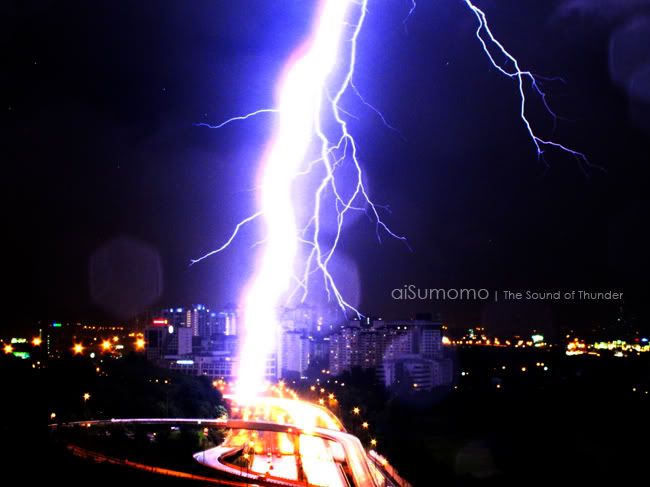
[a350 | focal : 105mm | 1/40s | f/8.0 | ISO 400]
Photography [PIC-A-Day Thread] Post your daily shots here! V5, A Pictar A Day Keeps Da Fungus Away! (:
|
|
 Mar 28 2010, 11:13 AM Mar 28 2010, 11:13 AM
Return to original view | Post
#21
|
 
Senior Member
2,546 posts Joined: Jan 2009 From: Cyberjaya 
|
bulat-bulat
[a350 | focal : 105mm | 1/40s | f/8.0 | ISO 400] |
|
|
|
|
|
Mar 28 2010, 04:16 PM
Return to original view | Post
#22
|
|
Senior Member
2,546 posts Joined: Jan 2009 From: Cyberjaya
|
QUOTE(destfull @ Mar 28 2010, 02:39 PM) That bokeh is distracting.. your flower isn't sharp either sorry bout that...   can share tips get sharp2 picture... i always get not sharp2 ones... either too noise (high iso) or OOF (manual and even AF)  |
|
|
Mar 29 2010, 09:29 PM
Return to original view | Post
#23
|
|
Senior Member
2,546 posts Joined: Jan 2009 From: Cyberjaya
|
 [a350 | 1/50s | f/5.6 | ISO :200 ] |
|
|
Mar 31 2010, 11:01 PM
Return to original view | Post
#24
|
|
Senior Member
2,546 posts Joined: Jan 2009 From: Cyberjaya
|
overexposed (correct spot metering)
 [a350 | 1/100s | f/10.0 | ISO 200 |200mm ] underexposed or ok?? (center metering) distracting trees thou  [a350 | 1/640 | f/10.0 | ISO 200 | 200mm ] |
|
|
Apr 1 2010, 01:30 AM
Return to original view | Post
#25
|
|
Senior Member
2,546 posts Joined: Jan 2009 From: Cyberjaya
|
QUOTE(da3shou3 @ Apr 1 2010, 12:18 AM) 2nd one is under. how to read histogram eh?? Always check your histogram.   like for the underexposed one what this histogram show?? (i try google but if have good explaination here would be better  ) ) This post has been edited by mastering89: Apr 1 2010, 01:33 AM |
|
|
Apr 1 2010, 10:42 AM
Return to original view | Post
#26
|
|
Senior Member
2,546 posts Joined: Jan 2009 From: Cyberjaya
|
QUOTE(lwliam @ Apr 1 2010, 02:29 AM) meaning, left side of the graph is shadows, right side is highlights, the entire range of the graph is what your camera can capture, anything outside of it is clipped (which shows as 0,0,0 for total black, or 256, 256, 256 for total white) which in this case, there is no data recorded, no matter how good your post processing skills are, will not be able to retrieve anything. oh thanks, detail explanationso always keep the graph well within the middle of range. (different if you are looking for high-key / low-key shots) it is also worth reading about "exposing to the right" on google. taking your shot as example, the graph is bunched up to the left, which is where the shadows are, which show in your image as the black area of leaves and branches. little or no details will be found there. the 3rd quarter of the graph is not clipped = the sky in your image. there are plenty of image data there. i always use this function when im shooting under the bright sun when i cant judge the image's luminosity on the LCD screen. the histogram will tell me all i need to know whether my image is properly exposed or not. left = shadow right = highlight more highlight more details but if shoot in RAW can get more details?? aisumomo : OMG  , the last one is , the last one is  This post has been edited by mastering89: Apr 1 2010, 10:43 AM |
|
|
|
|
|
Apr 1 2010, 11:59 AM
Return to original view | Post
#27
|
|
Senior Member
2,546 posts Joined: Jan 2009 From: Cyberjaya
|
QUOTE(lwliam @ Apr 1 2010, 11:42 AM) i wouldnt say that more highlight = more details, just as long as the data falls within the range, then all details will be there. to "expose right" is because noise tend to linger more in the shadows, taking 2 images of the same subject which all data is properly recorded within the dynamic range for example, one is dark, another is bright, to brighten up a dark picture will introduce more noise than to darken a bright picture. that's the logic behind it. oh thanks...and yes, shooting in RAW will retain more details, but by paying the price of post processing time and a larger file size. by shooting in RAW, the dynamic range effectively broadens up by 1-2 stops on each end. now i get it (theoritically) need go practice is it the same with balancing the EV meter in Manual mode??? or the EV is the histogram in viewfinder??? i saw like if the EV meter is at middle the histogram is at middle range... This post has been edited by mastering89: Apr 1 2010, 12:00 PM |
|
|
Apr 1 2010, 06:54 PM
Return to original view | Post
#28
|
|
Senior Member
2,546 posts Joined: Jan 2009 From: Cyberjaya
|
» Click to show Spoiler - click again to hide... « like Enel's (one piece) Devil Fruit power    Shot taken at car wash [alpha 350 + 50mm 1.8 + love bokeh hood cover| 1/25s | f/1.8 | ISO 400 ] |
|
|
Apr 4 2010, 01:25 AM
Return to original view | Post
#29
|
|
Senior Member
2,546 posts Joined: Jan 2009 From: Cyberjaya
|
QUOTE(tiktsin @ Apr 4 2010, 01:11 AM)  EOS 20D + 10-22mm f/3.5  got FE effect  |
|
|
Apr 5 2010, 10:15 PM
Return to original view | Post
#30
|
|
Senior Member
2,546 posts Joined: Jan 2009 From: Cyberjaya
|
Kantoi
 » Click to show Spoiler - click again to hide... « |
|
|
Apr 6 2010, 02:55 PM
Return to original view | Post
#31
|
|
Senior Member
2,546 posts Joined: Jan 2009 From: Cyberjaya
|
For sale : ready to pack , juz wrap with ribbon
   » Click to show Spoiler - click again to hide... « |
|
|
Apr 8 2010, 01:12 PM
Return to original view | Post
#32
|
|
Senior Member
2,546 posts Joined: Jan 2009 From: Cyberjaya
|
B&W + spot metering + turn off DRO
 » Click to show Spoiler - click again to hide... « |
|
|
Apr 12 2010, 08:48 PM
Return to original view | Post
#33
|
|
Senior Member
2,546 posts Joined: Jan 2009 From: Cyberjaya
|
Sakura in Yokohama
 » Click to show Spoiler - click again to hide... « This post has been edited by mastering89: Apr 12 2010, 08:49 PM |
|
|
|
|
|
Apr 13 2010, 06:48 AM
Return to original view | Post
#34
|
|
Senior Member
2,546 posts Joined: Jan 2009 From: Cyberjaya
|
Mt Fuji
 » Click to show Spoiler - click again to hide... « |
|
|
Apr 13 2010, 04:20 PM
Return to original view | Post
#35
|
|
Senior Member
2,546 posts Joined: Jan 2009 From: Cyberjaya
|
fishnoxygen : i usually used centered metering...
if landscape photography should i juz used matrix metering??? or better take 3 exposure and blend in all HotChocolate : most of shots i juz used the Aperture mode... i still dont know how and what is the "correct exposure", which metering mode to use, This post has been edited by mastering89: Apr 13 2010, 04:56 PM |
|
|
Apr 14 2010, 09:36 AM
Return to original view | Post
#36
|
|
Senior Member
2,546 posts Joined: Jan 2009 From: Cyberjaya
|
Komagatake Ropeway
Color Accent Mode  [Canon Ixy 10s (japan name) | Color Accent Mode | 1/1250s | f/3.5 | focal 4.3mm ] dreadlessdream : 1)Turn on DRO : Always ON 2)Use matrix metering for landscape. : my mistake. Actually was using spot and center to take pics of family with that background 3)AF Area= Wide : was using spot focus focussing on family, forgot to change 4)If you are using A Mode. Then try exposure compensation. : Will try  5)And always use your camera Histogram to evaluate : Will try This post has been edited by mastering89: Apr 14 2010, 09:43 AM |
|
|
Apr 16 2010, 10:57 PM
Return to original view | Post
#37
|
|
Senior Member
2,546 posts Joined: Jan 2009 From: Cyberjaya
|
Pinkish!
  edited using Picnik original picture EXIF: » Click to show Spoiler - click again to hide... « This post has been edited by mastering89: Apr 16 2010, 10:58 PM |
|
|
Apr 18 2010, 08:22 PM
Return to original view | Post
#38
|
|
Senior Member
2,546 posts Joined: Jan 2009 From: Cyberjaya
|
Ferris Wheel in Kasai Rinkai Kouen
Combining 3 horizontal pics vertically use PS  » Click to show Spoiler - click again to hide... « |
|
|
Apr 22 2010, 12:22 AM
Return to original view | Post
#39
|
|
Senior Member
2,546 posts Joined: Jan 2009 From: Cyberjaya
|
not macro, but close up
+10 close up tends to sharp only at middle area only   » Click to show Spoiler - click again to hide... « This post has been edited by mastering89: Apr 22 2010, 12:24 AM |
|
|
Apr 22 2010, 11:40 PM
Return to original view | Post
#40
|
|
Senior Member
2,546 posts Joined: Jan 2009 From: Cyberjaya
|
Birds at Shibuya
 [ a350 + 1855 | 1/80s | f/8 | ISO 400 ] |
|
Topic ClosedOptions
|
| Change to: |  0.0486sec 0.0486sec
 0.55 0.55
 7 queries 7 queries
 GZIP Disabled GZIP Disabled
Time is now: 3rd December 2025 - 01:42 AM |
 Quote
Quote