


to

because my speaker only can support this 4 pole minijack cable and normal 3 pole mini jack (5.1 thx speaker)
help!!!!
This post has been edited by gui_bj: Feb 5 2010, 06:56 PM
WTA- does any1 know in audio convetor..?, (solution found out and share in here)
|
|
 Feb 4 2010, 10:24 AM, updated 16y ago Feb 4 2010, 10:24 AM, updated 16y ago
Show posts by this member only | Post
#1
|
 
Junior Member
17 posts Joined: Feb 2008 
|
Does any1 know how to convert from optical digital audio cable to 3 pole mini jack audio cable?
to because my speaker only can support this 4 pole minijack cable and normal 3 pole mini jack (5.1 thx speaker) help!!!! This post has been edited by gui_bj: Feb 5 2010, 06:56 PM |
|
|
|
|
|
Feb 4 2010, 10:30 AM
Show posts by this member only | Post
#2
|

Senior Member
4,403 posts Joined: Jan 2007 From: Johor Bahru 
|
bro, that is impossible...unless it came with a control box/converter....totally different system...are you sure bro?
Check again..or give actual pictures |
|
|
Feb 4 2010, 10:44 AM
Show posts by this member only | Post
#3
|
|
Junior Member
17 posts Joined: Feb 2008
|
thx, all i know every1 try to help me.... thx all......
 (Ps3 slim 120GB new 1 from sony) output from my ps3 to  my speaker I/O interface ( Creative MegaWorks 510D creative speaker) sorry.... cos the pic is take from internet. but dunno y cant c after i put in to this post. This post has been edited by gui_bj: Feb 4 2010, 11:50 AM |
|
|
Feb 4 2010, 10:47 AM
Show posts by this member only | Post
#4
|

Senior Member
6,059 posts Joined: Feb 2010 From: Cheras, Kuala Lumpur  
|
QUOTE(gui_bj @ Feb 4 2010, 10:44 AM) output from my ps3 to 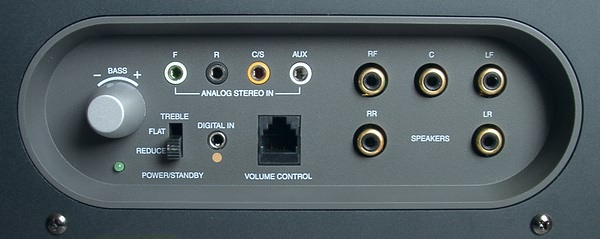 my speaker I/O interface  |
|
|
Feb 4 2010, 10:50 AM
Show posts by this member only | Post
#5
|
|
Junior Member
17 posts Joined: Feb 2008
|
so wat shld i do? now no audio for my ps3....
 |
|
|
Feb 4 2010, 11:14 AM
Show posts by this member only | Post
#6
|

Senior Member
2,643 posts Joined: Jan 2003
|
The ps3 should have the regular red,white and yellow rca cables right?
You can just use the red and white for sound. If you need to use a 3 pole mini jack, there are sound cables that have RCA connectors with a mini jack at the other end. You won't get surround sound but at least there's sound output. |
|
|
|
|
|
Feb 4 2010, 11:19 AM
Show posts by this member only | Post
#7
|

Senior Member
3,356 posts Joined: Dec 2006
|
PM me your email, I think a supplier has sent me a converter spec before that can solve this problem.
|
|
|
Feb 4 2010, 11:26 AM
Show posts by this member only | Post
#8
|
|
Junior Member
17 posts Joined: Feb 2008
|
QUOTE(Eventless @ Feb 4 2010, 11:14 AM) The ps3 should have the regular red,white and yellow rca cables right? yup. but im using my monitor to my ps3, so no speaker at all. in between that u have blueray game n video but running in to normal audio that is no point oso. since ps3 can support surround sound and i oso got speaker that can play surround, the best way is have to use surround sound effect right?You can just use the red and white for sound. If you need to use a 3 pole mini jack, there are sound cables that have RCA connectors with a mini jack at the other end. You won't get surround sound but at least there's sound output. |
|
|
Feb 4 2010, 11:31 AM
Show posts by this member only | Post
#9
|
|
Senior Member
4,403 posts Joined: Jan 2007 From: Johor Bahru
|
bro..we wanna help..but your picture incomplete...try posting the rest of the pics. again
|
|
|
Feb 4 2010, 11:41 AM
|
|
Junior Member
17 posts Joined: Feb 2008
|
thx, all i know every1 try to help me.... thx all......
(Ps3 slim 120GB new 1 from sony) output from my ps3 to my speaker I/O interface ( Creative MegaWorks 510D creative speaker) sorry.... cos the pic is take from internet. but dunno y cant c after i put in to this post. This post has been edited by gui_bj: Feb 4 2010, 11:51 AM |
|
|
Feb 4 2010, 11:42 AM
|
|
Senior Member
2,643 posts Joined: Jan 2003
|
Creative used to sell external sound cards (Extigy,DDTS-100) that can decode surround sound from digital inputs like coaxial or optical cable without a pc. Unfortunately those were phased out with no replacement models.
Are there any internal sound card that can do digital input from a coaxial or optical source and can decode the surround sound signal? If there is, you could use your pc to do the surround sound decoding. Downside is that the pc has to be on to do so. The only other option left would be to get an AV receiver. |
|
|
Feb 4 2010, 11:46 AM
|
|
Junior Member
17 posts Joined: Feb 2008
|
QUOTE(Eventless @ Feb 4 2010, 11:42 AM) Creative used to sell external sound cards (Extigy,DDTS-100) that can decode surround sound from digital inputs like coaxial or optical cable without a pc. Unfortunately those were phased out with no replacement models. but now i wanna use the speaker to my speaker... not for pc.... the ptoblem is the interface tht support between this 2 is diffrence.....Are there any internal sound card that can do digital input from a coaxial or optical source and can decode the surround sound signal? If there is, you could use your pc to do the surround sound decoding. Downside is that the pc has to be on to do so. The only other option left would be to get an AV receiver. |
|
|
Feb 4 2010, 11:53 AM
|
|
Senior Member
2,643 posts Joined: Jan 2003
|
Without any surround decoder, there's no way to get surround sound out from the optical input. Hardware/software is required to convert the incoming digital signals to analog signals for the front,rear and center speakers.
|
|
|
|
|
|
Feb 4 2010, 12:01 PM
|
|
Junior Member
17 posts Joined: Feb 2008
|
QUOTE(Eventless @ Feb 4 2010, 11:53 AM) Without any surround decoder, there's no way to get surround sound out from the optical input. Hardware/software is required to convert the incoming digital signals to analog signals for the front,rear and center speakers. that y im here to ask about how to convert the audio signal to digital optical cable to minijack cable, and 1 thing to tell the ps3 have support dts surround decode. |
|
|
Feb 4 2010, 12:08 PM
|
|
Senior Member
8,740 posts Joined: Aug 2009
|
I don't think your current setup is possible to use your speakers to your PS3
|
|
|
Feb 4 2010, 12:17 PM
|
|
Junior Member
17 posts Joined: Feb 2008
|
QUOTE(sonerin @ Feb 4 2010, 12:08 PM) I don't think your current setup is possible to use your speakers to your PS3 than sony say ps3 can support 5.1 audio is tipu 1 la... only can use when u buy sony audio system lo.... |
|
|
Feb 4 2010, 12:24 PM
|
|
Senior Member
2,643 posts Joined: Jan 2003
|
Simple answer is you can't get surround sound from the ps3 with your current setup. You need an additional piece hardware to decode the digital signal to get the surround sound. There's no simple adapter that can do this for you.
The ps3 is just there to provide the surround signal, not decode it for you. |
|
|
Feb 4 2010, 12:27 PM
|
|
Junior Member
17 posts Joined: Feb 2008
|
QUOTE(Eventless @ Feb 4 2010, 12:24 PM) Simple answer is you can't get surround sound from the ps3 with your current setup. You need an additional piece hardware to decode the digital signal to get the surround sound. There's no simple adapter that can do this for you. ya that is wat i wan to know.... if got any hardware convert the signal..... i believe that i have clearly mention about that....The ps3 is just there to provide the surround signal, not decode it for you. |
|
|
Feb 4 2010, 01:05 PM
|
|
Senior Member
2,643 posts Joined: Jan 2003
|
QUOTE(Eventless @ Feb 4 2010, 11:42 AM) Creative used to sell external sound cards (Extigy,DDTS-100) that can decode surround sound from digital inputs like coaxial or optical cable without a pc. Unfortunately those were phased out with no replacement models. The answer that you want is already in my previous post. Get an external sound card that can decode surround without a pc or get a internal soundcard that can accept and decode surround sound.Are there any internal sound card that can do digital input from a coaxial or optical source and can decode the surround sound signal? If there is, you could use your pc to do the surround sound decoding. Downside is that the pc has to be on to do so. The only other option left would be to get an AV receiver. If you can't get either of the these, go buy a home theater system with surround sound capabilities. |
|
|
Feb 4 2010, 01:16 PM
|
|
Junior Member
17 posts Joined: Feb 2008
|
QUOTE(Eventless @ Feb 4 2010, 01:05 PM) The answer that you want is already in my previous post. Get an external sound card that can decode surround without a pc or get a internal soundcard that can accept and decode surround sound. so u mean i have to installl the extra sound card for my ps3???? i will do thatis ps3 is allow to do that....If you can't get either of the these, go buy a home theater system with surround sound capabilities. |
| Change to: |  0.0176sec 0.0176sec
 0.49 0.49
 5 queries 5 queries
 GZIP Disabled GZIP Disabled
Time is now: 22nd December 2025 - 08:32 PM |
 Quote
Quote