Welcome Guest ( Log In | Register )

Outline · [ Standard ] · Linear+

 Dell Inspiron 1420 User Thread, Dell Inspiron 1420 Owners' Reviews

views
     
TSJeffrey1987
post Jan 27 2010, 06:29 PM, updated 16y ago

Regular
******
Senior Member
1,661 posts

Joined: Apr 2009


biggrin.gif Hello guys,

Actually, I'm one of the Dell Inspiron 1420 owner and I have own it for approximately 2 years. Hereby, I would like to share my reviews, experience (sweet or bad) and etc about my laptop. Hopefully, I can get some Dell Inspiron 1420 owners to join this thread and share their precious experience with me as well as other owners. For instance, installing new Windows or Mac OS (Microsoft Windows 7 or Mac OS X Snow Leopard), new accessories along with the laptop, problems (hardwares or softwares) and etc ...

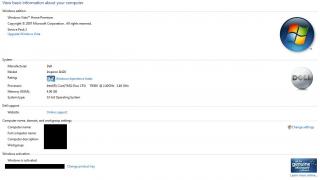
Below are the basic specifications of my laptop:

1. Intel Core 2 Duo CPU T8300 @ 2,4 GHz
2. Memory (RAM) 4.00 GB
3. Windows edition: Windows Vista Home Premium-Service Pack 2
3. System type: 32-bit Operating System
4. Windows Experience Index: 3.7
5. Graphics Card Information:
(i) Components: GeForce 8400M GS
(ii) Dedicated Video Memory: 128 MB
(iii) DirectX version: 10.0

Attached Image


"List of Glory" - Owners of Dell Inspiron 1420:
1. Jeffrey1987
2. shirley_andy
3. ShenWoo
4. peachy88
5. chrishii87
6. miloy2k
7. jenzz
8. lugiamcg
9. UltimatePerfect
10. bo093
11. mad_man
12. pronamide
13. Nemesis181188
14. wan7045
15. lazo

* PS: Please PM me if you are one of the Dell Inspiron 1420 User & I will add you guys into this "List of Glory" ... biggrin.gif

This post has been edited by Jeffrey1987: May 23 2010, 10:19 PM
TSJeffrey1987
post Jan 27 2010, 07:55 PM

Regular
******
Senior Member
1,661 posts

Joined: Apr 2009


QUOTE(Abch @ Jan 27 2010, 07:44 PM)
How much is it
*
rolleyes.gif I bought my Dell Inspiron 1420 laptop at the price of RM 3700 last two years. Along with the package, I also got a free Targus backpack, that is, Targus Pulse II Backpack (black). Below is the link of Targus:

(maybe you can have a look on how my backpack looks like)


http://www.targus.com/my/cases_notebook_ba...=2&PageNumber=5


This post has been edited by Jeffrey1987: Jan 28 2010, 05:39 PM
TSJeffrey1987
post Jan 28 2010, 06:12 PM

Regular
******
Senior Member
1,661 posts

Joined: Apr 2009


Dear Dell Inspiron 1420 owners:

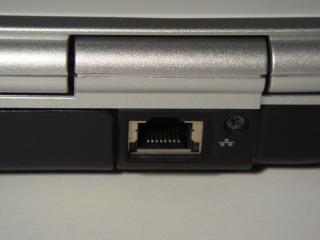
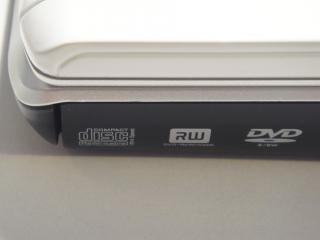
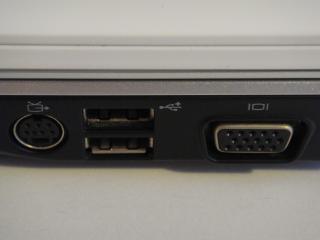
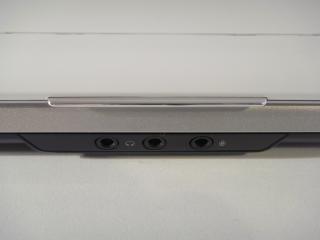
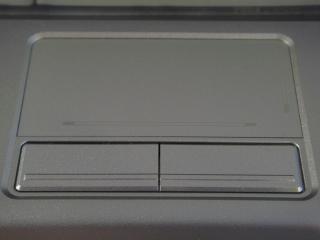
Below are some of my Dell Inspiron 1420 images, have a look ...

Attached Image Attached Image

Attached Image Attached Image

Attached Image Attached Image

Attached Image Attached Image

Attached Image Attached Image

Attached Image Attached Image

Attached Image Attached Image

Attached Image Attached Image

Attached Image Attached Image

Attached Image Attached Image

This post has been edited by Jeffrey1987: Feb 5 2010, 02:31 AM
IwanAGP
post Jan 30 2010, 11:43 AM

Nothing is Possible!
*******
Senior Member
9,590 posts

Joined: Jan 2008
From: S'wak||KL||SG


Oo... the battery part got LED one arh??? Nvr notice it... My sis using 1420. She got the remote but dunno why not functioning. Lolz
TSJeffrey1987
post Jan 30 2010, 02:52 PM

Regular
******
Senior Member
1,661 posts

Joined: Apr 2009


QUOTE(IwanAGP @ Jan 30 2010, 11:43 AM)
Oo... the battery part got LED one arh??? Nvr notice it... My sis using 1420. She got the remote but dunno why not functioning. Lolz
*
nod.gif Yea. if I'm not mistaken,currently only Dell laptops have LED battery indicators compared to other brands like Acer, Lenovo and etc. In my opinion, I think it was a good idea to add this LED battery indicator as occasionally a laptop user may want to check the availability of his/her battery on the spot without plugging in and switching on the laptop. Thus, I want to give this credit to Dell! rclxms.gif

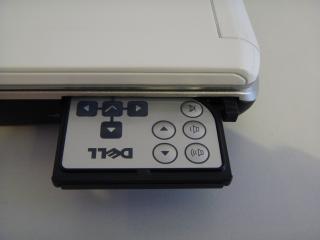
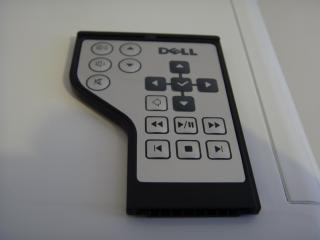
As for the multimedia remote control, it was so unfortunate that your sister's one was malfunction. Maybe you can ask her to replace a new battery for her remote control. That might be a solution. biggrin.gif Anyway, I usually used it for my presentation (Microsoft Power Point) and also for my MOVIE session in my laptop. I will use it to play/pause/stop during the movie session as I'm lazy to move around so much when I'm watching a movie @ drama. laugh.gif

This post has been edited by Jeffrey1987: Jan 30 2010, 09:33 PM
IwanAGP
post Feb 1 2010, 07:23 PM

Nothing is Possible!
*******
Senior Member
9,590 posts

Joined: Jan 2008
From: S'wak||KL||SG


~~ just found that the led will only light up if press that button. My studio 15 one also got but is 5 white leds... can use as torch light!!
TSJeffrey1987
post Feb 2 2010, 06:54 AM

Regular
******
Senior Member
1,661 posts

Joined: Apr 2009


QUOTE(IwanAGP @ Feb 1 2010, 07:23 PM)
~~ just found that the led will only light up if press that button. My studio 15 one also got but is 5 white leds... can use as torch light!!
*
nod.gif But I'm doubt that it can be used as torch light ... hehehe ...

shirley_andy
post Feb 2 2010, 06:59 AM

VR Hardware Solution Provider
*******
Senior Member
2,631 posts

Joined: Jun 2009
Another DELL 1420 user here...
You bought yours at RM3700??? why so expensive?? what you've upgraded??

I got my Black coloured one at around 2.6k(almost 18months ago), my upgrade during purchase was Nvidia 8400 GS, Windows Vista HP(although now I already reformatted it with Win7).

Had problem with the display once and they sent technician to change the whole motherboard for me..

Till now no problem and loving it with my Win7.... If only it could have fitted better GC, my current Nvidia 8400 can't play games in full details.
monza84
post Feb 2 2010, 07:21 AM

......
*******
Senior Member
2,059 posts

Joined: Jan 2010
QUOTE(shirley_andy @ Feb 2 2010, 06:59 AM)
Another DELL 1420 user here...
You bought yours at RM3700??? why so expensive?? what you've upgraded??

I got my Black coloured one at around 2.6k(almost 18months ago), my upgrade during purchase was Nvidia 8400 GS, Windows Vista HP(although now I already reformatted it with Win7).

Had problem with the display once and they sent technician to change the whole motherboard for me..

Till now no problem and loving it with my Win7.... If only it could have fitted better GC, my current Nvidia 8400 can't play games in full details.
*
Better be careful as 8400 GS is one of the problematic cards from NVidia, seems that you already spoiled the display once and maybe in near future the problem might occur...you can google for 8400/8600 GS problem, its one of defective product from NVidia.
TSJeffrey1987
post Feb 2 2010, 07:22 AM

Regular
******
Senior Member
1,661 posts

Joined: Apr 2009


QUOTE(shirley_andy @ Feb 2 2010, 06:59 AM)
Another DELL 1420 user here...
You bought yours at RM3700??? why so expensive?? what you've upgraded??

I got my Black coloured one at around 2.6k(almost 18months ago), my upgrade during purchase was Nvidia 8400 GS, Windows Vista HP(although now I already reformatted it with Win7).

Had problem with the display once and they sent technician to change the whole motherboard for me..

Till now no problem and loving it with my Win7.... If only it could have fitted better GC, my current Nvidia 8400 can't play games in full details.
*
thumbup.gif Welcome to our new thread ... hehehe ... actually I almost forgot what I have upgraded ... biggrin.gif Below are some of the basic upgrade options that I have customized last time:

1. Processor T8300 (2.4 GHz)
2. 4 GB RAM (667MHz)
3. Screen Resolutions 1440x900
4. Targus backpack

That's all if I'm not mistaken ... How about yours? What have you upgraded?

As for problems, luckily I have encountered no major problems during the years ... brows.gif Oh yea, how you got Windows 7 drivers for Dell Inspiron 1420? Mind to tell me?

For gaming part, I'm not really in it. Thus, I have no idea on how bad it is ... hehehehe ... but I have heard before that 8400M GS is problematic ... be careful!

This post has been edited by Jeffrey1987: Feb 2 2010, 07:25 AM
monza84
post Feb 2 2010, 07:25 AM

......
*******
Senior Member
2,059 posts

Joined: Jan 2010
Well, comparing both Jeff & Shirley price, its reasonable as Jeff bought his 2 years ago which by means that the market price at that time are still high and now its gotten much more cheaper (which Shirley bought hers at RM2600 that this 18 months ago)...

@Jeff
Got any problem with your display before??
TSJeffrey1987
post Feb 2 2010, 07:31 AM

Regular
******
Senior Member
1,661 posts

Joined: Apr 2009


QUOTE(monza84 @ Feb 2 2010, 07:25 AM)
Well, comparing both Jeff & Shirley price, its reasonable as Jeff bought his 2 years ago which by means that the market price at that time are still high and now its gotten much more cheaper (which Shirley bought hers at RM2600 that this 18 months ago)...

@Jeff
Got any problem with your display before??
*
Luckily is a big NO for me ... maybe because I seldom use it for gaming ... I usually used my laptop for surfing internet only ... Besides that, I'm also using cooler pad ... but now not anymore ... because at Germany, the room temperature is quite low (around 20 degree celsius) ...
monza84
post Feb 2 2010, 07:32 AM

......
*******
Senior Member
2,059 posts

Joined: Jan 2010
QUOTE(Jeffrey1987 @ Feb 2 2010, 07:31 AM)
Luckily is a big NO for me ... maybe because I seldom use it for gaming ... I usually used my laptop for surfing internet only ... Besides that, I'm also using cooler pad ... but now not anymore ... because at Germany, the room temperature is quite low (around 20 degree celsius) ...
*
Well, then its thumbup.gif for you...often heard problem from laptop equipped with 8400M/8600M GS...well, maybe temp playing a big part here nod.gif
TSJeffrey1987
post Feb 2 2010, 07:36 AM

Regular
******
Senior Member
1,661 posts

Joined: Apr 2009


QUOTE(monza84 @ Feb 2 2010, 07:32 AM)
Well, then its thumbup.gif for you...often heard problem from laptop equipped with 8400M/8600M GS...well, maybe temp playing a big part here nod.gif
*
nod.gif Yea, I do agree with you ... because the Dell Inspiron 1420 easily heat up ... so we have to be careful with the temperature ... hehehe rclxms.gif

shirley_andy
post Feb 3 2010, 04:10 PM

VR Hardware Solution Provider
*******
Senior Member
2,631 posts

Joined: Jun 2009
QUOTE(Jeffrey1987 @ Feb 2 2010, 07:22 AM)
thumbup.gif Welcome to our new thread ... hehehe ... actually I almost forgot what I have upgraded ...  biggrin.gif Below are some of the basic upgrade options that I have customized last time:

1. Processor T8300 (2.4 GHz)
2. 4 GB RAM (667MHz)
3. Screen Resolutions 1440x900
4. Targus backpack

That's all if I'm not mistaken ... How about yours? What have you upgraded?

As for problems, luckily I have encountered no major problems during the years ...  brows.gif Oh yea, how you got Windows 7 drivers for Dell Inspiron 1420? Mind to tell me?

For gaming part, I'm not really in it. Thus, I have no idea on how bad it is ... hehehehe ... but I have heard before that 8400M GS is problematic ... be careful!
*
Wow, then hopefully it(8400 GraphicCard) won't spoil again cuz it's already no more on waranty...
Anyway almost all driver is workable on Win7... Only the 8400GS graphic card I have to re download the driver cuz switching from 32 bit to 64 bit
ShenWoo
post Feb 3 2010, 10:42 PM

Sir Shen Knight The 2nd
*****
Senior Member
842 posts

Joined: Jan 2003
From: End of Klang river. Beside the monsoon drains


Guys. I need some help here about my wireless.

Recently my laptop had been disconnecting randomly when its connected to a network but the network is still available(HP laptop as witness)

Did any of you suffered the same?
peachy88
post Feb 3 2010, 10:46 PM

Getting Started
**
Junior Member
133 posts

Joined: Jul 2009
Mine was white, bought a year ago, change the display screen twice in less than 6 months...the technician sed, this model normally is display screen problem lur...^^''
Anyway, Dell service was fast...keke...

TSJeffrey1987
post Feb 3 2010, 10:49 PM

Regular
******
Senior Member
1,661 posts

Joined: Apr 2009


QUOTE(ShenWoo @ Feb 3 2010, 10:42 PM)
Guys. I need some help here about my wireless.

Recently my laptop had been disconnecting randomly when its connected to a network but the network is still available(HP laptop as witness)

Did any of you suffered the same?
*
hmm.gif I personally don't have this kind of problem occured ... but sometimes my laptop do hard to connect to the existing wireless network ... maybe due to my poor wireless card and the type of wireless router? I don't have any idea about it ... sorry. unsure.gif


Added on February 3, 2010, 10:53 pm
QUOTE(peachy88 @ Feb 3 2010, 10:46 PM)
Mine was white, bought a year ago, change the display screen twice in less than 6 months...the technician sed, this model normally is display screen problem lur...^^''
Anyway, Dell service was fast...keke...
*
blink.gif O.M.G ... so unfortunate ... Luckily, your laptop is still under warranty ... biggrin.gif

Anyway, your laptop cover is same colour as mine. I'm loving it so much till now though it already 2 years old. thumbup.gif

Oh yea, do you have any minor problems occured besides that?


Added on February 3, 2010, 11:08 pm
QUOTE(shirley_andy @ Feb 3 2010, 04:10 PM)
Wow, then hopefully it(8400 GraphicCard) won't spoil again cuz it's already no more on waranty...
Anyway almost all driver is workable on Win7... Only the 8400GS graphic card I have to re download the driver cuz switching from 32 bit to 64 bit
*
Oh yea, do you mind to share with us what is your laptop specifications? drool.gif Thanks in advance!

This post has been edited by Jeffrey1987: Feb 3 2010, 11:08 PM
chrishii87
post Feb 3 2010, 11:42 PM

New Member
*
Junior Member
41 posts

Joined: Nov 2007


hi, i'm one of the user too. bought it a year plus already. got problems with gpu. and lucky it's still under warranty and got my laptop's motherboard changed. i have a question to ask, i'm using windows 7 32bits. does anyone have a problem with the bluetooth? mine not working with the vista driver...
miloy2k
post Feb 4 2010, 09:59 PM

[[[[[IMPERIAL ARMY]]]]]
********
All Stars
15,773 posts

Joined: Jan 2003
From: Capital Wasteland


QUOTE(chrishii87 @ Feb 3 2010, 11:42 PM)
hi, i'm one of the user too. bought it a year plus already. got problems with gpu. and lucky it's still under warranty and got my laptop's motherboard changed. i have a question to ask, i'm using windows 7 32bits. does anyone have a problem with the bluetooth? mine not working with the vista driver...
*
so far nope smile.gif try checking dell website for latest driver maybe got already laugh.gif
TSJeffrey1987
post Feb 4 2010, 10:25 PM

Regular
******
Senior Member
1,661 posts

Joined: Apr 2009


QUOTE(miloy2k @ Feb 4 2010, 09:59 PM)
so far nope smile.gif try checking dell website for latest driver maybe got already laugh.gif
*
rclxms.gif So, you don't have problem with bluetooth driver? You are using Windows 7 too? Because I plan to switch mine to Windows 7 very soon and bluetooth is very important for me as my Logitech V470 mouse is a bluetooth mouse and without bluetooth I will be "finished" ... sad.gif

miloy2k
post Feb 4 2010, 10:29 PM

[[[[[IMPERIAL ARMY]]]]]
********
All Stars
15,773 posts

Joined: Jan 2003
From: Capital Wasteland


so far nope, using win7 32bit for wiffy lappy
TSJeffrey1987
post Feb 4 2010, 10:34 PM

Regular
******
Senior Member
1,661 posts

Joined: Apr 2009


QUOTE(miloy2k @ Feb 4 2010, 10:29 PM)
so far nope, using win7 32bit for wiffy lappy
*
biggrin.gif Hooray ... really happy to hear that ... oh yea, do you mind to share with us your specifications of your laptop? For instance, colour, processor, RAM and etc ... nod.gif

Besides that, how long have you owned Dell Inspiron 1420 and is it still under warranty? notworthy.gif

chrishii87
post Feb 4 2010, 10:44 PM

New Member
*
Junior Member
41 posts

Joined: Nov 2007


QUOTE(miloy2k @ Feb 4 2010, 10:59 PM)
so far nope smile.gif try checking dell website for latest driver maybe got already laugh.gif
*
yea, i tried installing the one on the dell's websites. It doesn't work for me though. Hm...
TSJeffrey1987
post Feb 4 2010, 10:48 PM

Regular
******
Senior Member
1,661 posts

Joined: Apr 2009


QUOTE(chrishii87 @ Feb 4 2010, 10:44 PM)
yea, i tried installing the one on the dell's websites. It doesn't work for me though. Hm...
*
blink.gif O.M.G ... tell me if you have the solution ...

chrishii87
post Feb 5 2010, 11:36 AM

New Member
*
Junior Member
41 posts

Joined: Nov 2007


QUOTE(Jeffrey1987 @ Feb 4 2010, 11:48 PM)
blink.gif O.M.G ... tell me if you have the solution ...
*
nope. don't have the solution yet. Have tried numerous of times and it still doesn't work. I wonder if it's the way i install. Hm.. anyone else got this kind of problem?
jenzz
post Feb 7 2010, 06:28 PM

Getting Started
**
Junior Member
112 posts

Joined: Aug 2008


New user reporting in~hehe.
Been using 1420 for 2 years i think,colour is white too.haha

I got 1 question as i am seriously very clueless when it comes to computer stuffs,when 1st bought the labtop, do we have to buy the graphic card on our own or isit already installed inside it? (This labtop is not mine orginally).

I'm having problem playing games because it is so damn SLOW.
TSJeffrey1987
post Feb 7 2010, 07:48 PM

Regular
******
Senior Member
1,661 posts

Joined: Apr 2009


QUOTE(jenzz @ Feb 7 2010, 06:28 PM)
New user reporting in~hehe.
Been using 1420 for 2 years i think,colour is white too.haha

I got 1 question as i am seriously very clueless when it comes to computer stuffs,when 1st bought the labtop, do we have to buy the graphic card on our own or isit already installed inside it? (This labtop is not mine orginally).

I'm having problem playing games because it is so damn SLOW.
*
" ACCESS DENIED ... PLEASE TYPE YOUR USERNAME & PASSWORD AGAIN ... "

laugh.gif Just kidding ... you are certainly welcome to our new Dell Inspiron 1420 user thread ... We are glad and excited to have you here ...

Firstly, I will try to answer your questions with my humble computering knowledge ... biggrin.gif Generally, a laptop is equipped with a integrated graphic card or dedicated graphic card. It depends on the buyer himself/herself according to their daily usage and demand. Thus, they have to decide whether they will use their laptops mostly on high-end applications/ gaming or just normal usage like doing some office works and internet surfing. For instance, I have bought the Dell Inspiron 1420 laptop which was equipped with dedicated graphic card, that is, NVidea GeForce 8400M GS (128 MB) for some light gaming.

As for the second question, a laptop will become slow due to several factors:

1. Processor
2. RAM
3. Capacity of your hard drive (HDD)

Lastly, mind to share with us your laptop's specifications? thumbup.gif

lugiamcg
post Feb 13 2010, 07:54 AM

On my way
****
Senior Member
640 posts

Joined: May 2009
From: Whirlpool Island, Johto


QUOTE(jenzz @ Feb 7 2010, 06:28 PM)
New user reporting in~hehe.
Been using 1420 for 2 years i think,colour is white too.haha

I got 1 question as i am seriously very clueless when it comes to computer stuffs,when 1st bought the labtop, do we have to buy the graphic card on our own or isit already installed inside it? (This labtop is not mine orginally).

I'm having problem playing games because it is so damn SLOW.
*
if u're still being loyal to the stock OS( Vista Home Basic), slow, is juz normal. I couldn't bear those lags anymore so i changed it to 7 Ultimate 64-bit but there's a catch, u'll be having some prob if ur games are using directx 9.0c =D

PS: add me into this thread =D
TSJeffrey1987
post Feb 13 2010, 08:20 AM

Regular
******
Senior Member
1,661 posts

Joined: Apr 2009


QUOTE(lugiamcg @ Feb 13 2010, 07:54 AM)
if u're still being loyal to the stock OS( Vista Home Basic), slow, is juz normal. I couldn't bear those lags anymore so i changed it to 7 Ultimate 64-bit but there's a catch, u'll be having some prob if ur games are using directx 9.0c =D

PS: add me into this thread =D
*
rclxms.gif Welcome to our new "clan" ... Actually, I'm now still using Windows Vista Home Premium 32-bit and plan to switch to Windows 7 Professional 32-bit very soon but I heard some problems regarding on bluetooth driver. Do you encounter the same problem? For your information, bluetooth is very important for me as my mouse is a bluetooth mouse & for certain I need bluetooth to connect it to my laptop ... sad.gif
lugiamcg
post Feb 13 2010, 08:43 AM

On my way
****
Senior Member
640 posts

Joined: May 2009
From: Whirlpool Island, Johto


QUOTE(Jeffrey1987 @ Feb 13 2010, 08:20 AM)
rclxms.gif Welcome to our new "clan" ... Actually, I'm now still using Windows Vista Home Premium 32-bit and plan to switch to Windows 7 Professional 32-bit very soon but I heard some problems regarding on bluetooth driver. Do you encounter the same problem? For your information, bluetooth is very important for me as my mouse is a bluetooth mouse & for certain I need bluetooth to connect it to my laptop ... sad.gif
*
frankly, yes, initially. Now, it's all solved thx to 'Prasys'. He found a bluetooth driver that solved it lol. U can try seeking for his help and hope that he would be able to find it again =D
TSJeffrey1987
post Feb 13 2010, 08:49 AM

Regular
******
Senior Member
1,661 posts

Joined: Apr 2009


QUOTE(lugiamcg @ Feb 13 2010, 08:43 AM)
frankly, yes, initially. Now, it's all solved thx to 'Prasys'. He found a bluetooth driver that solved it lol. U can try seeking for his help and hope that he would be able to find it again =D
*
O.I.C ... then I will try to PM him in order to get the solution ... hehehe ... rclxm9.gif Thanks so much for your precious information ... Anyway, mind to share with us your basic specifications of your laptop? For instance, colour, CPU, GPU and etc ...

This post has been edited by Jeffrey1987: Feb 13 2010, 08:49 AM
lugiamcg
post Feb 13 2010, 09:18 AM

On my way
****
Senior Member
640 posts

Joined: May 2009
From: Whirlpool Island, Johto


QUOTE(Jeffrey1987 @ Feb 13 2010, 08:49 AM)
O.I.C ... then I will try to PM him in order to get the solution ... hehehe ...  rclxm9.gif Thanks so much for your precious information ... Anyway, mind to share with us your basic specifications of your laptop? For instance, colour, CPU, GPU and etc ...
*
lol, no prob.
oh no, my specs...haha. It's a way too bad compared to urs cry.gif

CPU: C2D 2.0Ghz
GPU: NG 8400M GS( overclock when needed)
Ram: 3G only cry.gif
OS: Mac OSX n 7 Ultimate
Color: Red
Wifi card: some dono wad wireless-n card


TSJeffrey1987
post Feb 13 2010, 09:28 AM

Regular
******
Senior Member
1,661 posts

Joined: Apr 2009


QUOTE(lugiamcg @ Feb 13 2010, 09:18 AM)
lol, no prob.
oh no, my specs...haha. It's a way too bad compared to urs  cry.gif

CPU: C2D 2.0Ghz
GPU: NG 8400M GS( overclock when needed)
Ram: 3G only  cry.gif
OS: Mac OSX n 7 Ultimate
Color: Red
Wifi card: some dono wad wireless-n card
*
Just sharing around ... don't be so shame of your laptop ... laugh.gif
Briefly, how many years have you owned your laptop. Like mine, I have own this machine for approximately 2 years. As for the wireless card, I also have forgotten what is mine ... biggrin.gif Oh yea, sometimes I do found that my laptop was hard to connect to the wireless signal compared to my friend's laptop ... haiyz ... don't know whether is wireless card or wireless router problem ... cry.gif

This post has been edited by Jeffrey1987: Feb 13 2010, 09:44 AM
lugiamcg
post Feb 13 2010, 12:10 PM

On my way
****
Senior Member
640 posts

Joined: May 2009
From: Whirlpool Island, Johto


QUOTE(Jeffrey1987 @ Feb 13 2010, 09:28 AM)
Just sharing around ... don't be so shame of your laptop ...  laugh.gif
Briefly, how many years have you owned your laptop. Like mine, I have own this machine for approximately 2 years. As for the wireless card, I also have forgotten what is mine ...  biggrin.gif Oh yea, sometimes I do found that my laptop was hard to connect to the wireless signal compared to my friend's laptop ... haiyz ... don't know whether is wireless card or wireless router problem ...  cry.gif
*
lol, mine is 1yr n 4mths old.
well, when im using vista, same thing happens to me. Not only that it's hard to connect, most of the time, it seems to auto-dc
but once i changed to 7, prob is solved. Not sure why...
TSJeffrey1987
post Feb 13 2010, 06:07 PM

Regular
******
Senior Member
1,661 posts

Joined: Apr 2009


QUOTE(lugiamcg @ Feb 13 2010, 12:10 PM)
lol, mine is 1yr n 4mths old.
well, when im using vista, same thing happens to me. Not only that it's hard to connect, most of the time, it seems to auto-dc
but once i changed to 7, prob is solved. Not sure why...
*
Then, I will switch to Windows 7 A.S.A.P after I have finished my exam ... can't wait to try out the Windows 7 ... drool.gif
UltimatePerfect
post Feb 14 2010, 12:09 AM

Getting Started
**
Junior Member
156 posts

Joined: Sep 2006
From: Alor Setar


hi..i also use dell inspiron 1420.red colour..use around 2 years++ ... nice laptop...!!
TSJeffrey1987
post Feb 14 2010, 12:56 AM

Regular
******
Senior Member
1,661 posts

Joined: Apr 2009


QUOTE(UltimatePerfect @ Feb 14 2010, 12:09 AM)
hi..i also use dell inspiron 1420.red colour..use around 2 years++ ... nice laptop...!!
*
rclxms.gif Welcome to our new Dell Inspiron 1420 User thread & hope you will enjoy yourself here ... biggrin.gif Anyway, mind to share with us your laptop's specifications? For example, the GPU, CPU and etc ...

Moreover, you can also share with us your experience as Dell Inspiron 1420 owner such as problems encountered during the usage of this laptop and warranty.

Furthermore, have you switched to Windows 7 or still stick to Windows Vista? Hope you can share with us and exchange stories among the "Lister of Glory" ... icon_idea.gif Tchuss!

PS: I have added your name into our "List of Glory". Please be informed!

This post has been edited by Jeffrey1987: Feb 15 2010, 11:22 PM
lowlock
post Feb 14 2010, 08:54 AM

Getting Started
**
Junior Member
179 posts

Joined: Dec 2009
From: Rumahku syurgaku


hello...ca i join...i don hav dis lappy....hehe
but i do the maintanence...hihi
its my gurl lappy,i think a year n a half now...
this is the spec:

C2D 2.0 Ghz
Nvidia 8400 GS
Win 7 Ultimate

once she told me it hav bluetooth,
but now gone??why ek??
chrishii87
post Feb 14 2010, 10:39 AM

New Member
*
Junior Member
41 posts

Joined: Nov 2007


QUOTE(Jeffrey1987 @ Feb 13 2010, 09:49 AM)
O.I.C ... then I will try to PM him in order to get the solution ... hehehe ...  rclxm9.gif Thanks so much for your precious information ... Anyway, mind to share with us your basic specifications of your laptop? For instance, colour, CPU, GPU and etc ...
*
let me know if you have the solutions already.. biggrin.gif
TSJeffrey1987
post Feb 14 2010, 04:16 PM

Regular
******
Senior Member
1,661 posts

Joined: Apr 2009


QUOTE(lowlock @ Feb 14 2010, 08:54 AM)
hello...ca i join...i don hav dis lappy....hehe
but i do the maintanence...hihi
its my gurl lappy,i think a year n a half now...
this is the spec:

C2D 2.0 Ghz
Nvidia 8400 GS
Win 7 Ultimate

once she told me it hav bluetooth,
but now gone??why ek??
*
rclxms.gif Yea, you are welcome to join us here at our new Dell Inspiron 1420 thread. Nevertheless, I can't add you into our "List of Glory" as apparently you are not a Dell Inspiron 1420 user. SORRY. Oh yea, I saw from your last post that you are the one who help to maintain your GF's laptop and you encountered bluetooth problem? Actually, the laptop's bluetooth started to malfunction since when? After you have reformat her laptop or ... ? As I heard from other Dell Inspiron 1420 users, they are also having the same problem except lugiamcg who said he got a solution from "prasys" . So, maybe you can ask "prasys" directly? I will only can assist you after I have finished my exam on 9 March 2010 because I plan to switch to Windows 7 too.


Added on February 14, 2010, 4:24 pm
QUOTE(chrishii87 @ Feb 14 2010, 10:39 AM)
let me know if you have the solutions already.. biggrin.gif
*
Yea, certainly I will inform you if I have the solution. However, I will be very busy till 9 March 2010 as I have exams coming on. Thus, maybe you can PM "prasys" as I have stated at the previous post. So far I have known, he is the only person who know how to solve the bluetooth issue. All the best!

This post has been edited by Jeffrey1987: Feb 14 2010, 04:25 PM
lowlock
post Feb 14 2010, 05:22 PM

Getting Started
**
Junior Member
179 posts

Joined: Dec 2009
From: Rumahku syurgaku


the bluetooth got prob b4 i 4mat to w7 ultimate,
now my gf say sumtimes its ok n sumtimes not...
TSJeffrey1987
post Feb 14 2010, 07:34 PM

Regular
******
Senior Member
1,661 posts

Joined: Apr 2009


QUOTE(lowlock @ Feb 14 2010, 05:22 PM)
the bluetooth got prob b4 i 4mat to w7 ultimate,
now my gf say sumtimes its ok n sumtimes not...
*
O.I.C ... then i'm not really sure about it. Maybe there is a hardware problem. You can try to scan your hardware & see whether the bluetooth card is working properly.

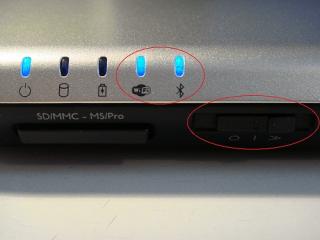
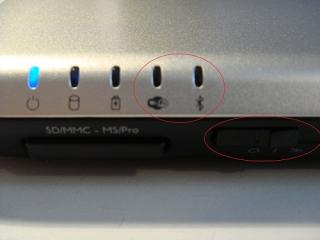
Furthermore, is there any possibilities that your GF accidentally switch off the bluetooth? For instance, please refer to the picture below:

Attached Image Attached Image
lowlock
post Feb 14 2010, 08:09 PM

Getting Started
**
Junior Member
179 posts

Joined: Dec 2009
From: Rumahku syurgaku


that wifi switch rght
TSJeffrey1987
post Feb 14 2010, 08:20 PM

Regular
******
Senior Member
1,661 posts

Joined: Apr 2009


QUOTE(lowlock @ Feb 14 2010, 08:09 PM)
that wifi switch rght
*
hmm.gif Initially, I think like that too. However, the bluetooth always go off when I switch it off. Thus, I believe that the switch has to be connected to the bluetooth. From the 2nd picture, you can notice that the bluetooth indicator light goes off when I switch it off ... In order to verify my hypothesis is true, maybe you can try on your GF's laptop ... blush.gif
bo093
post Feb 15 2010, 06:32 PM

404
******
Senior Member
1,185 posts

Joined: Feb 2008
From: Not Found


C2D 1.8GHz
2GB Ram
220GB HDD
8400M GS

After just 1.4 year+ got hit by the GFX card.
Swap the motherboard.
TSJeffrey1987
post Feb 15 2010, 11:18 PM

Regular
******
Senior Member
1,661 posts

Joined: Apr 2009


QUOTE(bo093 @ Feb 15 2010, 06:32 PM)
C2D 1.8GHz
2GB Ram
220GB HDD
8400M GS

After just 1.4 year+ got hit by the GFX card.
Swap the motherboard.
*
thumbup.gif Welcome to our new Dell Inspiron 1420 thread. Thanks for sharing with us your specifications of your laptop. biggrin.gif First and foremost, I have heard from you that your Dell Inspiron 1420 laptop occured GPU problem after 1.4 years of usage and eventually lead to the failure of motherboard. At that moment, are you still in warranty period? If not, how much you need to pay for your swapping of motherboard? hmm.gif

Besides that, how much your laptop cost you when you 1st bought it? Like mine, I have bought mine for RM 3700 including a Targus backpack. thumbup.gif


PS: I have added your name into our "List of Glory" ... rclxm9.gif

This post has been edited by Jeffrey1987: Feb 16 2010, 02:57 AM
bo093
post Feb 16 2010, 09:56 AM

404
******
Senior Member
1,185 posts

Joined: Feb 2008
From: Not Found


Around Rm2700+
The thing about the GPU is.
If that fail. You must swap the motherboard.

Just recently. Swap OS. To XP.

TSJeffrey1987
post Feb 16 2010, 05:19 PM

Regular
******
Senior Member
1,661 posts

Joined: Apr 2009


QUOTE(bo093 @ Feb 16 2010, 09:56 AM)
Around Rm2700+
The thing about the GPU is.
If that fail. You must swap the motherboard.

Just recently. Swap OS. To XP.
*
O.I.C ... Anyway, why don't you try on the Microsoft's newest OS- Windows 7. I think it will run as smooth as Windows XP too ... biggrin.gif
bo093
post Feb 16 2010, 08:24 PM

404
******
Senior Member
1,185 posts

Joined: Feb 2008
From: Not Found


I get W7 when I can.
TSJeffrey1987
post Feb 16 2010, 08:48 PM

Regular
******
Senior Member
1,661 posts

Joined: Apr 2009


QUOTE(bo093 @ Feb 16 2010, 08:24 PM)
I get W7 when I can.
*
Oh yea, how many years of warranty do you have for your laptop?
Grimm
post Feb 17 2010, 12:12 PM

I don't know anymore
*******
Senior Member
2,030 posts

Joined: Dec 2005
From: Melbourne


Inspiron 1420 user that lost his laptop T_T
TSJeffrey1987
post Feb 17 2010, 01:15 PM

Regular
******
Senior Member
1,661 posts

Joined: Apr 2009


QUOTE(Grimm @ Feb 17 2010, 12:12 PM)
Inspiron 1420 user that lost his laptop T_T
*
sad.gif Sorry to hear that. Actually, when you lost your Dell Inspiron 1420 laptop & how did it being stolen? As I saw from your location status- Melbourne, Australia, did you lost your laptop there?

This post has been edited by Jeffrey1987: Feb 17 2010, 01:16 PM
TSJeffrey1987
post Feb 18 2010, 06:04 AM

Regular
******
Senior Member
1,661 posts

Joined: Apr 2009


biggrin.gif Ladies and Gentlemen,

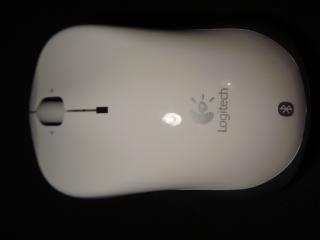
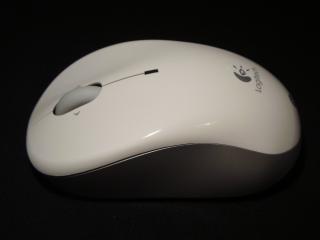
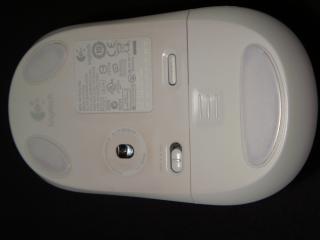
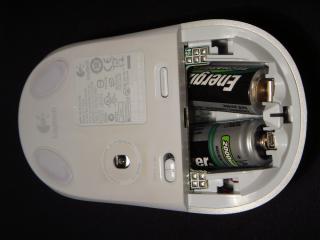
Today, I would like to share with you guys my laptop accessories which I have used them along with my Dell Inspiron 1420 for 2 years. Hereby, I would like to show you guys my mouse, that is, V470 Cordless Laser Mouse for Bluetooth (White) . For your informations, I bought my mouse right after I received my laptop. The main reason I bought Logitech mouse is because I personally believe the quality built that was promised by Logitech though the price was quite high at that time. The colour is white which I purposely chose it in order to match it with my alpine white laptop. biggrin.gif Below are some pictures of my precious mouse:

Attached Image Attached Image Attached Image

Attached Image Attached Image Attached Image

This post has been edited by Jeffrey1987: Feb 18 2010, 06:23 AM
eprhaim
post Feb 19 2010, 09:39 PM

New Member
*
Junior Member
29 posts

Joined: Jan 2010
hello Jeffrey...was invited here by u...lol...actually the post was for my uncle...wanted a quick solution but now since new year is gone so...i forgot the specs...haha...btw need to change the motherboard if the screen got blur??cause it cost around RM400 le.... cry.gif
TSJeffrey1987
post Feb 19 2010, 09:52 PM

Regular
******
Senior Member
1,661 posts

Joined: Apr 2009


QUOTE(eprhaim @ Feb 19 2010, 09:39 PM)
hello Jeffrey...was invited here by u...lol...actually the post was for my uncle...wanted a quick solution but now since new year is gone so...i forgot the specs...haha...btw need to change the motherboard if the screen got blur??cause it cost around RM400 le.... cry.gif
*
You are welcome to our thread though ... biggrin.gif Actually, Dell Inspiron 1420 laptop has GPU problem ... did your uncle's laptop equipped with NVidea GeForce 8M?
eprhaim
post Feb 20 2010, 11:13 AM

New Member
*
Junior Member
29 posts

Joined: Jan 2010
QUOTE(Jeffrey1987 @ Feb 19 2010, 09:52 PM)
You are welcome to our thread though ...  biggrin.gif Actually, Dell Inspiron 1420 laptop has GPU problem ... did your uncle's laptop equipped with NVidea GeForce 8M?
*
from wat i know...i think so.... hmm.gif
TSJeffrey1987
post Feb 27 2010, 11:30 PM

Regular
******
Senior Member
1,661 posts

Joined: Apr 2009


rclxms.gif Hello guys,

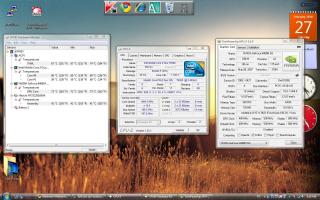
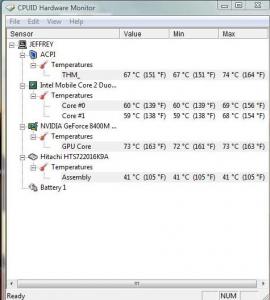
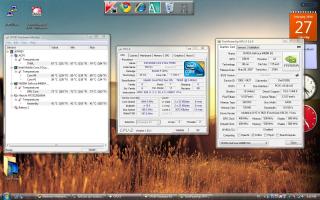
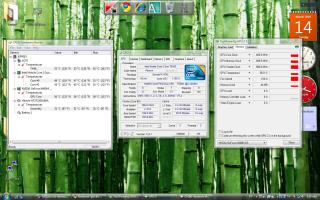
Today, I would like to share with you guys my Dell Inspiron 1420's Benchmark. As you can see from my screenshots, my CPU and GPU temperatures are relatively high. How about you guys?

Attached Image Attached Image

This post has been edited by Jeffrey1987: Feb 27 2010, 11:33 PM
eprhaim
post Feb 28 2010, 12:09 PM

New Member
*
Junior Member
29 posts

Joined: Jan 2010
QUOTE(Jeffrey1987 @ Feb 27 2010, 11:30 PM)
rclxms.gif Hello guys,

Today, I would like to share with you guys my Dell Inspiron 1420's Benchmark. As you can see from my screenshots, my CPU and GPU temperatures are relatively high. How about you guys?

Attached Image   Attached Image
*
from wat i know laptops are like tat. where did u use it when u do this? when it is on ur lap?for laptops there is this cooler that u can put under the laptops...
TSJeffrey1987
post Feb 28 2010, 08:45 PM

Regular
******
Senior Member
1,661 posts

Joined: Apr 2009


QUOTE(eprhaim @ Feb 28 2010, 12:09 PM)
from wat i know laptops are like tat. where did u use it when u do this? when it is on ur lap?for laptops there is this cooler that u can put under the laptops...
*
I did the temperature measurement by lying my laptop on my table without using any laptop cooler. The room temperature here is around 20 degree celcius as now is still consider winter at Germany. In my opinion, the CPU and GPU temperatures are quite high compared to other laptops. How about your uncle's one? hmm.gif
mad_man
post Mar 1 2010, 11:16 AM

Getting Started
**
Junior Member
94 posts

Joined: Sep 2009
All sifu's here,
sorry to butt in but I got a problem with me 1420.

My 1420 failed to boot. it came out stating that there is a problem in booting with the OS from the HDD and asked to boot with repair (recomended), but once i choose the option, it just froze with a blank screen!
I went to the boot setup and tried to boot with the vista CD that came with, but halfway thru loading windows (after a blue flicker on the webcam), everything froze again! I thought it needed some time so I left it running as it is but after 6 hours still the same blank screen.
The HDD indicator on the laptop did not flash at all!

Got my 1420 2 years ago, running on vista premium, 2GB RAM, Celeron Core Duo. there is ample disc space.
I m no techie so would appreciate your valuable feedbacks....
HELP PLEASE!
TSJeffrey1987
post Mar 1 2010, 01:21 PM

Regular
******
Senior Member
1,661 posts

Joined: Apr 2009


QUOTE(mad_man @ Mar 1 2010, 11:16 AM)
All sifu's here,
sorry to butt in but I got a problem with me 1420.

My 1420 failed to boot. it came out stating that there is a problem in booting with the OS from the HDD and asked to boot with repair (recomended), but once i choose the option, it just froze with a blank screen!
I went to the boot setup and tried to boot with the vista CD that came with, but halfway thru loading windows (after a blue flicker on the webcam), everything froze again! I thought it needed some time so I left it running as it is but after 6 hours still the same blank screen.
The HDD indicator on the laptop did not flash at all!

Got my 1420 2 years ago, running on vista premium, 2GB RAM, Celeron Core Duo. there is ample disc space.
I m no techie so would appreciate your valuable feedbacks....
HELP PLEASE!
*
In simple words, your laptop can't boot up into the Windows? Right? Recently, did you installed some new softwares? Maybe you can try to scan your hardwares in order to check their functionality. If there are no problems occured, then that might be a big probability that you have installed some incompatible softwares into your laptop. Thus, you can try to reset your laptop to previous date and boot it up again. All the best!

This post has been edited by Jeffrey1987: Mar 1 2010, 02:14 PM
mad_man
post Mar 1 2010, 02:07 PM

Getting Started
**
Junior Member
94 posts

Joined: Sep 2009
QUOTE(Jeffrey1987 @ Mar 1 2010, 01:21 PM)
In simple words, you laptop can't boot up into the Windows? Right? Recently, did you installed some new softwares? Maybe you can try to scan your hardwares in order to check their functionality. If there are no problems occured, then that might be a big probability that you have installed some incompatible softwares into your laptop. Thus, you can try to reset your laptop to previous date and boot it up again. All the best!
*
Hi Bro Jeff,
thks for your advice

new software, hmmm... it could be the FOC spybot software some friends recomended....
but i noticed that my laptop has been "behaving" wierdafter the installation. slow startup... excessive heat... but didnt take note of it.... my mistake...

just a quick 1.... how do i go about scan the hardwares to ensure functionailty and reseting my laptop to the previous date as i can;t even go beyond anything...

thanks again for your advice...

This post has been edited by mad_man: Mar 1 2010, 02:08 PM
miahahaha
post Mar 1 2010, 02:12 PM

Beru
*******
Senior Member
7,558 posts

Joined: Mar 2008
From: HornBill Borneo


@mad_man
you can try booting your HDD with other laptop..see if the problem lies in the OS or not...if your Window can boot nicely with other laptop then your problem is your laptop itself, and if your Window also cannot boot with other laptop then maybe your HDD got problem or your OS corrupted somehow nod.gif...
lee_what2004
post Mar 1 2010, 02:21 PM

*stare* ji--------
Group Icon
Elite
14,813 posts

Joined: Nov 2006


Can you boot into Safe Mode by pressing F8 during boot?
eprhaim
post Mar 1 2010, 07:07 PM

New Member
*
Junior Member
29 posts

Joined: Jan 2010
QUOTE(Jeffrey1987 @ Feb 28 2010, 08:45 PM)
I did the temperature measurement by lying my laptop on my table without using any laptop cooler. The room temperature here is around 20 degree celcius as now is still consider winter at Germany. In my opinion, the CPU and GPU temperatures are quite high compared to other laptops. How about your uncle's one?  hmm.gif
*
well i dun know about my uncle's 1 right now. cause i live in malaysia and my uncle is on the other island..if u understand wat i'm saying. well generally people will make the laptop to be higher at the back or leave some space at the btm. cause if i'm not mistaken, the laptop works on heat sinks where generally it is enough for moderate work at ur temperature u are at now. if u are the gaming type den...u should at least get a laptop cooler... thats my opinion generally...
mad_man
post Mar 2 2010, 08:31 AM

Getting Started
**
Junior Member
94 posts

Joined: Sep 2009
QUOTE(miahahaha @ Mar 1 2010, 02:12 PM)
@mad_man
you can try booting your HDD with other laptop..see if the problem lies in the OS or not...if your Window can boot nicely with other laptop then your problem is your laptop itself, and if your Window also cannot boot with other laptop then maybe your HDD got problem or your OS corrupted somehow nod.gif...
*
Hi miahahaha,
i can't get my hands on another laptop..
i have tried to use the HDD with an external casing/adapter but the pins are not the same


Added on March 2, 2010, 8:32 am
QUOTE(lee_what2004 @ Mar 1 2010, 02:21 PM)
Can you boot into Safe Mode by pressing F8 during boot?
*
will try tonight! hope this works!

on the safe side, any other recomendations if this fails?

This post has been edited by mad_man: Mar 2 2010, 08:32 AM
TSJeffrey1987
post Mar 2 2010, 04:30 PM

Regular
******
Senior Member
1,661 posts

Joined: Apr 2009


QUOTE(mad_man @ Mar 1 2010, 02:07 PM)
Hi Bro Jeff,
thks for your advice

new software, hmmm... it could be the FOC spybot software some friends recomended....
but i noticed that my laptop has been "behaving" wierdafter the installation. slow startup... excessive heat... but didnt take note of it.... my mistake...

just a quick 1.... how do i go about scan the hardwares to ensure functionailty and reseting my laptop to the previous date as i can;t even go beyond anything...

thanks again for your advice...
*
For the hardware scan, you press the button "F12" before booting the Windows. After that, you select the hardware scan in order to proceed. Then, let it scan your hardwares and wait until it finishes. thumbup.gif

PS: I have added your name into our "List of Glory". rclxms.gif

This post has been edited by Jeffrey1987: Mar 2 2010, 04:32 PM
mad_man
post Mar 3 2010, 01:40 PM

Getting Started
**
Junior Member
94 posts

Joined: Sep 2009
QUOTE(Jeffrey1987 @ Mar 2 2010, 04:30 PM)
For the hardware scan, you press the button "F12" before booting the Windows. After that, you select the hardware scan in order to proceed. Then, let it scan your hardwares and wait until it finishes.  thumbup.gif

PS: I have added your name into our "List of Glory"rclxms.gif
*
Hi Jeff,
thks for update.
Seems hard disc kong! everything else working normally (thank goodness)
headache now have to load everything again!

thks again for all your advises and help!

BTW, what is "list of Glory?"
TSJeffrey1987
post Mar 3 2010, 03:32 PM

Regular
******
Senior Member
1,661 posts

Joined: Apr 2009


QUOTE(mad_man @ Mar 3 2010, 01:40 PM)
Hi Jeff,
thks for update.
Seems hard disc kong! everything else working normally (thank goodness)
headache now have to load everything again!

thks again for all your advises and help!

BTW, what is "list of Glory?"
*
laugh.gif All the best for your laptop. Anyway, "List of Glory" is a list of Dell Inspiron 1420 owners' name which I have created specially for this thread. You can refer to the 1st post of this thread. icon_rolleyes.gif
bo093
post Mar 9 2010, 10:58 PM

404
******
Senior Member
1,185 posts

Joined: Feb 2008
From: Not Found


Can you all share your temp from your laptop?
lugiamcg
post Mar 9 2010, 11:05 PM

On my way
****
Senior Member
640 posts

Joined: May 2009
From: Whirlpool Island, Johto


QUOTE(bo093 @ Mar 9 2010, 10:58 PM)
Can you all share your temp from your laptop?
*
temperature of? cpu, gpu etc?
Kimie
post Mar 9 2010, 11:14 PM

Getting Started
**
Junior Member
187 posts

Joined: Jan 2008
Hi Guys,

WTA, is there any other way to buy the ORI adapter for 1420 60W/90W beside from online call? can i buy it from DELL authorized reseller around KL or PJ? How much it is the cost of the adapter and the warranty?

thanks a lot...
TSJeffrey1987
post Mar 10 2010, 02:58 AM

Regular
******
Senior Member
1,661 posts

Joined: Apr 2009


QUOTE(bo093 @ Mar 9 2010, 10:58 PM)
Can you all share your temp from your laptop?
*
Here is mine, share with us yours too.

(i) The Temp. without ZM NC2000 Notebook Cooler:

Attached Image

(ii) The Temp. with ZM NC2000 Notebook Cooler:

Attached Image


Added on March 10, 2010, 3:08 am
QUOTE(Kimie @ Mar 9 2010, 11:14 PM)
Hi Guys,

WTA, is there any other way to buy the ORI adapter for 1420 60W/90W beside from online call? can i buy it from DELL authorized reseller around KL or PJ? How much it is the cost of the adapter and the warranty?

thanks a lot...
*
I'm not really sure about this. hmm.gif Oh yea, you are Dell Inspiron 1420 user too? May I add your name into our "List of Glory"?

This post has been edited by Jeffrey1987: Mar 14 2010, 04:49 PM
pronamide
post Mar 21 2010, 08:05 PM

Getting Started
**
Junior Member
123 posts

Joined: Nov 2008


another inspiron 1420 owner reporting in.. smile.gif
TSJeffrey1987
post Mar 21 2010, 09:28 PM

Regular
******
Senior Member
1,661 posts

Joined: Apr 2009


QUOTE(pronamide @ Mar 21 2010, 08:05 PM)
another inspiron 1420 owner reporting in.. smile.gif
*
rclxms.gif Glad to have you here with us ...I already add you into our "List of Glory". Please share with us your exp. of being the Dell Inspiron 1420 owner ... love to hear that!

weirdguy
post Mar 22 2010, 10:19 AM

On my way
****
Senior Member
587 posts

Joined: Jul 2005
From: Miri, Sarawak


Do anyone have problems with the Eject Buttons? (DVD-ROM)
kelvin8810
post Mar 22 2010, 01:00 PM

Getting Started
**
Junior Member
136 posts

Joined: Sep 2008
is this model still build with the nVidia 8400 Graphic Cards?

Thanks
TSJeffrey1987
post Mar 22 2010, 07:30 PM

Regular
******
Senior Member
1,661 posts

Joined: Apr 2009


QUOTE(weirdguy @ Mar 22 2010, 10:19 AM)
Do anyone have problems with the Eject Buttons? (DVD-ROM)
*
For the time being, I do not have the optical drive eject problem. What happen to yours anyway? You can try to eject the optical drive by right click the optical drive icon at "My Computer" and then select "eject". smile.gif


Added on March 22, 2010, 7:33 pm
QUOTE(kelvin8810 @ Mar 22 2010, 01:00 PM)
is this model still build with the nVidia 8400 Graphic Cards?

Thanks
*
Yea, I believe that Dell Inspiron 1420 only comes with NVidea GeForce 8400M GS which is a problematic GPU series in laptop. sad.gif Why you asked so?

This post has been edited by Jeffrey1987: Mar 22 2010, 07:34 PM
bo093
post Mar 28 2010, 10:09 AM

404
******
Senior Member
1,185 posts

Joined: Feb 2008
From: Not Found


QUOTE(Jeffrey1987 @ Mar 10 2010, 02:58 AM)
Here is mine, share with us yours too.

(i) The Temp. without ZM NC2000 Notebook Cooler:       
 
    Attached Image                                                

(ii) The Temp. with ZM NC2000 Notebook Cooler:
   
    Attached Image

Added on March 10, 2010, 3:08 am

I'm not really sure about this.  hmm.gif Oh yea, you are Dell Inspiron 1420 user too? May I add your name into our "List of Glory"?
*
Around 70C your one.
My is 73C. With cooler pad. and without.

If I put my hand near the exhaust. It feel like can cook eggs. shakehead.gif

Maybe I need to try one of these
http://www.evercool.com.tw/products/nb_ma1.htm
http://www.evercool.com.tw/products/nb_ft1.htm
http://www.evercool.com.tw/products/nb_fa.htm

TSJeffrey1987
post Mar 28 2010, 03:28 PM

Regular
******
Senior Member
1,661 posts

Joined: Apr 2009


QUOTE


hmm.gif In my humble opinion, Zalman notebook cooler served me and most of the other end users very well. Thus, maybe you can consider of buying a Zalman notebook cooler? Anyway, I never saw the review on this type of notebook cooler. So, I'm not really sure whether it is really efficient on dissipating heat from the laptop. Nevertheless, it still depends on your budget. If your budget is around:

(i) RM200 = Zalman NC2000.
(ii) RM100 - RM199 = Zalman NC1000 or NC1500.
(iii) RM 50 - RM 99 = Cooler Master NotePal Color Infinite, Cooler Master NotePal U2 and etc.

Besides of Zalman NC2000, I also recommend you to buy Cooler Master NotePal U2 which you can adjust your location of the fan. I have seen some reviews on this and all are positive feedbacks from the laptop owners.

Below is the unboxing video of my Zalman NC2000:


This post has been edited by Jeffrey1987: Mar 28 2010, 07:35 PM
bo093
post Mar 28 2010, 06:27 PM

404
******
Senior Member
1,185 posts

Joined: Feb 2008
From: Not Found


Well the product I link is not a cooler pad.
Well that item will help draw out the hot air.
This item plus cooler pad could be a wining solution.
But I have to get a better cooling pad.
I Cooler Master NotePal U2 will the best option since can adjust the fan location.
Cause my laptop i put the vent ontop of the fan.
lugiamcg
post Mar 28 2010, 06:36 PM

On my way
****
Senior Member
640 posts

Joined: May 2009
From: Whirlpool Island, Johto


bro Jeffery1987,
the Zalman NC2000 looks promising...may i know which shop sells it?(klang valley, kl, selangor)

Thanks biggrin.gif
TSJeffrey1987
post Mar 28 2010, 07:16 PM

Regular
******
Senior Member
1,661 posts

Joined: Apr 2009


QUOTE(bo093 @ Mar 28 2010, 06:27 PM)
Well the product I link is not a cooler pad.
Well that item will help draw out the hot air.
This item plus cooler pad could be a wining solution.
But I have to get a better cooling pad.
I Cooler Master NotePal U2 will the best option since can adjust the fan location.
Cause my laptop i put the vent ontop of the fan.
*
smile.gif Yea, I know that they are not cooling pad. Anyway, why your laptop's temperature is so high though you are using a notebook cooler too? What is your current notebook cooler brand? May I have a look on your screen shot of your temperature monitoring sensors such as HWMonitor?

Last but not least, Cooler Master NotePal U2 is really a good choice as it is cheap and relatively good with its adjustable fan. icon_rolleyes.gif


Added on March 28, 2010, 7:23 pm
QUOTE(lugiamcg @ Mar 28 2010, 06:36 PM)
bro Jeffery1987,
the Zalman NC2000 looks promising...may i know which shop sells it?(klang valley, kl, selangor)

Thanks  biggrin.gif
*
As you can see from the unboxing video in YouTube above, I have ordered it from Amazon.de as in Germany I hardly can find the Zalman products from the electronic shops which is really pathetic and it cost me around 46 EUROS. As for shops in Malaysia, I think you can find it in any Low Yatt Plaza shops but I do come across a Low Yatt Forumer who bought it quite cheap from a dealer in this forum. Click this.

This post has been edited by Jeffrey1987: Mar 28 2010, 07:33 PM
bo093
post Mar 28 2010, 07:55 PM

404
******
Senior Member
1,185 posts

Joined: Feb 2008
From: Not Found


Some china made brand.
Im not even sure why is it this hot.
I clean the vent often. And the pad.

But I think it got to be the coolling pad fan or the pad itself.
The pad don't have holes or vent.

Forget about the 73C. Now is 68C. shocking.gif
TSJeffrey1987
post Mar 28 2010, 08:00 PM

Regular
******
Senior Member
1,661 posts

Joined: Apr 2009


QUOTE(bo093 @ Mar 28 2010, 07:55 PM)
Some china made brand.
Im not even sure why is it this hot.
I clean the vent often. And the pad.

But I think it got to be the coolling pad fan or the pad itself.
The pad don't have holes or vent.

Forget about the 73C. Now is 68C.  shocking.gif
*
I think your notebook cooler is not suitable for Dell Inspiron 1420. Anyway, are you a gamer? If you do, then it is probably one of the contributing factors. smile.gif

This post has been edited by Jeffrey1987: Mar 28 2010, 08:00 PM
bo093
post Mar 28 2010, 09:23 PM

404
******
Senior Member
1,185 posts

Joined: Feb 2008
From: Not Found


QUOTE(Jeffrey1987 @ Mar 28 2010, 08:00 PM)
I think your notebook cooler is not suitable for Dell Inspiron 1420. Anyway, are you a gamer? If you do, then it is probably one of the contributing factors.  smile.gif
*
I do play games.
But pretty much light games. Like Counter Strike 1.6 and COD4 with tweaks.
CS1.6, my Frame Per Second is 100. COD4, I get FPS 120 highest.

If I use V-Sync will the Graphic card get cooler?
60 FPS for 60Hz.
There for not making the GC producing extra frames.

I sound a bit abusive there. sweat.gif

Okay Now I understand why is on 73C, I was watching video on youtube. Fullscreen of course.
68C when idling. tongue.gif

TSJeffrey1987
post Mar 29 2010, 08:36 AM

Regular
******
Senior Member
1,661 posts

Joined: Apr 2009


QUOTE(bo093 @ Mar 28 2010, 09:23 PM)
I do play games.
But pretty much light games. Like Counter Strike 1.6 and COD4 with tweaks.
CS1.6, my Frame Per Second is 100. COD4, I get FPS 120 highest.

If I use V-Sync will the Graphic card get cooler?
60 FPS for 60Hz.
There for not making the GC producing extra frames.

I sound a bit abusive there.  sweat.gif

Okay Now I understand why is on 73C, I was watching video on youtube. Fullscreen of course.
68C when idling. tongue.gif
*
laugh.gif Actually, I'm not a gamer. Thus, I'm not really good at these stuffs such as frame per second and etc. Nevertheless, I do know that playing games can heat up the GPU instantly. biggrin.gif
Corrupted Spirits
post Apr 1 2010, 03:09 PM

Somewhere out there
****
Senior Member
633 posts

Joined: Jun 2008


My girlfriend is using the Inspiron 1420

But during yesterday,she did the windows update and when everything was done,the screen brightness is very dim.

Usually when we connect using the power plug and not the battery,the brightness is high but then now using power plug the brightness is dimmer than using battery.

Any ideas what happened?
TSJeffrey1987
post Apr 1 2010, 05:59 PM

Regular
******
Senior Member
1,661 posts

Joined: Apr 2009


QUOTE(Corrupted Spirits @ Apr 1 2010, 03:09 PM)
My girlfriend is using the Inspiron 1420

But during yesterday,she did the windows update and when everything was done,the screen brightness is very dim.

Usually when we connect using the power plug and not the battery,the brightness is high but then now using power plug the brightness is dimmer than using battery.

Any ideas what happened?
*
Have you went to the "Power Options" inside the "Control Panel" to check whether you have accidentally lowered the plan brightness or not? hmm.gif
Corrupted Spirits
post Apr 1 2010, 10:11 PM

Somewhere out there
****
Senior Member
633 posts

Joined: Jun 2008


QUOTE(Jeffrey1987 @ Apr 1 2010, 05:59 PM)
Have you went to the "Power Options" inside the "Control Panel" to check whether you have accidentally lowered the plan brightness or not?  hmm.gif
*
Tried that. Anyway, everything is fine now. Found out that I need to change the video setting in BIOS.
chrishii87
post Apr 2 2010, 01:33 PM

New Member
*
Junior Member
41 posts

Joined: Nov 2007


I'm using U2 and it does show better drop in temperature. But I don't really play games now after it spoiled last time for playing games. Most of the time I'll be watching movies and youtube. smile.gif

Web browsing with cooler:

GPU: 53 degree
CPU: 53 degree

Movies with cooler:

GPU: 58 - 60 degree
CPU: average 59 degree

Hope this helps

This post has been edited by chrishii87: Apr 2 2010, 01:35 PM
vyzc
post Apr 2 2010, 05:05 PM

Getting Started
**
Junior Member
119 posts

Joined: Aug 2005
From: Kuala Lumpur


Has anyone purchased a replacement battery for the 1420 before? What's the price like?
TSJeffrey1987
post Apr 2 2010, 05:33 PM

Regular
******
Senior Member
1,661 posts

Joined: Apr 2009


QUOTE(chrishii87 @ Apr 2 2010, 01:33 PM)
I'm using U2 and it does show better drop in temperature. But I don't really play games now after it spoiled last time for playing games. Most of the time I'll be watching movies and youtube. smile.gif

Web browsing with cooler:

GPU: 53 degree
CPU: 53 degree

Movies with cooler:

GPU: 58 - 60 degree
CPU: average 59 degree

Hope this helps
*
rclxms.gif Thanks for sharing! BTW, I believe that all Dell Inspiron 1420 owners MUST buy a notebook cooler as this is essential in decreasing the rapid rising temperature of the notebook.


Added on April 2, 2010, 5:35 pm
QUOTE(vyzc @ Apr 2 2010, 05:05 PM)
Has anyone purchased a replacement battery for the 1420 before? What's the price like?
*
Never came across this topic before. Nevertheless, you can e-mail or call Dell and ask them how much it costs. smile.gif


This post has been edited by Jeffrey1987: Apr 2 2010, 05:35 PM
yOuNg$tEr
post Apr 12 2010, 06:39 PM

Enthusiast
*****
Senior Member
728 posts

Joined: Feb 2006


Hey hey is the dell inspiron 1440 considered a next gen model for the 1420?
TSJeffrey1987
post Apr 12 2010, 06:48 PM

Regular
******
Senior Member
1,661 posts

Joined: Apr 2009


QUOTE(yOuNg$tEr @ Apr 12 2010, 06:39 PM)
Hey hey is the dell inspiron 1440 considered a next gen model for the 1420?
*
You can say so. Actually, Dell Inspiron 1420 is not in production anymore and it is replaced by a newer inspiron series, that is, Dell Inspiron 1440. As I know, Dell Inspiron 1440 has a sleek design compared to bulky Dell Inspiron 1420. laugh.gif
yOuNg$tEr
post Apr 13 2010, 02:35 PM

Enthusiast
*****
Senior Member
728 posts

Joined: Feb 2006


Ahh i see, is it under this thread?tongue.gif
I just placed order for a 1440 but at the same time i also saw another Inspiron 14 with a more sleeker design ._."
Getting mine in ~2 weeks !w00ts.
lee_what2004
post Apr 13 2010, 03:53 PM

*stare* ji--------
Group Icon
Elite
14,813 posts

Joined: Nov 2006


I thought latest one is 1464?
TSJeffrey1987
post Apr 13 2010, 04:14 PM

Regular
******
Senior Member
1,661 posts

Joined: Apr 2009


QUOTE(yOuNg$tEr @ Apr 13 2010, 02:35 PM)
Ahh i see, is it under this thread?tongue.gif
I just placed order for a 1440 but at the same time i also saw another Inspiron 14 with a more sleeker design ._."
Getting mine in ~2 weeks !w00ts.
*
Unfortunately, NOPE. But you can share your problems here and we are happy to help you out. Actually, like what lee_what2004 has said, the latest dell inspiron series is 1464 which comes with intel core i processor and 1440 comes with intel processor. biggrin.gif Anyway, congratulation and hope that you will enjoy it very much!


Added on April 13, 2010, 4:15 pm
QUOTE(lee_what2004 @ Apr 13 2010, 03:53 PM)
I thought latest one is 1464?
*
You are right. laugh.gif

This post has been edited by Jeffrey1987: Apr 13 2010, 04:32 PM
Dackson
post Apr 13 2010, 09:19 PM

Decide to start hunting
*******
Senior Member
6,439 posts

Joined: Oct 2008
From: Mlc to PP ?


how much is the warranty upgrade for inspiron 1420 after expired ?
TSJeffrey1987
post Apr 14 2010, 03:11 AM

Regular
******
Senior Member
1,661 posts

Joined: Apr 2009


QUOTE(Dackson @ Apr 13 2010, 09:19 PM)
how much is the warranty upgrade for inspiron 1420 after expired ?
*
I have no idea how much you should add for the warranty upgrade after it expired. Oh yea, do they allow us to extend the warranty as Dell Inspiron 1420 has stop produced by Dell? hmm.gif
Nemesis181188
post Apr 20 2010, 10:50 PM

On my way
****
Senior Member
635 posts

Joined: Feb 2006
I wonder how much does it take for Dell to fix the fan of my laptop.I'd probably need to change the fan when I get back home to Malaysia.Currently I'm using a zalman cooler to cool my laptop for now.

And btw do Dell still sell inspiron 1420 batteries??Thought of getting an extra battery.

This post has been edited by Nemesis181188: Apr 20 2010, 10:51 PM
TSJeffrey1987
post Apr 20 2010, 10:54 PM

Regular
******
Senior Member
1,661 posts

Joined: Apr 2009


@Nemesis181188

I have added you into our "List of Glory" and welcome to our Dell Inspiron 1420 user thread.
TSJeffrey1987
post Apr 20 2010, 10:56 PM

Regular
******
Senior Member
1,661 posts

Joined: Apr 2009


QUOTE(Nemesis181188 @ Apr 20 2010, 10:50 PM)
I wonder how much does it take for Dell to fix the fan of my laptop.I'd probably need to change the fan when I get back home to Malaysia.Currently I'm using a zalman cooler to cool my laptop for now.

And btw do Dell still sell inspiron 1420 batteries??Thought of getting an extra battery.
*
Maybe you can try to e-mail them 1st and ask about this matter. Currently, I'm using ZM NC2000. This notebook cooler served me so well. Oh yea, where are you at present?
Nemesis181188
post Apr 20 2010, 10:56 PM

On my way
****
Senior Member
635 posts

Joined: Feb 2006
Wow thanks hahaha.I am honored. Proud user of Inspiron 1420 =D


Added on April 20, 2010, 11:18 pmI'm currently in the UK.So it will most probably be more expensive to get it fix here.I'm using the same cooler as yours =) Been serving me very well too.

This post has been edited by Nemesis181188: Apr 20 2010, 11:18 PM
TSJeffrey1987
post Apr 20 2010, 11:27 PM

Regular
******
Senior Member
1,661 posts

Joined: Apr 2009


QUOTE(Nemesis181188 @ Apr 20 2010, 10:56 PM)
Wow thanks hahaha.I am honored. Proud user of Inspiron  1420 =D


Added on April 20, 2010, 11:18 pmI'm currently in the UK.So it will most probably be more expensive to get it fix here.I'm using the same cooler as yours =) Been serving me very well too.
*
Yea, definitely. The electronic stuffs here are darn exp. mad.gif
Nemesis181188
post Apr 20 2010, 11:29 PM

On my way
****
Senior Member
635 posts

Joined: Feb 2006
Yeah the bloody VAT is really killing me.Can't buy gadgets here like I do in Lowyat plaza hahaha.


Added on April 29, 2010, 9:34 pmAnyone knows roughly how much Dell charges to fix my inspiron's fan? I would like to roughly know much then I could get it fix once I'm back home.I still love my inspiron really much =(

This post has been edited by Nemesis181188: Apr 29 2010, 09:34 PM
wan7045
post May 15 2010, 07:39 PM

Getting Started
**
Junior Member
103 posts

Joined: Jul 2007
From: Sabah
Guys...can help me?
where can i find windows 7 driver for dell 1420? been google around but seems that i cannot find any driver for 1420..
and btw put me in the list of 1420 owner please brows.gif
chrishii87
post May 20 2010, 01:40 AM

New Member
*
Junior Member
41 posts

Joined: Nov 2007


wan7045, i think vista's driver should be able to work.. maybe some might not..
TSJeffrey1987
post May 23 2010, 04:13 PM

Regular
******
Senior Member
1,661 posts

Joined: Apr 2009


QUOTE(wan7045 @ May 15 2010, 07:39 PM)
Guys...can help me?
where can i find windows 7 driver for dell 1420? been google around but seems that i cannot find any driver for 1420..
and btw put me in the list of 1420 owner please brows.gif
*
Sorry for the late reply. I believe that Windows Vista drivers should be compatible with Windows 7. Don't worry. Thus, you just have to go to dell's support website and download the Vista drivers for your Dell Inspiron 1420. All the best! thumbup.gif
lazo
post May 23 2010, 09:31 PM

Civil Engineer
*****
Senior Member
797 posts

Joined: Mar 2006
From: Bukit Mertajam, Penang


Mine is the older 1420 version. My graphic card is 8400M GS. do you guys with this newer model have better graphic card?

I am planning to get a 21.5/23 inch external monitor to connect with my 1420 for extended screen (dual screen). the monitor that i'm eyeing has a max resolution of 1920x1080.

i wonder if this will work out for me or not.

my current configuration is c2d 1.67, 2gbram, 8400m gs 256mb gfx, win 7 pro.

pls help D;
TSJeffrey1987
post May 23 2010, 10:18 PM

Regular
******
Senior Member
1,661 posts

Joined: Apr 2009


QUOTE(lazo @ May 23 2010, 09:31 PM)
Mine is the older 1420 version. My graphic card is 8400M GS. do you guys with this newer model have better graphic card?

I am planning to get a 21.5/23 inch external monitor to connect with my 1420 for extended screen (dual screen). the monitor that i'm eyeing has a max resolution of 1920x1080.

i wonder if this will work out for me or not.

my current configuration is c2d 1.67, 2gbram, 8400m gs 256mb gfx, win 7 pro.

pls help D;
*
Nope. Dell Inspiron 1420 has stopped its production and the latest GPU is NVidea GeForce 8400M GS.

As for the dual screen monitor, I have no idea whether it will work or not?

This post has been edited by Jeffrey1987: May 23 2010, 10:20 PM
anderson1188
post Jun 26 2010, 02:28 AM

Casual
***
Junior Member
335 posts

Joined: May 2006
hi guys,i've a problem with inspiron 1420..The screen has been flickering for quite sometime now and it's already been changed twice..any leads that can show that some certain batch of the 1420 have this particular problem because I'm demanding Dell to replace it for free replacement as it's ridiculous to have a screen changed twice and still spoils..

any input from you guys would definately help,thanks alot.=)
TSJeffrey1987
post Jun 26 2010, 04:05 AM

Regular
******
Senior Member
1,661 posts

Joined: Apr 2009


QUOTE(anderson1188 @ Jun 26 2010, 02:28 AM)
hi guys,i've a problem with inspiron 1420..The screen has been flickering for quite sometime now and it's already been changed twice..any leads that can show that some certain batch of the 1420 have this particular problem because I'm demanding Dell to replace it for free replacement as it's ridiculous to have a screen changed twice and still spoils..

any input from you guys would definately help,thanks alot.=)
*
Any chance of GPU failure? hmm.gif
anderson1188
post Jun 27 2010, 03:49 AM

Casual
***
Junior Member
335 posts

Joined: May 2006
well i've did some research about the GPU failure issue but I don't have any GPU upgrades,so that minus off the possibility.It's just that it's mind bogging to have a replacement of screen every now and then,2 times within warranty period and now the 3rd time and they say it's non related to them.I think I should really go for consumer tribunal already..
TSJeffrey1987
post Jun 27 2010, 03:54 AM

Regular
******
Senior Member
1,661 posts

Joined: Apr 2009


QUOTE(anderson1188 @ Jun 27 2010, 03:49 AM)
well i've did some research about the GPU failure issue but I don't have any GPU upgrades,so that minus off the possibility.It's just that it's mind bogging to have a replacement of screen every now and then,2 times within warranty period and now the 3rd time and they say it's non related to them.I think I should really go for consumer tribunal already..
*
Oh yea, forget to ask you whether yours come with NVidia GeForce 8400M GS or the Intel integrated GPU? laugh.gif
bo093
post Jun 27 2010, 01:10 PM

404
******
Senior Member
1,185 posts

Joined: Feb 2008
From: Not Found


My remote control won't work. Any idea whats wrong? Other than battery. I check the battery. Still working.
anderson1188
post Jun 30 2010, 10:28 PM

Casual
***
Junior Member
335 posts

Joined: May 2006
QUOTE(Jeffrey1987 @ Jun 27 2010, 03:54 AM)
Oh yea, forget to ask you whether yours come with NVidia GeForce 8400M GS or the Intel integrated GPU?  laugh.gif
*
It's the Intel GPU,so I guess the flickering screen doesn't account to the fail mainboard issue.
TSJeffrey1987
post Jun 30 2010, 11:57 PM

Regular
******
Senior Member
1,661 posts

Joined: Apr 2009


QUOTE(bo093 @ Jun 27 2010, 01:10 PM)
My remote control won't work. Any idea whats wrong? Other than battery. I check the battery. Still working.
*
Maybe you can just change the old batteries to the new ones. brows.gif


Added on June 30, 2010, 11:58 pm
QUOTE(anderson1188 @ Jun 30 2010, 10:28 PM)
It's the Intel GPU,so I guess the flickering screen doesn't account to the fail mainboard issue.
*
Maybe you can try to hook up to an external monitor and see whether it will still flicker or not? hmm.gif

This post has been edited by Jeffrey1987: Jun 30 2010, 11:58 PM
anderson1188
post Jul 1 2010, 02:12 AM

Casual
***
Junior Member
335 posts

Joined: May 2006
Nope,tried it before.Even emailed Dell to complain and seek for free replacement but to no avail they refuse.Now i'm writing up to lodge a report at consumer tribunal hopefully they'll do something to help me to get a free replacement.3 flickering screens in 1.5 years!
bo093
post Jul 25 2010, 03:28 PM

404
******
Senior Member
1,185 posts

Joined: Feb 2008
From: Not Found


I wonder how the remote work?
TSJeffrey1987
post Jul 25 2010, 06:27 PM

Regular
******
Senior Member
1,661 posts

Joined: Apr 2009


QUOTE(bo093 @ Jul 25 2010, 03:28 PM)
I wonder how the remote work?
*
Directly pull it out from the express card slot and use it as usual like a normal remote control. sweat.gif
McRyan
post Jul 26 2010, 03:10 PM

On my way
****
Senior Member
539 posts

Joined: Feb 2005
is the driver of 1420 same as 4010?
lee_what2004
post Jul 26 2010, 03:42 PM

*stare* ji--------
Group Icon
Elite
14,813 posts

Joined: Nov 2006


No...
Xploit Machine
post Jan 25 2012, 01:19 AM

❤️ 孤独な旅行者 ❤️​
*******
Senior Member
7,256 posts

Joined: Nov 2008
From: SINGAPORE💃

DELL Inspiron 1420 - Complete Drivers (2012) - Windows XP only !


Full Capabilities Screenshot (In Spoiler)

» Click to show Spoiler - click again to hide... «


Download: https://rapidshare.com/files/117803734/Dell...pdates_2011.rar

Reminder: Please have Windows XP installation disc handy for any support files required from Microsoft

thumbup.gif Have fun ! thumbup.gif


Change to:
| Lo-Fi Version
0.0749sec    0.48    6 queries    GZIP Disabled
Time is now: 9th December 2025 - 12:51 PM