Outline ·
[ Standard ] ·
Linear+
Dell Inspiron 1420 User Thread, Dell Inspiron 1420 Owners' Reviews
|
mad_man
|
 Mar 1 2010, 11:16 AM Mar 1 2010, 11:16 AM
|
Getting Started


|
All sifu's here,
sorry to butt in but I got a problem with me 1420.
My 1420 failed to boot. it came out stating that there is a problem in booting with the OS from the HDD and asked to boot with repair (recomended), but once i choose the option, it just froze with a blank screen!
I went to the boot setup and tried to boot with the vista CD that came with, but halfway thru loading windows (after a blue flicker on the webcam), everything froze again! I thought it needed some time so I left it running as it is but after 6 hours still the same blank screen.
The HDD indicator on the laptop did not flash at all!
Got my 1420 2 years ago, running on vista premium, 2GB RAM, Celeron Core Duo. there is ample disc space.
I m no techie so would appreciate your valuable feedbacks....
HELP PLEASE!
|
|
|
|
|
|
TSJeffrey1987
|
Mar 1 2010, 01:21 PM
|
|
|
QUOTE(mad_man @ Mar 1 2010, 11:16 AM) All sifu's here, sorry to butt in but I got a problem with me 1420. My 1420 failed to boot. it came out stating that there is a problem in booting with the OS from the HDD and asked to boot with repair (recomended), but once i choose the option, it just froze with a blank screen! I went to the boot setup and tried to boot with the vista CD that came with, but halfway thru loading windows (after a blue flicker on the webcam), everything froze again! I thought it needed some time so I left it running as it is but after 6 hours still the same blank screen. The HDD indicator on the laptop did not flash at all! Got my 1420 2 years ago, running on vista premium, 2GB RAM, Celeron Core Duo. there is ample disc space. I m no techie so would appreciate your valuable feedbacks.... HELP PLEASE! In simple words, your laptop can't boot up into the Windows? Right? Recently, did you installed some new softwares? Maybe you can try to scan your hardwares in order to check their functionality. If there are no problems occured, then that might be a big probability that you have installed some incompatible softwares into your laptop. Thus, you can try to reset your laptop to previous date and boot it up again. All the best! This post has been edited by Jeffrey1987: Mar 1 2010, 02:14 PM |
|
|
|
|
|
mad_man
|
Mar 1 2010, 02:07 PM
|
Getting Started
|
QUOTE(Jeffrey1987 @ Mar 1 2010, 01:21 PM) In simple words, you laptop can't boot up into the Windows? Right? Recently, did you installed some new softwares? Maybe you can try to scan your hardwares in order to check their functionality. If there are no problems occured, then that might be a big probability that you have installed some incompatible softwares into your laptop. Thus, you can try to reset your laptop to previous date and boot it up again. All the best! Hi Bro Jeff, thks for your advice new software, hmmm... it could be the FOC spybot software some friends recomended.... but i noticed that my laptop has been "behaving" wierdafter the installation. slow startup... excessive heat... but didnt take note of it.... my mistake... just a quick 1.... how do i go about scan the hardwares to ensure functionailty and reseting my laptop to the previous date as i can;t even go beyond anything... thanks again for your advice... This post has been edited by mad_man: Mar 1 2010, 02:08 PM |
|
|
|
|
|
miahahaha
|
Mar 1 2010, 02:12 PM
|
|
|
@mad_man you can try booting your HDD with other laptop..see if the problem lies in the OS or not...if your Window can boot nicely with other laptop then your problem is your laptop itself, and if your Window also cannot boot with other laptop then maybe your HDD got problem or your OS corrupted somehow  ... |
|
|
|
|
|
lee_what2004
|
Mar 1 2010, 02:21 PM
|
*stare* ji--------

|
Can you boot into Safe Mode by pressing F8 during boot?
|
|
|
|
|
|
eprhaim
|
Mar 1 2010, 07:07 PM
|
New Member
|
QUOTE(Jeffrey1987 @ Feb 28 2010, 08:45 PM) I did the temperature measurement by lying my laptop on my table without using any laptop cooler. The room temperature here is around 20 degree celcius as now is still consider winter at Germany. In my opinion, the CPU and GPU temperatures are quite high compared to other laptops. How about your uncle's one?  well i dun know about my uncle's 1 right now. cause i live in malaysia and my uncle is on the other island..if u understand wat i'm saying. well generally people will make the laptop to be higher at the back or leave some space at the btm. cause if i'm not mistaken, the laptop works on heat sinks where generally it is enough for moderate work at ur temperature u are at now. if u are the gaming type den...u should at least get a laptop cooler... thats my opinion generally... |
|
|
|
|
|
mad_man
|
Mar 2 2010, 08:31 AM
|
Getting Started
|
QUOTE(miahahaha @ Mar 1 2010, 02:12 PM) @mad_man you can try booting your HDD with other laptop..see if the problem lies in the OS or not...if your Window can boot nicely with other laptop then your problem is your laptop itself, and if your Window also cannot boot with other laptop then maybe your HDD got problem or your OS corrupted somehow ... Hi miahahaha, i can't get my hands on another laptop.. i have tried to use the HDD with an external casing/adapter but the pins are not the same
Added on March 2, 2010, 8:32 amQUOTE(lee_what2004 @ Mar 1 2010, 02:21 PM) Can you boot into Safe Mode by pressing F8 during boot? will try tonight! hope this works! on the safe side, any other recomendations if this fails? This post has been edited by mad_man: Mar 2 2010, 08:32 AM |
|
|
|
|
|
TSJeffrey1987
|
Mar 2 2010, 04:30 PM
|
|
|
QUOTE(mad_man @ Mar 1 2010, 02:07 PM) Hi Bro Jeff, thks for your advice new software, hmmm... it could be the FOC spybot software some friends recomended.... but i noticed that my laptop has been "behaving" wierdafter the installation. slow startup... excessive heat... but didnt take note of it.... my mistake... just a quick 1.... how do i go about scan the hardwares to ensure functionailty and reseting my laptop to the previous date as i can;t even go beyond anything... thanks again for your advice... For the hardware scan, you press the button "F12" before booting the Windows. After that, you select the hardware scan in order to proceed. Then, let it scan your hardwares and wait until it finishes.  PS: I have added your name into our "List of Glory".  This post has been edited by Jeffrey1987: Mar 2 2010, 04:32 PM This post has been edited by Jeffrey1987: Mar 2 2010, 04:32 PM |
|
|
|
|
|
mad_man
|
Mar 3 2010, 01:40 PM
|
Getting Started
|
QUOTE(Jeffrey1987 @ Mar 2 2010, 04:30 PM) For the hardware scan, you press the button "F12" before booting the Windows. After that, you select the hardware scan in order to proceed. Then, let it scan your hardwares and wait until it finishes. PS: I have added your name into our "List of Glory". Hi Jeff, thks for update. Seems hard disc kong! everything else working normally (thank goodness) headache now have to load everything again! thks again for all your advises and help! BTW, what is "list of Glory?" |
|
|
|
|
|
TSJeffrey1987
|
Mar 3 2010, 03:32 PM
|
|
|
QUOTE(mad_man @ Mar 3 2010, 01:40 PM) Hi Jeff, thks for update. Seems hard disc kong! everything else working normally (thank goodness) headache now have to load everything again! thks again for all your advises and help! BTW, what is "list of Glory?"  All the best for your laptop. Anyway, "List of Glory" is a list of Dell Inspiron 1420 owners' name which I have created specially for this thread. You can refer to the 1st post of this thread.  |
|
|
|
|
|
bo093
|
Mar 9 2010, 10:58 PM
|
|
|
Can you all share your temp from your laptop?
|
|
|
|
|
|
lugiamcg
|
Mar 9 2010, 11:05 PM
|
|
|
QUOTE(bo093 @ Mar 9 2010, 10:58 PM) Can you all share your temp from your laptop? temperature of? cpu, gpu etc? |
|
|
|
|
|
Kimie
|
Mar 9 2010, 11:14 PM
|
Getting Started
|
Hi Guys,
WTA, is there any other way to buy the ORI adapter for 1420 60W/90W beside from online call? can i buy it from DELL authorized reseller around KL or PJ? How much it is the cost of the adapter and the warranty?
thanks a lot...
|
|
|
|
|
|
TSJeffrey1987
|
Mar 10 2010, 02:58 AM
|
|
|
QUOTE(bo093 @ Mar 9 2010, 10:58 PM) Can you all share your temp from your laptop? Here is mine, share with us yours too. (i) The Temp. without ZM NC2000 Notebook Cooler: 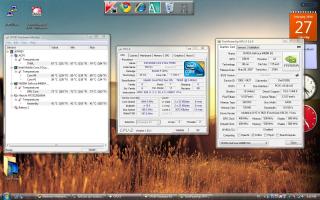
(ii) The Temp. with ZM NC2000 Notebook Cooler: 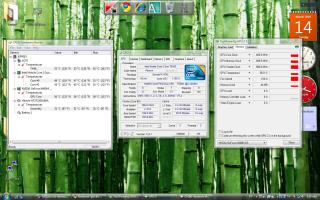
Added on March 10, 2010, 3:08 amQUOTE(Kimie @ Mar 9 2010, 11:14 PM) Hi Guys, WTA, is there any other way to buy the ORI adapter for 1420 60W/90W beside from online call? can i buy it from DELL authorized reseller around KL or PJ? How much it is the cost of the adapter and the warranty? thanks a lot... I'm not really sure about this. Oh yea, you are Dell Inspiron 1420 user too? May I add your name into our "List of Glory"? This post has been edited by Jeffrey1987: Mar 14 2010, 04:49 PM |
|
|
|
|
|
TSJeffrey1987
|
Mar 21 2010, 09:28 PM
|
|
|
QUOTE(pronamide @ Mar 21 2010, 08:05 PM) another inspiron 1420 owner reporting in..  Glad to have you here with us ...I already add you into our "List of Glory". Please share with us your exp. of being the Dell Inspiron 1420 owner ... love to hear that! |
|
|
|
|
|
weirdguy
|
Mar 22 2010, 10:19 AM
|
|
|
Do anyone have problems with the Eject Buttons? (DVD-ROM)
|
|
|
|
|
|
kelvin8810
|
Mar 22 2010, 01:00 PM
|
Getting Started
|
is this model still build with the nVidia 8400 Graphic Cards?
Thanks
|
|
|
|
|
|
TSJeffrey1987
|
Mar 22 2010, 07:30 PM
|
|
|
QUOTE(weirdguy @ Mar 22 2010, 10:19 AM) Do anyone have problems with the Eject Buttons? (DVD-ROM) For the time being, I do not have the optical drive eject problem. What happen to yours anyway? You can try to eject the optical drive by right click the optical drive icon at "My Computer" and then select "eject".
Added on March 22, 2010, 7:33 pmQUOTE(kelvin8810 @ Mar 22 2010, 01:00 PM) is this model still build with the nVidia 8400 Graphic Cards? Thanks Yea, I believe that Dell Inspiron 1420 only comes with NVidea GeForce 8400M GS which is a problematic GPU series in laptop.  Why you asked so? This post has been edited by Jeffrey1987: Mar 22 2010, 07:34 PM |
|
|
|
|
|
bo093
|
Mar 28 2010, 10:09 AM
|
|
|
QUOTE(Jeffrey1987 @ Mar 10 2010, 02:58 AM) Here is mine, share with us yours too. (i) The Temp. without ZM NC2000 Notebook Cooler:
(ii) The Temp. with ZM NC2000 Notebook Cooler:
Added on March 10, 2010, 3:08 amI'm not really sure about this. Oh yea, you are Dell Inspiron 1420 user too? May I add your name into our "List of Glory"? Around 70C your one. My is 73C. With cooler pad. and without. If I put my hand near the exhaust. It feel like can cook eggs.  Maybe I need to try one of these http://www.evercool.com.tw/products/nb_ma1.htmhttp://www.evercool.com.tw/products/nb_ft1.htmhttp://www.evercool.com.tw/products/nb_fa.htm |
|
|
|
|



 Quote
Quote











 0.0281sec
 0.24
0.24
 6 queries
 GZIP Disabled