Welcome Guest ( Log In | Register )

Outline · [ Standard ] · Linear+

 Dell Inspiron 1420 User Thread, Dell Inspiron 1420 Owners' Reviews

views
     
TSJeffrey1987
post Feb 14 2010, 08:20 PM

Regular
******
Senior Member
1,661 posts

Joined: Apr 2009


QUOTE(lowlock @ Feb 14 2010, 08:09 PM)
that wifi switch rght
*
hmm.gif Initially, I think like that too. However, the bluetooth always go off when I switch it off. Thus, I believe that the switch has to be connected to the bluetooth. From the 2nd picture, you can notice that the bluetooth indicator light goes off when I switch it off ... In order to verify my hypothesis is true, maybe you can try on your GF's laptop ... blush.gif
TSJeffrey1987
post Feb 15 2010, 11:18 PM

Regular
******
Senior Member
1,661 posts

Joined: Apr 2009


QUOTE(bo093 @ Feb 15 2010, 06:32 PM)
C2D 1.8GHz
2GB Ram
220GB HDD
8400M GS

After just 1.4 year+ got hit by the GFX card.
Swap the motherboard.
*
thumbup.gif Welcome to our new Dell Inspiron 1420 thread. Thanks for sharing with us your specifications of your laptop. biggrin.gif First and foremost, I have heard from you that your Dell Inspiron 1420 laptop occured GPU problem after 1.4 years of usage and eventually lead to the failure of motherboard. At that moment, are you still in warranty period? If not, how much you need to pay for your swapping of motherboard? hmm.gif

Besides that, how much your laptop cost you when you 1st bought it? Like mine, I have bought mine for RM 3700 including a Targus backpack. thumbup.gif


PS: I have added your name into our "List of Glory" ... rclxm9.gif

This post has been edited by Jeffrey1987: Feb 16 2010, 02:57 AM
TSJeffrey1987
post Feb 16 2010, 05:19 PM

Regular
******
Senior Member
1,661 posts

Joined: Apr 2009


QUOTE(bo093 @ Feb 16 2010, 09:56 AM)
Around Rm2700+
The thing about the GPU is.
If that fail. You must swap the motherboard.

Just recently. Swap OS. To XP.
*
O.I.C ... Anyway, why don't you try on the Microsoft's newest OS- Windows 7. I think it will run as smooth as Windows XP too ... biggrin.gif
TSJeffrey1987
post Feb 16 2010, 08:48 PM

Regular
******
Senior Member
1,661 posts

Joined: Apr 2009


QUOTE(bo093 @ Feb 16 2010, 08:24 PM)
I get W7 when I can.
*
Oh yea, how many years of warranty do you have for your laptop?
TSJeffrey1987
post Feb 17 2010, 01:15 PM

Regular
******
Senior Member
1,661 posts

Joined: Apr 2009


QUOTE(Grimm @ Feb 17 2010, 12:12 PM)
Inspiron 1420 user that lost his laptop T_T
*
sad.gif Sorry to hear that. Actually, when you lost your Dell Inspiron 1420 laptop & how did it being stolen? As I saw from your location status- Melbourne, Australia, did you lost your laptop there?

This post has been edited by Jeffrey1987: Feb 17 2010, 01:16 PM
TSJeffrey1987
post Feb 18 2010, 06:04 AM

Regular
******
Senior Member
1,661 posts

Joined: Apr 2009


biggrin.gif Ladies and Gentlemen,

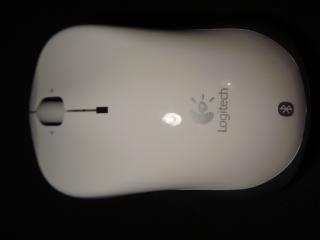
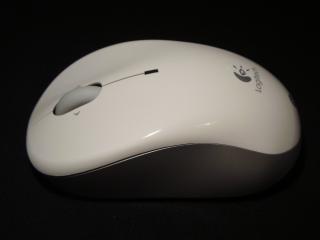
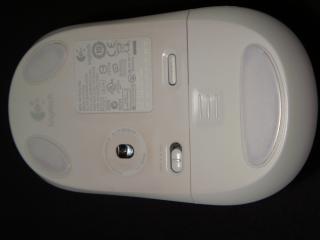
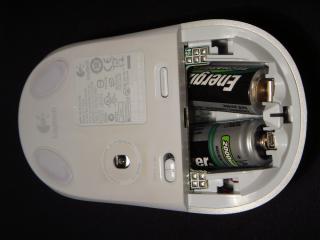
Today, I would like to share with you guys my laptop accessories which I have used them along with my Dell Inspiron 1420 for 2 years. Hereby, I would like to show you guys my mouse, that is, V470 Cordless Laser Mouse for Bluetooth (White) . For your informations, I bought my mouse right after I received my laptop. The main reason I bought Logitech mouse is because I personally believe the quality built that was promised by Logitech though the price was quite high at that time. The colour is white which I purposely chose it in order to match it with my alpine white laptop. biggrin.gif Below are some pictures of my precious mouse:

Attached Image Attached Image Attached Image

Attached Image Attached Image Attached Image

This post has been edited by Jeffrey1987: Feb 18 2010, 06:23 AM
TSJeffrey1987
post Feb 19 2010, 09:52 PM

Regular
******
Senior Member
1,661 posts

Joined: Apr 2009


QUOTE(eprhaim @ Feb 19 2010, 09:39 PM)
hello Jeffrey...was invited here by u...lol...actually the post was for my uncle...wanted a quick solution but now since new year is gone so...i forgot the specs...haha...btw need to change the motherboard if the screen got blur??cause it cost around RM400 le.... cry.gif
*
You are welcome to our thread though ... biggrin.gif Actually, Dell Inspiron 1420 laptop has GPU problem ... did your uncle's laptop equipped with NVidea GeForce 8M?
TSJeffrey1987
post Feb 27 2010, 11:30 PM

Regular
******
Senior Member
1,661 posts

Joined: Apr 2009


rclxms.gif Hello guys,

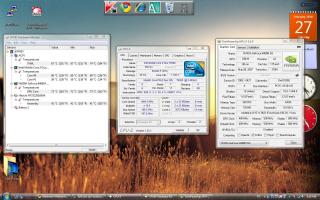
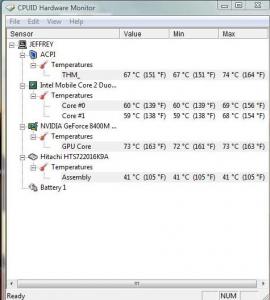
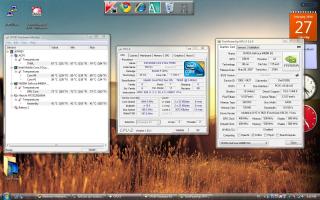
Today, I would like to share with you guys my Dell Inspiron 1420's Benchmark. As you can see from my screenshots, my CPU and GPU temperatures are relatively high. How about you guys?

Attached Image Attached Image

This post has been edited by Jeffrey1987: Feb 27 2010, 11:33 PM
TSJeffrey1987
post Feb 28 2010, 08:45 PM

Regular
******
Senior Member
1,661 posts

Joined: Apr 2009


QUOTE(eprhaim @ Feb 28 2010, 12:09 PM)
from wat i know laptops are like tat. where did u use it when u do this? when it is on ur lap?for laptops there is this cooler that u can put under the laptops...
*
I did the temperature measurement by lying my laptop on my table without using any laptop cooler. The room temperature here is around 20 degree celcius as now is still consider winter at Germany. In my opinion, the CPU and GPU temperatures are quite high compared to other laptops. How about your uncle's one? hmm.gif
TSJeffrey1987
post Mar 1 2010, 01:21 PM

Regular
******
Senior Member
1,661 posts

Joined: Apr 2009


QUOTE(mad_man @ Mar 1 2010, 11:16 AM)
All sifu's here,
sorry to butt in but I got a problem with me 1420.

My 1420 failed to boot. it came out stating that there is a problem in booting with the OS from the HDD and asked to boot with repair (recomended), but once i choose the option, it just froze with a blank screen!
I went to the boot setup and tried to boot with the vista CD that came with, but halfway thru loading windows (after a blue flicker on the webcam), everything froze again! I thought it needed some time so I left it running as it is but after 6 hours still the same blank screen.
The HDD indicator on the laptop did not flash at all!

Got my 1420 2 years ago, running on vista premium, 2GB RAM, Celeron Core Duo. there is ample disc space.
I m no techie so would appreciate your valuable feedbacks....
HELP PLEASE!
*
In simple words, your laptop can't boot up into the Windows? Right? Recently, did you installed some new softwares? Maybe you can try to scan your hardwares in order to check their functionality. If there are no problems occured, then that might be a big probability that you have installed some incompatible softwares into your laptop. Thus, you can try to reset your laptop to previous date and boot it up again. All the best!

This post has been edited by Jeffrey1987: Mar 1 2010, 02:14 PM
TSJeffrey1987
post Mar 2 2010, 04:30 PM

Regular
******
Senior Member
1,661 posts

Joined: Apr 2009


QUOTE(mad_man @ Mar 1 2010, 02:07 PM)
Hi Bro Jeff,
thks for your advice

new software, hmmm... it could be the FOC spybot software some friends recomended....
but i noticed that my laptop has been "behaving" wierdafter the installation. slow startup... excessive heat... but didnt take note of it.... my mistake...

just a quick 1.... how do i go about scan the hardwares to ensure functionailty and reseting my laptop to the previous date as i can;t even go beyond anything...

thanks again for your advice...
*
For the hardware scan, you press the button "F12" before booting the Windows. After that, you select the hardware scan in order to proceed. Then, let it scan your hardwares and wait until it finishes. thumbup.gif

PS: I have added your name into our "List of Glory". rclxms.gif

This post has been edited by Jeffrey1987: Mar 2 2010, 04:32 PM
TSJeffrey1987
post Mar 3 2010, 03:32 PM

Regular
******
Senior Member
1,661 posts

Joined: Apr 2009


QUOTE(mad_man @ Mar 3 2010, 01:40 PM)
Hi Jeff,
thks for update.
Seems hard disc kong! everything else working normally (thank goodness)
headache now have to load everything again!

thks again for all your advises and help!

BTW, what is "list of Glory?"
*
laugh.gif All the best for your laptop. Anyway, "List of Glory" is a list of Dell Inspiron 1420 owners' name which I have created specially for this thread. You can refer to the 1st post of this thread. icon_rolleyes.gif
TSJeffrey1987
post Mar 10 2010, 02:58 AM

Regular
******
Senior Member
1,661 posts

Joined: Apr 2009


QUOTE(bo093 @ Mar 9 2010, 10:58 PM)
Can you all share your temp from your laptop?
*
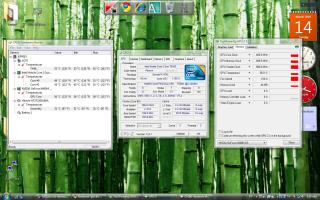
Here is mine, share with us yours too.

(i) The Temp. without ZM NC2000 Notebook Cooler:

Attached Image

(ii) The Temp. with ZM NC2000 Notebook Cooler:

Attached Image


Added on March 10, 2010, 3:08 am
QUOTE(Kimie @ Mar 9 2010, 11:14 PM)
Hi Guys,

WTA, is there any other way to buy the ORI adapter for 1420 60W/90W beside from online call? can i buy it from DELL authorized reseller around KL or PJ? How much it is the cost of the adapter and the warranty?

thanks a lot...
*
I'm not really sure about this. hmm.gif Oh yea, you are Dell Inspiron 1420 user too? May I add your name into our "List of Glory"?

This post has been edited by Jeffrey1987: Mar 14 2010, 04:49 PM
TSJeffrey1987
post Mar 21 2010, 09:28 PM

Regular
******
Senior Member
1,661 posts

Joined: Apr 2009


QUOTE(pronamide @ Mar 21 2010, 08:05 PM)
another inspiron 1420 owner reporting in.. smile.gif
*
rclxms.gif Glad to have you here with us ...I already add you into our "List of Glory". Please share with us your exp. of being the Dell Inspiron 1420 owner ... love to hear that!

TSJeffrey1987
post Mar 22 2010, 07:30 PM

Regular
******
Senior Member
1,661 posts

Joined: Apr 2009


QUOTE(weirdguy @ Mar 22 2010, 10:19 AM)
Do anyone have problems with the Eject Buttons? (DVD-ROM)
*
For the time being, I do not have the optical drive eject problem. What happen to yours anyway? You can try to eject the optical drive by right click the optical drive icon at "My Computer" and then select "eject". smile.gif


Added on March 22, 2010, 7:33 pm
QUOTE(kelvin8810 @ Mar 22 2010, 01:00 PM)
is this model still build with the nVidia 8400 Graphic Cards?

Thanks
*
Yea, I believe that Dell Inspiron 1420 only comes with NVidea GeForce 8400M GS which is a problematic GPU series in laptop. sad.gif Why you asked so?

This post has been edited by Jeffrey1987: Mar 22 2010, 07:34 PM
TSJeffrey1987
post Mar 28 2010, 03:28 PM

Regular
******
Senior Member
1,661 posts

Joined: Apr 2009


QUOTE


hmm.gif In my humble opinion, Zalman notebook cooler served me and most of the other end users very well. Thus, maybe you can consider of buying a Zalman notebook cooler? Anyway, I never saw the review on this type of notebook cooler. So, I'm not really sure whether it is really efficient on dissipating heat from the laptop. Nevertheless, it still depends on your budget. If your budget is around:

(i) RM200 = Zalman NC2000.
(ii) RM100 - RM199 = Zalman NC1000 or NC1500.
(iii) RM 50 - RM 99 = Cooler Master NotePal Color Infinite, Cooler Master NotePal U2 and etc.

Besides of Zalman NC2000, I also recommend you to buy Cooler Master NotePal U2 which you can adjust your location of the fan. I have seen some reviews on this and all are positive feedbacks from the laptop owners.

Below is the unboxing video of my Zalman NC2000:


This post has been edited by Jeffrey1987: Mar 28 2010, 07:35 PM
TSJeffrey1987
post Mar 28 2010, 07:16 PM

Regular
******
Senior Member
1,661 posts

Joined: Apr 2009


QUOTE(bo093 @ Mar 28 2010, 06:27 PM)
Well the product I link is not a cooler pad.
Well that item will help draw out the hot air.
This item plus cooler pad could be a wining solution.
But I have to get a better cooling pad.
I Cooler Master NotePal U2 will the best option since can adjust the fan location.
Cause my laptop i put the vent ontop of the fan.
*
smile.gif Yea, I know that they are not cooling pad. Anyway, why your laptop's temperature is so high though you are using a notebook cooler too? What is your current notebook cooler brand? May I have a look on your screen shot of your temperature monitoring sensors such as HWMonitor?

Last but not least, Cooler Master NotePal U2 is really a good choice as it is cheap and relatively good with its adjustable fan. icon_rolleyes.gif


Added on March 28, 2010, 7:23 pm
QUOTE(lugiamcg @ Mar 28 2010, 06:36 PM)
bro Jeffery1987,
the Zalman NC2000 looks promising...may i know which shop sells it?(klang valley, kl, selangor)

Thanks  biggrin.gif
*
As you can see from the unboxing video in YouTube above, I have ordered it from Amazon.de as in Germany I hardly can find the Zalman products from the electronic shops which is really pathetic and it cost me around 46 EUROS. As for shops in Malaysia, I think you can find it in any Low Yatt Plaza shops but I do come across a Low Yatt Forumer who bought it quite cheap from a dealer in this forum. Click this.

This post has been edited by Jeffrey1987: Mar 28 2010, 07:33 PM

TSJeffrey1987
post Mar 28 2010, 08:00 PM

Regular
******
Senior Member
1,661 posts

Joined: Apr 2009


QUOTE(bo093 @ Mar 28 2010, 07:55 PM)
Some china made brand.
Im not even sure why is it this hot.
I clean the vent often. And the pad.

But I think it got to be the coolling pad fan or the pad itself.
The pad don't have holes or vent.

Forget about the 73C. Now is 68C.  shocking.gif
*
I think your notebook cooler is not suitable for Dell Inspiron 1420. Anyway, are you a gamer? If you do, then it is probably one of the contributing factors. smile.gif

This post has been edited by Jeffrey1987: Mar 28 2010, 08:00 PM
TSJeffrey1987
post Mar 29 2010, 08:36 AM

Regular
******
Senior Member
1,661 posts

Joined: Apr 2009


QUOTE(bo093 @ Mar 28 2010, 09:23 PM)
I do play games.
But pretty much light games. Like Counter Strike 1.6 and COD4 with tweaks.
CS1.6, my Frame Per Second is 100. COD4, I get FPS 120 highest.

If I use V-Sync will the Graphic card get cooler?
60 FPS for 60Hz.
There for not making the GC producing extra frames.

I sound a bit abusive there.  sweat.gif

Okay Now I understand why is on 73C, I was watching video on youtube. Fullscreen of course.
68C when idling. tongue.gif
*
laugh.gif Actually, I'm not a gamer. Thus, I'm not really good at these stuffs such as frame per second and etc. Nevertheless, I do know that playing games can heat up the GPU instantly. biggrin.gif
TSJeffrey1987
post Apr 1 2010, 05:59 PM

Regular
******
Senior Member
1,661 posts

Joined: Apr 2009


QUOTE(Corrupted Spirits @ Apr 1 2010, 03:09 PM)
My girlfriend is using the Inspiron 1420

But during yesterday,she did the windows update and when everything was done,the screen brightness is very dim.

Usually when we connect using the power plug and not the battery,the brightness is high but then now using power plug the brightness is dimmer than using battery.

Any ideas what happened?
*
Have you went to the "Power Options" inside the "Control Panel" to check whether you have accidentally lowered the plan brightness or not? hmm.gif

3 Pages < 1 2 3 >Top
 

Change to:
| Lo-Fi Version
0.0163sec    0.64    7 queries    GZIP Disabled
Time is now: 7th December 2025 - 06:53 PM