Outline ·
[ Standard ] ·
Linear+
WTA SB Live 5.1 Speaker to Samsung LCD, pc speaker to LCD TV
|
TSyoung
|
 Jan 21 2010, 10:01 PM, updated 16y ago Jan 21 2010, 10:01 PM, updated 16y ago
|
Getting Started


|
Hi all,
I just bought an Samsung LCD and would like to connect my SB Live 5.1 to it. I did some research there is a converter change the SB Live wires to RCA. But I have no clue where to get it. On the other hand, I went to a shop to ask about this converter and the person told me that an amp is required. So I need some help regarding this issue.
My speaker model is SB Live! 5.1 comes with a sound card. Around 6 years old.
TV model : Samsung series 6- 610
Thank you for all replies before hand.
|
|
|
|
|
|
arafat
|
Jan 21 2010, 10:12 PM
|
|
|
you need to find a 3.5mm jack to rca Y cable. I'm sure you can find in hypermarket or local electric store. amp is not required. 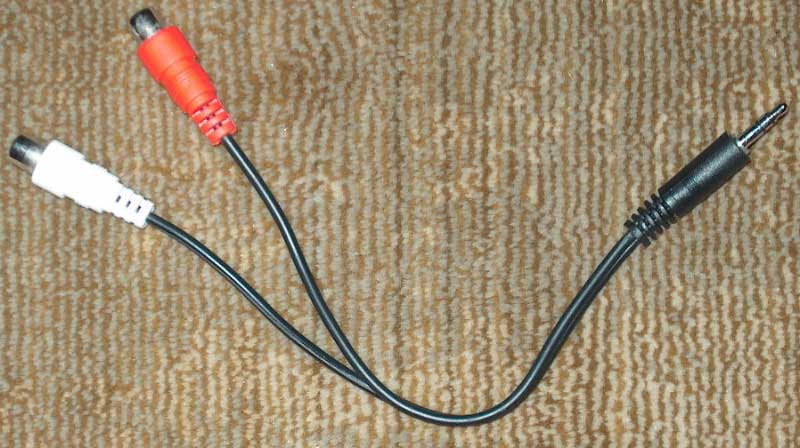 |
|
|
|
|
|
TSyoung
|
Jan 21 2010, 10:15 PM
|
Getting Started
|
Hi,
Thanks for the reply. But my speaker is 5.1 . It has 3 jack outlets instead of the usual single jack. It comes with a sub-woofer as well
|
|
|
|
|
|
arafat
|
Jan 23 2010, 02:54 AM
|
|
|
QUOTE(young @ Jan 21 2010, 10:15 PM) Hi, Thanks for the reply. But my speaker is 5.1 . It has 3 jack outlets instead of the usual single jack. It comes with a sub-woofer as well in first post, you asked on how to connect your sound card to lcd tv..but now?  can you please describe clearly your setup? |
|
|
|
|
|
TSyoung
|
Jan 24 2010, 11:46 PM
|
Getting Started
|
My speaker is Creative Inspire 5100 which is a 5.1 system. When I bought it , it was bundled with SoundBlaster Live! sound card. The 5 speakers connects to the sub-woofer individually. From the sub-woofer , 3 port out jack(wires) similar to 3.5mm jack then connects to sound card. However, that is the set up on a PC. Currently I would like to connect the speakers to a LCD TV. On a PC , the speakers run connects through the sound card which has specific ports for each of the 3 cable. On the other hand, the LCD TV doesn't. I was wondering how could I connect the speakers to the LCD TV. Thank you!  |
|
|
|
|
|
sonerin
|
Jan 25 2010, 07:25 AM
|
|
|
I don't think it is possible to connect the speakers to your LCD TV.
|
|
|
|
|
|
Dark NT
|
Jan 25 2010, 01:35 PM
|
|
|
Don't think you can do that.
the 3 jacks is designed only for PC sound card.
I had same problem too. I have Enzo 4000 with 3 jacks. In the end I still connect to my LCD, but using the RCA (white/red) only.
Output is stereo and no 5.1 , although I am pretty happy with it, its a PC speaker afterall.
|
|
|
|
|
|
RAMChYLD
|
Jan 25 2010, 01:54 PM
|
|
|
EDIT: You want to connect TV to speakers. My bad. Yeah. You need the cable shown by Arafat. And even then only front two speakers will have sound. Cannot be helped(*1). You're better off getting an AVR.
(*1) If your TV has audio out or headphones out, you can theorically shoehorn it to PC by plugging it into PC Line-In, but then there's no point in doing that since the PC must be always on to process the sound. Might as well mod your PC into a HTPC and use tuner card...
This post has been edited by RAMChYLD: Jan 25 2010, 01:59 PM
|
|
|
|
|
|
TSyoung
|
Jan 26 2010, 12:04 AM
|
Getting Started
|
Thank you for all the reply. Seems impossible to get 5.1 then , only normal stereo.
Thanks again
|
|
|
|
|
|
arafat
|
Jan 27 2010, 12:10 AM
|
|
|
actually it is still possible to get the front & rear speakers working, for centre speakers you need to enable matrix mode if available you need to get this type of converter  i got it free with my logitech |
|
|
|
|



 Quote
Quote


 0.0152sec
 0.53
0.53
 5 queries
 GZIP Disabled