Outline ·
[ Standard ] ·
Linear+
Speaker's sound is too loud
|
TSroxxor
|
 Jan 12 2010, 02:10 PM, updated 16y ago Jan 12 2010, 02:10 PM, updated 16y ago
|
Getting Started


|
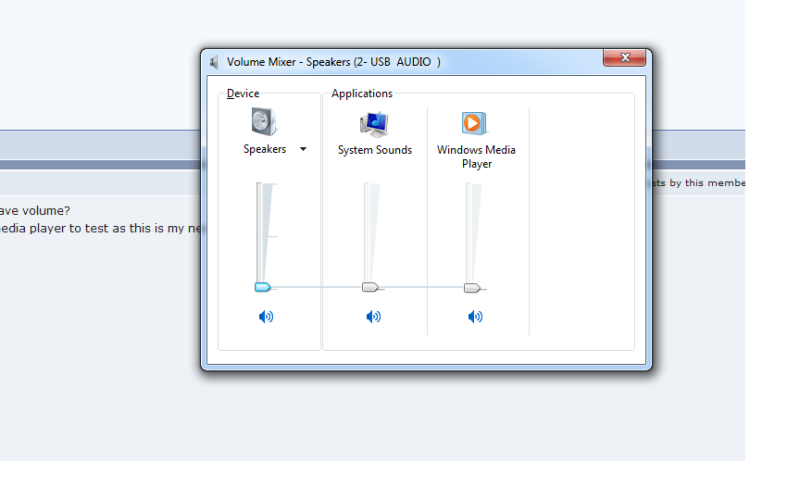
I set my system sound to the lowest, which is 1%, and set my speaker's volume to the lowest possible, but I still receive a loud sound from my speaker. Have to adjust the media player's volume to about 10% then only can listen song at normal loudness. I am using a logitech S150 usb speakers. Any idea how to solve this problem?
|
|
|
|
|
|
terakiyuki
|
Jan 12 2010, 02:32 PM
|
|
|
QUOTE(roxxor @ Jan 12 2010, 02:10 PM) I set my system sound to the lowest, which is 1%, and set my speaker's volume to the lowest possible, but I still receive a loud sound from my speaker. Have to adjust the media player's volume to about 10% then only can listen song at normal loudness. I am using a logitech S150 usb speakers. Any idea how to solve this problem? try to decrease the wave volume too... not just master volume.. |
|
|
|
|
|
TristanX
|
Jan 12 2010, 02:34 PM
|
Where is my stars?

|
You can try using this software to control volume with your mouse. http://www.nirsoft.net/utils/volumouse.htmlIt's customizable and you can set hotkeys + mouse wheel for it. |
|
|
|
|
|
alexei
|
Jan 12 2010, 02:42 PM
|
|
|
what software u use to play song? Does is have an internal volume booster? You can look for it and turn it off.
|
|
|
|
|
|
TSroxxor
|
Jan 12 2010, 03:02 PM
|
Getting Started
|
How do I reduce the wave volume?
I was using windows media player to test as this is my new pc. Even playing youtube video is loud as well.
|
|
|
|
|
|
terakiyuki
|
Jan 12 2010, 03:09 PM
|
|
|
 the one in the red circle is wave volume |
|
|
|
|
|
viruz019
|
Jan 12 2010, 03:28 PM
|
|
|
try click on the "speakers" a menu will open up..den look around the Levels and Enhancement..at enhancement scroll down till u see Loudness Equalization.. try turning it on might help solve  |
|
|
|
|
|
TSroxxor
|
Jan 12 2010, 03:35 PM
|
Getting Started
|
QUOTE(viruz019 @ Jan 12 2010, 03:28 PM) try click on the "speakers" a menu will open up..den look around the Levels and Enhancement..at enhancement scroll down till u see Loudness Equalization.. try turning it on might help solve Tried. It doesnt help either.  |
|
|
|
|
|
lex
|
Jan 12 2010, 04:15 PM
|
Old Am I?

|
"USB audio"?  What sound card is this?  |
|
|
|
|
|
TSroxxor
|
Jan 12 2010, 04:26 PM
|
Getting Started
|
The sound card I think its VIA something. The built in sound card for asus p7p55m mobo. 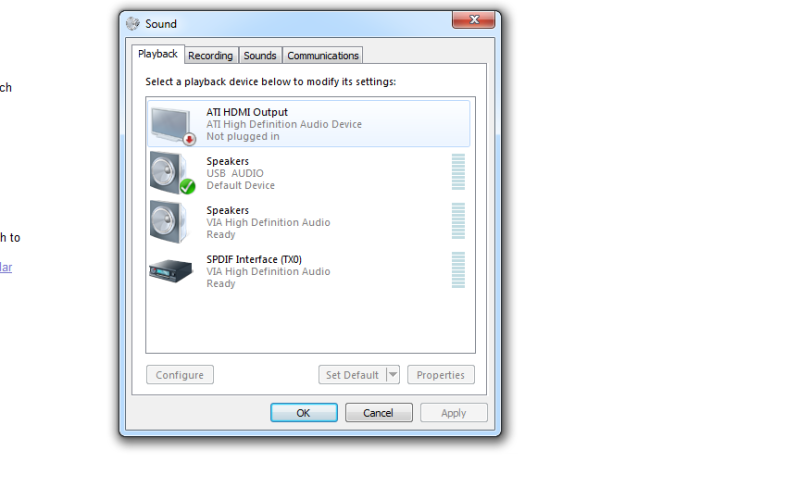 Only enabling the USB audio allows the speaker to produce sound. The rest wont do it. |
|
|
|
|
|
viruz019
|
Jan 12 2010, 04:37 PM
|
|
|
hrm..try reading the guide book tat comes along with the speker?
|
|
|
|
|
|
TSroxxor
|
Jan 12 2010, 04:49 PM
|
Getting Started
|
Yea read already. Not much instructions there. It just asks to plug in the usb bla bla bla. Could it be the speaker's problem?
|
|
|
|
|
|
muhiann
|
Jan 12 2010, 09:08 PM
|
|
|
i also have logitech s150 usb speaker..have problem like your..1% also loud..i think its normal la for this usb speaker..the solution during watch youtube,movie or music just adjust the volume on the player it self.
|
|
|
|
|
|
bryant601
|
Jan 12 2010, 09:27 PM
|
|
|
same to me aso.. mine aso usb speaker put at 1% the sound come out from the speaker super loud..
|
|
|
|
|
|
TSroxxor
|
Jan 12 2010, 09:50 PM
|
Getting Started
|
Yea I think its the problem with the speaker. I use my old dell speaker also no problem.
|
|
|
|
|
|
Jit
|
Jan 13 2010, 01:01 AM
|
|
|
so case resolved?
|
|
|
|
|
|
lex
|
Jan 13 2010, 01:09 AM
|
Old Am I?
|
QUOTE(roxxor @ Jan 12 2010, 04:26 PM) The sound card I think its VIA something. The built in sound card for asus p7p55m mobo. Only enabling the USB audio allows the speaker to produce sound. The rest wont do it. It doesn't seem like its using the internal audio at all but using the external USB audio instead (speaker comes with its own "sound card").. Thus you have to adjust the USB audio controls, not the internal one.. This post has been edited by lex: Jan 13 2010, 01:10 AM |
|
|
|
|
|
TSroxxor
|
Jan 13 2010, 01:14 AM
|
Getting Started
|
Yea I adjusted the usb audio volume and everything to the lowest, but still producing loud sound. The volume adjust on the speaker, when you increase the volume, it actually increases the volume in the system sound, unlike my old ones, where the system sound remains the same even I adjusted the volume on the speaker.
|
|
|
|
|
|
lex
|
Jan 13 2010, 01:19 AM
|
Old Am I?
|
QUOTE(roxxor @ Jan 13 2010, 01:14 AM) Yea I adjusted the usb audio volume and everything to the lowest, but still producing loud sound. The volume adjust on the speaker, when you increase the volume, it actually increases the volume in the system sound, unlike my old ones, where the system sound remains the same even I adjusted the volume on the speaker. That's because the USB volume knob is "connected" to the USB volume control (both are the same).  How much did you buy these speakers for? |
|
|
|
|
|
lex
|
Jan 13 2010, 01:26 AM
|
Old Am I?
|
QUOTE(roxxor @ Jan 13 2010, 01:22 AM) Bought for rm35. Quite cheap.  If its still new then go back to the shop and complain.. then ask for better speaker with top-up.. Make sure it isn't another USB one. |
|
|
|
|



 Quote
Quote






 0.0193sec
 0.40
0.40
 5 queries
 GZIP Disabled