


Check this out --> Cydia Apps Compatibility with iPad
This post has been edited by Edoras: May 12 2010, 04:52 PM
Hardware Apple iPad Discussion Thread | V1, Everything about iPad
|
|
 May 12 2010, 04:50 PM May 12 2010, 04:50 PM
Return to original view | Post
#121
|
 
Senior Member
1,134 posts Joined: Jan 2003 
|
I have Jailbroken my iPad with Spirit.
Check this out --> Cydia Apps Compatibility with iPad This post has been edited by Edoras: May 12 2010, 04:52 PM |
|
|
|
|
|
May 12 2010, 04:55 PM
Return to original view | Post
#122
|
|
Senior Member
1,134 posts Joined: Jan 2003
|
QUOTE(rheza02 @ May 12 2010, 04:54 PM) you're late buddy. I was very cautious not to jump in earlier...   Glad I did... BTW - Anyone have tried Cydia app called "Poof"? Poof is a simple App available through Cydia which allows you to hide and unhide your applications. It allows you to hide all AppStore, Cydia as well as system integrated apps on the iPhone 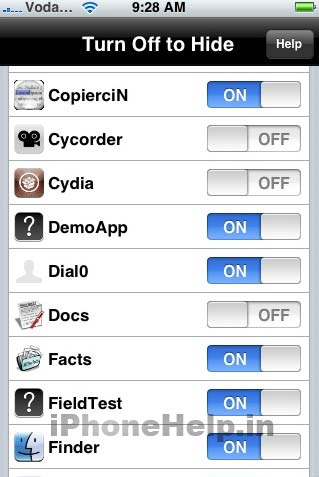 This post has been edited by Edoras: May 12 2010, 04:57 PM |
|
|
May 13 2010, 10:09 AM
Return to original view | Post
#123
|
|
Senior Member
1,134 posts Joined: Jan 2003
|
QUOTE(mAxPC @ May 12 2010, 06:34 PM) My jailbroken iPad only has 1 Cydia app which is Lockdown to enable password access to the mail app (*or any app you want), other than that, not much else. Bought Real Racing today, got bored of NFS Shift. But I thought Lockdown is not compatible with iPad yet. Do you encounter any problems? |
|
|
May 14 2010, 11:33 AM
Return to original view | Post
#124
|
|
Senior Member
1,134 posts Joined: Jan 2003
|
Here's what I have purchased so far...
List of iPad Apps 1 - MaxJournal - $ 2.99 (April 30, 2010) 2 - Paperdesk - $ 1.99 (May 1, 2010) 3 - GoodReader - $ 0.99 (April, 2010) 4 - Popular Science - $ 4.99 (April 2010) 5 - List n Do - $1.99 (May 3, 2010) - Universal 6 - Atomic Web Browser - $0.99 (May 8, 2010) - Universal 7 - BlogPress - $2.99 (May 8, 2010) - Universal 8- Quran Majeed - $4.99 (May 10, 2010) - Universal 9- AppAdvice - $1.99 (May 11, 2010) - Universal 10- ToDo for iPad - $4.99 (May 13, 2010) Can we continue our iPad application topic in this thread? --> http://forum.lowyat.net/topic/1407526 |
|
|
May 15 2010, 05:19 PM
Return to original view | Post
#125
|
|
Senior Member
1,134 posts Joined: Jan 2003
|
QUOTE(kukubisu @ May 15 2010, 04:54 PM) Hi, Yes, with that kind of usage and the loss of "usb", you might regret buying an ipad.Im intrested to buy iPad as my new mini laptop for me to: Some uses in the office (word documentation, note taking, some presentation etc), Surfing the internet at Starbuck or Mcd or etc, Utilize it while out-station (word documentation, note taking, some presentation etc), on road journey multimedia coz the battery is impressive... The price is being an issue which the ipad+Keyboard dock+ VGA Adapter = +-RM3000 I really interested on it. But The most fundamental thing is lost = USB port Any suggestions from iPad User or any experts? Is it worth to spend almost RM3k for my listed purpose? Will I regret soon after bought it? |
|
|
May 15 2010, 09:22 PM
Return to original view | Post
#126
|
|
Senior Member
1,134 posts Joined: Jan 2003
|
QUOTE(keyven @ May 15 2010, 05:10 PM) for the activities you listed, iPAD is too much from price point of view. Hence better buy a net book. There is no MS office application for ipad. Only Apple's keynote, pages & numbers are available where you cant save back to MS office format. Better Net book (ASUS or HP or whatever you feel Ok for the price) Office 2 can edit MS Word. |
|
|
May 16 2010, 08:19 AM
Return to original view | Post
#127
|
|
Senior Member
1,134 posts Joined: Jan 2003
|
QUOTE(little ice @ May 16 2010, 12:57 AM) hmm it seems like everyone is debating about the netbook/laptop versus ipad, and 3G-less versus 3G all over the net. WORKi wonder what do you use the ipad mainly for? I can use either GoodReader to read the PDF files or use iAnnotate PDF to read and comment/highlight/annotate my tons of PDF files. Use my Todo app to manage my daily Things-To-Do. If at time, I want to write my thoughts, I use the MindNode (a mind mapping app). Going to meetings without my pen and paper because now I just use my Paperdesk app. HOME I use Calibre to convert a number of PDF files to ePub for easy reading in iBook style. During my spare time, I use MaxJournal to write my private Diary. I don't have to buy an Aquarium coz the iPad have an excellent app that replace the physical aquarium. Browsing Internet is really a breeze.... without having to boot up the computer. And reading the Net by lying down on bed... For blogging purposes, I use BlogPress - easy to blog from everywhere. PLAY Great app like Iron Man 2... wow... This post has been edited by Edoras: May 16 2010, 08:20 AM |
|
Topic ClosedOptions
|
| Change to: |  0.0164sec 0.0164sec
 0.79 0.79
 7 queries 7 queries
 GZIP Disabled GZIP Disabled
Time is now: 10th December 2025 - 06:56 AM |
 Quote
Quote