

Looks like automan5891's speed for TM snail mail was also throttled down...
Don't you think TM is too much ?, Fight for our rights !
Don't you think TM is too much ?, Fight for our rights !
|
|
 Dec 28 2009, 02:38 AM Dec 28 2009, 02:38 AM
Return to original view | Post
#1
|
 
Senior Member
974 posts Joined: Jan 2009 
|
Looks like automan5891's speed for TM snail mail was also throttled down...
|
|
|
|
|
|
Dec 28 2009, 07:05 PM
Return to original view | Post
#2
|
|
Senior Member
974 posts Joined: Jan 2009
|
QUOTE(fabianz03 @ Dec 26 2009, 04:40 PM) But YouTube is TOTALLY legal to use. This is my testing to show what happens. I have checked on this many times over many days and the results are reproduceable.How can they throttle our connection to YouTube ? The only problem we have now is we do not have enough proof to state that TM is actually throttling connections to YouTube.  Last test I did was today around 3.30pm. Step #1 Two files are uploaded to a local web server. First file is v10.zip. Second file is v10.flv. Both are 10MB in size. . v10.zip is NOT a real zip file. v10.flv is NOT a real video file. Both are the exact same text file with different filenames. Running MD5 check on each file produces the same checksum string indicating the contents of both files are exactly the same. Note #1 Using a local server eliminates any international connection or congestion issues. Using the same text file eliminates any filtering based on actual file contents such as zip or video file header identifiers. Step #2 Using IE7 browser, each file is downloaded using http method (direct download). Each file is downloaded one at a time. No other downloads are running at the same time. No download managers etc are running at the same time. No proxy server is being used. A 1Mbps Streamyx connection is used. A 1Mbps Jaring connection is used for comparison. Note #2 Using direct download eliminates any other factors that may influence the results. Using a Jaring connection as comparison eliminates any problem with the local webserver. Results v10.zip download rate is approx 100KB/s using Streamyx. v10.flv download rate is approx 25KB/s using Streamyx. v10.zip download rate is approx 105KB/s using Jaring. v10.flv download rate is approx 105KB/s using Jaring. So its only with the Streamyx connection where there is a difference in the file download speeds. The downloading can be repeated again but the results are the same. Step #3 v10.zip and v10.flv are downloaded using a FTP program using streamyx. Note #3 Using FTP and getting normal speeds eliminates any connection or congestion problems with either ISP networks or the webserver hosting the files. Result: All FTP downloads are at approx 105-110KB/s irrespective of file extension. Comparison testing: Step #4 Video files (.flv) hosted on a local server are streamed using HTTP progressive download method using a embedded flash player. These video also do not play smoothly using the Streamyx connection due to the constant play/stop/buffering cycle. However, the videos play smootly using the Jaring connection. Note #4 This eliminates that it is only YouTube video being throttled. The same slow down also affects other video streaming. Conclusion: Nothing to do with YouTube network or servers. Nothing to do with Streamyx users side. Nothing to do with local network connection or congestion. Nothing to do with international network connection or congestion. Nothing to do with DNS or routing etc. So, TM is throttling http download and video streaming speeds for .flv file extension? Remarks: 1. There are times where the v10.flv can be downloaded at full speed of approx 100KB/s like the v10.zip file. It is dificult to determine exactly when and under what conditions this can happen. At that time, YouTube video seems to stream smoothly as wel. Perhaps at those times the throttling is removed or there is some sort of random throttling going on. 2. An additional quick test similar to listed above using a v10.swf file also downloads at approx 25KB/s. So .swf are also being throttled. 3. Using a proxy, the videos stream smootly, again pointing to throttling on TM side for direct Streamyx connections. 4. The low rate at which the throttling is set to is not acceptable as you can hardly watch videos with constant pauses for buffering every few seconds. At the very least, the rate of throttling has to be increased to maybe 40-50KB/s (not sure exactly) for smooth playback. 5. If TM is using file extension to do throttling, this is not a good method at all. It is not only YouTube that streams videos. There are regular websites that may have videos too to promote their own product and services. These will be affected too. Can others comment on the above? Is there another explanation? What else apart from throttling can cause such a result? |
|
|
Dec 28 2009, 07:33 PM
Return to original view | Post
#3
|
|
Senior Member
974 posts Joined: Jan 2009
|
QUOTE(fabianz03 @ Dec 28 2009, 07:24 PM) Well, if we put throttling aside, the problem maybe bad routing. And currently the AAG cable is down. As I tested on a local server, this is not international routing. Unless TM own local network has problems. But I don't think so. There is no problem when I test the route to the local server. Also, from the same server, one file can download without problem, but another cannot. So its not routing.AAG does not come into play. I don't even think that the AAG link is being used for us as I don't see the tracerts have changed recently to show this. |
|
|
Dec 28 2009, 07:44 PM
Return to original view | Post
#4
|
|
Senior Member
974 posts Joined: Jan 2009
|
QUOTE(liquidsny @ Dec 28 2009, 07:32 PM) i do admit youtube is really slow to access but when u guys complaint over rapidshare/mu few month ago, i didn't have problem with it i mean my download was fine providing that i look fr the right ip. in youtube case, mayb they do capped it due to cases such as namewee videos... n bullying cases that keeps popping up on every flash video site Again, as I tested, this is not only YouTube. I just ran a quick similar test from an overseas server. Nothing to do with YouTube. The .zip file downloads as per normal speed, the .flv downloads at approx 25KB/s. This is http direct download. Not even streaming video. Just speed difference based on file extension.I also tried a .swf and its approx 25KB/s. But a .mov downloads at normal speed. All this within a few minutes testing. What else can you conclude if not file extension filtering / throttling? Added on December 28, 2009, 7:50 pm QUOTE(liquidsny @ Dec 28 2009, 07:36 PM) » Click to show Spoiler - click again to hide... « surely this is a great test achievement however u did not provide screenshot of ur test. we could just say u made this up.. same like streamyx, they say they didn't throttle and we say they did . it's just words against words Yes, I did not take screen shots. But you know, that also can be said to be false and it is still our word against theirs. When I spoke to customer service about YouTube being slow, I did mention to them that I can show them what is going on. This post has been edited by mylinear: Dec 28 2009, 07:50 PM |
|
|
Dec 28 2009, 09:54 PM
Return to original view | Post
#5
|
|
Senior Member
974 posts Joined: Jan 2009
|
QUOTE(fabianz03 @ Dec 28 2009, 07:53 PM) Thanks, from what I see YouTube is being mirrored locally now. No, that is not local mirror. It is probably Google's POP in India. Google / YouTube etc use a CDN. It is not always necessary you will get the same server when you ping youtube.The latency are too low for international routing. The YouTube website itself has no problems loading. It is the video streaming part. Why is it that the website loads ok, the searches returns results fast, all the thumbnail and the comments on the pages etc load ok. But the video streaming itself is slow? |
|
|
Dec 28 2009, 09:55 PM
Return to original view | Post
#6
|
|
Senior Member
974 posts Joined: Jan 2009
|
QUOTE(fabianz03 @ Dec 28 2009, 09:32 PM) So basically they're throttling all flash content ? I don't know about ALL flash content. But it seems to me .flv files as my testing shows.Lemme search 1Malaysia website got flash content or not. |
|
|
|
|
|
Dec 28 2009, 11:20 PM
Return to original view | Post
#7
|
|
Senior Member
974 posts Joined: Jan 2009
|
QUOTE(liquidsny @ Dec 28 2009, 07:36 PM) surely this is a great test achievement however u did not provide screenshot of ur test. we could just say u made this up.. same like streamyx, they say they didn't throttle and we say they did . it's just words against words Here's a suggestion.Those of you who knows this forum administrators should request they setup a similar test as I did on the forum server. It will take up some bandwidth so maybe limit the testing to a couple of days or to a selected group of forum users. Then different users can run the test at different times of the day and report the results. Extra info such as IP range, package type etc etc can also be provided. Ten we can all get a better idea of what is going on or see a pattern of this problem. So, who knows the admins to make this request? Admins, if you are reading, what do you think about this? |
|
|
Dec 30 2009, 12:48 AM
Return to original view | Post
#8
|
|
Senior Member
974 posts Joined: Jan 2009
|
QUOTE(liquidsny @ Dec 28 2009, 07:36 PM) surely this is a great test achievement however u did not provide screenshot of ur test. we could just say u made this up.. same like streamyx, they say they didn't throttle and we say they did . it's just words against words Here is some screenshots of one of my tests.1. Downloading .zip file  2. Downloading .flv file 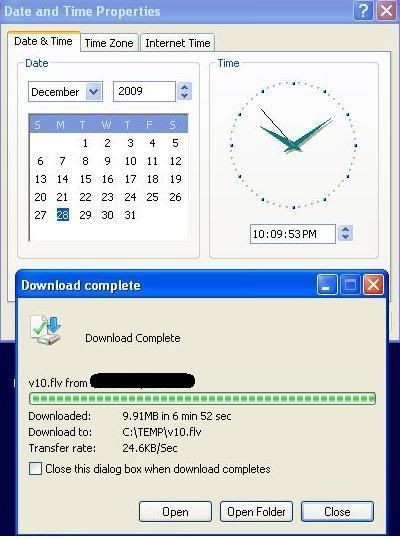 3. Downloading .swf file 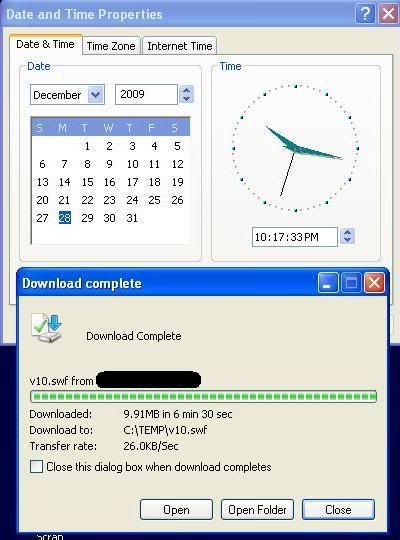 4. Downloading .zip file (trying again for comparison) 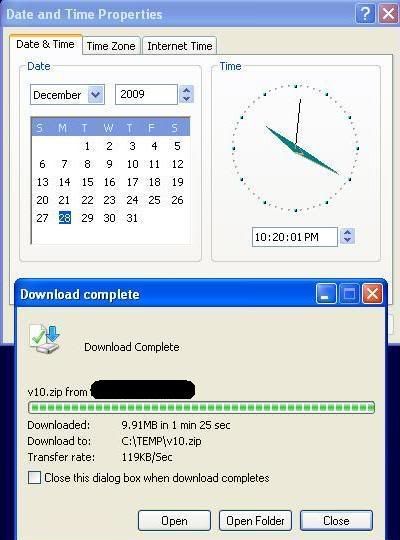 |
|
|
Dec 30 2009, 03:46 PM
Return to original view | Post
#9
|
|
Senior Member
974 posts Joined: Jan 2009
|
My testing indicates direct download of .mp4 file is normal.
|
|
|
Dec 30 2009, 03:49 PM
Return to original view | Post
#10
|
|
Senior Member
974 posts Joined: Jan 2009
|
QUOTE(automan5891 @ Dec 30 2009, 03:22 PM) No throttle time is from 1am till 11am. In my earlier post, the screenshots show the testing was at 10pm and was slow. I just tried now at 3.30pm and .flv is downloading slow. So, it cannot be only between 1am - 11am.Added on December 30, 2009, 3:58 pm QUOTE(fabianz03 @ Dec 30 2009, 03:48 PM) Mine shows different. How are you downloading? Direct download? Any other downloads running at the same time? Maybe it's back ? But it take some time to get it back for all of us ? What is the link to the file, so I can try it. This post has been edited by mylinear: Dec 30 2009, 03:58 PM |
|
|
Dec 31 2009, 07:01 PM
Return to original view | Post
#11
|
|
Senior Member
974 posts Joined: Jan 2009
|
QUOTE(automan5891 @ Dec 31 2009, 04:49 PM) No throttle time is from 1am till 11am. Throtttle time is from 11am till 1am next day. Throttle = slowdown. Sorry automan5891, I misread your earlier post, my mistake. |
| Change to: |  0.0221sec 0.0221sec
 0.80 0.80
 7 queries 7 queries
 GZIP Disabled GZIP Disabled
Time is now: 19th December 2025 - 06:03 AM |
 Quote
Quote