

hmm..how to edit the weather thingy?
mine always shown snow and etc. -___-
Rainmeter Help Thread, Post ur Rainmeter configs/tips here :)
Rainmeter Help Thread, Post ur Rainmeter configs/tips here :)
|
|
 Feb 6 2011, 12:45 AM Feb 6 2011, 12:45 AM
|
 
Senior Member
1,023 posts Joined: May 2010 
|
hmm..how to edit the weather thingy?
mine always shown snow and etc. -___- |
|
|
|
|
|
Feb 6 2011, 09:35 AM
|

Senior Member
3,251 posts Joined: Nov 2006 From: Kuala Rompin, Pahang 
|
QUOTE(Scavengers @ Feb 6 2011, 12:24 AM) roger that (1920x1080 alert) I think you already have what essential for desktop management (processor, RAM, network and music player). If you add more will be to crowded since you already highlight big umbrella sign in the middle. Added on February 6, 2011, 9:41 am QUOTE(Sai91 @ Feb 6 2011, 12:45 AM) hmm..how to edit the weather thingy? Mind sharing which widget you are using. Cause some widget need you to edit the skin file and some widget already include option to change weather code.mine always shown snow and etc. -___-  This post has been edited by Deani_77: Feb 6 2011, 09:41 AM |
|
|
Feb 6 2011, 01:23 PM
|

Junior Member
380 posts Joined: Oct 2004 From: Vekta 
|
QUOTE(Deani_77 @ Feb 6 2011, 09:35 AM) I think you already have what essential for desktop management (processor, RAM, network and music player). If you add more will be to crowded since you already highlight big umbrella sign in the middle. hi ..Added on February 6, 2011, 9:41 am Mind sharing which widget you are using. Cause some widget need you to edit the skin file and some widget already include option to change weather code. for the cpu, i'm looking for a simple one that support quad core so far already browse tru deviantart n customize but didnt suit my theme any recommendation on the cpu meter? thanks a bunch |
|
|
Feb 6 2011, 07:46 PM
|
|
Senior Member
1,023 posts Joined: May 2010
|
QUOTE(Deani_77 @ Feb 6 2011, 09:35 AM) I think you already have what essential for desktop management (processor, RAM, network and music player). If you add more will be to crowded since you already highlight big umbrella sign in the middle. its errm..its Gnometer.. =XAdded on February 6, 2011, 9:41 am Mind sharing which widget you are using. Cause some widget need you to edit the skin file and some widget already include option to change weather code. |
|
|
Feb 7 2011, 09:39 PM
|
|
Senior Member
3,251 posts Joined: Nov 2006 From: Kuala Rompin, Pahang
|
QUOTE(Scavengers @ Feb 6 2011, 01:23 PM) hi .. Omnimo have quad core CPU meter but dunno it working or not since it not working on my dual core... Gnometer also have widget supported multi-core. Other than that I never try it yet...for the cpu, i'm looking for a simple one that support quad core so far already browse tru deviantart n customize but didnt suit my theme any recommendation on the cpu meter? thanks a bunch Added on February 7, 2011, 9:45 pm QUOTE(Sai91 @ Feb 6 2011, 07:46 PM) its errm..its Gnometer.. =X Just go to settings widget. There you can change the weather code... use weather code from yahoo weather to look for your location...This post has been edited by Deani_77: Feb 7 2011, 09:45 PM |
|
|
Feb 8 2011, 03:48 AM
|

Senior Member
2,538 posts Joined: Jan 2003 From: Kota Bharu 
|
QUOTE(Scavengers @ Feb 4 2011, 10:05 AM) heheh actually the 5 hours include some sc2 gaming LOL mind sharing the docks ?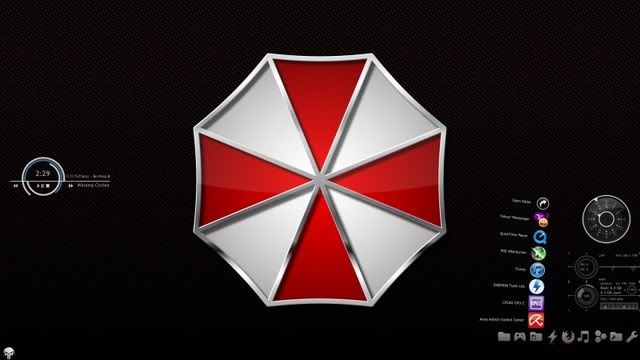 pix umbrella corp; deviantart rainmeter implosion by gordanj; cpu n network winamp cirlces by gerguter; winamp vatch black; watch dock rocket dock/ docklet; icon by token windows orb the punisher orb by XXrazor need to fill more but donno what  any recommendation?  |
|
|
|
|
|
Feb 8 2011, 11:32 AM
|

Junior Member
101 posts Joined: Jul 2010
|
@ Shooterz: Isn't that object dock + stack docklet?
This post has been edited by gailfriz: Feb 8 2011, 11:34 AM |
|
|
Feb 8 2011, 06:46 PM
|
|
Senior Member
2,538 posts Joined: Jan 2003 From: Kota Bharu
|
QUOTE(gailfriz @ Feb 8 2011, 11:32 AM) @ Shooterz: Isn't that object dock + stack docklet? i have no idea , nvr use this rainmeter before thoplanning to try it out and use what's he's using  |
|
|
Feb 9 2011, 03:14 PM
|
|
Junior Member
380 posts Joined: Oct 2004 From: Vekta
|
QUOTE(Shooterz @ Feb 8 2011, 03:48 AM) mind sharing the docks ? i'm using rocketdock (rocketdock.com/download) token icon (brsev.deviantart.com/art/Token-128429570) cheers This post has been edited by Scavengers: Feb 9 2011, 03:16 PM |
|
|
Feb 18 2011, 06:18 AM
|

Junior Member
85 posts Joined: Jul 2009
|
My rainmeter setup is using before dawn bar skin.. i'm looking to change the icon, can anybody help me with this?
Thanks a lot from me. |
|
|
Feb 18 2011, 10:53 PM
|

Senior Member
5,372 posts Joined: May 2008 From: Nokia HQ
|
I m using this plugin to show my GPU stats in Rainmeter http://montana.guru3d.com/showthread.php?t=319558
Nvm, just sharing. had a problem but I solved it lolz!My own version to fit ilustro skin CODE [Rainmeter] Update=1000 [Metadata] ; Contains basic information of the skin. Name=CoreTemp Description=This skin displays basic system stats. License=Creative Commons BY-NC-SA 3.0 Version=1.0.0 [Variables] ; Variables declared here can be used later on between two # characters (e.g. #MyVariable#). fontName=Trebuchet MS textSize=8 colorBar=235,170,0,255 colorText=255,255,255,205 ; ---------------------------------- ; MEASURES return some kind of value ; ---------------------------------- [MeasureMSIAfterburnerCoreClock] Measure=Plugin Plugin=Plugins\MSIAfterburner.dll GPU=0 DataSource=Core clock [MeasureMSIAfterburnerMemoryClock] Measure=Plugin Plugin=Plugins\MSIAfterburner.dll DataSource=Memory clock [MeasureMSIAfterburnerGPUUsage] Measure=Plugin Plugin=Plugins\MSIAfterburner.dll DataSource=GPU usage MinValue=0 MaxValue=100 [MeasureMSIAfterburnerMemoryUsage] Measure=Plugin Plugin=Plugins\MSIAfterburner.dll DataSource=Memory usage MinValue=0 MaxValue=1024 [MeasureMSIAfterburnerGPUTemp] Measure=Plugin Plugin=Plugins\MSIAfterburner.dll DataSource=GPU temperature MinValue=0 MaxValue=100 [MeasureMSIAfterburnerFanSpeed] Measure=Plugin Plugin=Plugins\MSIAfterburner.dll DataSource=Fan speed MinValue=0 MaxValue=100 ; ---------------------------------- ; STYLES are used to "centralize" options ; ---------------------------------- [styleTitle] StringAlign=CENTER StringCase=UPPER StringStyle=BOLD StringEffect=SHADOW FontEffectColor=0,0,0,50 FontColor=#colorText# FontFace=#fontName# FontSize=10 AntiAlias=1 ClipString=1 [styleLeftText] StringAlign=LEFT ; Meters using styleLeftText will be left-aligned. StringCase=NONE StringStyle=BOLD StringEffect=SHADOW FontEffectColor=0,0,0,20 FontColor=#colorText# FontFace=#fontName# FontSize=#textSize# AntiAlias=1 ClipString=1 [styleRightText] StringAlign=RIGHT StringCase=NONE StringStyle=BOLD StringEffect=SHADOW FontEffectColor=0,0,0,20 FontColor=#colorText# FontFace=#fontName# FontSize=#textSize# AntiAlias=1 ClipString=1 [styleSeperator] SolidColor=255,255,255,15 [styleBar] BarColor=#colorBar# BarOrientation=HORIZONTAL SolidColor=255,255,255,15 ; ---------------------------------- ; METERS display images, text, bars, etc. ; ---------------------------------- [meterBackground] Meter=IMAGE ImageName=#SKINSPATH#\illustro\SHARED\Background6Line.png ; #SKINSPATH# is a global variable that stands for your skin path. It is ; usually Documents\Rainmeter\Skins. X=0 Y=0 [meterTitle] Meter=STRING MeterStyle=styleTitle ; Using MeterStyle=styleTitle will basically "copy" the ; contents of the [styleTitle] section here during runtime. X=100 Y=12 W=190 H=18 Text="AfterBurner" [MeterLabelCoreClock] Meter=STRING MeterStyle=styleLeftText MeasureName=MeasureMSIAfterburnerCoreClock X=5 Y=40 W=200 H=20 Text="Core Clock" [meterValueCoreClock] Meter=STRING MeterStyle=styleRightText MeasureName=MeasureMSIAfterburnerCoreClock X=200 Y=0r W=190 H=14 Text="%1 Mhz" NumOfDecimals=1 [meterSeperator] Meter=IMAGE MeterStyle=styleSeperator X=10 Y=52 W=190 H=1 [MeterLabelMemoryClock] Meter=STRING MeterStyle=styleLeftText MeasureName=MeasureMSIAfterburnerMemoryClock X=5 Y=60 W=200 H=20 Text="Memory Clock" [meterValueMemoryClock] Meter=STRING MeterStyle=styleRightText MeasureName=MeasureMSIAfterburnerMemoryClock X=200 Y=0r W=190 H=14 Text="%1 MHz" NumOfDecimals=1 [meterSeperator2] Meter=IMAGE MeterStyle=styleSeperator X=10 Y=72 W=190 H=1 [MeterLabelGPUUsage] Meter=STRING MeterStyle=styleLeftText MeasureName=MeasureMSIAfterburnerGPUUsage X=5 Y=80 W=200 H=20 Text="GPU Usage" [meterValueGPUUsage] Meter=STRING MeterStyle=styleRightText MeasureName=MeasureMSIAfterburnerGPUUsage X=200 Y=80 W=190 H=14 Text="%1%" [meterGPUUsage] Meter=BAR MeterStyle=styleBar MeasureName=MeasureMSIAfterburnerGPUUsage X=5 Y=93 W=190 H=1 [MeterLabelMemUsage] Meter=STRING MeterStyle=styleLeftText MeasureName=MeasureMSIAfterburnerMemoryUsage X=5 Y=100 W=200 H=20 Text="Memory Usage" [meterValueMemUsage] Meter=STRING MeterStyle=styleRightText MeasureName=MeasureMSIAfterburnerMemoryUsage X=200 Y=100 W=190 H=14 Text="%1MB/1024MB" [meterMemUsage] Meter=BAR MeterStyle=styleBar MeasureName=MeasureMSIAfterburnerMemoryUsage X=5 Y=113 W=190 H=1 [MeterLabelTemp] Meter=STRING MeterStyle=styleLeftText MeasureName=MeasureMSIAfterburnerGPUTemp X=5 Y=120 W=200 H=20 Text="GPU Temp" [meterValueTemp] Meter=STRING MeterStyle=styleRightText MeasureName=MeasureMSIAfterburnerGPUTemp X=200 Y=120 W=190 H=14 Text="%1°C" [meterTempbar] Meter=BAR MeterStyle=styleBar MeasureName=MeasureMSIAfterburnerGPUTemp X=5 Y=133 W=190 H=1 [MeterLabelFanSpeed] Meter=STRING MeterStyle=styleLeftText MeasureName=MeasureMSIAfterburnerFanSpeed X=5 Y=140 W=200 H=20 Text="Fan Speed" [meterValueFanSpeed] Meter=STRING MeterStyle=styleRightText MeasureName=MeasureMSIAfterburnerFanSpeed X=200 Y=140 W=190 H=14 Text="%1%" [meterFanBar] Meter=BAR MeterStyle=styleBar MeasureName=MeasureMSIAfterburnerFanSpeed X=5 Y=153 W=190 H=1 This post has been edited by ne0cz: Feb 18 2011, 10:56 PM |
|
|
Feb 19 2011, 08:43 PM
|
|
Junior Member
85 posts Joined: Jul 2009
|
QUOTE(Sai91 @ Feb 6 2011, 12:45 AM) hmm..how to edit the weather thingy? Change the weather code in edit skin according to the city in Malaysia below:mine always shown snow and etc. -___- MYXX0001 Batu Pahat MYXX0025 Bintulu MYXX0002 George Town MYXX0003 Ipoh MYXX0004 Johor Bahru MYXX0005 Kajang MYXX0006 Klang MYXX0023 Kota Bharu MYXX0028 Kota Kinabalu MYXX0007 Kuala Dungun MYXX0008 Kuala Lumpur MYXX0009 Kuala Terengganu MYXX0010 Kuantan MYXX0011 Kuching MYXX0027 Labuan MYXX0032 Langkawi MYXX0012 Lundu MYXX0013 Melaka MYXX0026 Miri MYXX0014 Muar MYXX0015 Pekan MYXX0022 Penang/Bayan Lepas MYXX0030 Sandakan MYXX0016 Segamat MYXX0031 Sepang MYXX0017 Seremban MYXX0018 Serian MYXX0029 Sibu MYXX0020 Simanggang MYXX0024 Sitiawan MYXX0029 Tawau MYXX0021 Teluk Intan |
|
|
Feb 20 2011, 06:03 AM
|

Junior Member
172 posts Joined: Jan 2011
|
how 2 chge my theme..i ady download it also can chge
|
|
|
|
|
|
Feb 20 2011, 10:33 AM
|
|
Senior Member
3,251 posts Joined: Nov 2006 From: Kuala Rompin, Pahang
|
QUOTE(XBearBrickX @ Feb 20 2011, 06:03 AM) how 2 chge my theme..i ady download it also can chge If your newly download theme come under rmskin format. You need to install it first. just look for application name 'Rainstaller.exe' inside rainmeter folder.This is an example where that application located in my lappy. C:\Program Files\Rainmeter-1.3-64bit\Addons\Rainstaller Or if it only a widget you can just put that inside this folder 'C:\Users\User\Documents\Rainmeter\Skins' To apply new themes you can just right click icon at the notification area, then select themes or if you only need widget right click then select config Hope this help...  |
|
|
Feb 20 2011, 01:41 PM
|
|
Junior Member
172 posts Joined: Jan 2011
|
can suggest me where 2 dload rainmter theme other than deviant
|
|
|
Feb 20 2011, 01:46 PM
|

Senior Member
3,657 posts Joined: Aug 2009
|
QUOTE(XBearBrickX @ Feb 20 2011, 01:41 PM) can suggest me where 2 dload rainmter theme other than deviant http://customize.org/ |
|
|
Feb 20 2011, 01:56 PM
|
|
Junior Member
172 posts Joined: Jan 2011
|
feel dizzy 2 make rain...sobb
|
|
|
Feb 20 2011, 02:00 PM
|

Senior Member
1,439 posts Joined: Aug 2010
|
QUOTE(XBearBrickX @ Feb 20 2011, 01:56 PM) feel dizzy 2 make rain...sobb actually rainmeter is not difficult as u think..try explore more and what u get is fun when u expert already using it...u can try modified the default skin by edit code,add some of ur own favor by design ur own skin etc.....  |
|
|
Feb 20 2011, 02:05 PM
|
|
Junior Member
172 posts Joined: Jan 2011
|
where all the widget can be found?
|
|
|
Feb 20 2011, 02:13 PM
|
|
Junior Member
77 posts Joined: Feb 2010
|
the widget always come with the themes.
|
| Change to: |  0.0318sec 0.0318sec
 0.79 0.79
 6 queries 6 queries
 GZIP Disabled GZIP Disabled
Time is now: 21st December 2025 - 03:14 AM |
 Quote
Quote