Welcome Guest ( Log In | Register )

Bump Topic Topic Closed RSS Feed

Outline · [ Standard ] · Linear+

 help & advice me to oc laptop, ~

views
     
TSpreluder84
post Dec 4 2009, 05:32 PM, updated 16y ago

Getting Started
**
Junior Member
200 posts

Joined: May 2009
From: penang


hi sifu2 and otai2!!

already oc my oldschool laptop..

here my original spec..

~ACER 4520~
=========

~AMD Turion 64x2 tl-58 1.900mhz
~4gb dual channel runing ram (ditect 3gb at vista and win-xp)
~120gb hdd
~nvidia geforce 7000m/610n (original clock at 350mhz and memory clock at 350mhz)
~os vista ultimate
~additional fan=cagiva single blade USB nc

HERE some original spec screen shot and benchmark
===============================

Processor
======
» Click to show Spoiler - click again to hide... «
pl4tinum
post Dec 4 2009, 07:22 PM

Getting Started
**
Junior Member
218 posts

Joined: Oct 2008
From: Kuching


Seriously speaking i don't think you'll get much overclocking done using a laptop as there isn't much headroom for your heat issue to improve. From experience laptops heat up fast enough as it is especially old ones that havent been maintained on a regular basis. My advice would be to get a cheap p4 system around 200-300 ringgit from garage sales and play around with that if you're very interested in getting some basic overclocking knowledge.
TSpreluder84
post Dec 4 2009, 09:27 PM

Getting Started
**
Junior Member
200 posts

Joined: May 2009
From: penang


QUOTE(pl4tinum @ Dec 4 2009, 07:22 PM)
Seriously speaking i don't think you'll get much overclocking done using a laptop as there isn't much headroom for your heat issue to improve. From experience laptops heat up fast enough as it is especially old ones that havent been maintained on a regular basis. My advice would be to get a cheap p4 system around 200-300 ringgit from garage sales and play around with that if you're very interested in getting some basic overclocking knowledge.
*
very thanks bro 4 ur advice..
i do some google bout laptop oc..and i find someone oc laptop...
but i dont know how to do it..
btw thanks again.. icon_rolleyes.gif icon_rolleyes.gif
kInOzAwA
post Dec 4 2009, 09:59 PM

LYN Ninja
*******
Senior Member
2,889 posts

Joined: Jul 2006
From: Intranet & Internet

i think it's better you avoid overclocking over lappy because mostly they're not intended to be good for oc, the fan is not enough to cool down the processor. But if your lappy is a gamer series and created to support OC like some Dell & Alienware series laptop, it's not matter to do that.... biggrin.gif
TSpreluder84
post Dec 5 2009, 12:49 AM

Getting Started
**
Junior Member
200 posts

Joined: May 2009
From: penang


QUOTE(kInOzAwA @ Dec 4 2009, 09:59 PM)
i think it's better you avoid overclocking over lappy because mostly they're not intended to be good for oc, the fan is not enough to cool down the processor. But if your lappy is a gamer series and created to support OCĀ  like some Dell & Alienware series laptop, it's not matter to do that.... biggrin.gif
*
This post has been edited by preluder84: Dec 16 2009, 12:07 PM
pl4tinum
post Dec 5 2009, 01:40 AM

Getting Started
**
Junior Member
218 posts

Joined: Oct 2008
From: Kuching


Even alienware laptops have trouble handling the heat that they produce. Just google and there have been reports of teh mx-15 casing crack after extensive usage and from personal experience, prolonged usage of such laptops will also degrade the exterior of the laptop even if your not doing any extreme stuff with it.
TSpreluder84
post Dec 16 2009, 12:07 PM

Getting Started
**
Junior Member
200 posts

Joined: May 2009
From: penang


QUOTE(pl4tinum @ Dec 5 2009, 01:40 AM)
Even alienware laptops have trouble handling the heat that they produce. Just google and there have been reports of teh mx-15 casing crack after extensive usage and from personal experience, prolonged usage of such laptops will also degrade the exterior of the laptop even if your not doing any extreme stuff with it.
*
can i just do it small amount overclocking??

1.9ghz to 2.1ghz for processor

350mhz to 400mhz for graphic

anyone have experience??

Kaellis
post Dec 16 2009, 02:04 PM

Certified Perodua Alza hater
******
Senior Member
1,231 posts

Joined: Aug 2005
From: Shah Alam
if BIOS corrupt, how are you gonna reset CMOS?

dont do it
TSpreluder84
post Dec 16 2009, 02:13 PM

Getting Started
**
Junior Member
200 posts

Joined: May 2009
From: penang


QUOTE(Kaellis @ Dec 16 2009, 02:04 PM)
if BIOS corrupt, how are you gonna reset CMOS?

dont do it
*
ermm..
that right..no way to solve its??
ma43q
post Dec 16 2009, 03:31 PM

Regular
******
Senior Member
1,820 posts

Joined: Jan 2005
even if u manage to OC your notebook, a jump of 200mhz for proc and 50mhz for GC will not improve much and i dont think you can really notice any big difference unless u just want to try it out of curiosity


selferino
post Dec 16 2009, 03:53 PM

joe cole = english samba!
******
Senior Member
1,219 posts

Joined: Jul 2009
pm Darksilver, he has OC his lappy b4 n has some experience in doing so.
TSpreluder84
post Dec 16 2009, 05:29 PM

Getting Started
**
Junior Member
200 posts

Joined: May 2009
From: penang


ok thanks all

i already oc my lappie..
1.9ghz to 2.1ghz max 2.35 ghz..
gpu 350mhz to 400mhz...

im doing this just for fun..
becoz i know oc lappie will make my lappie easy to get burn

btw...thanks guy
TDUEnthusiast
post Dec 16 2009, 05:35 PM

Critical thinking
Group Icon
Elite
10,015 posts

Joined: Mar 2009
From: the future
You do have another comp to use right? hmm.gif
InFe_eD
post Dec 16 2009, 09:56 PM

Can you imagine?
*****
Senior Member
929 posts

Joined: Mar 2009
From: Earth, just like you


goggle k10 stat and use it to OC, very easy, can be done in less den 5 minute
TSpreluder84
post Dec 16 2009, 10:38 PM

Getting Started
**
Junior Member
200 posts

Joined: May 2009
From: penang


QUOTE(TDUEnthusiast @ Dec 16 2009, 05:35 PM)
You do have another comp to use right? hmm.gif
*
dont have ler bro..hahaha..

i google bout oc acer 4520 by indon people..oc to 2600mhz..
im done only for 2.1ghz..
currently stabil..

just want to know how to set ram timing..


Added on December 16, 2009, 10:41 pm
QUOTE(InFe_eD @ Dec 16 2009, 09:56 PM)
goggle k10 stat and use it to OC, very easy, can be done in less den 5 minute
*
bro
just type k10 stat or wat??


This post has been edited by preluder84: Dec 16 2009, 10:41 PM
budakhops
post Dec 17 2009, 03:23 AM

Regular
******
Senior Member
1,519 posts

Joined: Aug 2007
From: Somewhere in the distant galaxy....


make sure u provide enough cooling for it... scared later ur laptop burn.... it's like burning money away wei...
TSpreluder84
post Dec 17 2009, 02:45 PM

Getting Started
**
Junior Member
200 posts

Joined: May 2009
From: penang


QUOTE(budakhops @ Dec 17 2009, 03:23 AM)
make sure u provide enough cooling for it... scared later ur laptop burn.... it's like burning money away wei...
*
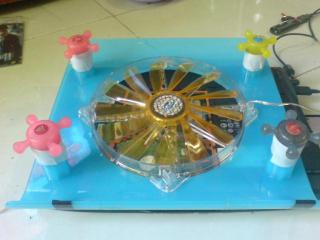
ya ya...just buy new fan cooler for laptop with big fan..help much with that!!

wat da ya think??
cool2.gif
brows.gif

Attached Image

This post has been edited by preluder84: Dec 17 2009, 06:10 PM
bryanyeo87
post Dec 18 2009, 12:42 PM

Below the Belt
*******
Senior Member
3,175 posts

Joined: May 2006
^
^
^
All the above does not answer the question.


@TS, IGP's cannot be overclocked. It is not recommended as it will destabilize your OS as well. But if you want, you can try with rivatuner and atitool. Am unsure if they will detect your IGP and allow you to clock it or not. So just download it and give it a twirl. I know that it works with some la.

As for CPU overclocking, it is a lil more trickier due to the fact that amd's HTT and ram is linked with the processor speed, and it will destabilize. If you want, download ClockGen and see if the PLL is selectable. If not, you may have to disassemble your laptop to see what is the PLL chip mode and code.

And hopefully, clockgen has it in, there is another way that you can custom instruct for clockgen, but lets leave that part out smile.gif

This post has been edited by bryanyeo87: Dec 18 2009, 12:43 PM
TSpreluder84
post Dec 18 2009, 04:42 PM

Getting Started
**
Junior Member
200 posts

Joined: May 2009
From: penang


QUOTE(bryanyeo87 @ Dec 18 2009, 12:42 PM)
^
^
^
All the above does not answer the question.
@TS, IGP's cannot be overclocked. It is not recommended as it will destabilize your OS as well. But if you want, you can try with rivatuner and atitool. Am unsure if they will detect your IGP and allow you to clock it or not. So just download it and give it a twirl. I know that it works with some la.

As for CPU overclocking, it is a lil more trickier due to the fact that amd's HTT and ram is linked with the processor speed, and it will destabilize. If you want, download ClockGen and see if the PLL is selectable. If not, you may have to disassemble your laptop to see what is the PLL chip mode and code.

And hopefully, clockgen has it in, there is another way that you can custom instruct for clockgen, but lets leave that part out smile.gif
*
hi..
thanks a lot for that information!!
notworthy.gif notworthy.gif

what means by IGP's??

btw..what im try to do here is learn more bout o.c..
coz after reading indon guys blog about succesfull o.c acer aspire..
im just want to give a try and learn more bout this..

i realize that o.c laptop is not recomended...
before im joining lowyat forum..
i dont know bout o.c.. zero knowledge bout that..

what i learn here..oc make cpu work faster,.but working in hot temp,.
my benchmark totaly different after o.c..n now i know why people o.c their Desktop..

im happy with that,.at least i know what is o.c..what it use for..

thanks for information,advice,support from u all!!!

thumbup.gif thumbup.gif

This post has been edited by preluder84: Dec 18 2009, 11:03 PM

kInOzAwA
post Dec 20 2009, 02:50 PM

LYN Ninja
*******
Senior Member
2,889 posts

Joined: Jul 2006
From: Intranet & Internet

IGP = integrated Graphics Processor.
TSpreluder84
post Dec 20 2009, 05:14 PM

Getting Started
**
Junior Member
200 posts

Joined: May 2009
From: penang


QUOTE(kInOzAwA @ Dec 20 2009, 02:50 PM)
IGP = integrated Graphics Processor.
*
thanks to okinozawa coz gimme information..

This post has been edited by preluder84: Dec 20 2009, 05:14 PM

Topic ClosedOptions
 

Change to:
| Lo-Fi Version
0.0199sec    0.85    6 queries    GZIP Disabled
Time is now: 10th December 2025 - 03:03 PM