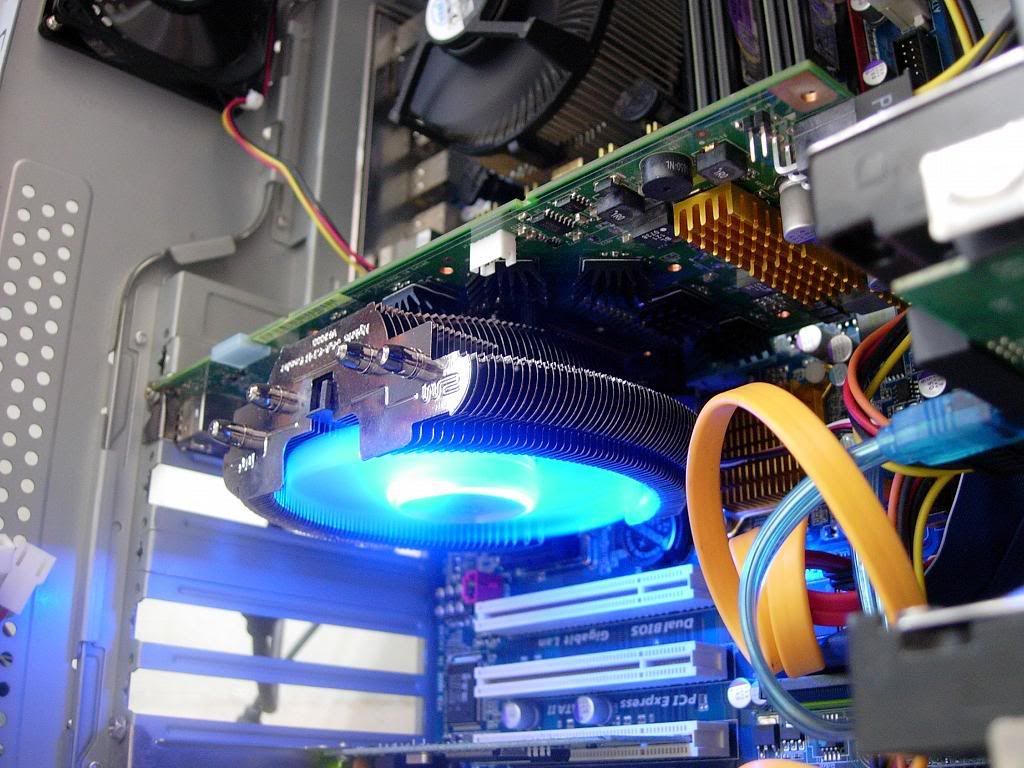
Welcome Guest ( Log In | Register )

Outline · [ Standard ] · Linear+

 Graphic Card Centrifuge Fan, 8800GT example discussion

views
     
TSPcWork
post Dec 4 2009, 04:24 PM, updated 17y ago

Audio Phreak
*******
Senior Member
6,489 posts

Joined: Mar 2005
From: Serdang
Not sure if anyone had talk about it before. but more-likely i would like to share my though on this.

my brother had owned a Asus 8800GT for the pass 2@3 year.
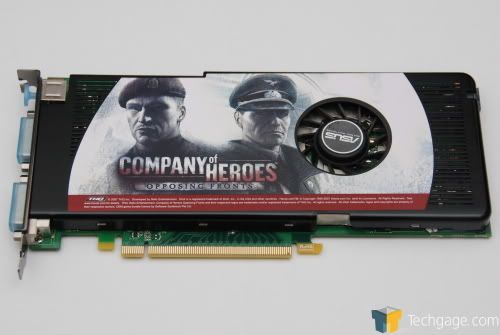
user posted image

and this item is well known for it's SUPER noisy fan and super inefficiency fan as they designed it into SLIM profile that only taken 1 single slot.
however, after sometime my brother using it, he started to complain that the fan is SUPER noisy, even in air-con room which the cool air directly blowing the casing. and the air temperature is set to 16C, it is so cool that even CPU cooler fan oso stop spining (C2D E6550). However, this small fan of graphic card on this particular asus graphic card still spinning at super annoying speed with very high pitch sound.

Eventually my brother had reach a limit of tolerance with the annoying noise and he decided to give me the card. upon i receive the card. i immediately install it to my system for a test drive.. On games like microsoft flight simulator FX, the graphic cards runs at very high speed fan, with temperature ranging around 65-70C.
and it's about 59C ideal. however, i test it with street fighter IV. the graphic card shoots up immediately to 85C within 5 minute and a warning msg pop out.

So we had the stock heatsink replaced with zalman VF-2000 , and now the ideal temperature is 45C, full load gaming of crysis for 3-4 hours will increase it to 52C. MAX 55C. so. a big thumb up for VF2000.. thumbup.gif

however, i had become curious with the stock cooler..
so i try to take it open to see what's their design in it..

here it comes :
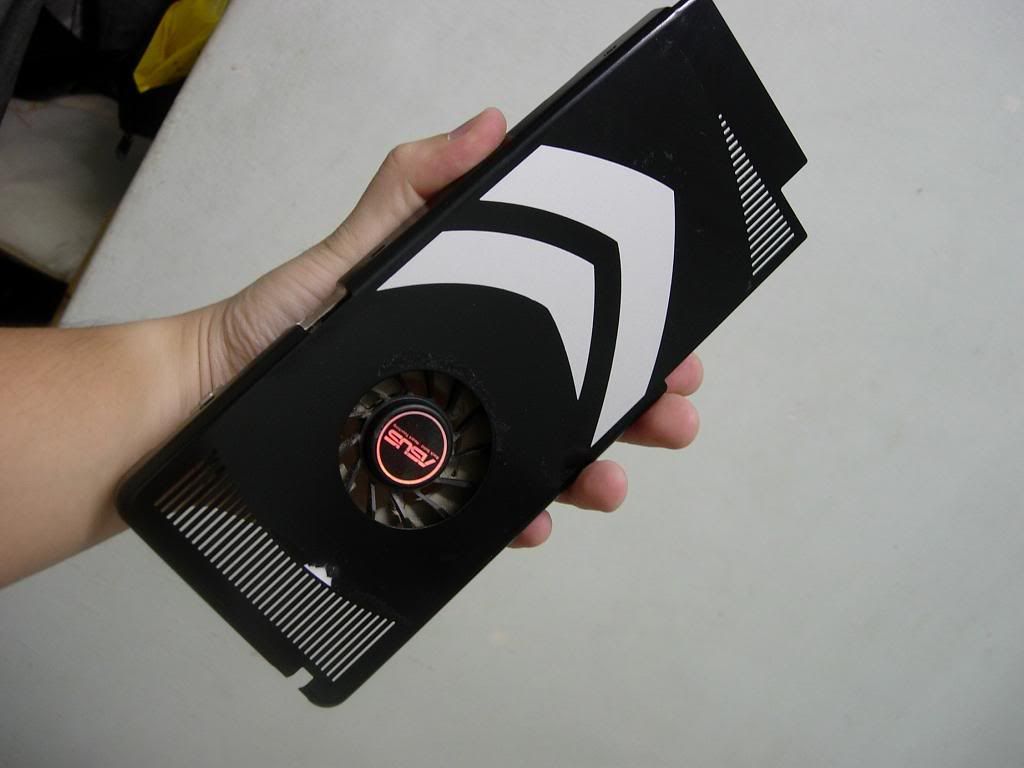
user posted image
i peel off the sticker of the picture (i though there's screw inside).. and this reveal a big nvidia logo..
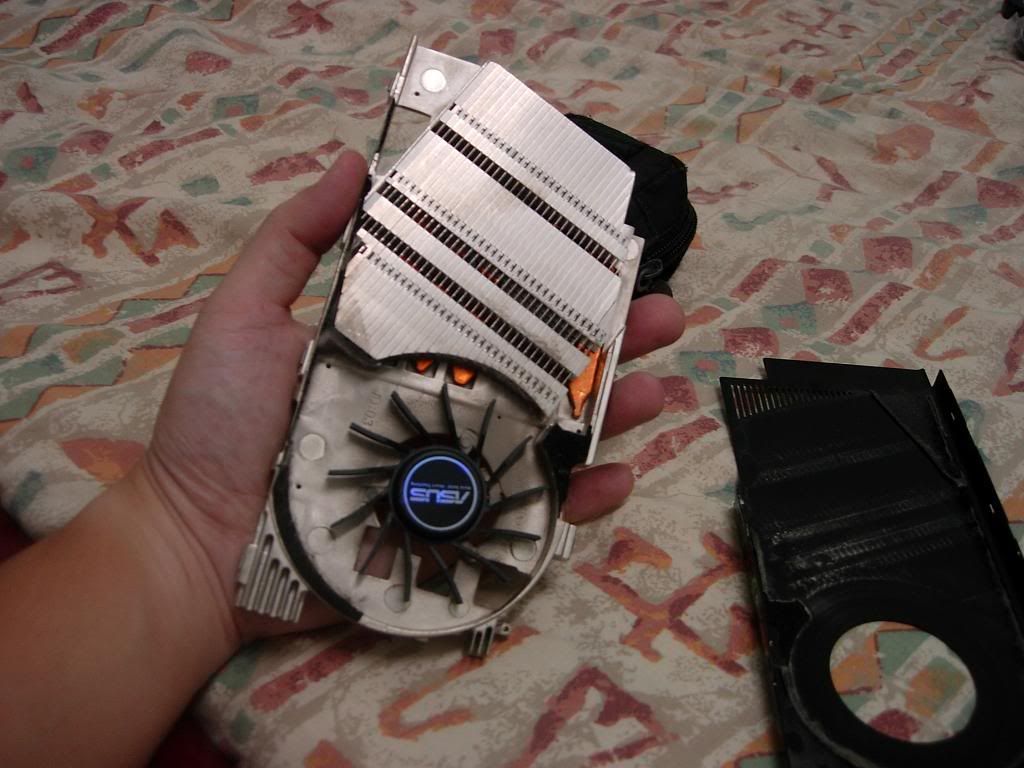
user posted image
lightly pry open the metal casing..

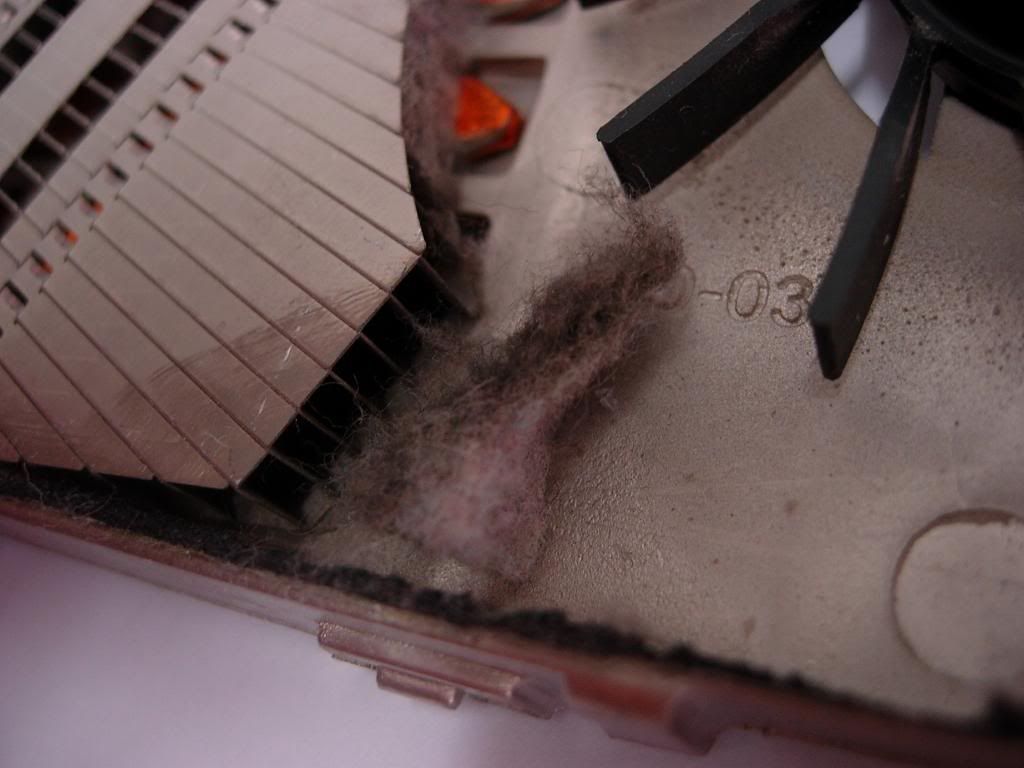
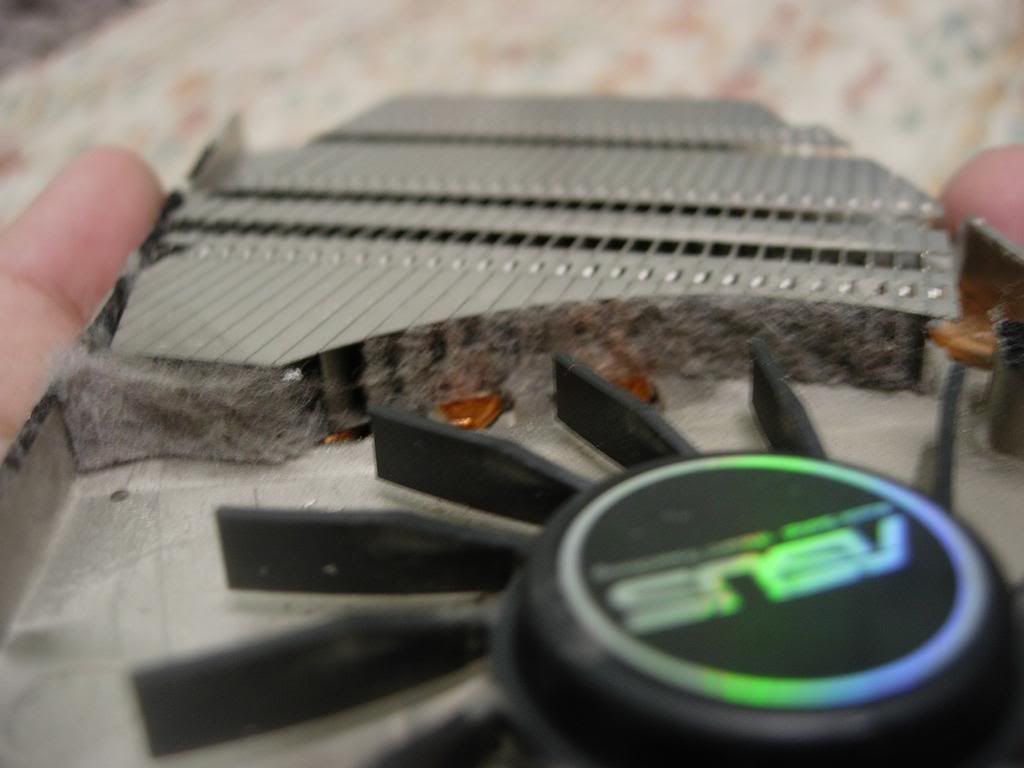
and then what's shocking me was..
user posted image

user posted image
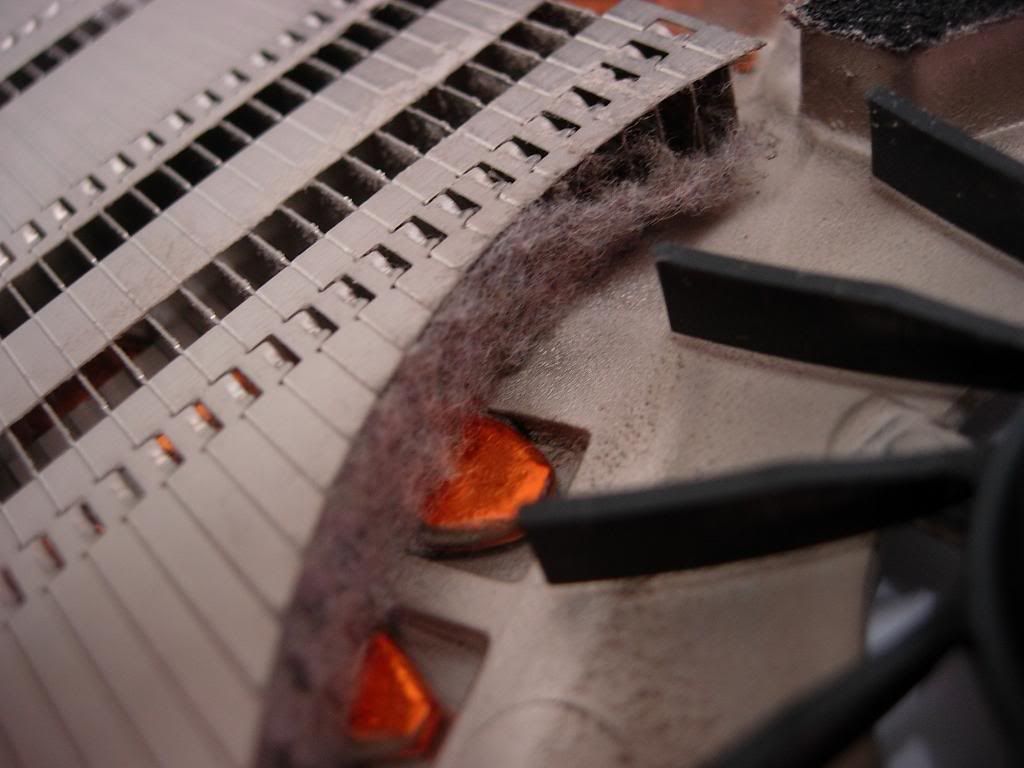
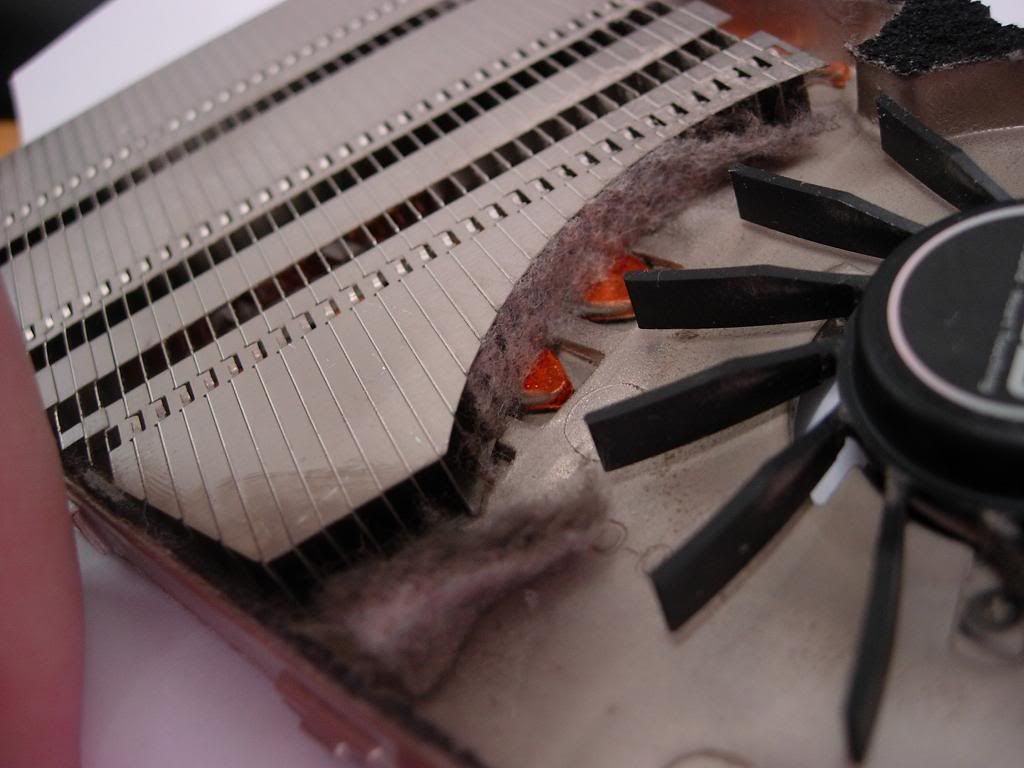
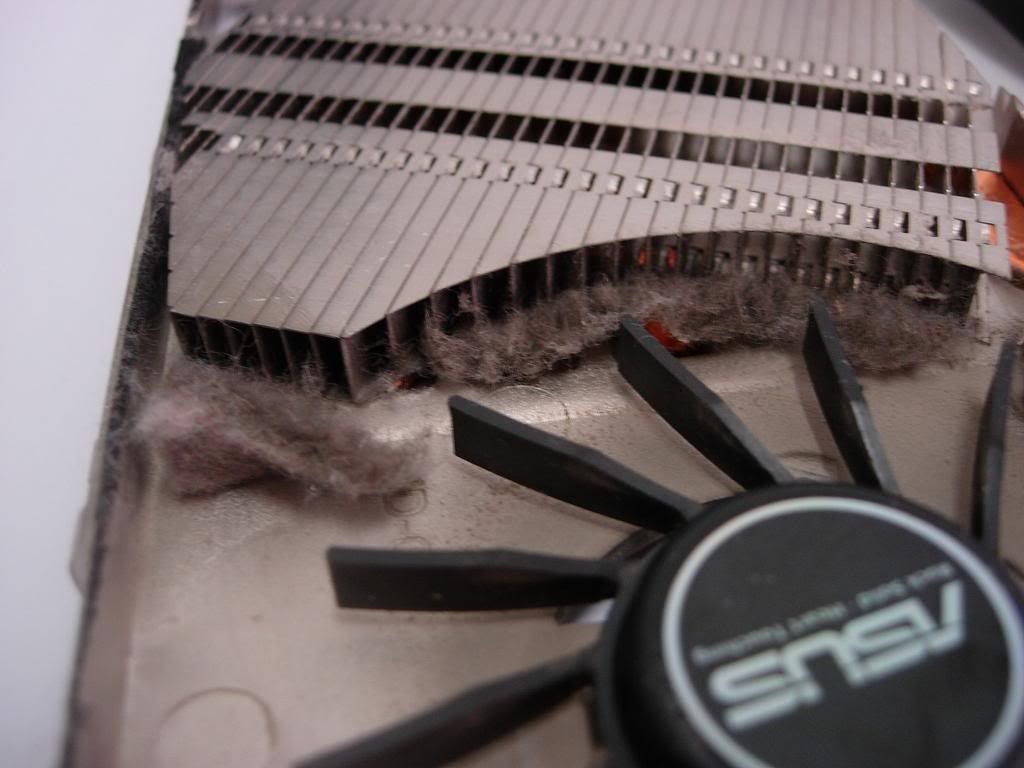
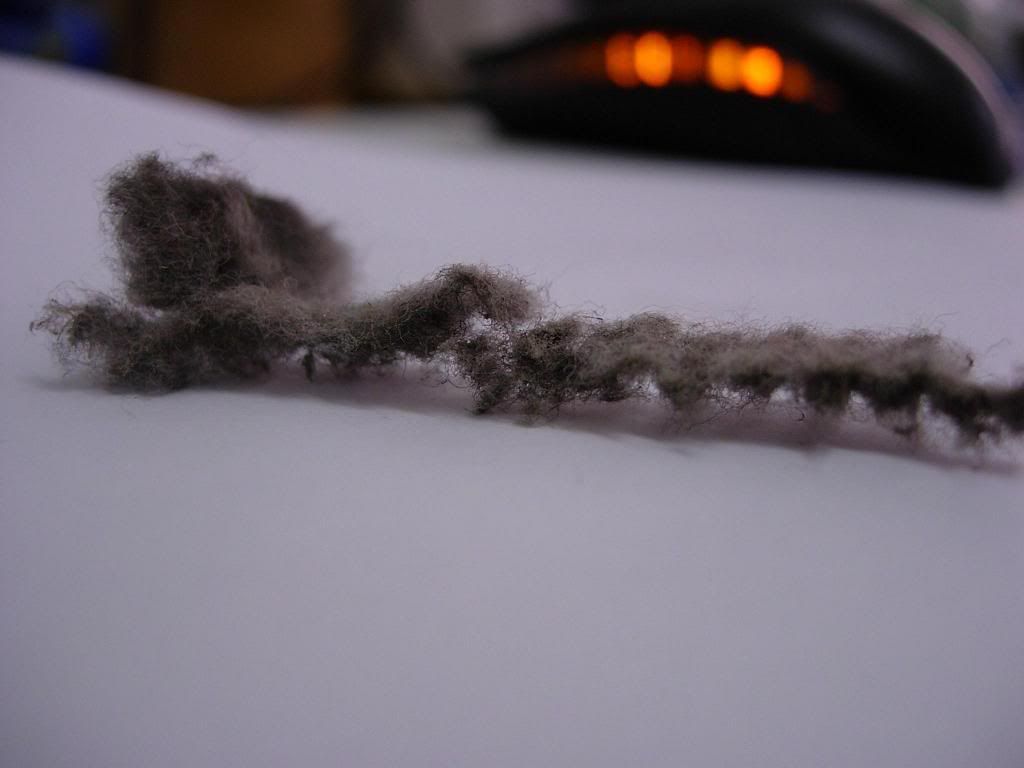
Look how thick the dust was..


user posted image

user posted image

user posted image

It's totally blocking the air funnel through the heatsink.. so i assume the fan were merely spinning itself without any effect of cooling the heat sink. all this while the 8800Gt were running at PASSIVE COOLING?
user posted image

But i had already installed VF2000, and it's working fine. i don't want to install this back to test out either this heatsink is working all right or not.


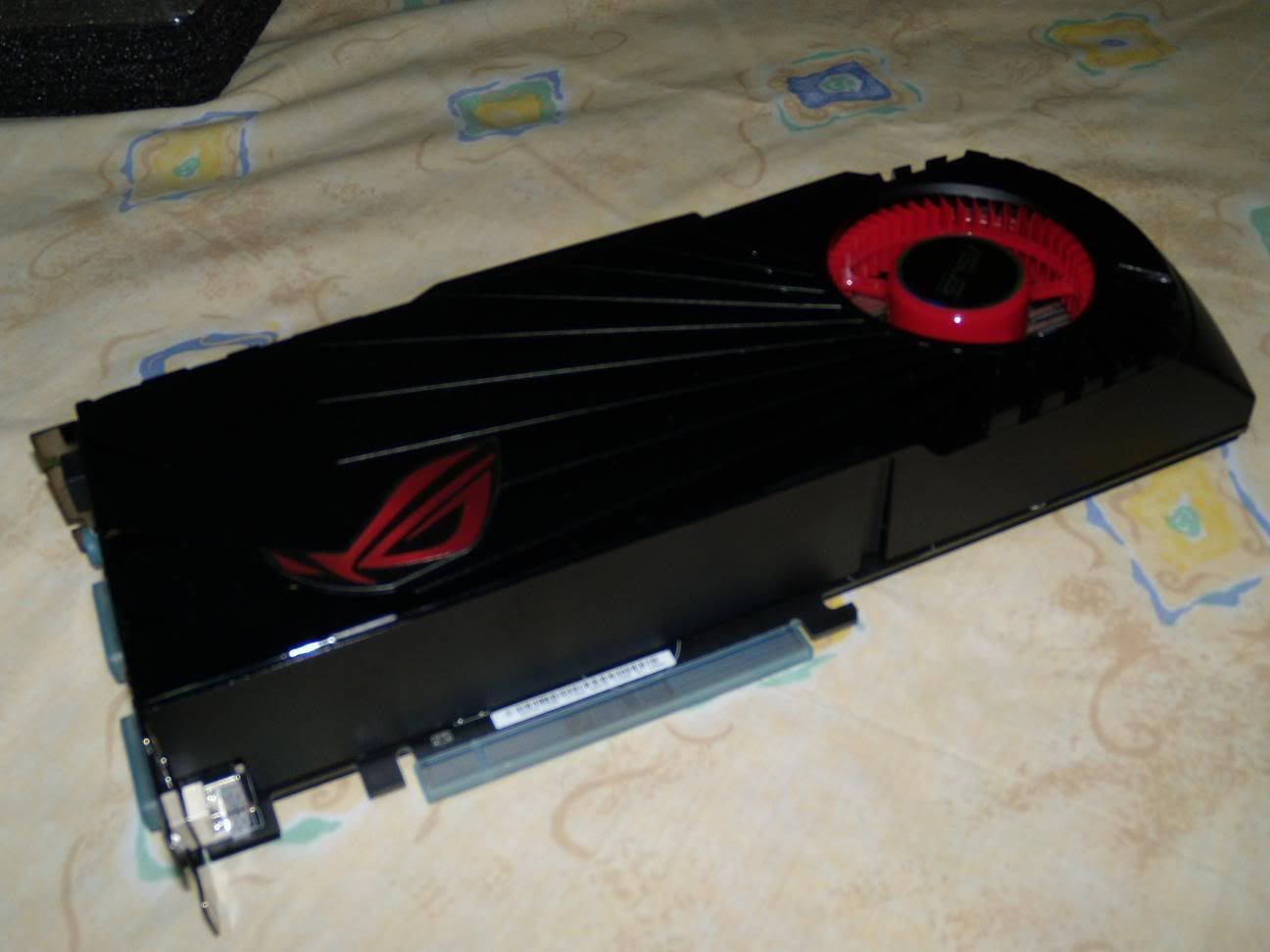
as recently i had help my brother acquired a Asus GTX 285 Matrix
user posted image

so one big question comes into my mind that, i had seen a lot of those higher end graphic cards were using centrifuge fan. will it develop problems like the 8800GT i had? dust blocked all the heatsink? and there's no way we can clean it?

how to prevent it? any methods? or just directly use vacuum cleaner suck the air inlet of the graphic card? and use a pcs of paper cards to poke the dust out???
pls enlighten me.. Thanks notworthy.gif notworthy.gif notworthy.gif

This post has been edited by PcWork: Dec 4 2009, 04:36 PM
Johan-N
post Dec 4 2009, 04:44 PM

Life is Half Spent Before One knows what life is~
******
Senior Member
1,186 posts

Joined: Aug 2009
From: KL & PG


i have the same card.... mine is running smoothly luckily biggrin.gif
TSPcWork
post Dec 4 2009, 04:47 PM

Audio Phreak
*******
Senior Member
6,489 posts

Joined: Mar 2005
From: Serdang
QUOTE(Johan-N @ Dec 4 2009, 04:44 PM)
i have the same card.... mine is running smoothly luckily biggrin.gif
*
8800 GT? but ur signature shows 8800GTS 3 SLI?
if it is 8800Gt. how much temperature u have now?

This post has been edited by PcWork: Dec 4 2009, 04:49 PM
ahwolfy
post Dec 4 2009, 04:54 PM

New Member
*
Junior Member
22 posts

Joined: Apr 2009
From: The Oil Town, Land of Hornbill.


what PcWork shows is my previous stupid-one-slot-stock heatsink 8800gt .

produce tons of annoying high pitch sound, feel so frust especially watching dvd with pc.

i think those with 2 slots heatsink shouldnt have any similar problem with mine.
Johan-N
post Dec 4 2009, 04:59 PM

Life is Half Spent Before One knows what life is~
******
Senior Member
1,186 posts

Joined: Aug 2009
From: KL & PG


QUOTE(PcWork @ Dec 4 2009, 04:47 PM)
8800 GT? but ur signature shows 8800GTS 3 SLI?
if it is 8800Gt. how much temperature u have now?
*
i have a few comps at home biggrin.gif ...anyway i dont really monitor the temperature...dont know how to sweat.gif


Added on December 4, 2009, 5:00 pm
QUOTE(ahwolfy @ Dec 4 2009, 04:54 PM)
what PcWork shows is my previous stupid-one-slot-stock heatsink 8800gt .

produce tons of annoying high pitch sound, feel so frust especially watching dvd with pc.

i think those with 2 slots heatsink shouldnt have any similar problem with mine.
*
2 slot design is way better..but sadly mine is only 1 slot cry.gif

This post has been edited by Johan-N: Dec 4 2009, 05:00 PM
TSPcWork
post Dec 4 2009, 05:06 PM

Audio Phreak
*******
Senior Member
6,489 posts

Joined: Mar 2005
From: Serdang
QUOTE(Johan-N @ Dec 4 2009, 04:59 PM)
i have a few comps at home biggrin.gif ...anyway i dont really monitor the temperature...dont know how to sweat.gif


Added on December 4, 2009, 5:00 pm

2 slot design is way better..but sadly mine is only 1 slot cry.gif
*
go to http://www.cpuid.com/hwmonitor.php
download the hardware monitor and u shall be able to see it.
by the way if u have the exact same card as mine. the Asus Smart doctor or somethings comes with the driver disc HAD the hardware temperature monitor there.
u shouldn't be able to miss it. it's a big number displayed.


user posted image
my 8800GT with VF2000 now.

Johan-N
post Dec 4 2009, 05:08 PM

Life is Half Spent Before One knows what life is~
******
Senior Member
1,186 posts

Joined: Aug 2009
From: KL & PG


QUOTE(PcWork @ Dec 4 2009, 05:06 PM)
go to http://www.cpuid.com/hwmonitor.php
download the hardware monitor and u shall be able to see it.
by the way if u have the exact same card as mine. the Asus Smart doctor or somethings comes with the driver disc HAD the hardware temperature monitor there.
u shouldn't be able to miss it. it's a big number displayed.
user posted image
my 8800GT with VF2000 now.
*
mine is Forsa 8800gt destroyer edition. ok i will download the CPUid thing....


Added on December 4, 2009, 5:24 pmIs it easy to remove the GPU casing?

This post has been edited by Johan-N: Dec 4 2009, 05:24 PM
TSPcWork
post Dec 4 2009, 05:31 PM

Audio Phreak
*******
Senior Member
6,489 posts

Joined: Mar 2005
From: Serdang
QUOTE(Johan-N @ Dec 4 2009, 05:08 PM)
mine is Forsa 8800gt destroyer edition. ok i will download the CPUid thing....


Added on December 4, 2009, 5:24 pmIs it easy to remove the GPU casing?
*
i will not recommend u to open the casing with the heatsink attached to the GPU..
i did apply some force. but not brutal to bend it. if it is on the card. i worry u might bend some other stuff by applying such force.
the black casing is actually GLUED with double sided mounting tape to the heatsink itself. see the black parts carefully in my picture, u shall able to see the mark.
ahwolfy
post Dec 4 2009, 05:33 PM

New Member
*
Junior Member
22 posts

Joined: Apr 2009
From: The Oil Town, Land of Hornbill.


tat one slot heatsink was so nice to help collect and keep the dust .. tat y my pc room is so clean from dust ...lol ..thanks to the engineer who came out with tat design!!

This post has been edited by ahwolfy: Dec 4 2009, 05:34 PM
selfdz87
post Dec 4 2009, 05:57 PM

~5Ghz+ Club~
*****
Senior Member
932 posts

Joined: Dec 2008
From: Paris With Love


i have 1 xfx 8800GT b4 this....
but sold already... sweat.gif
nice card lol...
i have the same problem when playing crysis,the temp reach till 65-70c...
but i just ignore it... laugh.gif laugh.gif
but never open the heatsink to see whats inside,scare lol... sweat.gif
thats the problem with single card solution i think,the cooling is not so efficient eh...
but now i love my gtx tri-fan...
cool enuf for me wit the noisy fan... sweat.gif laugh.gif

This post has been edited by selfdz87: Dec 4 2009, 06:01 PM
Johan-N
post Dec 4 2009, 05:59 PM

Life is Half Spent Before One knows what life is~
******
Senior Member
1,186 posts

Joined: Aug 2009
From: KL & PG


i just checked my temp on cpuid the temperature is 66 degrees Celsius...

is this normal???


Added on December 4, 2009, 6:11 pmjust tested it with graphic card stability test and the temperature went to 86 degrees celsius

This post has been edited by Johan-N: Dec 4 2009, 06:11 PM
ahwolfy
post Dec 4 2009, 07:47 PM

New Member
*
Junior Member
22 posts

Joined: Apr 2009
From: The Oil Town, Land of Hornbill.


QUOTE(Johan-N @ Dec 4 2009, 05:59 PM)
i just checked my temp on cpuid the temperature is 66 degrees Celsius...

is this normal???


Added on December 4, 2009, 6:11 pmjust tested it with graphic card stability test and the temperature went to 86 degrees celsius
*
wat is ur room temp? my experience with this card is room temp 22c (with aircon), vga idle temp = 55c.
and 60c++ with room temp 27c (without aircon).

according to nvidia, the max temp for 8800gt is 105c
http://www.nvidia.com/object/product_geforce_8800_gt_us.html

so, i think 80c with load should be no problem for your card.

my problem with this 8800gt before is the freaking annoying high pitch sound shakehead.gif shakehead.gif shakehead.gif produced by the single slot heatsink fan ... it really drive my crazy. rclxub.gif rclxub.gif rclxub.gif


Johan-N
post Dec 4 2009, 08:37 PM

Life is Half Spent Before One knows what life is~
******
Senior Member
1,186 posts

Joined: Aug 2009
From: KL & PG


QUOTE(ahwolfy @ Dec 4 2009, 07:47 PM)
wat is ur room temp? my experience with this card is room temp 22c (with aircon), vga idle temp = 55c.
and 60c++ with room temp 27c (without aircon).

according to nvidia, the max temp for 8800gt is 105c
http://www.nvidia.com/object/product_geforce_8800_gt_us.html

so, i think 80c with load should be no problem for your card.

my problem with this 8800gt before is the freaking annoying high pitch sound  shakehead.gif  shakehead.gif  shakehead.gif produced by the single slot heatsink fan ... it really drive my crazy. rclxub.gif  rclxub.gif  rclxub.gif
*
my room aircond off temperature at idle is 70 when do graphic stress test it go up to 85c

ahwolfy
post Dec 4 2009, 09:03 PM

New Member
*
Junior Member
22 posts

Joined: Apr 2009
From: The Oil Town, Land of Hornbill.


QUOTE(Johan-N @ Dec 4 2009, 08:37 PM)
my room aircond off temperature at idle is 70 when do graphic stress test it go up to 85c
*
hmm.gif ....
i think should be no harm if not exceeding 100c. but of course the lower the better.
if u welling to spend some $, maybe u can think of swap the stock heatsink with zalman vf2000. it is a very effective silent vga cooler. thumbup.gif , as me and pcwork have tested.
Johan-N
post Dec 4 2009, 09:04 PM

Life is Half Spent Before One knows what life is~
******
Senior Member
1,186 posts

Joined: Aug 2009
From: KL & PG


QUOTE(ahwolfy @ Dec 4 2009, 09:03 PM)
hmm.gif ....
i think should be no harm if not exceeding 100c. but of course the lower the better.
if u welling to spend some $, maybe u can think of swap the stock heatsink with zalman vf2000. it is a very effective silent vga cooler.  thumbup.gif , as me and pcwork have tested.
*
how much is it?

and also is it normal to run at 90c when playing games?

This post has been edited by Johan-N: Dec 4 2009, 09:07 PM
ahwolfy
post Dec 4 2009, 09:11 PM

New Member
*
Junior Member
22 posts

Joined: Apr 2009
From: The Oil Town, Land of Hornbill.


for me ... 90c i will consider hot .. lolz
the vf2000 is RM 215++ , bought from modernopc
Johan-N
post Dec 4 2009, 09:15 PM

Life is Half Spent Before One knows what life is~
******
Senior Member
1,186 posts

Joined: Aug 2009
From: KL & PG


QUOTE(ahwolfy @ Dec 4 2009, 09:11 PM)
for me ... 90c i will consider hot .. lolz
the vf2000 is RM 215++ , bought from modernopc
*
so expensive vf2000.... my card now like can boil water.....

anyway any cheaper cooler?


ahwolfy
post Dec 4 2009, 10:36 PM

New Member
*
Junior Member
22 posts

Joined: Apr 2009
From: The Oil Town, Land of Hornbill.


hmm.gif

thermaltake Duorb = rm160++ i think .
many reviews said it is a good cooler for 8800gt.
pl4tinum
post Dec 5 2009, 01:47 AM

Getting Started
**
Junior Member
218 posts

Joined: Oct 2008
From: Kuching


If i'm not mistaken 105c is the temperature your card can attain before the forceware forces the card to stop operating.

@TS yeah welcome to malaysian hardware i guess. Luckily my old 8800gt was the zalman fan ed., not top of the line but at least the fan is easier to maintain. But since we're on the topic, im guessing that the room your pc is kept is carpeted? And i would be guessing that your casing isn't closed compeletely?

I've cleaned a few with more dust buildup in their components but when the pc is not kept in an air conditioned room the dust tends to be more packed and "sticky". So i'm just presuming.
Johan-N
post Dec 5 2009, 02:16 AM

Life is Half Spent Before One knows what life is~
******
Senior Member
1,186 posts

Joined: Aug 2009
From: KL & PG


QUOTE(pl4tinum @ Dec 5 2009, 01:47 AM)
If i'm not mistaken 105c is the temperature your card can attain before the forceware forces the card to stop operating. 

@TS yeah welcome to malaysian hardware i guess. Luckily my old 8800gt was the zalman fan ed., not top of the line but at least the fan is easier to maintain. But since we're on the topic, im guessing that the room your pc is kept is carpeted? And i would be guessing that your casing isn't closed compeletely?

I've cleaned a few with more dust buildup in their components but when the pc is not kept in an air conditioned room the dust tends to be more packed and "sticky". So i'm just presuming.
*
my case got alot of fans sucking air in so i guess there might be a lot of dust....and most of the time i use aircond.


is there any way that i can clean my 8800gt slim?
ahwolfy
post Dec 5 2009, 09:10 AM

New Member
*
Junior Member
22 posts

Joined: Apr 2009
From: The Oil Town, Land of Hornbill.


@pl4tinum, u r rite, according to nvidia website, the max temp for 8800gt is 105c. and for your kind info, i am the one use tat 8800gt before i gave it to my real brother pcwork. my pc room condition is airconed (try to reduce the temp so that lower the fan speed to less produce freaking high pitch noise) and the floor is ceramic tiled. cleaning the room once a week. laugh.gif wat i can say is the nvidia engineer who came up with this single slot design is "good", it do the cooling job, at the meantime help me keeping the dust .. doh.gif

@johan-n, maybe u can try to remove ur 8800gt from mobo/casing, and suck out the dust from the heatsink fan with vacuum cleaner ... see it is working or not?. but u must be very careful while handling ur VGA. don do any physical damage on the component. or else u will cry.gif

This post has been edited by ahwolfy: Dec 5 2009, 06:22 PM
Johan-N
post Dec 5 2009, 02:45 PM

Life is Half Spent Before One knows what life is~
******
Senior Member
1,186 posts

Joined: Aug 2009
From: KL & PG


QUOTE(ahwolfy @ Dec 5 2009, 09:10 AM)
@pl4tinum, u r rite, according to nvidia website, the max temp for 8800gt is 105c. and for your kind, i am the one use tat 8800gt before i gave it to my real brother pcwork. my pc room condition is airconed (try to reduce the temp so that lower the fan speed to less produce freaking high pitch noise) and the floor is ceramic tiled. cleaning the room once a week.  laugh.gif  wat i can say is the nvidia engineer who came up with this single slot design is "good", it do the cooling job, at the meantime help me keeping the dust ..  doh.gif

@johan-n, maybe u can try to remove ur 8800gt from mobo/casing, and suck out the dust from the heatsink fan with vacuum cleaner ... see it is working or not?. but u must be very careful while handling ur VGA. don do any physical damage on the component. or else u will  cry.gif
*
can use vacuum cleaner??? i thought cannot use vacuum cleaner with computer parts hmm.gif
ahwolfy
post Dec 5 2009, 03:04 PM

New Member
*
Junior Member
22 posts

Joined: Apr 2009
From: The Oil Town, Land of Hornbill.


just need to be extra careful. but i am not sure whether the vacuum cleaner able to suck out the dust from the air inlet or not. never try tat before. i am just assuming only

imo, the best way is spend abit of $$, swap the stupid stock heatsink with aftermarket one, i.e. zalman vf2000. u will have nice led fan, silent and efficient cooling, brows.gif no need to worry about the dust anymore. rclxms.gif

This post has been edited by ahwolfy: Dec 5 2009, 03:08 PM
Johan-N
post Dec 5 2009, 03:37 PM

Life is Half Spent Before One knows what life is~
******
Senior Member
1,186 posts

Joined: Aug 2009
From: KL & PG


QUOTE(ahwolfy @ Dec 5 2009, 03:04 PM)
just need to be extra careful. but i am not sure whether the vacuum cleaner able to suck out the dust from the air inlet or not. never try tat before. i am just assuming only

imo, the best way is spend abit of $$, swap the stupid stock heatsink with aftermarket one, i.e. zalman vf2000. u will have nice led fan, silent and efficient cooling, brows.gif no need to worry about the dust anymore.  rclxms.gif
*
ya planning on getting cheap one.... but for now i have to be stuck with this stupid cooler cry.gif
ahwolfy
post Dec 5 2009, 09:25 PM

New Member
*
Junior Member
22 posts

Joined: Apr 2009
From: The Oil Town, Land of Hornbill.


lol.... i have "enjoyed" the high pitch noise for about 2yrs ...
good luck to you ... lol
Johan-N
post Dec 5 2009, 09:49 PM

Life is Half Spent Before One knows what life is~
******
Senior Member
1,186 posts

Joined: Aug 2009
From: KL & PG


QUOTE(ahwolfy @ Dec 5 2009, 09:25 PM)
lol.... i have "enjoyed" the high pitch noise for about 2yrs ...
good luck to you ... lol
*
2 years shocking.gif ....but i think the pitch noise will only occur if u put the fan speed to 70% and above
ahwolfy
post Dec 5 2009, 10:15 PM

New Member
*
Junior Member
22 posts

Joined: Apr 2009
From: The Oil Town, Land of Hornbill.


tat time i was using the bunded software "smart doctor" to auto control the fan speed based on the gpu temp.

i hardly stand the noisy when the fan is 50%.

with tat zalman which pcwork currently using, even putting 100% u will hardly hear the fan noise.
pl4tinum
post Dec 6 2009, 01:31 AM

Getting Started
**
Junior Member
218 posts

Joined: Oct 2008
From: Kuching


I have heard from various technicians that the vacuum cleaner is not the safest way of dust maintainence as it will cause a build up a static electricity or something like that. Lol i lost interest in the topic as i was having my old graphics card RMA'ed.

Anyways if you must insist on a more powerful cleaning agent, i personally use a cotton bud to clear up the more obvious and bigger pieces of dust before i blow it all off with acan of compressed air. Been doing it for a few years now and have yet to see any problems arise as a result of this method.
Johan-N
post Dec 6 2009, 02:47 AM

Life is Half Spent Before One knows what life is~
******
Senior Member
1,186 posts

Joined: Aug 2009
From: KL & PG


QUOTE(pl4tinum @ Dec 6 2009, 01:31 AM)
I have heard from various technicians that the vacuum cleaner is not the safest way of dust maintainence as it will cause a build up a static electricity or something like that. Lol i lost interest in the topic as i was having my old graphics card RMA'ed.

Anyways if you must insist on a more powerful cleaning agent, i personally use a cotton bud to clear up the more obvious and bigger pieces of dust before i blow it all off with acan of compressed air. Been doing it for a few years now and have yet to see any problems arise as a result of this method.
*
where to get compressed air thing?
TSPcWork
post Dec 6 2009, 06:39 PM

Audio Phreak
*******
Senior Member
6,489 posts

Joined: Mar 2005
From: Serdang
QUOTE(pl4tinum @ Dec 6 2009, 01:31 AM)
I have heard from various technicians that the vacuum cleaner is not the safest way of dust maintainence as it will cause a build up a static electricity or something like that. Lol i lost interest in the topic as i was having my old graphics card RMA'ed.

Anyways if you must insist on a more powerful cleaning agent, i personally use a cotton bud to clear up the more obvious and bigger pieces of dust before i blow it all off with acan of compressed air. Been doing it for a few years now and have yet to see any problems arise as a result of this method.

*
i seriously don't understand what you are trying to express here.
1. though u having ur card RMA'ed. doesn't means that your OTHER card might not having the same problem.

2. trying to clean up the dust by cotton bud? how? as you can see that the FAN is clean from above pictures, but the heatsink itself WAS stucked with dust. and the heatsink is HIDDEN underneath a metal hood, you can'e even see it unless you pry open the metal hood. it's not heatsink that with naked fin. if it is with naked fin, the problem won't exits. u can easily use a brush to clean it. But it can't be used in this case imho. Do you actually poke the cotton bud inside to clean it? if you wanna make a statement, do tell us that how can u actually clean dust with cotton bud, for heatsink that have similar structure with the type i showed in the example of picture.

3. and how on earth that a vacumm cleaner can built up static on your graphic card? even if vacuum cleaner itself produces static, the air inlet hose itself is PLASTIC / PVC. how to conduct the static? by sucking air fast passing through all the electronic component, it will produce static? then all stock cooler fan for heatsink will produce the same amount of the static as the vacuum cleaner.


This post has been edited by PcWork: Dec 6 2009, 06:41 PM
pl4tinum
post Dec 7 2009, 12:11 AM

Getting Started
**
Junior Member
218 posts

Joined: Oct 2008
From: Kuching


MMM need to clarify myself here :

1.) I was having my card RMA'ed and the technician was explaining to me the hazards of cleaning with a vacuum cleaner, i lost interest as i just wanted to just get the thing over as i was in a hurry.

2.)As for cleaning with cotton buds, when dust accumulates to a certain degree, there will be some "larger and more obvious" pieces as i said in my previous post before i blow the whole thing down with compressed air. The cotton bud is just sort of like the prelim to the real job which is cleaning with compressed air. I don't think there is a need to show how to use compressed air to clean a GC is there? biggrin.gif

3.) Like i said, this was a statement made by the techinicians and not a direct statement. I quoted it as a reference so maybe it may be wrong and maybe it's correct. ANyways for your benefit i have googled the matter and here, Static Elec from Vacuums.

I do hope this clarifies things for you PcWork smile.gif

@Johan-N I don't stay in west malaysia but i hear Ace Hardware carries them or you can find workshops (esp woodworking ones) around your place and ask if you can borrow their smaller air compressor to just blow the dust out.


metalfreak
post Jan 1 2010, 05:30 PM

Working out is not my routine, it's my new lifestyle
*******
Senior Member
3,300 posts

Joined: Jan 2003
I'm using 8800GT Gigabyte Zalman Edition. Not sure which Zalman cooler but it was already preinstalled.

Anyway, my temps during idle was 70Degrees..And sometimes when I play Street fighter 4, it would just turn my whole LCD into Purple / Green while I can still hear my character in the background.


Without further checking, it was the dust accumulated between the fins.

Who said we can't use vacuum cleaner?

All I did was 1 small brush, 1 vacuum cleaner.

of course, I cleaned my case at the same time since the vacuum and brush was with me

Results? My graphic card idled at 55 Degrees smile.gif
Load ah? didnt really check but no more hangs nor issue.


Your motherboard doesn't have loose screws...so why worry about alittle vacuuming?
Johan-N
post Jan 23 2010, 10:37 PM

Life is Half Spent Before One knows what life is~
******
Senior Member
1,186 posts

Joined: Aug 2009
From: KL & PG


QUOTE(metalfreak @ Jan 1 2010, 05:30 PM)
I'm using 8800GT Gigabyte Zalman Edition. Not sure which Zalman cooler but it was already preinstalled.

Anyway, my temps during idle was 70Degrees..And sometimes when I play Street fighter 4, it would just turn my whole LCD into Purple / Green while I can still hear my character in the background.
Without further checking, it was the dust accumulated between the fins.

Who said we can't use vacuum cleaner?

All I did was 1 small brush, 1 vacuum cleaner.

of course, I cleaned my case at the same time since the vacuum and brush was with me

Results? My graphic card idled at 55 Degrees smile.gif
Load ah? didnt really check but no more hangs nor issue.
Your motherboard doesn't have loose screws...so why worry about alittle vacuuming?
*
Dust flying through the air creates a lot of static which is bad for the computer circuitry

Btw i have tryed cleaning my GC with a Small thin piece of metal with a piece of thin cotton at the end.

but i only managed to clean several of the heatsink fins.


i really need a new cooler.

my Temp now is 64c shocking.gif in aircond room unsure.gif


This post has been edited by Johan-N: Feb 26 2010, 10:02 PM
Johan-N
post Feb 26 2010, 10:02 PM

Life is Half Spent Before One knows what life is~
******
Senior Member
1,186 posts

Joined: Aug 2009
From: KL & PG


I just Opened the Heatsink and Cleaned up all the dust and i also re apply some Performance thermal paste....and guess what...the Temperature has drop by 15c!!!!!!! rclxm9.gif rclxm9.gif
doob
post Mar 5 2010, 09:21 AM

[S]ingle[A]vailable[D]esperate
*****
Senior Member
853 posts

Joined: Sep 2008


mine 8800gt oso got probs like this
very think dust on it -.-"
general_odin
post Mar 5 2010, 10:14 AM

no work, no money
*****
Senior Member
904 posts

Joined: Nov 2006
From: Selangor & Malacca, Malaysia


LOL... u should clean it once in a while, put a dust filter on your case intake and close your casing would reduce dust builtup inside your components

and those dusts in ur 8800GT, those are fabrics
fabrics are one of the main killers in heatsink and radiators, better get some filter before it clots up your other component


Change to:
| Lo-Fi Version
0.0238sec    0.32    5 queries    GZIP Disabled
Time is now: 20th December 2025 - 11:31 AM