

 Oct 13 2005, 04:54 PM


some info on the various type of display and methods: LINK
QUOTE
The New Aspect Ratio
Current televisions are based upon the aspect ratio of 4:3. This means a TV with an aspect ratio of 4:3 will be 3 feet high and 4 feet wide. With HDTV the aspect ratio is 16:9, making the image much wider than a normal TV. The new screen size is 33% wider to be exact.

Comparison of the aspect ratio of a High Definition TV compared to a NTSC TV of the same height...
The increased width is a huge improvement because it allows you to view TV and movies as if you were watching them in a theater. When watching TV on a 16:9 screen you use your peripheral vision, which truly makes you feel like you are a part of the program.
Norm Samat, the directory of ABC's Monday Night Football HDTV feed put it perfectly:
You almost get into a trance looking at HDTV pictures because you really see more. The wider 16:9 aspect ratio makes a big difference in covering football. With the old 4:3 aspect ratio screens it was often tricky to cover the defense. In HDTV they are already in your picture, so you can see more of the play develop.
Resolution
The usual resolution a normal NTSC TV can display is 525 scan lines with 480 actually being visible. The usual TV can display a resolution of about 210,000 pixels per image. High Definition TV's can go all the way up to 1920 (horizontal) x 1080 (vertical) pixels, with a total of 2,073,600 pixels per image. That is ten times the resolution and picture quality. Ten times!

Number of pixels on a HDTV monitor at 1920 x 1080 versus NTSC at 720 x 486...
In fact, when you squeeze all these pixels down to the same sized TV you get impeccable quality. Instead of stretching these pixels out, they are crammed together so tight that resolutions get as high and as sharp as they do.
more info at: LINKCurrent televisions are based upon the aspect ratio of 4:3. This means a TV with an aspect ratio of 4:3 will be 3 feet high and 4 feet wide. With HDTV the aspect ratio is 16:9, making the image much wider than a normal TV. The new screen size is 33% wider to be exact.
Comparison of the aspect ratio of a High Definition TV compared to a NTSC TV of the same height...
The increased width is a huge improvement because it allows you to view TV and movies as if you were watching them in a theater. When watching TV on a 16:9 screen you use your peripheral vision, which truly makes you feel like you are a part of the program.
Norm Samat, the directory of ABC's Monday Night Football HDTV feed put it perfectly:
You almost get into a trance looking at HDTV pictures because you really see more. The wider 16:9 aspect ratio makes a big difference in covering football. With the old 4:3 aspect ratio screens it was often tricky to cover the defense. In HDTV they are already in your picture, so you can see more of the play develop.
Resolution
The usual resolution a normal NTSC TV can display is 525 scan lines with 480 actually being visible. The usual TV can display a resolution of about 210,000 pixels per image. High Definition TV's can go all the way up to 1920 (horizontal) x 1080 (vertical) pixels, with a total of 2,073,600 pixels per image. That is ten times the resolution and picture quality. Ten times!
Number of pixels on a HDTV monitor at 1920 x 1080 versus NTSC at 720 x 486...
In fact, when you squeeze all these pixels down to the same sized TV you get impeccable quality. Instead of stretching these pixels out, they are crammed together so tight that resolutions get as high and as sharp as they do.
HDTV Screenshot Database : some screenshot in HD
QUOTE
Different Views of SDTV and HDTV-Resolution
Digital TV - SDTV:
* 480i - 704x480 interlaced
* 480p - 704x480 progressive
Digital-HDTV:
* 720p - 1280x720 progressive
* 1080i - 1920x1080 interlaced
* 1080p - 1920x1080 progressive
More Accurate - Listing the resolution and frame rate:
* 480i - The picture is 704x480 - (60/2 interlaced frames per second)
= 30 complete frames per second.
* 480p - The picture is 704x480 - 60 complete frames per second.
* 720p - The picture is 1280x720 - 60 complete frames per second.
* 1080i - The picture is 1920x1080 - (60/2 interlaced frames per second)
= 30 complete frames per second.
* 1080p - The picture is 1920x1080 - 60 complete frames per second.
Comparison of Digital TV and HDTV

Note: Although "non-CRT" television sets use different technologies in creating the screen images, and there are other factors involved with how they display the picture, in the end, HDTV-Resolutions are still (720p) and (1080i) - or higher.
Digital TV - SDTV:
* 480i - 704x480 interlaced
* 480p - 704x480 progressive
Digital-HDTV:
* 720p - 1280x720 progressive
* 1080i - 1920x1080 interlaced
* 1080p - 1920x1080 progressive
More Accurate - Listing the resolution and frame rate:
* 480i - The picture is 704x480 - (60/2 interlaced frames per second)
= 30 complete frames per second.
* 480p - The picture is 704x480 - 60 complete frames per second.
* 720p - The picture is 1280x720 - 60 complete frames per second.
* 1080i - The picture is 1920x1080 - (60/2 interlaced frames per second)
= 30 complete frames per second.
* 1080p - The picture is 1920x1080 - 60 complete frames per second.
Comparison of Digital TV and HDTV
Note: Although "non-CRT" television sets use different technologies in creating the screen images, and there are other factors involved with how they display the picture, in the end, HDTV-Resolutions are still (720p) and (1080i) - or higher.
Link for HDTV-Resolution:LINK very good
 Quote
Quote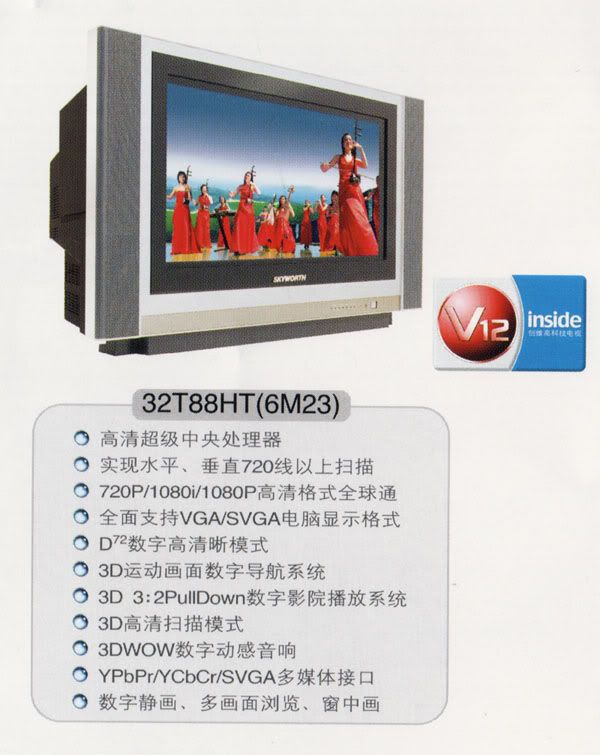


 while the demo of 2F2F still look nice, i would prefer to see it in 720p.


 Feel sorry for you man...kena con by china conman......seriously it's better to buy a Philip Pixel Plus or even SONY HDTV locally for that price....if problem occurs (touch wood)...who can fix and where to find spare parts?? A bit risky...


 0.0391sec
 0.32
0.32
 7 queries
 GZIP Disabled