Welcome Guest ( Log In | Register )

Outline · [ Standard ] · Linear+

 Need a help here..

views
     
TSJakall
post Nov 12 2009, 11:07 AM, updated 17y ago

New Member
*
Newbie
0 posts

Joined: Dec 2007


I bought an original copy of MW2 for PC yesterday at lowyat (forgot the store's name)
but until now i can't play it..

what i want to ask is..
how to install this thing?
everytime i tried to install it..
it keep updating the steam..
and then after all that pile of crap..
it says that the game will be downloaded from steam..
then what's the point of having 2 cd's??

really frustrated from what happen..
cry.gif cry.gif

anybody know how to PROPERLY USE the cd?
icon_question.gif icon_question.gif
Zephro
post Nov 12 2009, 11:13 AM

Getting Started
**
Junior Member
174 posts

Joined: Nov 2005
It needs to update.
Xonius
post Nov 12 2009, 11:15 AM

Y U NO MAD???
******
Senior Member
1,113 posts

Joined: Jan 2005
From: <Insert interesting place>


I dont get such problems, only steam should update, installation is directly from the DVD itself.
TSJakall
post Nov 12 2009, 11:28 AM

New Member
*
Newbie
0 posts

Joined: Dec 2007


Xonius..
where u buy the cd eyh?
mind to tell me how to install it..
coz mine also a DVD..
already update the steam..

fugowitz
post Nov 12 2009, 11:30 AM

New Member
*
Junior Member
4 posts

Joined: Jan 2009

Hi.

Same things with PS3. On inserting the BlueRay disc, it started to download some software. (Took about 10 minutes on the slow stremyix). After that the gameloaded fine.

TSJakall
post Nov 12 2009, 11:33 AM

New Member
*
Newbie
0 posts

Joined: Dec 2007


fine if just take only 10 minutes..
what's bothering me is..
i'm doing an installation last night..
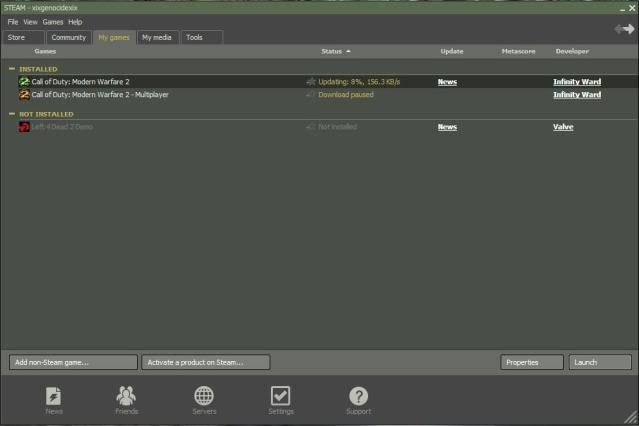
its been 12 hours since last night just to see that percent from steam showing that MW files are being downloaded..
still haven't finish..
damn..


Added on November 12, 2009, 11:39 amuser posted image

there's nothing about installation from the dvd..
cry.gif cry.gif

This post has been edited by Jakall: Nov 12 2009, 11:39 AM
AdamNg
post Nov 12 2009, 07:28 PM

Getting Started
**
Junior Member
219 posts

Joined: Sep 2008
1. Insert DVD.. click install.
2. It will start install STEAM. (u have to create account if u don't one)
3. Then it will download "prepare the file for installation)
4. Then it will start download the game.
5. Cancel the download.
6. Insert again the DVD.
7. Click Reinstall. It will install from the DVD (takes about 30 min).
8. Click STEAM icon, it will update the game (5 min).
9. Play the game...

Hope this help...
nipaa1412
post Nov 13 2009, 10:15 AM

On my way
****
Senior Member
634 posts

Joined: Apr 2009
What you can do is uninstall Steam and COD first. Then go to download the Steam and update it. Once finished install your COD and let it update a little. After all that, you are set to go

Camo_Suit
post Nov 13 2009, 11:14 AM

New Member
*
Junior Member
14 posts

Joined: May 2008
From: Ampang


sure your screamyx connection are okay bro? have to look at other possibilities as well, are the DSL light turn on? the PPP light is on? u know.

For the rest of us in here we did not encounter such problem.
unrealweapon
post Nov 13 2009, 11:17 AM

it's painful.
*****
Senior Member
865 posts

Joined: Jan 2008
From: Paradise City


QUOTE(Jakall @ Nov 12 2009, 11:33 AM)
fine if just take only 10 minutes..
what's bothering me is..
i'm doing an installation last night..
its been 12 hours since last night just to see that percent from steam showing that MW files are being downloaded..
still haven't finish..
damn..


Added on November 12, 2009, 11:39 amuser posted image

there's nothing about installation from the dvd..
cry.gif  cry.gif
*
11gb .. amazing. it took me a week to download a 13 GB MKV.
TSJakall
post Nov 15 2009, 01:19 AM

New Member
*
Newbie
0 posts

Joined: Dec 2007


well..
my internet connection are fine..
dats y i can log into lowyat forum..
btw thanx to AdamNg..
it really helps..
already finish single player twice..


Change to:
| Lo-Fi Version
0.0168sec    0.75    5 queries    GZIP Disabled
Time is now: 20th December 2025 - 01:19 AM