This post has been edited by Moogle Stiltzkin: Jul 14 2017, 08:25 PM
Small picture frame LCD for Ventrilo?
|
|
 Nov 11 2009, 10:16 AM, updated 9y ago Nov 11 2009, 10:16 AM, updated 9y ago
Show posts by this member only | Post
#1
|
 
Senior Member
4,476 posts Joined: Jan 2003 
|
This post has been edited by Moogle Stiltzkin: Jul 14 2017, 08:25 PM |
|
|
|
|
|
Nov 11 2009, 10:36 AM
Show posts by this member only | Post
#2
|

Senior Member
562 posts Joined: Dec 2008 From: WonderLand :D
|
QUOTE(Moogle Stiltzkin @ Nov 11 2009, 10:16 AM) Ok a while back i had the Logitech G5 motherboard. It had a LCD screen that can show who was speaking on vent. Sadly it broke :{ wrong section bro.........Anyone know of a way to get a small LCD screen to output whoever is chatting on ventrilo? Any ideas.  |
|
|
Nov 11 2009, 11:35 AM
Show posts by this member only | Post
#3
|

Senior Member
2,029 posts Joined: Oct 2008 From: KL, Seri Kembangan 
|
go to hardware section ... there will havv ppl help u ~
|
|
|
Nov 11 2009, 02:25 PM
Show posts by this member only | Post
#4
|

All Stars
10,530 posts Joined: Nov 2004 From: Petaling Jaya & Mid Valley
|
u could either get another g15 or mebbe a g13
or theres this LCD (forgot wat its called) where u have to do the wiring urself and connect to the lpt port...unfortunately i cant find it anymore... or u could use car in dash displays and mount it on ur 5.25 bay...something similar to this (thermaltake's version for USD399) which can act as a secondary monitor.  cheapest is of course the g15 or g13 |
|
|
Nov 12 2009, 05:17 PM
Show posts by this member only | Post
#5
|

Senior Member
1,095 posts Joined: Dec 2008
|
u should ask in HW Q&A
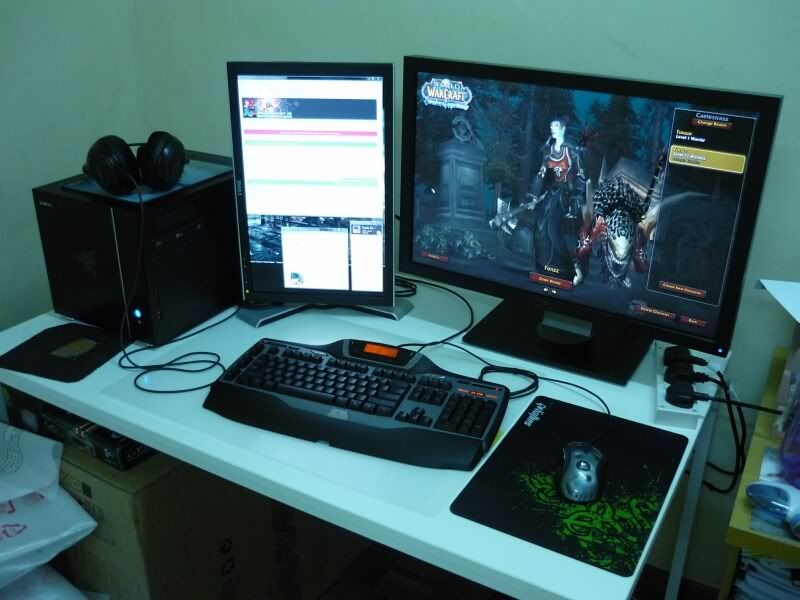
AFAIK, 2ndary LCD would be the best choice here my setup, my vent is on the left screen btw if using any logitech kybd with LCD, u gotta enable LCD support within ventrilo settings PICTA » Click to show Spoiler - click again to hide... « This post has been edited by fr0sti3: Nov 12 2009, 05:18 PM |
|
|
Nov 12 2009, 07:38 PM
Show posts by this member only | Post
#6
|
|
Senior Member
562 posts Joined: Dec 2008 From: WonderLand :D
|
QUOTE(fr0sti3 @ Nov 12 2009, 05:17 PM) u should ask in HW Q&A wow....nice setup....i like it AFAIK, 2ndary LCD would be the best choice here my setup, my vent is on the left screen btw if using any logitech kybd with LCD, u gotta enable LCD support within ventrilo settings PICTA » Click to show Spoiler - click again to hide... «  |
|
|
Nov 13 2009, 12:44 PM
Show posts by this member only | Post
#7
|

Senior Member
3,657 posts Joined: Aug 2009
|
QUOTE(fr0sti3 @ Nov 12 2009, 05:17 PM) u should ask in HW Q&A btw how it work with 2 lcd like that..mind to teach me?AFAIK, 2ndary LCD would be the best choice here my setup, my vent is on the left screen btw if using any logitech kybd with LCD, u gotta enable LCD support within ventrilo settings PICTA » Click to show Spoiler - click again to hide... « |
|
|
Nov 14 2009, 10:05 PM
Show posts by this member only | Post
#8
|

Junior Member
61 posts Joined: Oct 2008
|
2nd lcd how inche??
|
| Change to: |  0.0165sec 0.0165sec
 0.94 0.94
 5 queries 5 queries
 GZIP Disabled GZIP Disabled
Time is now: 22nd December 2025 - 03:37 PM |
 Quote
Quote