

BuFung,
i just found out where's the setting, but there are 4 options.
A-GPS
I-GPS
bluetooth GPS
network based
To avoid my prepaid credit get deducted , i shall ONLY tick I-GPS?
NOKIA N97 V3!, Firmware v21 is available for updates!
NOKIA N97 V3!, Firmware v21 is available for updates!
|
|
 Jan 27 2010, 03:31 PM Jan 27 2010, 03:31 PM
Return to original view | Post
#21
|
 
Junior Member
310 posts Joined: May 2005  
|
BuFung,
i just found out where's the setting, but there are 4 options. A-GPS I-GPS bluetooth GPS network based To avoid my prepaid credit get deducted , i shall ONLY tick I-GPS? |
|
|
|
|
|
Jan 27 2010, 03:59 PM
Return to original view | Post
#22
|
|
Junior Member
310 posts Joined: May 2005
|
QUOTE(BuFung @ Jan 27 2010, 03:40 PM) I only thick I-GPS... okay.... i also tick only i-gps.  How can i know if i have ovimap in my phone or not ? --- i just check with a-gps, every positionning few seconds eat up my few cent....crazy...!  |
|
|
Jan 27 2010, 04:13 PM
Return to original view | Post
#23
|
|
Junior Member
310 posts Joined: May 2005
|
QUOTE(BuFung @ Jan 27 2010, 04:03 PM) Any "MAPS" application on ur N97 is a OviMaps.. just depend what version... oh i see...make sure you have downloaded Malaysia map and also voice to ur phone via Nokia Map Loader... eat up ur few cent maybe is not the A-GPS.. is it the Data which you don't have the map on ur Phone and the application keep downloading the map to ur phone wherever place u scrolling.. just like Google map.. by doing this, gonna cost u a boom... I can know where am i now...is that mean i have malaysia map ? HAHAHAHA 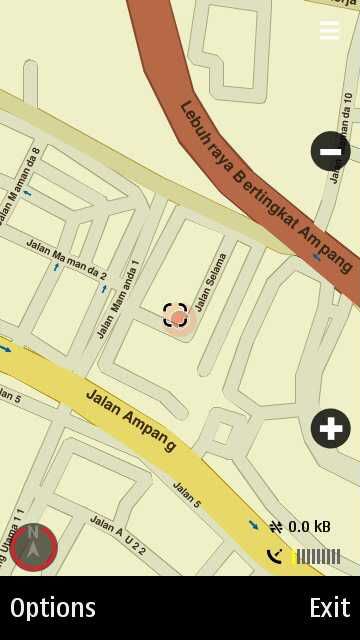 |
|
|
Jan 27 2010, 04:54 PM
Return to original view | Post
#24
|
|
Junior Member
310 posts Joined: May 2005
|
QUOTE(G K Lai @ Jan 27 2010, 04:41 PM) Hi NickyEng, by looking at the layout and icon position, I'm afraid the one you're using is not the latest v3.03 how to get v3.03 then ? Anyone really get the compass to work most of the time? Mine does not work most of the time!  After waving the phone as stated in the user manual, sometimes it would work, but most of the time it just failed!  This is my old problem since the older version of Nokia Maps v2. From the older v10 firmware until the current v20! Very disappointed! download from nokia map loader?  |
|
|
Jan 28 2010, 09:44 PM
Return to original view | Post
#25
|
|
Junior Member
310 posts Joined: May 2005
|
TPLUS1, how's your upgrade firmware from v12 to v20 ?
which NCC you go ? I just tried to upgrade from nokia software updater, and it said it is up to date but show me v12. My product code is not in the list i guess. but i trace the posts few pages back that 'liamlion' member also face the same issue. And BuFung suggested go to NCC. Any other way that we can do it ourself rather than go to NCC ? because i checked nokia website in malaysia only have 4 NCC...which they dont open during weekend.....wtf.... so how LiamLion & tplus1 settle this issue ? any idea guys? |
|
|
Jan 28 2010, 10:05 PM
Return to original view | Post
#26
|
|
Junior Member
310 posts Joined: May 2005
|
QUOTE(BuFung @ Jan 28 2010, 10:00 PM) @Nicky... if you want t odo it yourself.. you have to change the product code.. the NSU look @ the product code to provide you which firmware to use... cool....this saturday going 1u then.NCC are open 7 days till 10pm everyday in 1U.. not sure Berjaya time square... can they really upgrade to v20 ? because our product code not available in the list of v20.....and will they charge me of upgrading? can they do it right away for me ? |
|
|
|
|
|
Jan 29 2010, 09:11 AM
Return to original view | Post
#27
|
|
Junior Member
310 posts Joined: May 2005
|
QUOTE(BuFung @ Jan 28 2010, 10:36 PM) firmware available for my product code is only v12... Thanks for this info. Hehe. But my in V20 now.. by NCC.... not by myself... they can do it right away for u provided u own that company..  joking.. u have to queue and saturday a lot of peoples there... if just firmware.. u leave it there should be able to collect few hours later... So do i need to bring anything else like receipt or warranty card or just bring the phone will do ?  |
|
|
Jan 29 2010, 09:40 AM
Return to original view | Post
#28
|
|
Junior Member
310 posts Joined: May 2005
|
I have another question,
after i ask NCC to upgrade my firmware to v20, can I ask him to download latest OviMaps & Malaysia map & free navigation for me? |
|
|
Jan 29 2010, 10:10 AM
Return to original view | Post
#29
|
|
Junior Member
310 posts Joined: May 2005
|
QUOTE(Leo the Lion @ Jan 29 2010, 09:58 AM) You can ask, but I'm not sure whether the answer is Yes or No. from the phone? How much does it charge if i update like that?Why don't you install the ovi map v3.3 using Apps > SW Updates? |
|
|
Jan 29 2010, 10:49 AM
Return to original view | Post
#30
|
|
Junior Member
310 posts Joined: May 2005
|
QUOTE(Leo the Lion @ Jan 29 2010, 10:14 AM) First, connect to your WIFI and on the menu, click Apps and then click SW Updates. You'll find Ovi Map updates available in SW Updates. Thanks. I will try it after i upgrade to v20 |
|
|
Jan 29 2010, 08:29 PM
Return to original view | Post
#31
|
|
Junior Member
310 posts Joined: May 2005
|
QUOTE(gunslinger @ Jan 29 2010, 08:20 PM) i mean... i dunno how to use ovi map... i open it... wait and wait... no respond... although i hv follow ur words stand still outdoor... how i know gps is working and do it need connect to any network? can you wait for me to do it together? Hahacos i dont wanna miss any info here....I am going to ncc 1u there to upgrade my firmware....haiz.... |
|
|
Jan 31 2010, 10:31 AM
Return to original view | Post
#32
|
|
Junior Member
310 posts Joined: May 2005
|
QUOTE(adrian7386 @ Jan 30 2010, 07:53 PM) hey i cant seems to update my phobe with win 7...guys help please Follow instruction here~ LINKIt works in my windows 7.  Added on January 31, 2010, 10:32 am QUOTE(Spetre @ Jan 31 2010, 04:52 AM) shooting with my n97 (mini) ... haha ... same phone nia ... very nice shot! i love the color. what's the setting for it? This post has been edited by NickyEng: Jan 31 2010, 10:32 AM |
|
|
Jan 31 2010, 03:31 PM
Return to original view | Post
#33
|
|
Junior Member
310 posts Joined: May 2005
|
QUOTE(RAMChYLD @ Jan 31 2010, 01:25 PM) Yeah, I realized. The shop told me to go back to the shop for upgrade. Problem is, shop is closed today and I dun want to wait until next week. I am usually at work from 9-6 on Mon to Fri and by the time I get to the shop, shop most likely already closed. Nokia Care Centre in 1U shopping centre-new wing level 2opening all days from 10am to 10pm.  I just back from there and upgraded my firmware from v12 to v20. Basically it needs 2-3 hours and after that you can collect your phone.  |
|
|
|
|
|
Jan 31 2010, 04:38 PM
Return to original view | Post
#34
|
|
Junior Member
310 posts Joined: May 2005
|
I have a stupid question to ask....
After i install free navigation ovi maps v3.3 in my phone.....and then i go to Maps-> My Position, It does not show a map but only show on red spot in the middle of the screen. Why is it like that? Do i need to download and install any maps into it ? I tot by installing free navigation map v3.3 means I already download the map as well ? confusing.....anyone help? |
|
|
Jan 31 2010, 04:52 PM
Return to original view | Post
#35
|
|
Junior Member
310 posts Joined: May 2005
|
QUOTE(tplus1 @ Jan 31 2010, 04:49 PM) =.= hey tplus...how's your upgrade firmware working on?hey nicky, when u go for software update in NCC, u backup ur phn urself? or tell them to help u back up? yesterday i went to 1u...but due to function at nite so only go to collect my phone today. I just say i want to upgrade firmware from v12 to v20. the guy backup for me.....nothing missing. its all free....haha...so happy today get my phone. But now stuck with ovi maps...>< Added on January 31, 2010, 4:54 pm QUOTE(BuFung @ Jan 31 2010, 04:44 PM) SOlid red dot yeah? BuFung, zoom far far oout n see u in Malaysia or not.. U do not have Map in ur phone I suggest... of course u need to put in map... the OviMaps software do not have Map inside... you help me take alook at this....i do not understand why the bottom line there saying my map still version 0.x.x.xx? I tot i just installed ovi map v.3.3 ? 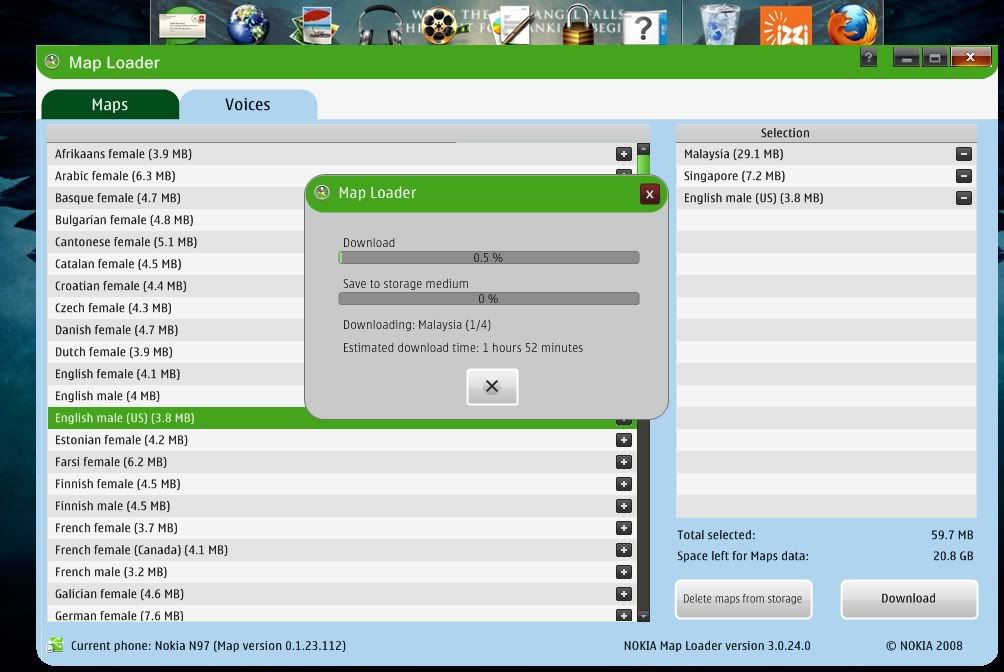 And is this the way of download install map and free navigation voice ? did i select the correct package to download? pls help..urgent..i'm downloading it now... This post has been edited by NickyEng: Jan 31 2010, 04:54 PM |
|
|
Feb 1 2010, 09:31 AM
Return to original view | Post
#36
|
|
Junior Member
310 posts Joined: May 2005
|
how about go NCC again and ask ? hahahha
|
|
|
Feb 1 2010, 09:49 AM
Return to original view | Post
#37
|
|
Junior Member
310 posts Joined: May 2005
|
v20 and v21 are there big differences ? is there any need to upgrade from v20 to v21 ?
|
|
|
Feb 2 2010, 09:05 PM
Return to original view | Post
#38
|
|
Junior Member
310 posts Joined: May 2005
|
QUOTE(tplus1 @ Feb 2 2010, 08:49 PM) 0586297 is disaster code.... same bro.... we both suffer... and yes.. NCC far far away from my place... your previous post i read and i tot why you so happy with the v12 ><i still stuck in V1.2... so "happy"  everyone here now upgrade to v21, but i wanna stick with v20 for a while. they dont have much diff anyway...dont wanna go through all the trouble. oh ya.... can anyone explain to me what is hard reset and how to do it ? |
|
|
Feb 3 2010, 01:34 PM
Return to original view | Post
#39
|
|
Junior Member
310 posts Joined: May 2005
|
May I know anyone facing problem with Ovi Maps comes with nokia firmware v20 when first open and click "my position"....it will not show my exact location and keep showing me my last-location......
how long does it takes to relocate my exact position ? or any setting to make it easier ? |
|
|
Feb 3 2010, 04:22 PM
Return to original view | Post
#40
|
|
Junior Member
310 posts Joined: May 2005
|
QUOTE(9minds @ Feb 3 2010, 02:04 PM) as far as i know... how to get it lock fast without using A-GPS ?u will only get your latest position when ovi maps locks gps signal |
|
Topic ClosedOptions
|
| Change to: |  0.0206sec 0.0206sec
 0.51 0.51
 7 queries 7 queries
 GZIP Disabled GZIP Disabled
Time is now: 2nd December 2025 - 01:39 PM |
 Quote
Quote