Welcome Guest ( Log In | Register )

Bump Topic Topic Closed RSS Feed

Outline · [ Standard ] · Linear+

 DVD player, So Much Difference ?

views
     
TS812799
post Oct 22 2009, 08:38 PM, updated 17y ago

Enthusiast
*****
Senior Member
837 posts

Joined: Aug 2007


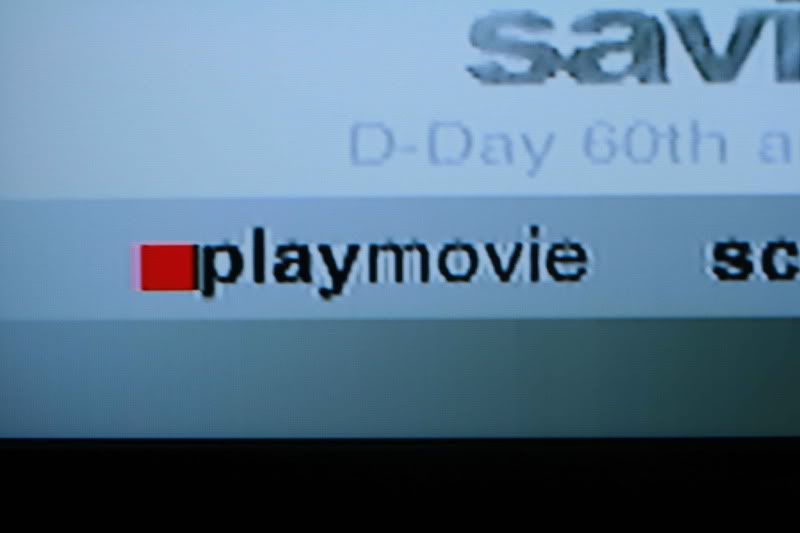
user posted image

My LCD display

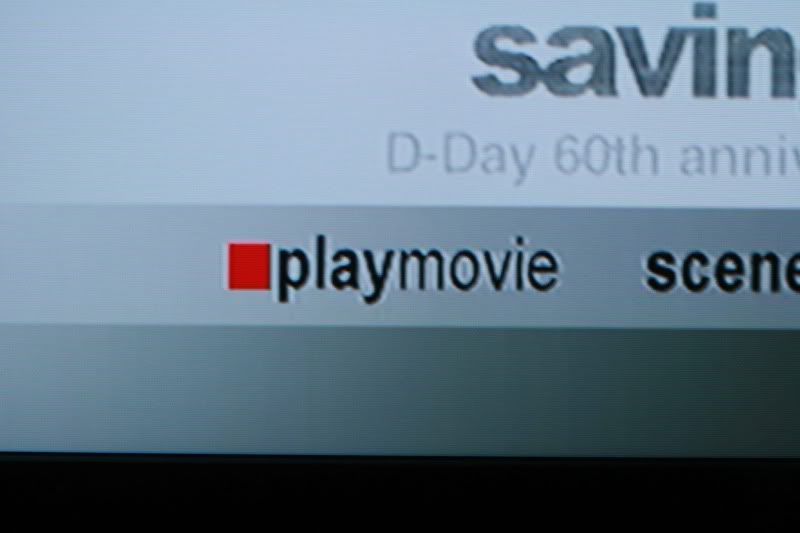
user posted image

My dad's LCD display

so bros and sis here , judging @ the difference between this two ...

on is using JVC DVD player (1 to 2 yr old )
another is using Hyundai DVD player (few weeks old)

both tv settings are the same ... my question is , is it really that much difference by different brands ?

ok i just took a look , he's using component audio , while i'm at AV , i changed the cable and is the same thing for me ... so anyone can shed some light ?
azbro
post Oct 22 2009, 08:48 PM

Look at all my stars!!
*******
Senior Member
4,403 posts

Joined: Jan 2007
From: Johor Bahru


How come the top image is pulled one?...


kianwee
post Oct 22 2009, 08:50 PM

Cube
*******
Senior Member
6,562 posts

Joined: Jan 2003
Saving Private Ryan? tongue.gif
ar188
post Oct 22 2009, 08:50 PM

Look at all my stars!!
*******
Senior Member
9,206 posts

Joined: Jun 2006
must be the stretch/fill/smart zoom function on TV...


Added on October 22, 2009, 8:51 pm
QUOTE(kianwee @ Oct 22 2009, 08:50 PM)
Saving Private Ryan? tongue.gif
*
D-day 60th aniversary.. if not then band of brothers? tongue.gif

This post has been edited by ar188: Oct 22 2009, 08:51 PM
anfieldude
post Oct 22 2009, 08:54 PM

Look at all my stars!!
*******
Senior Member
3,858 posts

Joined: Jan 2008
QUOTE(812799 @ Oct 22 2009, 08:38 PM)
user posted image

My LCD display

user posted image

My dad's LCD display

so bros and sis here , judging @ the difference between this two ...

on is using JVC DVD player (1 to 2 yr old )
another is using Hyundai DVD player (few weeks old)

both tv settings are the same ... my question is , is it really that much difference by different brands ?

ok i just took a look , he's using component audio , while i'm at AV , i changed the cable and is the same thing for me ... so anyone can shed some light ?
*
Before I answer, did u mean component video cables? And u used composite?


TS812799
post Oct 22 2009, 08:58 PM

Enthusiast
*****
Senior Member
837 posts

Joined: Aug 2007


clear some stuff up , yes it is Saving Private Ryan

and composite ... means ? i'm using the red , white and yellow cable provided with the dvd player ...

and yeah my dad's using component video , my bad for that , and i did use component video as well , but still the same thing ...


Added on October 22, 2009, 8:58 pmp/s : both LCD are the same model ...

This post has been edited by 812799: Oct 22 2009, 08:58 PM
anfieldude
post Oct 22 2009, 09:04 PM

Look at all my stars!!
*******
Senior Member
3,858 posts

Joined: Jan 2008
QUOTE(812799 @ Oct 22 2009, 08:58 PM)
clear some stuff up , yes it is Saving Private Ryan

and composite ... means ? i'm using the red , white and yellow cable provided with the dvd player ...

and yeah my dad's using component video , my bad for that , and i did use component video as well , but still the same thing ...


Added on October 22, 2009, 8:58 pmp/s : both LCD are the same model ...
*
1stly, component video will most likely send a progressive signal to ur set. Componet (yellow) will not (as far as I know). Component (Y,Cb,Cr) is a better video output cable than composite (all in one cable) if HDMI is not an option.

However, in short, DVD players are different. DVD is stored in 480i or 576i format. This needs to be deinterlaced (either in ur DVD player or ur display) and displayed as a progressive signal. Better DVD players have better chips that do this. There is a lot going on in ur player before the data is sent to ur display.

If u do not like what u see and u r not moving to Blu Ray soon, get a better player. Better yet, make it a Blu Ray player (most Blu Ray players are excellent DVD players as well) and ure covered for a while.

TS812799
post Oct 22 2009, 09:15 PM

Enthusiast
*****
Senior Member
837 posts

Joined: Aug 2007


urm , what i meant for his component is he's using other colours , mine is R , W , Y ...

his was Blue , green and red ... and he had another cable which says "Video Digital Out/Stream" which i think connects to the amplifier ...

and one more thing , i tried it on a samsung player @ the living room , and it's even better ... it's also using a good component video cables ... but somehow i think i need 2 swap those dvd players and see how thing turns out ...
Ngto
post Oct 22 2009, 10:00 PM

Look at all my stars!!
*******
Senior Member
4,350 posts

Joined: Sep 2005
First of all one image is longer than the other. Not the same image. Set both image equal first then show us the pic again.
TS812799
post Oct 22 2009, 10:05 PM

Enthusiast
*****
Senior Member
837 posts

Joined: Aug 2007


QUOTE(Ngto @ Oct 22 2009, 10:00 PM)
First of all one image is longer than the other. Not the same image. Set both image equal first then show us the pic  again.
*
dude , the images shows it clearly alrdy mate , i think with this limited view , is good enough to compare it ...

and yes i see what's the problem , not the cables but the DVD player itself ...
Ngto
post Oct 22 2009, 10:23 PM

Look at all my stars!!
*******
Senior Member
4,350 posts

Joined: Sep 2005
Like you said problem is DVD player. One player image is longer than the other. Adjust the player so that both images are the same aspect ratio.

Only then can compare.

Topic ClosedOptions
 

Change to:
| Lo-Fi Version
0.0174sec    0.77    5 queries    GZIP Disabled
Time is now: 17th December 2025 - 08:46 PM