


before:


after:


pls give me some advice..tQ

Cable Management Thread V2, Share your cabling tricks here
|
|
 Jun 29 2011, 12:56 AM Jun 29 2011, 12:56 AM
Return to original view | Post
#1
|
 
Junior Member
45 posts Joined: Jun 2009 From: in the bucket   
|
here's mine..newbie here..this is my 1st time do cable management..
before: after: pls give me some advice..tQ |
|
|
Jun 29 2011, 05:29 PM
Return to original view | Post
#2
|
|
Junior Member
45 posts Joined: Jun 2009 From: in the bucket
|
QUOTE(iaknesnah @ Jun 29 2011, 02:48 AM) wah u manage to hide all the cacing that's all i can do for now..   Added on June 29, 2011, 5:30 pm QUOTE(Hoodlums @ Jun 29 2011, 03:41 PM) xauxix, if u rotate the HDD, still can use plastic holder? rotate HDD?what do you mean?   This post has been edited by xauxix: Jun 29 2011, 05:30 PM |
|
|
Jun 30 2011, 08:36 PM
Return to original view | Post
#3
|
|
Junior Member
45 posts Joined: Jun 2009 From: in the bucket
|
QUOTE(ahhann @ Jun 30 2011, 06:41 PM) » Click to show Spoiler - click again to hide... « 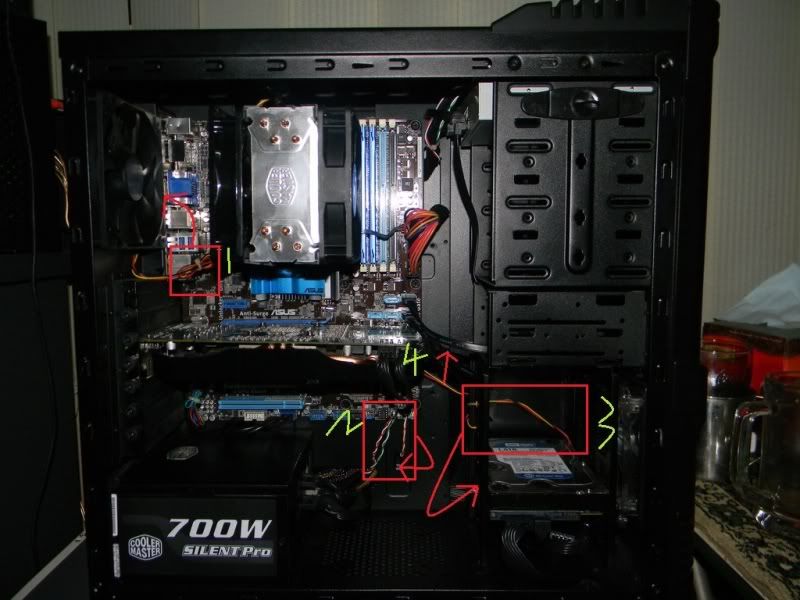 1)Hide the cable at the side of the fan, it should able to sit tight at there. Don't "gulung" your cable, make sure what is expose to your eye is 1 slim wire only. 2)"Gulung" all this 3 system tray wire and pass through the hole where the pointer point. It should able to pass through the hole. 3)Hide this cable behind the HDD or the SATA power cable to HDD. 4)Hide this cable behind those black color SATA cable. This should bring better appearance to de eye   i'll try then post new result later..  |
| Change to: |  0.0394sec 0.0394sec
 0.85 0.85
 7 queries 7 queries
 GZIP Disabled GZIP Disabled
Time is now: 13th December 2025 - 10:06 PM |
 Quote
Quote