


Attached thumbnail(s)

Cable Management Thread V2, Share your cabling tricks here
|
|
 Aug 8 2013, 02:38 PM Aug 8 2013, 02:38 PM
Return to original view | Post
#1
|
 
Junior Member
196 posts Joined: Jan 2010 From: Kuala Lumpur  
|
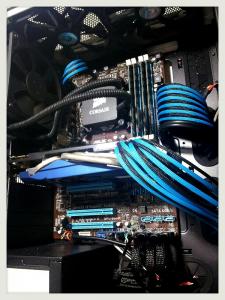
okie dok... here's my contribution... CM690II Advance...
Attached thumbnail(s)
|
|
|
|
|
|
Aug 12 2013, 04:02 PM
Return to original view | Post
#2
|
|
Junior Member
196 posts Joined: Jan 2010 From: Kuala Lumpur
|
QUOTE(Son of Sparda @ Aug 8 2013, 08:40 PM) Ur color juz like mine bro..hahah..nice rig.. hahaha... ya ya...  a few more images...  sata cables... 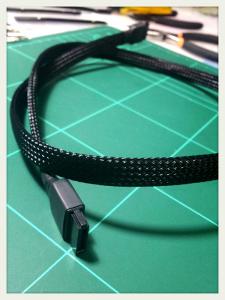
fan cables as well... 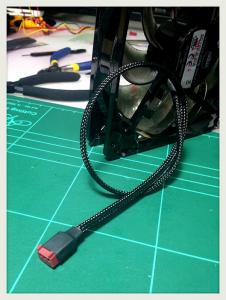
how the sata cables look like now... 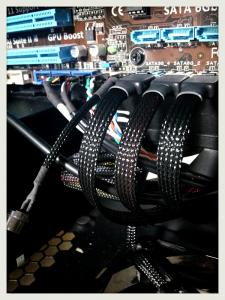
Well, before my current blue and black theme, I was using black and grey. 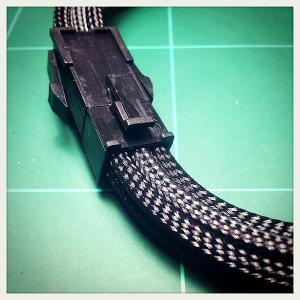
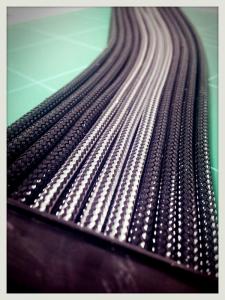

Then decided that the blue and black will look better since my GPU is in blue. 

Now the black and grey became extras... 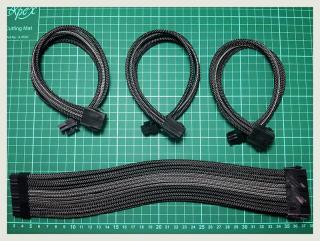
|
|
|
Aug 16 2013, 11:04 PM
Return to original view | Post
#3
|
|
Junior Member
196 posts Joined: Jan 2010 From: Kuala Lumpur
|
Yeah... cable management can be a real pain in the arse but it's very satisfying after all the trouble.
I'm using cable extensions from topazzatech, here: cable extender and I got the sleeves from him as well, here: colortrail. A problem with using cable extenders is that you will have to manage that extra cables in the back of your case. It'll be worst if you are using non-modular PSU as well. As my image here will show you... hahaha... 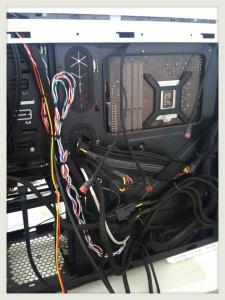
Then again, it is also the easiest way to make your case look tidy and clean! Just plan on how you want the front part to look like and then only worry how to manage the back. hahaha... XDThis post has been edited by antaras: Aug 16 2013, 11:05 PM |
|
|
Aug 16 2013, 11:16 PM
Return to original view | Post
#4
|
|
Junior Member
196 posts Joined: Jan 2010 From: Kuala Lumpur
|
QUOTE(AaronFPS @ Aug 15 2013, 07:50 PM) can someone share the best guide to learn cable management? Not quite sure about guide on cable management but I learn a lot from watching sifu Lutro0 on cable sleeving. He is the Yoda of cable sleeving! hahaha... here: cable sleeving guides. You can also learn a lot from reading his guides here: sleeving F.A.QHope this help...  |
|
|
Aug 17 2013, 11:24 AM
Return to original view | Post
#5
|
|
Junior Member
196 posts Joined: Jan 2010 From: Kuala Lumpur
|
QUOTE(Clem1982 @ Aug 17 2013, 09:55 AM) Lol your CM looks like mine bro, the back is a total mess... not that anyone could see it though 700W non-modular PSU have lotsa cables.. too many in fact lolz but I'm using the cable extensions from BitFenix, their Alchemy line is really good looking as well All the cables there are making it hard to close the rear panel sometimes.  hahaha... hahaha...That's why, in order to achieve that perfect look, you will need a modular PSU and then individually measured cable length. Plan the cables route and then sleeve the suckas!  |
|
|
Aug 19 2013, 11:03 AM
Return to original view | Post
#6
|
|
Junior Member
196 posts Joined: Jan 2010 From: Kuala Lumpur
|
QUOTE(Gaia34 @ Aug 18 2013, 06:57 PM) My cable management...Corsair 300r... Nice... now, if you can hide those bits of red, yellow and black wires more then it will be better. Try to make them align to the side of your casing if possible. It will make your case look a lot cleaner and organized! Your case also very clean!  [attachmentid=3588190] |
|
|
|
|
|
Aug 28 2013, 02:30 PM
Return to original view | Post
#7
|
|
Junior Member
196 posts Joined: Jan 2010 From: Kuala Lumpur
|
I never own an Outlaw before so I can't comment about it. Am using the CM690II now and I don't see much issue regarding it. However, I only hope they have a wider clearance between the back panel and the mobo tray. They added a few extra mm on the new CM690III though.
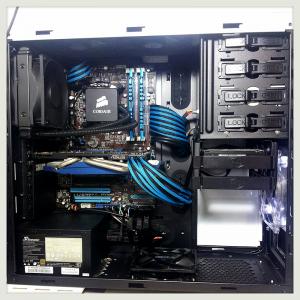
Here's my current 690II set up. |
|
|
Sep 10 2013, 04:32 PM
Return to original view | Post
#8
|
|
Junior Member
196 posts Joined: Jan 2010 From: Kuala Lumpur
|
QUOTE(Zzorro @ Aug 30 2013, 11:33 AM) just share together.. Wow... nice rig man...   QUOTE(cwk88 @ Sep 7 2013, 11:23 AM) here is mine (noob cable management xD) Very good job! Clean and tidy! Great fans as well. *sorry for bad picture quality   |
|
|
Sep 17 2013, 12:04 PM
Return to original view | Post
#9
|
|
Junior Member
196 posts Joined: Jan 2010 From: Kuala Lumpur
|
Good! Very clean and organized!
|
|
|
Oct 9 2014, 06:53 PM
Return to original view | Post
#10
|
|
Junior Member
196 posts Joined: Jan 2010 From: Kuala Lumpur
|
QUOTE(torino @ Oct 6 2014, 11:26 AM) My best trick so far for my family rig with CM Silencio 352 Case. Nice clean cables routing. Good stuff!*Internal layout is similar with N200, so you guys can try it out too..  |
|
|
Nov 18 2014, 03:12 PM
Return to original view | Post
#11
|
|
Junior Member
196 posts Joined: Jan 2010 From: Kuala Lumpur
|
QUOTE(ValityMental @ Nov 15 2014, 11:41 AM) No worry , practice make perfect ! Wow... nicely done there! Seldom see CM690II with WC setup and with such clean and tidy look too! You were on 240 or 280 rad up top?Mine before when i'm still in water-cooling [attachmentid=4217381] |
| Change to: |  0.0221sec 0.0221sec
 0.34 0.34
 7 queries 7 queries
 GZIP Disabled GZIP Disabled
Time is now: 3rd December 2025 - 10:32 AM |
 Quote
Quote