Outline ·
[ Standard ] ·
Linear+
Cable Management Thread V2, Share your cabling tricks here
|
M1X
|
  Aug 25 2011, 11:54 PM Aug 25 2011, 11:54 PM
|

|
Setup a new rig today... cheap casing so got seriously bad problem in cable management.  The factory sleeves really sux that's for sure. I already bought a bunch of sleeves but lazy to deal with it now. And I was  when i notice that HD6850 need 2x 6-pin power... It'a an Aerocool RV9 casing btw, since it is a cheap one, there no hole I can route cables to the rear (there is one right above the PSU, but got blocked by the ATX mobo)...  It's not really noticeable messy on normal running anyway (that camera's flash on pic above...)  (bought 6 fans and 1 of it sounds like a jet engine... wtf? ) This post has been edited by M1X: Aug 25 2011, 11:59 PM |
|
|
|
|
|
M1X
|
Aug 26 2011, 08:40 AM
|
|
|
I bought from niclasteoh as I can just go to his shop...
|
|
|
|
|
|
M1X
|
Sep 2 2011, 06:18 AM
|
|
|
Spent 4 hours sleeving up the 24-pin cables, and 3 hours managing layout & cables  Guess I should bought 3mm sleeve instead of 2mm for better "covering"? First time doing this, ok-lahhhhhhh...   Do you know where is my harddisk?  This post has been edited by M1X: Sep 2 2011, 08:26 AM This post has been edited by M1X: Sep 2 2011, 08:26 AM |
|
|
|
|
|
M1X
|
Sep 2 2011, 05:11 PM
|
|
|
QUOTE(iaknesnah @ Sep 2 2011, 03:18 PM) above the gpu, both black color Sharp eye, yes the cable above the GPU since the fastest SATA port is there instead of bottom. Now here's the answer for the harddisk: » Click to show Spoiler - click again to hide... « The 5.25" casing bracket allows me to mount a harddisk at one side of the bracket, and a 12cm fan on the other side of the bracket- and the fan will directly blow the harddisk of course and cool it down from ~40c to around 32c. I can choose to screw the bracket horizontally or vertically- so I do it vertically this time.  Now what I want to know is, what is the best sleeve sizes you guys usually use for PSU cable sleeving for best "covering"? I used 2mm for that 24-pin cables and still can see the cable colour... This post has been edited by M1X: Sep 2 2011, 05:15 PM |
|
|
|
|
|
M1X
|
Sep 2 2011, 08:29 PM
|
|
|
oh didn't notice there different type of sleeve thickness ;3
Added on September 2, 2011, 8:29 pmoh didn't notice there different type of sleeve thickness ;3
This post has been edited by M1X: Sep 2 2011, 08:29 PM
|
|
|
|
|
|
M1X
|
Sep 2 2011, 10:30 PM
|
|
|
http://forum.lowyat.net/index.php?showtopic=1868190&hl= aiya baru RM3.8/m nia~ should have know about such thing earlier...
|
|
|
|
|
|
M1X
|
Sep 7 2011, 12:59 PM
|
|
|
That casing looks like only support up to mATX... What is that extra electronic board below the 5.25" bay?
|
|
|
|
|
|
M1X
|
Mar 27 2012, 04:03 PM
|
|
|
Just a cheap & casual setup, made a little servicing yesterday  Flipped the casing over, how convenient design to do so... but cable management is HARD... (Aerocool VS9)  Rear: » Click to show Spoiler - click again to hide... « |
|
|
|
|
|
M1X
|
Mar 27 2012, 08:58 PM
|
|
|
QUOTE(Uncle Ron @ Mar 27 2012, 08:46 PM) Just wanna ask this casing make your mobo upside down yah?  I turn the casing upside down... roof become foot, foot become roof (they are both identical mesh anyway) |
|
|
|
|
|
M1X
|
May 12 2012, 11:25 AM
|
|
|
The CPU cooler is "senget"... er... not aligned properly. Make sure you screw it in tight and don't move easily. Especially the motherboard 4-pins 12v rail need to find a different way instead of flying across your graphic card. It looks short, yes extension will works. You can route ALL the default cables from power supply to the back of your casing (with the nearest hole possible), then get a bunch of extensions (mobo 12v, 24-pin, graphic card 6-pin/8-pin, .......), or better-> sleeved extensions that will immediately makes your casing looks better. I'm not sure if there anyone selling NZXT pre-sleeved extensions kit around here http://www.nzxt.com/new/product.php?series=13 But there are a lot of people can make you any extension cables with any sleeve color anyway, try check around garage sale. Well, just my 2cent. |
|
|
|
|
|
M1X
|
May 12 2012, 01:55 PM
|
|
|
QUOTE so its better if i get all the extension from seller then all the psu cable put behind the mobo? Well, you can DIY of course if don't want to buy directly. It is all matter of aesthetic (beauty) if you decide to put a few more dollars into it. But one usually thing is, always hide as many exposed-skinny-cables as possible Since you're already on Blue+Red maybe the sleeved cables should combine red+blue too? Although not many do that combination.  I usually visit him for stuff: http://forum.lowyat.net/index.php?act=Sear...ult_type=topicsWell I'll probably do like this... Don't need to follow this, use your own style. Was thinking of getting some sleeved extensions this morning too, tired of those skinny-cables... Not sure how much they will cost. » Click to show Spoiler - click again to hide... « |
|
|
|
|
|
M1X
|
May 12 2012, 02:11 PM
|
|
|
QUOTE but why the hdd wan to flip over? Haha, my personal thing, because the back side is black, not white/silver stickers.  But seriously it doesn't matter if you keep the door on. This post has been edited by M1X: May 12 2012, 02:12 PM |
|
|
|
|
|
M1X
|
May 14 2012, 04:52 PM
|
|
|
QUOTE(paktam @ May 7 2012, 11:16 AM) where can I get 4-pin ATX 12v extension... the cable from the PSU is too short... anybody know where to get it? Commonly sold in PC shop, not really very long probably just 20cm, about RM15 each over here in Kuching. |
|
|
|
|
|
M1X
|
May 14 2012, 09:07 PM
|
|
|
Second time sleeving, boleh tahan lah... At least not the first-time's-stupid-mistake-use-regular-sleeve. Going to fix up the old pc but still lacking some tools, today's shopping was a huge disaster...  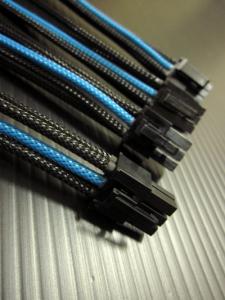
|
|
|
|
|
|
M1X
|
May 17 2012, 03:52 AM
|
|
|
|
|
|
|
|
|
M1X
|
Jun 23 2012, 04:14 PM
|
|
|
Same as this right? http://benchmarkreviews.com/index.php?opti...=1&limitstart=4Can make some reference there. Sleeve those grey front panel cable with black sleeve can make things looks much better. (always have manufacturers decide to make FULL BLACK casing, but supply WHITE/GREY cables........ zzz) |
|
|
|
|



 Quote
Quote



 0.0287sec
 1.89
1.89
 7 queries
 GZIP Disabled