
Hi bro, my xtreamer pro has been sent already?
Let me know the tracking number ya.
Thanks.
[BULK/WTS] Xtreamer, Xtreamer Pro & eTRAYz, All READY Stock... Ask for more details.
 Lowyat.NET -> Garage Sales -> Special Interest Garage Sales -> Home Electronics & Wares Garage Sales
[BULK/WTS] Xtreamer, Xtreamer Pro & eTRAYz, All READY Stock... Ask for more details.
|
|
 Jul 10 2010, 09:47 PM Jul 10 2010, 09:47 PM
|
 
Senior Member
1,392 posts Joined: Aug 2006 From: Sungai Petani  
|
Hi bro, my xtreamer pro has been sent already?
Let me know the tracking number ya. Thanks. |
|
|
|
|
|
Jul 12 2010, 11:24 PM
|
|
Senior Member
1,392 posts Joined: Aug 2006 From: Sungai Petani
|
Item arrived today! woot!
This is what in the box: 
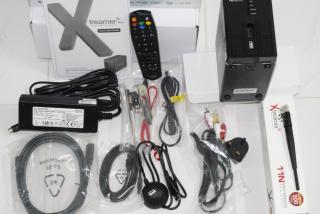
Setup is very easy, since my router has WPS option, I just connect Xtreamer to my network using WPS setup with Static IP of course. Combined with AV transmitter and composite splitter, I can wirelessly watch the movies in my room! See here: A few buggers: - Sometimes big files (over 5GB) have playback lagging. Usually when this happened, I just paused it for a few minutes and play it again. Reason doing this was because I thought it might need to catch buffers before playback. - By default, MYXTREAMER will show in the network but you can't access it. Just go to the webpage (type in xtreamer IP in browser) and setup it's workgroup. - How to make favorite? Is it only for files in the local HDD? If I have files stream from my other NAS, can I make them my favorite? |
|
|
Jul 14 2010, 03:20 PM
|

Junior Member
186 posts Joined: Jan 2003
|
i received my 2 unit of XtPro in less than 24hrs..
thanks. |
|
|
Jul 15 2010, 12:15 PM
|

Senior Member
1,342 posts Joined: Apr 2007
|
QUOTE(nyunyu @ Jul 12 2010, 11:24 PM) Item arrived today! woot! Thanks bro!!This is what in the box:
Setup is very easy, since my router has WPS option, I just connect Xtreamer to my network using WPS setup with Static IP of course. Combined with AV transmitter and composite splitter, I can wirelessly watch the movies in my room! See here: A few buggers: - Sometimes big files (over 5GB) have playback lagging. Usually when this happened, I just paused it for a few minutes and play it again. Reason doing this was because I thought it might need to catch buffers before playback. - By default, MYXTREAMER will show in the network but you can't access it. Just go to the webpage (type in xtreamer IP in browser) and setup it's workgroup. - How to make favorite? Is it only for files in the local HDD? If I have files stream from my other NAS, can I make them my favorite?  Added on July 15, 2010, 12:16 pm QUOTE(exshige @ Jul 14 2010, 03:20 PM) i received my 2 unit of XtPro in less than 24hrs.. Thanks for the support!!thanks. This post has been edited by hdwarexpert: Jul 15 2010, 12:16 PM |
|
|
Jul 18 2010, 02:47 PM
|
|
Senior Member
1,342 posts Joined: Apr 2007
|
Xtreamer v2.4 RC1 released to betatesters
The time has come. The long and highly anticipated v2.4 release candidate has been released to our official betatesters. Let me save all the blahs and give you right away all stuff that you can expect after the betatesters will have thoroughly tested it. I expect a final release to all users in about 1 week – don’t blame me though if we will find too many bugs =) NEW FEATURES (1) Subtitle Browser – You will be able to find this new option on the subtitle popup screen. It will allow you to select an external subtitle file on any location on your HDD. It will absolve you from the need to rename the subtitle to the same name as the movie file name and will free you from the need to place the subtitles on the same folder of the movie (2) HD Audio Passthrough – (For Xtreamer Pro and Sidewinder models only ) This beta introduces the long anticipated 7.1 Audio Passthrough to DTS-Master Audio, Dolby TrueHD and Dolby Digital Plus. Currently this feature is well presented on BluRay .m2ts files. HD audio in MKV container will be ready hopefully for the official release of this firmware. (3) Timer Off – The requested function which will allow you to set a time in which the device will be turned off was added. Search for it on the Settings menu. You will have a choice now to set the time between 30-120 minutes (4) NTP Client – The device was supplemented to adjust itself to a network time server. This will become handy once we will introduce you in the near future the “Recently added files” which will use the device time as reference point (5) Recently Watched Movies – This Function was added to the media library. you will see this option once you will go into the media library inital screen. press [1] on the remote control will display a popup screen with the list of the last 10 movies played on the device. You will have an option to remove items from the list as well. (6) Online Download & update mechanisms for Xtreamer live + Jukebox – This beta was introduced with the ability to download the Xtreamer Live and the Community Jukebox directly from our server provided that you agree to the terms outlined on the opening screen. This function will also allow users to perform online updates as they are made available by the community (7) Restricted Porn Section – The XXX porn section on the Xteramer live will be automatically protected by the system default password . (0000) . We will consider to make this section available as a manual download section and to present a “family” version of it on the official release. The password is based on the ‘Folder Lock’ password and can be updated on the Settings page (8) Hebrew TV GUI – was retranslated entirely so as to introduce a more localised experience to the various sections (9) Auto creation of swap file – A default (64MB) swap file will be created while entering the Movie Jukebox to improve performance (10) File Manager – We added enhanced functionality to the File manager function (New folder, Rename, Copy/Move, Delete) for network shares (11) Password Protected Shares – We introduced in this firmware the ability to use a Username/Password option to log into protected network shares (12) Improved Audio Streaming! – We dramatically improved / enhanced the .mms support so as to allow you greater compatibility and stability with mms audio streams. This opens the way for you to add the majority of mms audio streams of your favorite radio stations. We also added the ability to use both “mms://” and “mmsh://” protocols Example usage: Arirang radio [playlist] NumberOfEntries=1 File1=mms://s2.arirang.co.kr/FM_Live (13) Video Format Support – We can now stream AVI & WMV3 video streams which allows the addition of many thousands of active streams and supports more services for developers and users to use to enhance the online streaming experience (14) RTSP Streaming Format – We added “rtsp” protocol support for Internet section. Example usage: <item> <title>test rtsp</title> <enclosure type=”video/mp4″ url=”rtsp://live2.ncnews.com.cn/sjb”/> </item> (15) SMI Parsing – We Modified the parser code for SMI file. (16) RSS Local Movie Playback Improved – You can use all functions of “Media library” playback via the Internet section – allowing you to customise the way you display and play your movie collection (17) SQLite version 3.5.4 and PHP-5.3.2 – Were added to the device system core (18) Network Shares support via Xtreamer Web Server a) Listing all network shares b) Auto mount while click c) Play network media files using web media player d) Play network media files/folder directly on TV by clicking “Play” icon e) Download network shared files from Xtreamer web server f) Upload file to network shares g) File functions (New folder, Rename, Copy/Move, Delete) for network shares h) Zip/Archive option for network shares i) Direct file link for network share files (19) Play files and folders remotely with WEB UI – Screen shot in web rc,rc2 a) Play files directly from web UI to TV - Click Play button next to file name to play that file directly on TV b) Play all files of a folder directly from web UI to TV - Click Play button next to folder name to play the files of that folder directly on TV c) Playlist play option from web UI to TV - You need to firstly create a playlist from web UI or TV if none exists - Click Play button from playlist window (Video/Audio/Photo) to play that playlist directly on TV d) Play playlists from Web Remote Control to TV by one click - You need to firstly create a playlist from web UI or TV if none exists - Click Movies/Music/Photos button from web remote control to play corresponding playlist directly on TV e) Currently playing file information and remote control by viewing “TV ScreenShot” - Currently playing file name is viewable from main page of “RC - Click on that file name to see more information about - Go to “RC” sub page and click “Screen Shot” button to control your TV viewing screen shot - Or go to “RC2” and click on TV icon at the left to control your TV viewing screen shot - Currently need to refresh page to see updated Screen Shot 2. Playlist auto run option after boot or reboot a) Go to Setup->Playback->Auto Run and select the playlist you want to play automatically b) Whenever you will turn Xtreamer on or reboot your selected playlist will be auto played c. For photo playlist you need to select “Setup->Playback->Background Music->Playlist” for background music to be auto played (20) HDMI Compatibility Improved – New settings available a) We changed the default value of HDMI Compatibility Set. b) We also changed the default value of HDMI Chroma Sub-sampling Set to 4:2:2(Standard Default) (21) Subtitle Lock – We added the ability to display lock folder password on subtitle browser. Jukebox Recent Features The Jukebox currently supports 4 Scraper plugins in 4 languages. Currently 10 OSD languages are supported for a full OSD localised experience. This list is not final as we are in the process of adding additional languages within the upcoming updates. Once movies have been scanned and added to the Jukebox you will have the option to see a preview and full movie information even from the ‘Media Library’ by pressing the INFO button on the remote control on any folder which contains a movie with scanned data When movies have been scanned and added to the Jukebox you will see more detailed movie information if you press the INFO button while a movie is playing, this includes full plot information and movie rating We added an exciting feature to the media library FUNC popup that will allow you to add any movie to the jukebox even if you did not scan the entire folder or if you added the file later on. This will open doors for the community to allow you get movie info on the fly even if you did not pre-scrape / scan the folder on the jukebox. Its full functionality will be appreciated within a short time once the developers will introduce this working function. An upgrade check / download function has been added to the Jukebox. Press the ‘8′ (FUNC) button while on the setup screen to check if a new version exists. Your current jukebox version will be displayed on the jukebox homescreen. Jukebox Supported languages for official release 1. English 2. 中文(Chinese) 3. DUTCH (Nederlands) 4. GERMAN (Deutsch) 5. Français (French) 6. HEBREW (עברית) 7. SPANISH (Spain) 8. РУССКИЙ (Russian) 9. CATALAN (Català) 10. Korean 11. (Arabic) العربية 12. POLISH (POLSKI) 13. SWEDISH (Svenska) 14. ITALIANO 15. PORTUGUESE (Portugal) 16. PORTUGUES (Brasil) 17. ESTONIAN (Eesti) 18. SLOVENIAN (slovenščina) 19. FINNISH 20. ΕΛΛΗΝΙΚΑ (GREEK) 21. ROMANIAN (Romania) 22. HUNGARIAN Jukebox Webinterface (WI) Features A Movie Overview of all scanned movies in the database which allows you to: See cover and fanart preview quickly Edit movie information quickly Upload custom covers/fanart from local PC or via URL Update all stored movie information including images from online movie databases See immediately which movie has missing title, plot, rating, cover, fanart Delete single (or multiple or ALL) movies from the jukebox Get an idea how the info will look like on TV (RSS “infoOSD” emulation) Remotely browse / update your Jukebox collection Secured using your Xtreamer web interface credentials Filesystem Scanner Allows quick initial or update scan with the same options as on TV Shows you status of the scanner and how many (new) movies have been found Remote Control (almost) Live screen capture from TV output You can control anything as if you would use the real remote control File Browser Allows you to conveniently browse your local or network storage drives to add folders to your Favorites or files to the Jukebox without using the TV GUI Network shares will be mounted immediately when you go inside the share Favorites Overview and quick option to remove entries from the Favorites list Settings Offers an option to mount network shares automatically after reboot Option to wipe the Jukebox database and logfiles completely to start from scratch System Info Short overview of Firmware / Jukebox version, RAM / SWAP usage and used disc space on mounted storages PLEASE NOTE We are currently working on two core features we hope to release in time for the public release of the Jukebox beta at the moment (Search/Sorting and Local Cache) and will be on standby to answer any questions in the meantime. Full list of bug fixes & change log will be included with the public release The company will not take part in developing scrapers. This task will be supported by the community, for the community ! Thanks and enjoy…. From Xtreamer Development – Mavvy – Xende – Exe – Cap – Ozolli – Xdreamer – Spare – VPeter – Colombeen & Xtreamer R & D Staff Many thanks to the closed beta group who took their time and helped us with ongoing feedback and useful tips |
|
|
Jul 18 2010, 02:54 PM
|

Junior Member
181 posts Joined: Nov 2009 From: Sarawak , Kuching
|
Sir,
pls pm me the price of xtreamer pro and courier charges to sarawak kuching.Does it come with wifi dongle? thanks This post has been edited by ShenToN: Jul 18 2010, 04:03 PM |
|
|
|
|
|
Jul 19 2010, 01:02 PM
|
|
Senior Member
1,342 posts Joined: Apr 2007
|
QUOTE(ShenToN @ Jul 18 2010, 02:54 PM) Sir, Pm you the info.pls pm me the price of xtreamer pro and courier charges to sarawak kuching.Does it come with wifi dongle? thanks Thanks bro |
|
|
Jul 22 2010, 10:57 AM
|

Junior Member
140 posts Joined: Dec 2004
|
bro, any info on the shipment..my hand start to garu kepala ady...
|
|
|
Jul 24 2010, 04:23 PM
|

Senior Member
616 posts Joined: Jan 2003 From: Penang
|
hdwarexpert,
Xtreamer received  Really fast and trusted seller. Really fast and trusted seller. |
|
|
Jul 24 2010, 09:37 PM
|
|
Senior Member
1,342 posts Joined: Apr 2007
|
QUOTE(axenophage @ Jul 22 2010, 10:57 AM) bro, any info on the shipment..my hand start to garu kepala ady... Hold on your itch first with talcum powder...I'm rushing for you!!! |
|
|
Jul 25 2010, 09:30 PM
|

Junior Member
10 posts Joined: Jun 2010 From: Kuala Terengganu
|
boss, pm me price of xtreamer pro + wifi dongle + courier charge for Kuala Terengganu + discount  plan to buy.. hope can have special price. Thank you. |
|
|
Jul 28 2010, 09:28 AM
|
|
Junior Member
38 posts Joined: Oct 2009 
|
Sir,
Could you please PM me the price of xtreamer pro and courier charges to KL ? or where can COD ? Thanks. |
|
|
Jul 28 2010, 07:00 PM
|
|
Junior Member
10 posts Joined: Jun 2010 From: Kuala Terengganu
|
made payment today.. cant wait to hear what so good about lossless sound with xtreamer pro. |
|
|
|
|
|
Jul 28 2010, 09:20 PM
|

Senior Member
2,050 posts Joined: Dec 2009 From: DC
|
also interested in having Xtremer Pro!
Would you quote me the Xtremer Pro with wifi dongle (if free is better) and shipment cost to Kota Kinabalu |
|
|
Jul 29 2010, 09:25 AM
|
|
Senior Member
1,342 posts Joined: Apr 2007
|
QUOTE(koinibler @ Jul 28 2010, 09:20 PM) also interested in having Xtremer Pro! PM replied!Would you quote me the Xtremer Pro with wifi dongle (if free is better) and shipment cost to Kota Kinabalu Thanks bro1 |
|
|
Aug 5 2010, 05:11 PM
|
|
Junior Member
10 posts Joined: Jun 2010 From: Kuala Terengganu
|
boss, any news for my order? |
|
|
Aug 7 2010, 10:25 AM
|

Junior Member
508 posts Joined: Jan 2005
|
Please PM me xtreamer pro + wifi dongle. COD price / Courier price in KL area. Thanks.
|
|
|
Aug 10 2010, 08:16 PM
|
|
Senior Member
1,342 posts Joined: Apr 2007
|
Limited units of Xtreamer Pro available now.
Thanks. |
|
|
Aug 10 2010, 10:38 PM
|
|
Junior Member
140 posts Joined: Dec 2004
|
thanks bro for COD the Xtreamer Pro...I love it..fast fast coz according to hdwarexpert the stock is very limited
you wont regret this |
|
|
Aug 14 2010, 11:39 AM
|
|
Junior Member
10 posts Joined: Jun 2010 From: Kuala Terengganu
|
woot just back from Kuala Terengganu Citylink. cant wait to open the box.. thanks hdwarexpert... goodjob
 |
|
Topic ClosedOptions
|
| Change to: |  0.0320sec 0.0320sec
 0.38 0.38
 6 queries 6 queries
 GZIP Disabled GZIP Disabled
Time is now: 2nd December 2025 - 05:49 AM |
 Quote
Quote