Welcome Guest ( Log In | Register )

Bump Topic Topic Closed RSS Feed

Outline · [ Standard ] · Linear+

 CLOSED

views
     
low98944
post Oct 16 2009, 01:55 PM

...oooOOOooo...
*******
Senior Member
5,533 posts

Joined: Mar 2008
From: Area 51
QUOTE(de_lasoul @ Oct 16 2009, 01:46 PM)
I am using Series 6 Plasma.. definitely for me this model has better PQ.

But it is still a debate on the preferences, hence we have separate thread talking on the individual models you mentioned. Each will definitely say they are better.

Suggest you to take a look and compare for yourself, your eyes never lie.
*
Ya, I do agreed your eyes will never lie but the problem is your eyes never tell you what you see is the best result of those TVs or not. There is lot of factors affect the performance of the TVs. So, before testing, I believe you still need certain skills/knowledge to determine which brand or model is best fit you. laugh.gif

This post has been edited by low98944: Oct 16 2009, 02:06 PM
low98944
post Nov 6 2009, 05:20 PM

...oooOOOooo...
*******
Senior Member
5,533 posts

Joined: Mar 2008
From: Area 51
Panasonic TH-P50X10K
low98944
post Nov 24 2009, 01:22 AM

...oooOOOooo...
*******
Senior Member
5,533 posts

Joined: Mar 2008
From: Area 51
QUOTE(petrofsky77 @ Nov 23 2009, 10:47 PM)
Just one noob question ... if indeed that they say that Plasma TV is derived from old CRT technology, and LCD is the thing of the future, why do most forums i visit they still recommend Plasma over LCD if u want to watch hi-def contents like Blu-Ray movies???
*
My opinion is, Plasma is cheaper compared to LCD* yet in term of technology, both got it own strength in certain aspects and weak in other aspects. No one can claim that either technology can totally superior than another technology.

* The bigger the size of Plasma the cheaper the production costs whereas, the LCD is opposite, at least now.

I prefer Plasma not only it cost less but also look more natural. laugh.gif Just my 2 cents.


low98944
post Dec 15 2009, 10:29 AM

...oooOOOooo...
*******
Senior Member
5,533 posts

Joined: Mar 2008
From: Area 51
Anyone got any idea the price for Panasonic TH-P65V10K? tongue.gif
low98944
post Dec 17 2009, 08:40 AM

...oooOOOooo...
*******
Senior Member
5,533 posts

Joined: Mar 2008
From: Area 51
Malaysia's Panasonic website just include this product in their list.

user posted image


TH-P54Z1S

High Picture Quality
Full High-Definition
Moving Picture Resolution 1080 Lines
Infinite Black with Over 2,000,000:1Dynamic Contrast
THX Certified Display
6,144 Equivalent Steps of Gradation
24p Smooth Film
Deep Color
x.v. Color

Smart Networking
SD Link - JPEG/MPEG2/AVCHD
VIERA Link
HDMI X 4
Game Mode
VIERA Tools
PC Input

Others
1-inch Thinness
Mercury and Lead Free Panel
Long Panel Life, Up to 100,000 Hours


At last, Malaysia also got this product sweat.gif . I wonder how much their will charge. Must be cheaper than TH-P65V10K. hmm.gif

Link: http://www.panasonic.com.my/web/pid/8626/Spec


Added on December 17, 2009, 8:46 amOh ya! To those newbie, this is Plasma not LED LCD. sweat.gif Don't confused.

This post has been edited by low98944: Dec 17 2009, 08:46 AM
low98944
post Dec 17 2009, 09:25 AM

...oooOOOooo...
*******
Senior Member
5,533 posts

Joined: Mar 2008
From: Area 51
QUOTE(mpyw @ Dec 17 2009, 09:06 AM)
I was quote RM38k when they 1st launch.... sweat.gif
I quick quick "siam"....... sweat.gif
*
shocking.gif


Added on December 17, 2009, 9:29 am
QUOTE(ronaldjoe @ Dec 17 2009, 09:01 AM)
Cool info on this. Is it around 24k for this?
Overseas is selling this for RM18k.
*
Should be around that price. But, you know, sometimes their may give you very "surprise" price. sweat.gif


Added on December 17, 2009, 9:30 am
QUOTE(kayroll @ Dec 17 2009, 08:51 AM)
look like time to upgrade to 54 or 65 inches hmm.gif ... whose lead for this.....? icon_idea.gif
*
How about you first. brows.gif

This post has been edited by low98944: Dec 17 2009, 09:30 AM
low98944
post Dec 17 2009, 09:49 AM

...oooOOOooo...
*******
Senior Member
5,533 posts

Joined: Mar 2008
From: Area 51
QUOTE(kayroll @ Dec 17 2009, 09:46 AM)
my next target is KURO..... match up with my LX82..... smile.gif
*
notworthy.gif
low98944
post Dec 17 2009, 11:42 AM

...oooOOOooo...
*******
Senior Member
5,533 posts

Joined: Mar 2008
From: Area 51
QUOTE(de_lasoul @ Dec 17 2009, 10:58 AM)
yea lor.. now 50" like damn small ler... and it's only been 3 months...  sad.gif

so next is 21:9..56"  rclxms.gif hehe...
*
Target Panasonic new 150" Plasma better la. You will not outdated soon. laugh.gif If 150" too big, how about 103" brows.gif

This post has been edited by low98944: Dec 17 2009, 11:42 AM
low98944
post Dec 17 2009, 11:52 AM

...oooOOOooo...
*******
Senior Member
5,533 posts

Joined: Mar 2008
From: Area 51
QUOTE(ICDeadPeople @ Dec 17 2009, 11:49 AM)
Went to imsobloodysick shop last week, and he said 54" Z is around 18K. Dunno whether he's referring to oversea price or malaysia price.
*
That is more reasonable price if it is Malaysia's price.


Added on December 17, 2009, 11:54 amI wonder is Panasonic Malaysia want to sell the Speaker system for Z1 seperately? shakehead.gif Why I don't see speaker attached in that picture? doh.gif

This post has been edited by low98944: Dec 17 2009, 11:54 AM
low98944
post Dec 17 2009, 01:25 PM

...oooOOOooo...
*******
Senior Member
5,533 posts

Joined: Mar 2008
From: Area 51
QUOTE(formalin @ Dec 17 2009, 12:24 PM)
Panasonic is CRAZY rclxub.gif  to launch Z1 in Malaysia, should bring in 50V neoplasma which priced around 10K for all Malaysia  videophile to enjoy ! vmad.gif
*
This product and 65V are for those Elites who think the price is reasonable/cheap. laugh.gif
low98944
post Jan 19 2010, 02:49 PM

...oooOOOooo...
*******
Senior Member
5,533 posts

Joined: Mar 2008
From: Area 51
Finally, Panasonic USA has reveal the details for S2 model of Plasma in Panasonic USA website. rclxms.gif But still not news for other models.

Unfortunately, price for S2 still not yet reveal. Need to check with dealers.

Here is the specification for 42" S2 and also 42" S1 for comparison:

Listed Price N/A / $999.95
Model Type Plasma / Plasma
Series S2 / S1
Model Year 2010 / 2009
VIDEO .
Screen Size 42" Class (41.6" diagonal) / 42" Class (41.6" diagonal)
Contrast Ratio Native: 2,000,000:1 / Native: 40,000:1 ; Dynamic: Infinite Black/Over 2,000,000:1
Aspect Ratio 16:9 / 16:9
Native Resolution (Number of Pixels) 2,073,600 (1,920 x 1,080) / 2,073,600 (1,920 x 1,080)
Moving Picture Resolution 1080 lines / 1080 lines
Shades of Gradation 6,144 equivalent / 6,144 equivalent
HDTV Display Capability (1080p, 1080i, 720p) Yes / Yes
EDTV Display Capability (480p) Yes / Yes
Aspect Control Normal, Just, Zoom, Full, H-fill / Normal, Just, Zoom, Full, H-fill
AR (Anti-Reflective) Filter Yes / New AR (Anti-Reflective) Filter
600Hz Sub-field Drive Yes / Yes
24p Playback(2:3) Yes / Yes
Deep Color Yes / Yes
x.v.Color Yes / No
3D Color Management Yes / No
Motion Pattern Noise Reduction Yes / Yes
AUDIO .
Speakers Full-range x 2 (L, R) / Full-range x 2 (L, R)
Number of Speakers 2 / 2
Audio Output 20 W ( 10% THD ) / 20 W ( 10% THD ); (6 ohms, 150 Hz - 16 kHz)
Surround Sound Yes / Yes
INPUTS & JACKS .
Integrated ATSC Tuner Yes / Yes
VIERA Image Viewer™ Y (JPEG playback) / SD Memory Card Slot (SDHC Compatible) Y (JPEG playback)
HDMI Input 3 (1 side) / 3 (1 side)
Composite Video Input 2 (1 side) / 2 (1 side)
Audio Input (for Video) 2 (1 side) / 2 (1 side)
Component Video Inputs (Y, PB, PR) 2 / 2
Audio Input (for Component Video) 2 / 2
Digital Audio Output 1 / 1
CONVENIENCE .
VIERA Link™ Yes / Yes
VIERA® Tools Yes / Yes
Game Mode Yes / Yes
Clean Touch Bezel Yes / N/A
Pixel Orbiter (Anti-Image Retention) Yes / Yes
Built-In Closed Caption Decoder Yes / Yes
Off - Timers Yes / Timers Yes
GENERAL .
Power Supply AC 120 V, 60Hz / AC 120 V, 60Hz
Rated Power Consumption 298 W / 485 W
Standby Power Consumption 0.3 W / 0.3 W
Energy Star Yes / Yes
Receiving System ATSC/QAM/NTSC / ATSC/QAM/NTSC
Operating Temperature 32°F - 104°F (0°C - 40°C) / 32°F - 104°F (0°C - 40°C)
Safety Standard UL6500/C-UL / UL6500/C-UL
Optional Wall-mounting Bracket TY-WK4P1RW / TY-WK4P1RW
SPECIFICATIONS .
Dimensions (H x W x D) with Stand 27.8" x 40.6" x 12.1" / 28.0" x 40.6" x 12.9"
Dimensions (H x W x D) without Stand 26.1" x 40.6" x 3.7" / 26.1" x 40.6" x 4.2"
Weight (lbs.) w/Stand 55.1 lbs. / 59.6 lbs
Weight (lbs.) without Stand 50.7 lbs. / 57.4 lbs
Carton Dimensions 30.2" x 45.6" x 11.2" / 30.4" x 45.6" x 11.2"
Gross Weight [lbs (kg)] 70.5 lbs. / 72.8 lbs. (33.0 kg)
Trilingual Menu English/Spanish/French
HDMI Input-Support Feature Audio Return Channel (Input 1)
Analog Audio Input ( for HDMI/DVI) Yes / Yes

Malaysia version of S1 (S10K) is "inferior" compared to US S1. tongue.gif

This post has been edited by low98944: Jan 19 2010, 02:56 PM

low98944
post Jan 21 2010, 11:00 PM

...oooOOOooo...
*******
Senior Member
5,533 posts

Joined: Mar 2008
From: Area 51
QUOTE(jitbeng @ Jan 21 2010, 10:57 PM)
Malaysia S1/US S1

x.v.Color  Yes/No
3D Color Management  Yes/No
600Hz Sub-field Drive  No/Yes
Rated Power Consumption 350w/298w
*
Where you get your info.? Malaysia don't have S1 only S10

This post has been edited by low98944: Jan 21 2010, 11:01 PM
low98944
post Jan 29 2010, 11:03 PM

...oooOOOooo...
*******
Senior Member
5,533 posts

Joined: Mar 2008
From: Area 51
QUOTE(saiya @ Jan 29 2010, 10:36 PM)
what r the difrent between plasma n lcd screen? plasma is like a mirror isit?
*
Like mirror? Did you mean ppl brought Plasma is to watch themselves la? laugh.gif
low98944
post Jan 30 2010, 10:15 AM

...oooOOOooo...
*******
Senior Member
5,533 posts

Joined: Mar 2008
From: Area 51
QUOTE(saiya @ Jan 29 2010, 11:18 PM)
hahaha i mean like when we watch the tv, we can see reflection our self like mirror isit?
*
That depend on your viewing enviroment and condition. In my case, there is no light come from outside of my house and when I watch movie, I usually switch off the light in my room. So, since there is no light from inside or outside, so, there is no reflection issue. laugh.gif

This post has been edited by low98944: Jan 30 2010, 10:16 AM
low98944
post Feb 11 2010, 08:12 AM

...oooOOOooo...
*******
Senior Member
5,533 posts

Joined: Mar 2008
From: Area 51
QUOTE(matyeo @ Feb 10 2010, 10:27 PM)
Hi...LCD user do u have problem with your watching when u play BLU RAY MOVIE, i think something
wrong with image movement it look like not real....... hmm.gif  hmm.gif  ...anybody can explain to me...

i'm plasma user btw...
*
Off the 100Hz/120Hz/200Hz motion flow thingy.


Added on February 11, 2010, 8:41 amPanasonic Plasmas Get the 3D Treatment

The new 3D plasma TVs from Panasonic are set to release overseas.

It’s been just over a month since we got to see Panasonic’s new plasmas for the first time and they’ve already got an announced release date. These sharp looking sets are slated for an April 23rd release in Japan, with a US release to follow.

Panasonic’s 50” 3D plasma model is called the TH-P50VT2 and appears to be the same as the upcoming TC-P50VT25 in the US. Its main feature, aside from the 3D of course, is the deep blacks and high contrast ratio. Panasonic states that the contrast on the new plasmas is an impressive 5,000,000:1.

The TH-P50VT2 sports four HDMI inputs and a range of SD inputs. Anything that goes in standard definition can be processed by the set and displayed in HD. You’ve got upscaling built right in.

The 50” TH-P50VT2 is set to sell for around $4,800 in Japan while the next step up, a 54” set, will be running $6,000.


Source: http://bluray.highdefdigest.com/

This post has been edited by low98944: Feb 11 2010, 08:41 AM
low98944
post Feb 20 2010, 04:11 PM

...oooOOOooo...
*******
Senior Member
5,533 posts

Joined: Mar 2008
From: Area 51
Today's Amazon deal of the day:

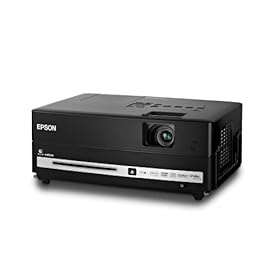
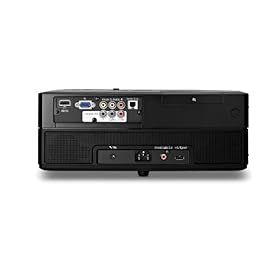
Epson MovieMate 60 V11H319220 Home Theater Projector

user posted imageuser posted image

Current price is $479.99 (Price before this deal available);
Deal of the Day offer: still $479.99 but yesterday price is $606.27 doh.gif

Anyone interested?

This post has been edited by low98944: Feb 20 2010, 04:28 PM
low98944
post Feb 27 2010, 08:58 AM

...oooOOOooo...
*******
Senior Member
5,533 posts

Joined: Mar 2008
From: Area 51
Here is expert from http://bluray.highdefdigest.com talking about effect of similar to "burn-in" in LCD TV.

LCD TVs and Burn-In

Q: Are any of the current crop of flat-screen TVs friendly to the 4:3 format? I have had two flat-screen LCDs (both Westinghouse), one a 37", the other a 42", and had been assured that burn-in would not be a problem...and had burn-in problems with both. The Westinghouse was purchased less than six months ago. A lot of broadcast TV is still in 4:3, and of course classic films and television. Maybe a third of what I watch falls into that category. I was told LCD did not have burn-in problems, that only plasma did. But my LCDs do have problems. I also have a stuck pixel.

A: What you were told initially is (mostly) correct. LCD displays do not suffer from burn-in as it's typically defined. Burn-in is a danger to phosphor-based displays such as CRT and plasma. LCDs don't have phosphors that can burn an image into the screen.

However, LCDs can exhibit a similar condition called sometimes called pixel persistence, image retention, or video memory. The general idea is the same: If you leave a static image on screen for too long, that image can get stuck on the screen. The difference is that once a plasma or CRT exhibits burn-in, the condition is usually permanent. With an LCD, it can often be corrected by either leaving the TV off or displaying a solid gray image (such as from a video calibration disc) for an extended period of time. Also, it takes much longer static exposure for an image to stick on an LCD than it does plasma or CRT.

Burn-in and image retention are primarily factors of having improperly calibrated contrast on the TV. The "contrast" control is the screen's white level. If you have this set too high, the white is more likely to (for lack of a better word) "burn" an image into the screen. Calibrating this setting, either yourself with a calibration disc or by bringing in a professional, will greatly reduce the likelihood of this problem occurring.

I would also recommend varying up the content that you watch. You say that 4:3 shows and movies make up approximately 1/3 of your viewing. Try to spread that out interspersed with content that fills the screen.

You also mention that you have a stuck pixel. That's a completely separate problem caused by poor manufacture of the TV. Unfortunately, that can't be corrected.


Source: http://bluray.highdefdigest.com/news/show/...Sixty_Five/4304
low98944
post Apr 17 2010, 09:52 AM

...oooOOOooo...
*******
Senior Member
5,533 posts

Joined: Mar 2008
From: Area 51
Here is some information that I quote from www.highdefdigest.com that maybe useful to some of you.
QUOTE
Panasonic 3-D Blu-ray Players Compatible with "Checkerboard" 3-D

Feedback: I had an opportunity to test the Mitsubishi 82" 3-D ready DLP TV with the Panasonic 3DT-300 3-D Blu-ray player at Best Buy. The manager at the Magnolia section was skeptical as to whether or not it would work. I told him I had my Samsung SSG-1000 3-D glasses and emitter with me. All I would have to do is set the Panasonic deck's 3-D mode to Checkerboard format, and enable the 3-D mode on the Mitsubishi TV. We hooked everything up and set the mode to Checkerboard. A test popped up with two boxes that had the numbers 1 and 2 in them. I turned on the 3-D mode for the Mitsubishi and the 3-D kicked right in. We fired up the demo disc that was bundled with the player, and playback was successful. At 82" the 3-D effect was very good even though it was not Full HD. The manager said he had no idea that the DLP would work with the new 3-D standard. As far as using the Panasonic 3-D player, it appears that legacy DLP owners will be able to enjoy the new Blu-ray 3-D format. Not to mention there would be no need to upgrade their receivers as this player is equipped with an extra HDMI output. As an owner of a 3-D DLP TV, this was good to find out. I hope this information is useful.
Source: http://www.highdefdigest.com/news/show/Jos...re_Are_You/4557
low98944
post May 8 2010, 09:05 AM

...oooOOOooo...
*******
Senior Member
5,533 posts

Joined: Mar 2008
From: Area 51
QUOTE(sean_gtech @ May 7 2010, 07:58 PM)
thanks for sharing w.m.khairul.appreciate it.my tv has arrive today.right now i got a problem "break- in" the tv.i've d/l the b/i images
from the internet.the size of the file is 1920 x1080.i install it in my usb.my problem is when i run the images,there still a black bar
on the top and bottom of the screen.i've try many method incl zoom and all but the bar is still there.what should i do?does the zoom
function applicable if i play the file using usb?any help is appreciated.thanks in advance.
*
Watch the movies with ratio of 1.78:1 and you can say bye bye to black bar. I believe the movie you play just now have ratio of higher than 1.78:1. Any movie with either higher or lower than 1.78:1 (slight higher or lower still ok), you will see black bar either in top and bottom or sides. whistling.gif Unless, you are using projector, that still got some solution to remove black bar, but if you are using LCD/LED/Plasma, there is no much think you can do except try the functions in you tv to remove them.

This post has been edited by low98944: May 8 2010, 09:35 AM
low98944
post Dec 28 2010, 09:34 PM

...oooOOOooo...
*******
Senior Member
5,533 posts

Joined: Mar 2008
From: Area 51
QUOTE(giggs_509 @ Dec 28 2010, 07:34 PM)
Which should i choose if budget 3k? Now already got plasma in living room (pana 42s10k). Plan to get another tv for masterbedroom or family area. 3k can get led? Which brand? Or plasma still perform the best? Or lcd beat plasma? Hope all sifu can advise..
*
Sorry to tell you, ask such a question in forum will never give you conclusive answer. whistling.gif You question just like you like apple or you like orange. Wait 100 years you will still don't get conclusive answer. whistling.gif

By the way, I like durian. tongue.gif

This post has been edited by low98944: Dec 28 2010, 09:43 PM

2 Pages  1 2 >Top
Topic ClosedOptions
 

Change to:
| Lo-Fi Version
0.0247sec    0.63    7 queries    GZIP Disabled
Time is now: 5th December 2025 - 08:47 AM