Sorry for the delay guys...quite busy these days..only now have time to do this

CODE
Laptop Model | CPU model | Amount of RAM | GPU model and VRAM | Driver version | OS name | 3D Mark Resolution
*screenshot of 3D Mark 06, CPU-Z and GPU-Z*
Game name | Graphic Settings | Resolution | Result
*screenshot of game with result*
Brought to you by [attachmentid=1192720]
BenQ BenchmarkS42» Click to show Spoiler - click again to hide... «
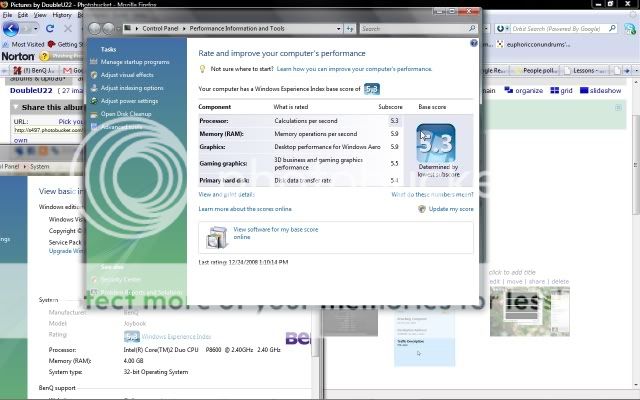
9600M GT - 65nm G96M, 32SP, 128-bit GDDR3Overall - 5879, SM2.0 - 2472, SM3.0 - 2309, CPU - 2154 @ 1280x800
by DoubleU on Core 2 Duo P8600 (45nm Penryn, 2.4GHz, 3MB L2 cache, 1066MHz FSB)
Link To Benchmark Batman Arkham Asylum, Mirror's Edge Brought to you by [attachmentid=1192721]
S57Contribute by BBxiongS42 Spect
» Click to show Spoiler - click again to hide... «
BenQS42:
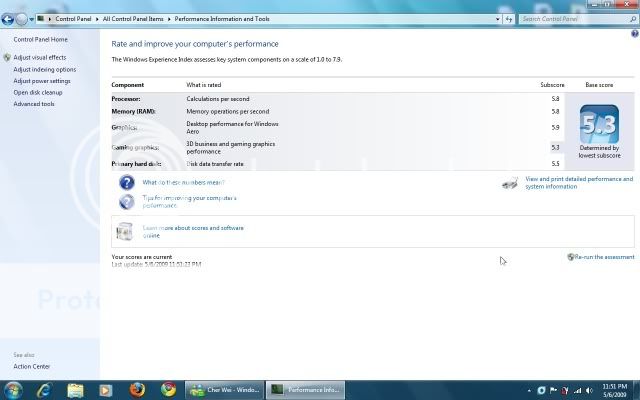
Intel Core 2 Duo P8400 @ 2.26Ghz
4GB 800Mhz RAM
Vista Business SP1
Nvidia 9600M GT @ 500/1250/740
Forceware 180.84(info from EVGA Precision)
Game Tested :» Click to show Spoiler - click again to hide... «
Company of Heroes» Click to show Spoiler - click again to hide... «
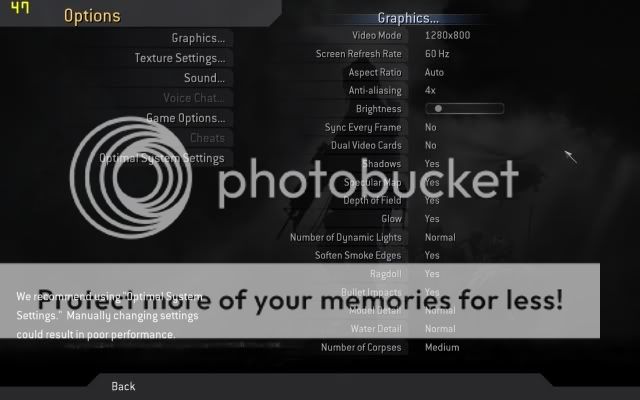
Below is the graphical settings:
[attachmentid=1192722]
Result on in-game benchmark:
[attachmentid=1192725]
Conclusion and notes:
framerate is most of the time more then 45, however will drop to 20++ when it comes to scenes with a lot of particle effects
also, the graphic card temperature shoots up to 95C(peak) after a few minutes, therefore lower settings are suggested to lower down the GPU temperature
Burnout:Paradise» Click to show Spoiler - click again to hide... «
Below is the graphical setting:
(resolution is max @ 1280x800)
[attachmentid=1192727]
Screenshots:(there is no benchmark tool for this game, so i show screenshots instead)
(QShot is not functioning properly, so i have to switch to fraps for taking pictures, therefore temperature cannot be shown)
[attachmentid=1192729]
[attachmentid=1192731]
[attachmentid=1192734]
Conclusion:
On high, the same is playable as well, but there will be some occasional lag, therefore my setting is medium(standard) with 2x AA
as shown, fps is maintained at 60, and will only go lower then 50fps when there are some massive accident in front of you..
Fallout 3» Click to show Spoiler - click again to hide... «
Settings:
(because it has all those render distance options, it has 2 pages...)
[attachmentid=1192736]
[attachmentid=1192740]
Screenshots:
[attachmentid=1192743]
[attachmentid=1192747]
Conclusion:
The game is somewhat playable..in indoor scenes, s42 can get 40-60fps, but outdoor scenes would have 20++-40++fps, but temperature, as usual is 95C, so you might wanna lower the settings if you cannot take the high temperature..
Grid» Click to show Spoiler - click again to hide... «
Settings used:
[attachmentid=1192748]
[attachmentid=1192751]
[attachmentid=1192752]
Screen shot :
[attachmentid=1192755]
[attachmentid=1192756]
[attachmentid=1192758]
[attachmentid=1192760]
Conclusion:
with the settings used, the gameplay is smooth, however, as always, the graphic card temperature is an issue.
it still go up to 95C after a few minutes, but i think lowering the settings will definitely lower the GPU temperature
Contribute by DoubleUMirror's Edge» Click to show Spoiler - click again to hide... «
Game Setting :
[attachmentid=1192762]
Screen Shot :
[attachmentid=1192764]
[attachmentid=1192767]
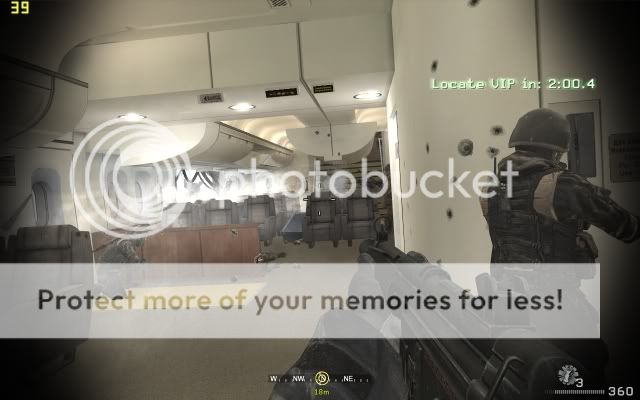
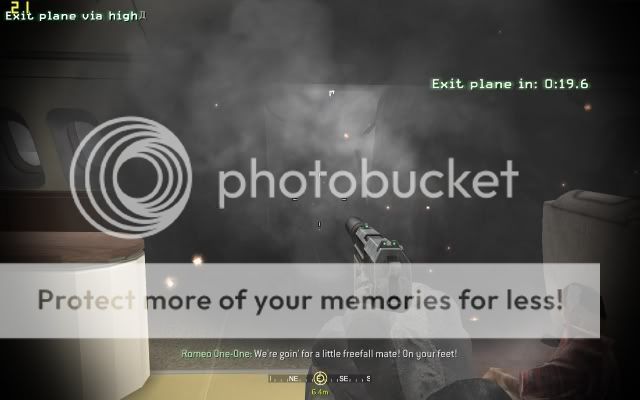
note: fps quite high and physX make all the glass flying around so nice... expecially when bullets hit things like the floor, then can see debris flying around.....
Batman Arkham Asylum» Click to show Spoiler - click again to hide... «
Game Setting :
[attachmentid=1192769]
Screen Shot :
[attachmentid=1192772]
[attachmentid=1192774]
note: please rmb that FRAPS causes framerate to drop like 3-5ish..... so overall its playeble, just certain moments got slight lag. Can always turn down the settings.... just the point is to show the physX is usable (when ur fighting, the papers will fly when you kick... like kungfu movie... but i couldn't take a screenshot >_> sorry...
Contribute by DragonSilverCrysis» Click to show Spoiler - click again to hide... «
Game Setting :
[attachmentid=1192775]
[attachmentid=1192776]
Screen Shot :
[attachmentid=1192777]
[attachmentid=1192778]
[attachmentid=1192779]
Driver installation Guild For S42  by BBXiong
» Click to show Spoiler - click again to hide... «
Special newsi heard there is a Forceware 190.15 that is design for Hybrid Graphic as well, and it's official(form what i heard), users who does not want to go through the below steps can always download and try that driver, but i have not tried that driver yet, so i cannot tell u what's the optimization or advantage over the 185.85.
This is for the 185.85 driver:(proven working by me, Miahaha, FongZai and others

)
Install procedure for hybrid graphics X64» Click to show Spoiler - click again to hide... «
for BenQ s42 users that have problem installing Dox's driver in Win7 x64, this is how you should install the driver(works for me)
1)run the dox driver just to extract the driver files first
2)go to device manager, make sure the intel card is installed(i think by default it will be installed by windows 7)
3)if so, on the "standard VGA adapter", right click and select "update driver version"
4)select "Browse my computer for driver software"
5)after u select it, u will see that it wants you to locate a folder to scan, ignore that, instead, click on the "Let me pick from a list of 6evice driver from my computer"
7)after selecting that one, you will only see "standard VGA adapter" on the list, it's normal..now, select "Have disk"
8)it will ask you to locate the driver, just select the folder that you extracted Dox's driver, then it will show the inf file, select the file and click ok
9)now, you will see nVidia 9600M GT on the list, click ok and it will install the driver
10)after it is installed, DO NOT RESTART FIRST...remember to select power mode to power saver
11)restart and boot with disable force driver signature*, and have fun
*the methods are stated in the original install guide from Dox here:
use method 1 to test if u succeeded installed the driver, and if yes, then use method 2 to sign the driver files
BenQ Authorized Local Service Center» Click to show Spoiler - click again to hide... «
For RMA - LCD Monitor, Projector, Joybook, Digital Camera
BenQ (Penang) Walk-in Service Center
2686 Jalan Todak, Seberang Jaya 13700 Prai, Penang.
Tel: 1800-38-8811
Operation Hours: 8am - 5pm (Mon-Fri)
Close on Saturday, Sunday and Public Holiday
For RMA - LCD Monitor, Projector, Joybook, Digital Camera
BenQ Nationwide Authorized Service Provider
ANDA Services Network Sdn Bhd (HQ)
A-G-11, Ground Floor, Block A,
Merchant Square @ Tropicana,
No 1, Jalan Selatan 1, PJU 3,
47400 Petaling Jaya, Selangor.
Tel: +603-7883 0055 (General Hunting Line)
Fax: +603-7883 0379
Operation Hours: 9am - 6pm (Mon-Fri)
Close on Saturday, Sunday and Public Holiday
Johor
97, Jalan Susur Perdana Tengah,
Taman Bukit Perdana,
83000 Batu Pahat, Johor
Tel: +607-434 1689
Fax: +607-434 1689
Operation Hours: 9am - 6pm (Mon-Fri)
Close on Saturday, Sunday and Public Holiday
32, Jalan Molek 2/1,
Taman Molek
881100 Johor Bahru, Johor
Tel: +607-355 5503 / 07-355 5509
Fax: +607-355 1502
Operation Hours: 9am - 6pm (Mon-Fri)
Close on Saturday, Sunday and Public Holiday
24, Jln 1/3
Taman Sri Kluang
86000, Kluang, Johor
Tel: +607-7771689
Operation Hours: 9am - 6pm (Mon-Fri)
Close on Saturday, Sunday and Public Holiday
Kedah
84 Susuran Tandop,
Kawasan Perusahaan Tandop Baru
05050 Alor Setar, Kedah
Tel: +604-399 2628 / 04-399 2629
Fax: +604-399 2627
Operation Hours: 9am - 6pm (Sun-Thu)
Close on Friday, Saturday and Public Holiday
Kelantan
PT63, Batu 2, Jalan Kuala Krai
15150 Kota Bharu, Kelantan
Tel: +609-743 5963 / 09-743 6725
Fax: +609-743 5662
Operation Hours: 9am - 6pm (Sun-Thu)
Close on Friday, Saturday and Public Holiday
Melaka
No. 82, Ground Floor, Jalan PPM 4,
Plaza Pandan Malim
Jalan Malim, 75250 Melaka
Tel: +606-336 9506 / 06-336 9507
Fax: +606-336 9508
Operation Hours: 9am - 6pm (Mon-Fri)
Close on Saturday, Sunday and Public Holiday
Negri Sembilan
No. 342, Jalan Tun Dr Ismail,
70200 Seremban,
Negeri Sembilan.
Tel: +606-761 6389
Operation Hours: 9am - 6pm (Mon-Fri)
Close on Saturday, Sunday and Public Holiday
Pahang
B24 Jalan Tun Ismail 1,
25000 Kuantan Pahang
Tel: +609-514 6607 / 04-514 6612
Fax: +609-514 6858
Operation Hours: 9am - 6pm (Mon-Fri)
Close on Saturday, Sunday and Public Holiday
No. 26, Jalan Semantan Baru 2,
Taman Bukit Semantan,
28000 Temerloh, Pahang
Tel : +609-296 6189 /09-296 1389
Fax : +609-296 8089
Operation Hours: 9am - 6pm (Mon-Fri)
Close on Saturday, Sunday and Public Holiday
Penang
No 31 Lebuh Melaka,
10400 Penang
Tel: +604-229 3370 / 04-229 2420
Fax: +604-229 2420
Operation Hours: 9am - 6pm (Mon-Fri)
Close on Saturday, Sunday and Public Holiday
55, Ground Floor,
Jalan Perai Jaya 4,
Bandar Perai Jaya, 13600 Prai
Tel: +604-399 2628 / 04-399 2629
Fax: +604-399 2627
Operation Hours: 9am - 6pm (Mon-Fri)
Close on Saturday, Sunday and Public Holiday
Perak
No 5, Lintasan Perajurit 6,
Taman Perak,
31400 Ipoh Perak
Tel: +605-547 8989 / 05-547 1689
Fax: +605-5475689
Operation Hours: 9am - 6pm (Mon-Fri)
Close on Saturday, Sunday and Public Holiday
469, Lorong 1,
Taman Kota Jaya Luar,
34700 Simpang, Taiping, Perak.
Tel: +605-847 8628
Operation Hours: 9am - 6pm (Mon-Fri)
Close on Saturday, Sunday and Public Holiday
19 Ground Floor
Taman Sejati II
32000 Sitiawan, Perak
Tel : +605-692 6789/05-6921989
Fax : +605-692 6389
Operation Hours: 9am - 6pm (Mon-Fri)
Close on Saturday, Sunday and Public Holiday
Sabah
Ground Floor, Block A
Lot 5 Plaza Utama, Penampang Bypass
88200 Kota Kinabalu.
Tel: +6088-731 858/731 718
fax: +6088-731 966
Operation Hours: 9am - 6pm (Mon-Fri)
Close on Saturday, Sunday and Public Holiday
Sarawak
Lot 857, Ground Floor,
Jalan Permaisuri
98000 Miri, Sarawak
Tel: +6085-414 818 / 085-411 898
Fax: +6085-427 818
Operation Hours: 9am - 6pm (Mon-Fri)
Close on Saturday, Sunday and Public Holiday
D-Tech OA Marketing
No 65, Ground Floor,
Lorong Pahlawan 7,
96000 Sibu Sarawak
Tel: 084-210 011
Fax: 084-210 033
Operation Hours: 9am - 6pm (Mon-Fri)
Close on Saturday, Sunday and Public Holiday
13G, Lot 2955 Jalan Tun Ahmad Zaidi Adruce
93250 Kuching Sarawak
Tel: +6082-422 618/420 618
Fax: +6082-415 618
Operation Hours: 9am - 6pm (Mon-Fri)
Close on Saturday, Sunday and Public Holiday
Terengganu
472-C Jalan Kamaruddin,
20400 Kuala Terengganu
Tel: +609-622 6607 / 09-622 6608
Fax: +609-622 6605
Operation Hours: 9am - 6pm (Sun-Thu)
Close on Friday, Saturday and Public Holiday
Email BenQ HereTrack Your Issue HereThis post has been edited by fabianz03: Oct 5 2009, 03:08 PM 

 Oct 4 2009, 04:19 PM, updated 17y ago





 )
) Quote
Quote




 0.2792sec
 0.62
0.62
 6 queries
 GZIP Disabled