WinX Video Converter User Guide WinX Video Converter could help you easily and fast convert assorted video formats into popular video formats as AVI, WMV, FLV, MOV, MP4, MPEG. WinX Video Converter is a professional multi-function video converter with friendly and simple interface. And this great video converting software is 100% free for all users.
http://www.winxdvd.com/video-converter/You can convert all popular videos to AVI, WMV, FLV, MOV, MP4, MPEG formats with WinX Video Converter as the following steps:
Step 1. Add video.
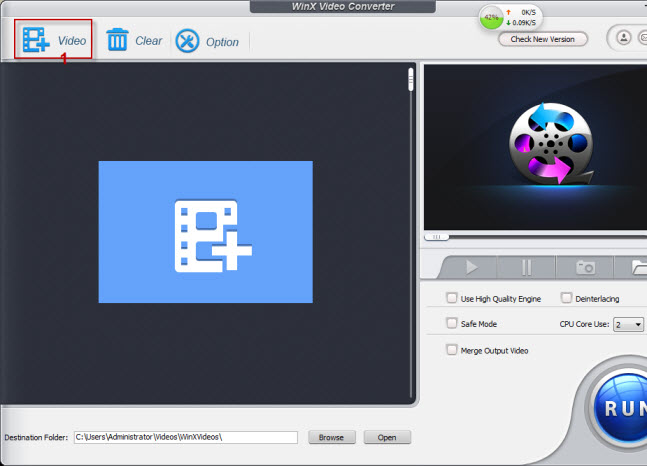
Run WinX Video Converter, you can click "Add" button to load video files.
Step 2. Select output format.
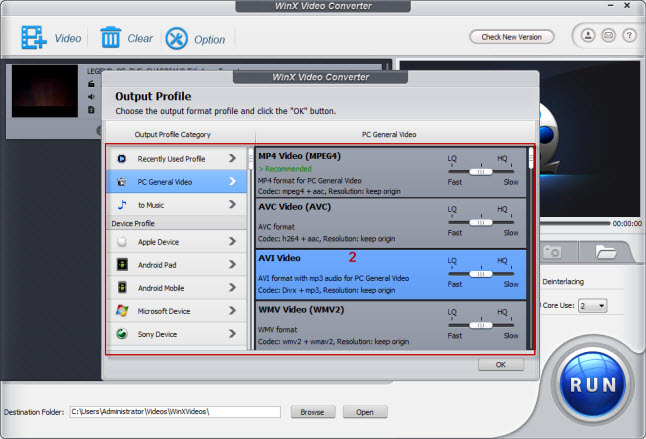
After adding video, the video's information, such as name, video size, video length, duration and output will be shown in the file list. Choose an output video format (AVI, WMV, FLV, MOV, MP4, MPEG) which you want to convert.
Step 3. Set output folder.
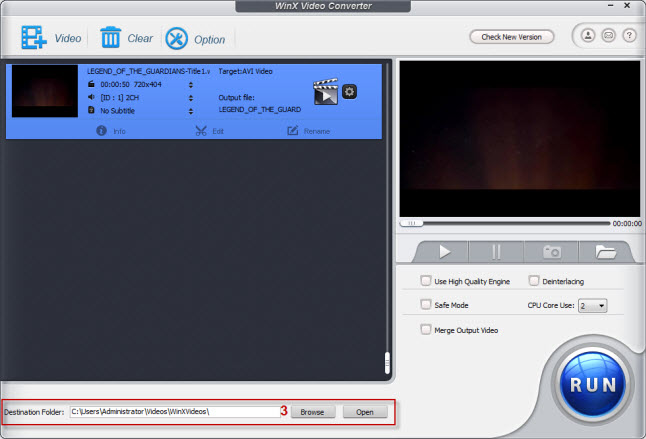
Click "Browse" button in output setting area, select a destination folder in the dialog box that opens, and then click OK.
Step 4.Convert file.
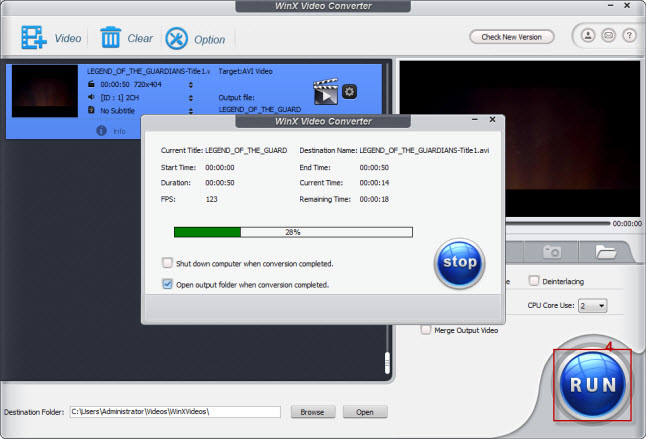
After finishing the above settings, check the files needed to convert in the file list, and click "Start" button on the main interface, to start converting the movie. You can view the conversion progress from the progress bar at the bottom of the dialog box.
WinX Video Converter Platinum, as a professional video converter, with more video formats supported, more powerful, could satisfy you for more addition requirements. Convert videos between all of popular multimedia devices such as Apple iPhone, iPod, iTouch, Sony PSP, PS3, PDA, Zune, Mobile phone, etc. .
http://www.winxdvd.com/video-converter-platinum/http://www.winxdvd.com/help/how-to-use-video-converter.htmTips:
1. You can set the detailed parameters of output format in the parameter setting area.
2. If you find a image you like in the video, just click "Snapshot" button under the preview window to store the image in your folder.
3. If you only want to get a segment of videos, you can trim the videos by setting the "Start time" and "End time".
4. If you want to cancel the converting process, you can click "Stop" button to do this.
Added on August 24, 2009, 3:36 pmWinX Video Converter's award
 http://www.winxdvd.com/video-converter/WinX Video Converter platinum
 http://www.winxdvd.com/upgrade/video-converter.htm
Upgraded version, WinX Video Converter platinum, as a professional video converter, with more video formats supported, more powerful, could satisfy you for more addition requirements. Only $14.95, upgrade from WinX Video Converter to WinX Video Converter Platinum.
Convert videos between all of popular multimedia devices such as Apple iPhone, iPod, iTouch, Sony PSP, PS3, PDA, Zune, Mobile phone, etc. Support popular video formats such as AVI, FLV, WMV, MPEG, MOV, MP4, etc. With WinX Video Converter Platinum, any kind of video format use on personal computers or popular portable and mobile devices is supported. It already integrated all video converting engines together. If you own WinX Video Converter Platinum, you don't need any video converter any more.
WinX Video Converter Platinum FeaturesHigh Definition Encoding Engine
Support iPhone
Support iPod
Support PSP
Support 3GP (Mobile phone video format)
Support Zune
Support Apple TV
Support PDA
Automated Search Multimedia Devices
Advanced Parameter Setting
Free Technical Support
Support General Video
Convert to music
Regular Update
Added on August 25, 2009, 4:53 pmWhat you can benefit from WinX Video Converter platinumhttp://www.winxdvd.com/dvd-ripper/Video ConversionSupport all popular video formats, include AVI, FLV, WMV, MPEG, MP4,
etc. and most multimedia devices player such as iPhone, iPod, itouch,
Apple TV, PSP, PS3, PDA, Zune, Mobile phone, etc.
Video EditEasy video splitting, full control video/audio parameters for you to
optimize output video/audio quality and image size.
Batch ConversionWinX Video Converter Platinum supports effortlessly converting batch
different video files at one time, and still with best quality and
fast speed.
Lifetime Automatically Free UpgradeWe offer lifetime free upgrade for WinX Video Converter platinum
users. Once a new version published, Win Video Converter Platinum will
be upgraded automatically without any charge.
Download here
http://www.winxdvd.com/download/winx-video-converter-pt.exe
Added on August 26, 2009, 5:09 pmYou can get WinX DVD Converter platinum only $14.95 in this page.
http://www.winxdvd.com/upgrade/video-converter.htm Or, get it free from trialpay

Added on August 27, 2009, 2:03 pmWinX DVD Ripper Platinum is a professional DVD ripper which could rip different DVDs to popular devices such as Sony PSP, Apple iPhone, iPod, Apple TV, PDA, Zune, mobile phone, rip the content of DVDs to all popular video formats as AVI, FLV, WMV, MPEG, MP4, RMVB, 3GP, etc.
 http://www.winxdvd.com/dvd-ripper-platinum/
Integrated all DVD ripping functions together, WinX DVD Ripper Platinum could easily rip and convert all DVDs into all video formats which no matter use for personal computer or popular portable devices.
This powerful DVD ripping and converting software fully compatible with normal DVDs, CSS protected DVDs and region 1-6 DVDs.
Added on August 28, 2009, 2:53 pmHow to use WinX DVD Ripper PlatiumYou can rip DVD to AVI, MPEG, MP4, WMV, MOV, FLV, Sony PSP, Apple
iPhone, iPod, iTouch, Apple TV, PDA, Zune, Mobile phone, Music, etc.
with WinX Ripper Platinum as the following steps:
[URL]http://www.winxdvd.com/help/how-to-use-dvd-ripper-platinum.htm
[/URL]
Step 1. Load DVD movie.
Run WinX DVD Ripper Platinum, you can load real DVD by click "DVD
Disc" button and DVD folder by click "DVD Path" button.
Step 2. Select output type.

After loading DVD, the DVD's information, such as title, subtitles,
duration, output etc., will be shown in the file list. Select an
output type of the video which you want to convert.
Step 3. Set output folder.
Click "Browse" button in output setting area, select a destination
folder in the dialog box that opens, then click OK.
Step 4.Convert file.
After finishing the above settings, check the files needed to convert
in the file list, and click "Start" button on the main interface, to
start converting the movie. You can view the conversion progress from
the progress bar at the bottom of the dialog box.
http://www.winxdvd.com/dvd-ripper-platinum/This post has been edited by alaaa: Aug 28 2009, 02:53 PM 

 Aug 20 2009, 02:19 PM, updated 17y ago


 Quote
Quote



 0.0218sec
 0.43
0.43
 5 queries
 GZIP Disabled