Outline ·
[ Standard ] ·
Linear+
Dell Inspiron Users Thread, The ultra mobile from Dell
|
davidmak
|
 Aug 5 2012, 06:36 PM Aug 5 2012, 06:36 PM
|

|
QUOTE(vivaz3s @ Aug 4 2012, 09:18 PM) 7.2k HDD, skullcandy speakers, 2gb graphic (don't know if the 2gb is dedicated or not) and backlit keyboard option...correct me if i'm wrong..just now try to customize 14r special edition... does anyone know apart form the 7.2k HDD and backlit keyboard..is it worth to get it than normal ones.... the graphic if dedicated 2gb is very good or so-so only compared to the 1gb ones in normal inspiron 14? I don't remember the 15R SE model has 7200RPM HDD. Don't they only come with 1TB 5400RPM HDD? I believe the 2GB VRAM is dedicated and separate from the system RAM (SE comes with 8GB DDR3 RAM standard). 2GB allows GPU to load more large textures and lesser trips to your system. But most mid-end GPUs are not powerful enough to take advantage of that. The 15R SE comes with AMD Mobility Radeon HD 7730M which is pretty new at the moment. |
|
|
|
|
|
vivaz3s
|
Aug 6 2012, 10:12 PM
|
Getting Started

|
sorry...missed that cause I'm aiming at 14r..
|
|
|
|
|
|
Mr.Docter
|
Aug 9 2012, 08:00 AM
|
|
|
Hey, if anyone want to extend/renew their Inspiron warranty, just PM me ya. Dropping by from Alienware Mothership  |
|
|
|
|
|
davidmak
|
Aug 9 2012, 09:42 PM
|
|
|
QUOTE(Mr.Docter @ Aug 9 2012, 08:00 AM) Hey, if anyone want to extend/renew their Inspiron warranty, just PM me ya. Dropping by from Alienware Mothership OK sure will find you in 2 years time |
|
|
|
|
|
samfisher
|
Sep 21 2012, 10:08 AM
|
Getting Started
|
hi guys..i'm using dell inspiron 1464..specs Intel Core i3 330M, 2x2GB DDR3 1066MHz, Intel Graphics Media Accelerator HD, 250GB 5400rpm HDD n etc.. my question is there any limitation to upgrade HDD coz i'm planning to upgrade it to 1TB...can my laptop support it?...  |
|
|
|
|
|
lee_what2004
|
Sep 21 2012, 10:18 AM
|
*stare* ji--------

|
Should be no limitation, as long the HDD is 9.5mm thick..
This post has been edited by lee_what2004: Sep 21 2012, 10:18 AM
|
|
|
|
|
|
SUSaaronsuarez95
|
Oct 8 2012, 06:11 AM
|
|
|
WTA my dell inspiron 14 laptop sometimes the screen will blink 1second black and return to normal. What is the problem?
|
|
|
|
|
|
linkinstreet
|
Oct 8 2012, 03:21 PM
|
Red Bull Addict

|
 got this office issued 14r and installed BF3 immediately. I kinda hate the chiclet keyboard tho. It sucks for touch typing as well as gaming This post has been edited by linkinstreet: Oct 8 2012, 03:24 PM |
|
|
|
|
|
Chyan
|
Oct 30 2012, 10:04 PM
|
|
|
Anybody installed W8 on their Inspiron N4110?
The laptop's bugger GPU 6630M is the main hiccup.
|
|
|
|
|
|
Boy96
|
Nov 14 2012, 08:37 PM
|
|
|
My laptop was recently stolen, was thinking about getting the 14 R SE, But I cant decide if I want Windows 8 or not...  |
|
|
|
|
|
beebouly
|
Nov 22 2012, 02:23 PM
|
Getting Started
|
Just got mine today!
Inspiron 15 (3520) -- 15.6" screen
Intel Core i5
4GB Memory
500GB HD
Intel HD Graphics 4000
|
|
|
|
|
|
zellleonhart
|
Nov 28 2012, 10:16 AM
|
|
|
Anyone with 14/15R SE have problem with the USB ports? Mine (all 4) will sort of lose connectivity after a period of time using it, e.g. plugging in usb devices does not show up. Even mouse won't be working unless I log off and log on back.
I think it's driver problem but I am using latest driver in Windows 8 (was having the same problem in windows 7). This is freaking me out..
|
|
|
|
|
|
Andrew Lim
|
Nov 28 2012, 11:46 AM
|
|
|
I have 14R SE and there are lots of issues. For me isn't the USB connectivity, but the Wifi/LAN connectivity. Their device adapters have gradually disappeared to nowhere. I suspect the internet hardware adapters have failed. Now have to resort to external WiFi adapters to work.
My S key has also broken.
This is my first Dell. I'll never buy a Dell again.
|
|
|
|
|
|
lee_what2004
|
Nov 28 2012, 12:11 PM
|
*stare* ji--------
|
No more warranty ?
|
|
|
|
|
|
zellleonhart
|
Nov 28 2012, 12:50 PM
|
|
|
QUOTE(Andrew Lim @ Nov 28 2012, 11:46 AM) I have 14R SE and there are lots of issues. For me isn't the USB connectivity, but the Wifi/LAN connectivity. Their device adapters have gradually disappeared to nowhere. I suspect the internet hardware adapters have failed. Now have to resort to external WiFi adapters to work. My S key has also broken. This is my first Dell. I'll never buy a Dell again. You can straight away call Dell (I am sure got warranty left) and ask them to inspect and fix on the spot... They will send technician the next working day. All manufacturers also got problem, you can't say you can get a perfect laptop with asus or acer, etc. |
|
|
|
|
|
Andrew Lim
|
Nov 28 2012, 03:18 PM
|
|
|
Yes still under warranty, will probably call after I get back from vacation.
So far only Dell give me so many problems in 2 months of purchasing it. Asus, Vaio, Acer... they all gave me problems only after a few years.
|
|
|
|
|
|
nobody#2
|
Dec 1 2012, 01:46 AM
|
|
|
Hi, all sifu.. just recently reformat this notebook, and follow the internet information to install all the drivers, but finally found the USB cannot detect the devices and the bluetooth not function.. can please guide me what is the correct driver to download, attached the image shown which model that i'm having. Thanks in advance. Model is Dell Inspiron N311z 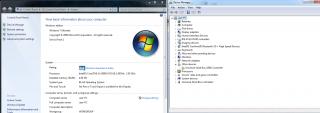 This post has been edited by nobody#2: Dec 1 2012, 01:48 AM
 |
|
|
|
|
|
linkinstreet
|
Dec 1 2012, 11:59 AM
|
Red Bull Addict
|
QUOTE(nobody#2 @ Dec 1 2012, 01:46 AM) Hi, all sifu.. just recently reformat this notebook, and follow the internet information to install all the drivers, but finally found the USB cannot detect the devices and the bluetooth not function.. can please guide me what is the correct driver to download, attached the image shown which model that i'm having. Thanks in advance. Model is Dell Inspiron N311z
Hmm, try from the DVD that is given with the laptop? or use Dell's website? Btw, my 14r overheats massively when I am playing Hitman Absolution on it, so much so that it shuts down by itself. I think it's due to me connecting to an external monitor and I usually closes the lid as I don't use the laptop monitor itself, causing heat to collect. |
|
|
|
|
|
nobody#2
|
Dec 1 2012, 12:01 PM
|
|
|
QUOTE(linkinstreet @ Dec 1 2012, 11:59 AM) Hmm, try from the DVD that is given with the laptop? or use Dell's website? Btw, my 14r overheats massively when I am playing Hitman Absolution on it, so much so that it shuts down by itself. I think it's due to me connecting to an external monitor and I usually closes the lid as I don't use the laptop monitor itself, causing heat to collect. In box, Dell give me nothing..  The information in Dell support website not informative. This post has been edited by nobody#2: Dec 1 2012, 12:02 PM |
|
|
|
|
|
linkinstreet
|
Dec 1 2012, 12:57 PM
|
Red Bull Addict
|
QUOTE(nobody#2 @ Dec 1 2012, 12:01 PM) In box, Dell give me nothing.. The information in Dell support website not informative. weird, Dell gave me a driver CD as well. Did you get it from a shop or direct from DELL? edit: This? http://www.dell.com/support/drivers/my/en/.../inspiron-n311zThis post has been edited by linkinstreet: Dec 1 2012, 12:59 PM |
|
|
|
|



 Quote
Quote






 0.0205sec
 0.74
0.74
 6 queries
 GZIP Disabled