

 Aug 16 2009, 10:20 AM, updated 17y ago


just got my storm yesterday...
cant sleep for whole night and kept playing with it...
but one thing im wonder and have no clue at all...
when i read the following...
QUOTE
• To change the typing input language quickly when you are using your
BlackBerry® device in landscape view, click the globe icon. Click an input
language.
BlackBerry® device in landscape view, click the globe icon. Click an input
language.
I wonder where is the "GLOBE ICON" and how does it look like? cannot find it at all... :s
and i tried search over the internet...i found this...
QUOTE
-To change text input languages, hold the Storm in landscape mode, bring up the virtual keyboard and click the "Globe" key found directly to
the left of the Space key. Next, scroll to the desired language, highlight it and click the Storm's screen to select.
the left of the Space key. Next, scroll to the desired language, highlight it and click the Storm's screen to select.
when i looked into my storm, that is in the keyboard in landscape view...
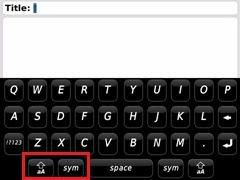
the only button directly to the left of the Space key is "sym" and "shift"...dun see any "globe" key... :s
can anyone enlighten me on this?
thanks....

 Quote
Quote


 0.0142sec
 1.27
1.27
 5 queries
 GZIP Disabled