

i guess someone selling... u can refer back to V3 thread
Dell Studio 15 Fans Club V4., Now with ATI Mobility Radeon™ HD 5470
Dell Studio 15 Fans Club V4., Now with ATI Mobility Radeon™ HD 5470
|
|
 Aug 15 2009, 02:00 PM Aug 15 2009, 02:00 PM
|
 
Senior Member
809 posts Joined: Jun 2007 
|
i guess someone selling... u can refer back to V3 thread
|
|
|
|
|
|
Aug 15 2009, 02:12 PM
|

Junior Member
11 posts Joined: Sep 2008
|
I am planning to buy Studio 15 and is my 1st laptop. Here are some question i need to clarify:
using laptop to do various stuff, for gaming, surfing, etc. 1. 3GB ram or 4GB ram? aiming to use window 7 so issue with vista only able to read 3gb ram is no longer an issue. Is 3gb enough or better go for 4gb? 2. 6 cell or 9 cell battery? How long 6 cell battery last especially when playing games? will 9 cells come out too much from the laptop? 3. Blacklit keyboard. Should get it? really helpful? 4. Do Dell Premium warranty includes 3 years of completeCover accidental damage protection? 5. Do studio 15 easily overheated? how much the temperature should the laptop stay below in order to last long period of time? can last for 1-2 day not shutting down? any tips? Any other recommendation is welcome before i purchase it. |
|
|
Aug 15 2009, 04:20 PM
|

Junior Member
137 posts Joined: Jun 2009 From: Tranquil Forest
|
QUOTE(I.hunter @ Aug 15 2009, 02:12 PM) I am planning to buy Studio 15 and is my 1st laptop. Here are some question i need to clarify: Just my opinion:using laptop to do various stuff, for gaming, surfing, etc. 1. 3GB ram or 4GB ram? aiming to use window 7 so issue with vista only able to read 3gb ram is no longer an issue. Is 3gb enough or better go for 4gb? 2. 6 cell or 9 cell battery? How long 6 cell battery last especially when playing games? will 9 cells come out too much from the laptop? 3. Blacklit keyboard. Should get it? really helpful? 4. Do Dell Premium warranty includes 3 years of completeCover accidental damage protection? 5. Do studio 15 easily overheated? how much the temperature should the laptop stay below in order to last long period of time? can last for 1-2 day not shutting down? any tips? Any other recommendation is welcome before i purchase it.  1. More RAM is always good and no harm getting if you have some extra $$ since it would allow you to run dual channel mode which might give a tiny performance boost. However, 3 gb RAM is enough for most of the programs you are going to be running unless you plan to do heavy multitasking or image editting. Also, it depends whether you want to go with 32-bit OS or 64-bit OS. If you're aiming for 32-bit then stick with 3 gb of ram since 32-bit OS only recognizes max around 3.5gb. RAM is pretty cheap nowadays so its not really a problem if you want to upgrade this later. 2. 6 cell if the laptop is mostly going to be on your desk. Some people claim that 9-cell increases the height of the back by about an inch so there's more airflow but frankly if you're going to be using it on the desk, you should take out the battery anyway. Spend on a cooler instead. If you're going mobile, consider whether you want additional hr of battery life or the additional weight that the battery would add. You can't really do hardcore gaming on battery eitherway as your battery would drain down in around an hr. Besides, it would get hot on your lap. 3. Backlit keyboard - not really a must since it adds no performance values but everyone who has one loves it. Its great for using your laptop in the dark in the late nights, which gamers do quite often and looks cool. i would recommend getting one. 4. Not sure, somebody else may be able to advise. 5. Get a laptop cooler. If you have good technical knowledge of pc, try undervolting (only for expert pc users). I've left my laptop on for days before without a problem but i still recommend shutting down laptop when not using since it saves power and lowers chance of random overheat. |
|
|
Aug 15 2009, 04:27 PM
|

Senior Member
1,582 posts Joined: Aug 2007 From: Lost in Transition 
|
QUOTE(lendew @ Aug 15 2009, 08:57 AM) use any aftermarket cooling pad? mine is still naked without cooling pad. I already checked normal usage is around 48 to 49.aishhh Well, to me, keyboard protector is not that necessary as it will only make your typing getting harder. You mean skin or screen protector? Skin is the cover? If you want I have one in my closet, 15'6 inch. I got it from the bulk made by the owner here last time, never really applied it onto my laptop. Added on August 15, 2009, 9:21 amI am surfing and searching about the dell studio 1555 keyboard and skin protector. So anyone here already bought it? Where to buy that item? For current situation, i am just using universal protector for keyboard. not really nice because its not fit well QUOTE(Enilyks34 @ Aug 15 2009, 11:55 AM) I was gonna gt the Studio15 via on9 bt y is all the basic colour options gone? Only topo black left? I would suggest you to order through sales person. Don't worry, their sales person can speak multiple languages. The reason here is because you can ask for better bargain and the procedure will be faster.Anywayz the main concern 4 me is hw long will it take to reach me if i order thru on9? Thx~ QUOTE(I.hunter @ Aug 15 2009, 02:12 PM) I am planning to buy Studio 15 and is my 1st laptop. Here are some question i need to clarify: 1) If you wanted to run on Win 7, get a 4gb ram but upgrade it yourself. Not through Dell. You can ask for 64bit Vista from Dell in order to utilize the 3.5gb ram.using laptop to do various stuff, for gaming, surfing, etc. 1. 3GB ram or 4GB ram? aiming to use window 7 so issue with vista only able to read 3gb ram is no longer an issue. Is 3gb enough or better go for 4gb? 2. 6 cell or 9 cell battery? How long 6 cell battery last especially when playing games? will 9 cells come out too much from the laptop? 3. Blacklit keyboard. Should get it? really helpful? 4. Do Dell Premium warranty includes 3 years of completeCover accidental damage protection? 5. Do studio 15 easily overheated? how much the temperature should the laptop stay below in order to last long period of time? can last for 1-2 day not shutting down? any tips? Any other recommendation is welcome before i purchase it. 2) 9 cells for traveling and longer usage hour. Well, the battery will edge out a bit but it lift up your laptop and increase the space for air ventilation. 3) Backlid keyboard is a must to me. Not many laptop have this feature and it helps when you typing in the dark. I switch off my room light when gaming, and I don't have backlid keyboard which makes my gaming tougher. 4) Yes. This warranty is the most expensive among all. To clear you doubt, call Dell to clarify. 5) Every laptop have heat issue. My Studio 15 run for continuous 4 days without any problem. I just borrow my friend cooler to lift up the laptop so the air ventilation is better. After 4 days, my laptop temperature is around 42-45'c. Laptop is easy heat up if you just put it on a table or on your bed. The build in fan and heat sink can't work properly if there is no air ventilation. If you have a laptop cooler then its a plus. |
|
|
Aug 15 2009, 09:13 PM
|

Senior Member
1,200 posts Joined: Feb 2006 From: Wangsa Maju
|
im using dell studio 15..n i got a problem.. i connect to internet using maxis broadband usb modem, after 15-30 minute of surfing..the usb modem "look like"ejecting itself..is this the problem with the usb modem or the usb port on my dell...??..
|
|
|
Aug 15 2009, 10:20 PM
|

Junior Member
54 posts Joined: Aug 2009 From: Hong Kong
|
Hey acid_head. I am sorry for not replying your previous post. Yes you can use disk cleanup, or Mcafee Security centre > Maintain Computer > Mcafee QuickClean to clean those system restore points.
|
|
|
|
|
|
Aug 15 2009, 10:28 PM
|

Junior Member
208 posts Joined: Nov 2006 From: Penang, Malaysia
|
~ -.- 5400RPM HDD Run vista seen like very slow ~ Bored ~
before purchase, the seller of the shop said the HDD is 7200RPM.. after bought check it, is 5400RPM ~ =.= the shop people said. his manager wrote wrong for him ~=.=||| ~ This post has been edited by honghongnet: Aug 15 2009, 10:36 PM |
|
|
Aug 15 2009, 11:01 PM
|
|
Senior Member
1,582 posts Joined: Aug 2007 From: Lost in Transition
|
QUOTE(nazman @ Aug 15 2009, 09:13 PM) im using dell studio 15..n i got a problem.. i connect to internet using maxis broadband usb modem, after 15-30 minute of surfing..the usb modem "look like"ejecting itself..is this the problem with the usb modem or the usb port on my dell...??.. I suggest you to try your usb modem on another laptop or desktop to check whether is the modem problem or not. Do you try the usb port with normal pendrive or external HDD? Is the same issue occurs?QUOTE(honghongnet @ Aug 15 2009, 10:28 PM) ~ -.- 5400RPM HDD Run vista seen like very slow ~ Bored ~ Nope, 5400rpm HDD run perfectly fine on my laptop. Do you clean up your HDD? before purchase, the seller of the shop said the HDD is 7200RPM.. after bought check it, is 5400RPM ~ =.= the shop people said. his manager wrote wrong for him ~=.=||| ~ If I were you, I'll complain or even ask for refund. That is cheating to me. Or you should check your laptop at the shop before bringing it back home  |
|
|
Aug 15 2009, 11:42 PM
|
|
Junior Member
54 posts Joined: Aug 2009 From: Hong Kong
|
QUOTE(honghongnet @ Aug 15 2009, 10:28 PM) ~ -.- 5400RPM HDD Run vista seen like very slow ~ Bored ~ That is ludicrous. before purchase, the seller of the shop said the HDD is 7200RPM.. after bought check it, is 5400RPM ~ =.= the shop people said. his manager wrote wrong for him ~=.=||| ~  And they did charge you for the 7200 rpm price? And they did charge you for the 7200 rpm price? |
|
|
Aug 15 2009, 11:54 PM
|
|
Junior Member
208 posts Joined: Nov 2006 From: Penang, Malaysia
|
rayz1031 : Yes, i clean disk 2 - 3 days a time. the day i collect my notebook, i din bring any software to check the harddisk model.. >.< QUOTE(Celebrity @ Aug 15 2009, 11:42 PM) That is ludicrous. bought it RM 3299 at Penang Dell Retailer Shop.. And they did charge you for the 7200 rpm price?before purchase, the shop said RM 3299 is included 7200RPM.. but after bought it, bring home use Everest ultimate to check on seagate website. the harddisk model is 5400RPM only..  i go back to the shop, the shop salesman said... is his Manager Wrote wrong, and then the manager said is Dell gave wrong information =.= .....~ bored ~ |
|
|
Aug 15 2009, 11:57 PM
|
|
Senior Member
1,582 posts Joined: Aug 2007 From: Lost in Transition
|
Your HDD is Seagate?? Not WD meh? Mine is WD and it perform well. Last time my Inspiron was running on Seagate but the performance of the HDD is quite poor actually. Maybe is the brand, nothing wrong with the OS. I dunno, never have good impression on Seagate
 This post has been edited by rayz1031: Aug 16 2009, 12:44 AM |
|
|
Aug 15 2009, 11:59 PM
|
|
Junior Member
208 posts Joined: Nov 2006 From: Penang, Malaysia
|
QUOTE(rayz1031 @ Aug 15 2009, 11:57 PM) Your HDD is Seagate?? Not WD meh? Mine is WD and it perform well. Last time my Inspiron was running on Seagate but the performance of the HDD is quite poor actually. Maybe is the brand, nothing wrong with the OS. I dunno, never have good impression on Seagate :lo: Yes ~ is Seagate ST9320320AS  |
|
|
Aug 16 2009, 12:53 AM
|
|
Junior Member
54 posts Joined: Aug 2009 From: Hong Kong
|
QUOTE(honghongnet @ Aug 15 2009, 11:59 PM) Yes ~ is Seagate ST9320320AS Goodness gracious. I think all of us who ordered directly from Dell is given Western Digital. The shop may have taken out the original Western Digital 7200 rpm and replaced a poorer Seagate 5400 rpm.  This post has been edited by Celebrity: Aug 16 2009, 12:54 AM |
|
|
|
|
|
Aug 16 2009, 12:56 AM
|
|
Senior Member
1,582 posts Joined: Aug 2007 From: Lost in Transition
|
Really? Do everyone HDD run on WD?? I thought Dell randomly select the brand of the HDD.
If all of the S15 users that ordered directly from Dell were using WD HDD, I think that shop better have proper explanation on it. Don't use manager told wrong and Dell gave wrong information this kinda bullshit..not to be a firestone, but if I were you, Ill storm off to that shop and demand an explanation. |
|
|
Aug 16 2009, 01:30 AM
|
|
Senior Member
809 posts Joined: Jun 2007
|
QUOTE(Celebrity @ Aug 15 2009, 10:20 PM) Hey acid_head. I am sorry for not replying your previous post. Yes you can use disk cleanup, or Mcafee Security centre > Maintain Computer > Mcafee QuickClean to clean those system restore points. thx bro.... looks like i doing the right thingsAdded on August 16, 2009, 1:33 amwhich temperature is the most important? is my lappy temperature normal? This post has been edited by acid_head: Aug 16 2009, 01:33 AM |
|
|
Aug 16 2009, 01:36 AM
|
|
Senior Member
809 posts Joined: Jun 2007
|
QUOTE(Celebrity @ Aug 15 2009, 10:20 PM) Hey acid_head. I am sorry for not replying your previous post. Yes you can use disk cleanup, or Mcafee Security centre > Maintain Computer > Mcafee QuickClean to clean those system restore points. thx bro.... looks like i doing the right thingsAdded on August 16, 2009, 1:33 amwhich temperature is the most important? is my lappy temperature normal? 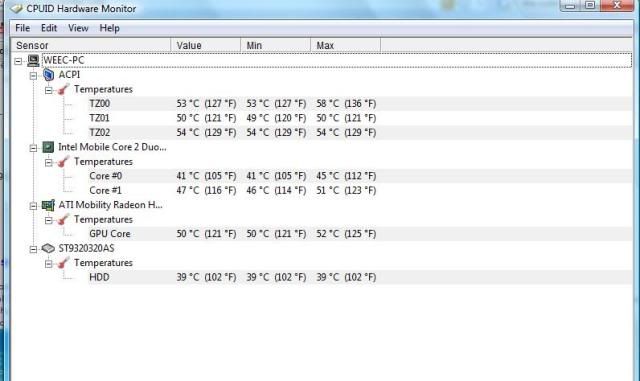 Attached thumbnail(s) 
|
|
|
Aug 16 2009, 05:38 AM
|
|
Junior Member
11 posts Joined: Sep 2008
|
What are the cons for undervolting?
|
|
|
Aug 16 2009, 07:38 AM
|

Senior Member
22,158 posts Joined: Aug 2008 From: Singapore
|
QUOTE(I.hunter @ Aug 16 2009, 07:38 AM) What are the cons for undervolting? not really if u dun go over the limit... |
|
|
Aug 16 2009, 11:30 AM
|

Senior Member
1,949 posts Joined: Nov 2006 From: village land 
|
Hi dude,wan to find out with you guys.
after register to win7 in dell website, so wat v waiting now? windowns 7 still not yet launch?i din receive any update from dell. |
|
|
Aug 16 2009, 11:55 AM
|
|
Junior Member
137 posts Joined: Jun 2009 From: Tranquil Forest
|
QUOTE(I.hunter @ Aug 16 2009, 05:38 AM) What are the cons for undervolting? If you know how to undervolt properly, there are no cons at all. The idea is to set the lowest possible voltage that your laptop can run stable at. Of course, the process involves lowering the voltages level by level to find out which voltages are the limit which will cause some blue screens. There is no damage at all to hardware though. Undervolting is a great way to get lower temperatures.QUOTE(MOMOchacha @ Aug 16 2009, 11:30 AM) Hi dude,wan to find out with you guys. Oct 22 is the launch date.after register to win7 in dell website, so wat v waiting now? windowns 7 still not yet launch?i din receive any update from dell. |
| Change to: |  0.0285sec 0.0285sec
 0.26 0.26
 6 queries 6 queries
 GZIP Disabled GZIP Disabled
Time is now: 7th December 2025 - 10:51 AM |
 Quote
Quote