

any jailbreaker pro here could u all please reply ASAP...having big shiit trouble
Attention Jailbreaker!
Attention Jailbreaker!
|
|
 Aug 4 2009, 03:01 AM, updated 17y ago Aug 4 2009, 03:01 AM, updated 17y ago
Show posts by this member only | Post
#1
|
 
Junior Member
25 posts Joined: Aug 2009 
|
any jailbreaker pro here could u all please reply ASAP...having big shiit trouble
|
|
|
|
|
|
Aug 4 2009, 03:21 AM
Show posts by this member only | Post
#2
|
|
Junior Member
25 posts Joined: Aug 2009
|
oh man...no one available???i think i just screw up my iphone....come on!
I guess I'll just state my problem here, hopefully, I'll get a reply soon. Earlier, I tried jailbreaking my iPhone 3Gs with the lastest version from iTune store. I got the exe from http://purplera1n.com/ for window user. I ran the exe after everything and the jailbreaking started until it went to the stage "done, wait for reboot". After awhile, still no changes to both the jailbreaking window and my phone so I assumed that the program hang-ed as I'm not using a very up to date com. So I closed the window and tries to reboot my phone but my phone is stuck at the picture during the jailbreaking process and I CAN'T reboot it no matter how long I hold the sleep/wake button. I tried hitting and holding the home button as well but no respond. I'm totally freaked out now. What should I do? Any advise?! Please tell me that my phone is still alright, my white sexy babe opened her eyes for 3 days only, I don't want to arrange funeral for her yet and definitely I don't want to send it back to Machines as I'm afraid that the waranty might be void already. This post has been edited by Jasie: Aug 4 2009, 03:43 AM |
|
|
Aug 4 2009, 04:08 AM
Show posts by this member only | Post
#3
|

Senior Member
1,228 posts Joined: Nov 2006 From: Moscow,Russia and Klang,Selangor 
|
Chill nia...anything just do a complete restore with itunes..
It'll go back to normal.. |
|
|
Aug 4 2009, 04:19 AM
Show posts by this member only | Post
#4
|
|
Senior Member
518 posts Joined: Jan 2003
|
QUOTE(Jasie @ Aug 4 2009, 03:21 AM) oh man...no one available???i think i just screw up my iphone....come on! Did you jailbreak with redsnow or purplera? I guess I'll just state my problem here, hopefully, I'll get a reply soon. Earlier, I tried jailbreaking my iPhone 3Gs with the lastest version from iTune store. I got the exe from http://purplera1n.com/ for window user. I ran the exe after everything and the jailbreaking started until it went to the stage "done, wait for reboot". After awhile, still no changes to both the jailbreaking window and my phone so I assumed that the program hang-ed as I'm not using a very up to date com. So I closed the window and tries to reboot my phone but my phone is stuck at the picture during the jailbreaking process and I CAN'T reboot it no matter how long I hold the sleep/wake button. I tried hitting and holding the home button as well but no respond. I'm totally freaked out now. What should I do? Any advise?! Please tell me that my phone is still alright, my white sexy babe opened her eyes for 3 days only, I don't want to arrange funeral for her yet and definitely I don't want to send it back to Machines as I'm afraid that the waranty might be void already.  just restore it. if you dunno how to restore, look at pinned topic, it 4am in the morning i am heading to sleep. tmr only help you. btw pueplera is for 3gs to unloack, did your phone is locked set? |
|
|
Aug 4 2009, 04:31 AM
Show posts by this member only | Post
#5
|

Senior Member
3,239 posts Joined: Oct 2006 From: Sydney, NSW
|
QUOTE(Jasie @ Aug 4 2009, 03:21 AM) oh man...no one available???i think i just screw up my iphone....come on! what's showing on your screen now?I guess I'll just state my problem here, hopefully, I'll get a reply soon. Earlier, I tried jailbreaking my iPhone 3Gs with the lastest version from iTune store. I got the exe from http://purplera1n.com/ for window user. I ran the exe after everything and the jailbreaking started until it went to the stage "done, wait for reboot". After awhile, still no changes to both the jailbreaking window and my phone so I assumed that the program hang-ed as I'm not using a very up to date com. So I closed the window and tries to reboot my phone but my phone is stuck at the picture during the jailbreaking process and I CAN'T reboot it no matter how long I hold the sleep/wake button. I tried hitting and holding the home button as well but no respond. I'm totally freaked out now. What should I do? Any advise?! Please tell me that my phone is still alright, my white sexy babe opened her eyes for 3 days only, I don't want to arrange funeral for her yet and definitely I don't want to send it back to Machines as I'm afraid that the waranty might be void already. try this: Q: How to restore and get into recovery mode? A: Get the iPhone into simple restore/recovery mode by following the guide below. When in this mode on the iPhone the iTunes logo and the USB cable is shown (Apple default), or "Steve" (Standard Pwnage) or your custom recovery logo. 1. Disconnect iPhone from your PC/Mac if not done already. 2. Hold Power/Sleep until the red slider shows up, slide to shut the iPhone down. If this aint work hold Power/Sleep and Home until the iPhone shuts down. Put it aside. 3. Start iTunes on your PC/Mac and make sure to have the latest version. 4. On the iPhone press Home button and keep holding it while connecting the iPhone to your PC/Mac. 5. iTunes will detect an iPhone in recovery mode, the iPhone shown the recovery logo. 6. Select your firmware and restore. if the above method doesn't work, try this: Q: How to get iPhone to DFU mode? A:Get the iPhone into DFU mode by following the guide below. When in this mode the iPhone screen is black. 1. Connect the iPhone and your Mac/PC 2. Shut down iTunes 3. Hold Power/Sleep until the red slider shows up, slide to shut the iPhone down. If this aint work hold Power/Sleep and Home until the iPhone shuts down. 3. Hold Start/Sleep and Home for 10 seconds 4. Let go of Start/Sleep but keep holding Home until... 5. ... iTunes starts up and finds an iPhone in restore/recovery mode. The iPhone screen is black. This post has been edited by teikwing: Aug 4 2009, 04:37 AM |
|
|
Aug 4 2009, 04:43 AM
Show posts by this member only | Post
#6
|
|
Junior Member
25 posts Joined: Aug 2009
|
The scary thing was iTune can't detect my phone.Even connected, my com didn't respond to it. But x3me was kind enough to help me out earlier. He told me to hold sleep/wake + home button long enough for it to respond and yes, I took quite a while. Previously I was using purplesn0w or something like that. I don't think I wanna use that program anymore. I'm currently with an iPhone 3Gs unlocked set from Maxis with version 3.0.1. x3me recommended redsn0w, so I think I'll give redsn0w a try but the download link for redsn0w is slowww plus from what I read, the installation sounds a little complicated. Sorry for being a n00b in iPhone stuff, I'm only a 4 days iPhone user.
|
|
|
|
|
|
Aug 4 2009, 04:47 AM
Show posts by this member only | Post
#7
|
|
Junior Member
56 posts Joined: Jan 2009
|
QUOTE(Jasie @ Aug 4 2009, 04:43 AM) The scary thing was iTune can't detect my phone.Even connected, my com didn't respond to it. But x3me was kind enough to help me out earlier. He told me to hold sleep/wake + home button long enough for it to respond and yes, I took quite a while. Previously I was using purplesn0w or something like that. I don't think I wanna use that program anymore. I'm currently with an iPhone 3Gs unlocked set from Maxis with version 3.0.1. x3me recommended redsn0w, so I think I'll give redsn0w a try but the download link for redsn0w is slowww plus from what I read, the installation sounds a little complicated. Sorry for being a n00b in iPhone stuff, I'm only a 4 days iPhone user. No probs.  Nah,its not that complicated. jz follow the steps & ur done. goin to sleep nw,good luck on ur JB. lol. Nah,its not that complicated. jz follow the steps & ur done. goin to sleep nw,good luck on ur JB. lol. |
|
|
Aug 4 2009, 04:53 AM
Show posts by this member only | Post
#8
|
|
Senior Member
3,239 posts Joined: Oct 2006 From: Sydney, NSW
|
QUOTE(Jasie @ Aug 4 2009, 04:43 AM) The scary thing was iTune can't detect my phone.Even connected, my com didn't respond to it. But x3me was kind enough to help me out earlier. He told me to hold sleep/wake + home button long enough for it to respond and yes, I took quite a while. Previously I was using purplesn0w or something like that. I don't think I wanna use that program anymore. I'm currently with an iPhone 3Gs unlocked set from Maxis with version 3.0.1. x3me recommended redsn0w, so I think I'll give redsn0w a try but the download link for redsn0w is slowww plus from what I read, the installation sounds a little complicated. Sorry for being a n00b in iPhone stuff, I'm only a 4 days iPhone user. several users has reported issues with iPhone 3GS while jailbreaking using redsn0w. thus, most would recommend using purplera1n. well, it depends on user's preference. (purplera1n is much simple & user-friendly anyway)just to help you out, here are some tutorials/guides: How to Jailbreak Your iPhone 3G on OS 3.0 Using RedSn0w (Windows) How to Jailbreak Your iPhone 3GS Using PurpleRa1n (Windows) we have proper threads to for forummers to have discussions/post questions on specific topics and opening of new threads are not neccessary. but it's okay since you're new. discussion and questions on jailbreaking should be done here: Pwnagetool/Redsn0w & Purplera1n(3GS), 2G/3G/3GS iPhone 3.0.1 Unlock/Jailbreak while for normal issues and news, head over to this thread: iPhone Club v9 - iPhone related news & Questions for new iPhone owners, have a good read on this: [GUIDE] New to iPhone? Where to begin? , Starter Kit (For all iPhone Users) This post has been edited by teikwing: Aug 4 2009, 04:57 AM |
|
|
Aug 4 2009, 05:05 AM
Show posts by this member only | Post
#9
|
|
Senior Member
3,239 posts Joined: Oct 2006 From: Sydney, NSW
|
do close this thread since you've found your solution. you can do so by:
1. scroll to the bottom of this thread 2. on the left corner, point your mouse to "Moderation Options" and click on the drop down button. 3. select "Close this topic" and click "Go". 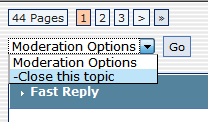 |
|
|
Aug 4 2009, 05:13 AM
|
|
Junior Member
25 posts Joined: Aug 2009
|
Well, I did read before actually attempting them. I read the guides for both redsn0w and purplerain. However, there are a few terms in the guide for redsn0w which I don't quite understand. As for choosing between purplerain and redsn0w, I choose purplerain at first too as the feedbacks were mostly positive but it just won't work for my phone. Tried it once more just now. It'll just hang at the "Done, wait for reboot" process even after 15 minutes of waiting. So I guess I'll have to switch to another alternative to jailbreak and redsn0w was recommended but redsn0w download mirrors are so limited that my download is still in queue
 By the way, thanks for all the replies! At least I don't have to worry bout my phone now By the way, thanks for all the replies! At least I don't have to worry bout my phone now  I'll go to bed now while waiting the redsn0w to be downloaded. Will try jailbreaking it tomorrow and if I still dont get the process, help me out! I'll go to bed now while waiting the redsn0w to be downloaded. Will try jailbreaking it tomorrow and if I still dont get the process, help me out!  |
|
|
Aug 4 2009, 05:42 AM
|
|
Junior Member
130 posts Joined: Aug 2007
|
Jasie: do not need to worry! same scenario happened to me. Just put the phone back into DFU mode, Itunes will recognise it, you can restore it through there. It's almost 100% brick proof. Knowing DFU will save your anxiety for sure! good luck!
|
|
|
Aug 4 2009, 08:11 AM
|

Junior Member
121 posts Joined: Sep 2008 From: 1 Msia Rasuah!! - '' I help You, You help Me”
|
is happened to me last month, when i try to reset all content on my 16gb i3gs US set and is hang-ed from 8pm till morning.
my luck that morning i can restore to original setting but my iphone come to Lock!!   on the same day i let-go mine ahakzz n booked maxis 32gs set on the same day i let-go mine ahakzz n booked maxis 32gs set |
|
|
 Aug 4 2009, 08:37 AM Aug 4 2009, 08:37 AM
|

Junior Member
237 posts Joined: Jul 2008
|
from your case u mentioned, u need to do it in DFU mode. Then u try to jailbreak again. The process might corrupt as u said, but u can keep retry it.
Added on August 4, 2009, 8:42 am QUOTE(Jasie @ Aug 4 2009, 04:43 AM) The scary thing was iTune can't detect my phone.Even connected, my com didn't respond to it. But x3me was kind enough to help me out earlier. He told me to hold sleep/wake + home button long enough for it to respond and yes, I took quite a while. Previously I was using purplesn0w or something like that. I don't think I wanna use that program anymore. I'm currently with an iPhone 3Gs unlocked set from Maxis with version 3.0.1. x3me recommended redsn0w, so I think I'll give redsn0w a try but the download link for redsn0w is slowww plus from what I read, the installation sounds a little complicated. Sorry for being a n00b in iPhone stuff, I'm only a 4 days iPhone user. After you in DFU mode, CONFIRM can detect... u search for youtube watch how ppls do DFU.We all are startlet before, just keep learn it from experience. Jasie, ur iphone won't crap and no need send to repair for this software reason. Restore it in DFU will answer ur question. I also face many many error and problem like u before. No worry. This post has been edited by geo-milano: Aug 4 2009, 08:42 AM |
|
|
Aug 4 2009, 09:10 AM
|
 
VIP
4,903 posts Joined: Jul 2008
|
Thread Closed
Use the proper thread for your queries next time. Thank you http://forum.lowyat.net/topic/984406 |
|
Topic ClosedOptions
|
| Change to: |  0.0179sec 0.0179sec
 1.42 1.42
 5 queries 5 queries
 GZIP Disabled GZIP Disabled
Time is now: 23rd December 2025 - 01:00 AM |
 Quote
Quote