

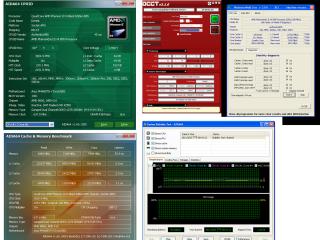
MB: Asus M4A88TD-V EVO/USB3
My result:

Attached thumbnail(s)
AMD® Socket AM3 Unlocking 4th CORE Thread ~, Those Who Have Tried,Please List it HERE
|
|
 Mar 27 2011, 03:22 PM Mar 27 2011, 03:22 PM
Return to original view | Post
#1
|
 
Junior Member
33 posts Joined: Aug 2008  
|
My CPU: AMD Phenom II X2 550 Black Edition -> -> AMD Phenom II X4 B55
MB: Asus M4A88TD-V EVO/USB3 My result: Attached thumbnail(s)
|
|
|
|
|
|
Apr 5 2011, 01:21 PM
Return to original view | Post
#2
|
|
Junior Member
33 posts Joined: Aug 2008
|
my phenom II x2 555BE unlock result. So far stable.
Attached thumbnail(s) 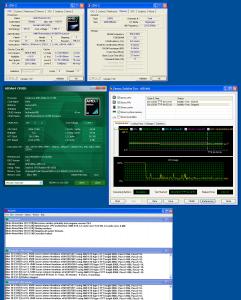
|
|
|
Apr 5 2011, 07:13 PM
Return to original view | Post
#3
|
|
Junior Member
33 posts Joined: Aug 2008
|
[quote=prestigio,Apr 5 2011, 07:03 PM]
WHICH MOBO??  Asus M4A88TD-V EVO/USB3 Very nice piece of board! This post has been edited by egorain: Apr 5 2011, 07:14 PM |
|
|
Apr 10 2011, 11:28 PM
Return to original view | Post
#4
|
|
Junior Member
33 posts Joined: Aug 2008
|
Mine just drop down to 3.8ghz for stability although 4.0 is through stress test.
My board : M4A88TD-V EVO/USB3 CPU : Phenom II x 2 555 BE OS : Window 7 Ultimate 64bit Attached thumbnail(s) 
|
|
|
Apr 17 2011, 08:19 AM
Return to original view | Post
#5
|
|
Junior Member
33 posts Joined: Aug 2008
|
Some tips for tweaking performance for dual core or quad core cpu at Window 7;
*Using MSCONFIG: (1) Go to the “Start Menu“, type “MSCONFIG ” in the search box and press Enter. The Windows system configuration tool will start. It might ask you for Administrator password before continue. (2) Click the “Boot” (2nd) tab (3) Click “Advanced Options” button (4) Select the number of processors you have and the amount of memory available. For example, if you’re using a Dual Core processor then you should select “2″ from processors drop down menu, if you have a Quad Core processor, you should select “4″ from the processor drop down menu, etc. (5) Select your numbers of memory ram also '4gb' (4096) or '8gb' (8192) etc. (6) Now Press “Ok“, then “Apply“, MSCONFIG might ask you to re-boot your computer.  Attached thumbnail(s) 
|
|
|
Apr 18 2011, 07:30 PM
Return to original view | Post
#6
|
|
Junior Member
33 posts Joined: Aug 2008
|
QUOTE(gelang @ Apr 18 2011, 06:51 PM) actually i oredi turn into 4 core..the problem is still happen..nvr play with msconfig.. It appeared your core speed & multiplier not showing the accurate figures, if you're unlock the core successfully, it shd be showing 3.2mhz at core speed, and x16 at multiplier, according to your cpu_z, it might cause your pro unstable, don't think about the ram speed first, you might turn of the core unlock feature first and restart enter window play some games, if it shows normal and no sudden happening, that means your pro core is not stable to unlock, bless for it now.sory..wat u mean by the speed quite low??u mean ram???my ram is 1333mhz but can OC to 1600Mhz...  Somehow I think your mobo gigabyte ga-770t-d3L's chipset is not good at unlock cores, it's only hv 4+1 phase VRM, not 8+2 one, may be you have to update newest bios & try again....  |
| Change to: |  0.0188sec 0.0188sec
 0.78 0.78
 7 queries 7 queries
 GZIP Disabled GZIP Disabled
Time is now: 4th December 2025 - 07:37 AM |
 Quote
Quote