

hi bro
1. houskeeping done but still the same.. aiya dont know what to do..

2. i try to revert by look out over the setting but there is no setting to revert..
what should i do guys? proceed to last resort (format)??

ASUS k40AB/k50AB: HD 4570 for just RM2K!, Light gaming on the cheap
|
|
 Aug 18 2009, 01:36 PM Aug 18 2009, 01:36 PM
|
 
Junior Member
38 posts Joined: May 2009 
|
@Astria
hi bro 1. houskeeping done but still the same.. aiya dont know what to do.. 2. i try to revert by look out over the setting but there is no setting to revert.. what should i do guys? proceed to last resort (format)?? |
|
|
|
|
|
Aug 18 2009, 01:36 PM
|

Senior Member
22,158 posts Joined: Aug 2008 From: Singapore 
|
QUOTE(sidefeast @ Aug 18 2009, 02:28 PM) just install the webcam driver and it'll be fixed. driver can be found at page 46. or maybe 48. go into safe mode...Regarding the delayed load, i think its because of the Avira. u hav to wait till the umbrella at the tray open first before u can access any file on my computer. i hav the same prob also and i nvr know how to solve it. i dont think its about housekeeping though. anyone? ___________________ Guys. I have serious situation here. Since i first switch on this laptop, i never bother anything bout the user account setting at the control panel. But just now, i clicked on it and created another administrator user and put up a password on every activated account. Then i see there are 2 administrators user, the one i just created, and another one i use to create the 1st one (which name cannot be changed. it is fixed as 'administrator'). Then when i restart the laptop, i cant by any way re-access the original administrator, only the new one is available to be selected. Thus, i cant access everything in that user when im in the new particular admin acc. How can i access back the old admin? i need to print an assignment. must submit in half an hour  |
|
|
Aug 18 2009, 01:41 PM
|
|
Junior Member
38 posts Joined: May 2009
|
@Sidefeast
just install the webcam driver and it'll be fixed. driver can be found at page 46. or maybe 48. Regarding the delayed load, i think its because of the Avira. u hav to wait till the umbrella at the tray open first before u can access any file on my computer. i hav the same prob also and i nvr know how to solve it. i dont think its about housekeeping though. anyone? ___________________ 1. i try to search at both page but cant find it.. 2. Ermm i think it wasnt about Avira because the same problem still occur after I uninstalled and reboot.. 3. So sorry to hear bout your prob.. wish i could help u.. good luck. This post has been edited by hasuji: Aug 18 2009, 01:42 PM |
|
|
Aug 18 2009, 01:56 PM
|

Junior Member
62 posts Joined: Jul 2009 From: From: From:
|
@hasuji
Webcam driver http://dlcdnet.asus.com/pub/ASUS/nb/Driver...n_XP_090422.zip assignment submitted woohoo! thanks Astria. |
|
|
Aug 18 2009, 02:00 PM
|

Junior Member
91 posts Joined: Jan 2003 From: Bear Hill, Melaka 
|
QUOTE(simonsii @ Aug 18 2009, 11:13 AM) I got my K50AB from PC City, Kuching with RM1999. I don't want freebie, so they gave me a special price for my Edifier S2.1M. Thanks for the info mate. I called out PC city few hours ago and they told me K40AB price is RM2089 :/For your info, PC City is authorized Sarawak Distributor for Asus Notebook & Edifier Speaker. |
|
|
Aug 18 2009, 02:02 PM
|
|
Junior Member
38 posts Joined: May 2009
|
QUOTE(sidefeast @ Aug 18 2009, 02:56 PM) @hasuji bro try it just know and this is what i gotWebcam driver http://dlcdnet.asus.com/pub/ASUS/nb/Driver...n_XP_090422.zip assignment submitted woohoo! thanks Astria. 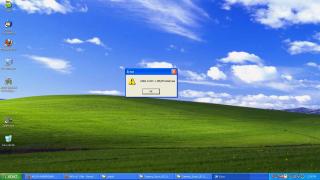
I unzip the file already..Really dont know where and what is wrong? This post has been edited by hasuji: Aug 18 2009, 02:03 PM |
|
|
|
|
|
Aug 18 2009, 02:09 PM
|

Senior Member
7,558 posts Joined: Mar 2008 From: HornBill Borneo  
|
@hasuji...maybe you can try check you 'msconfig'...see if there's any services or apps that you can off during start-up...about the webcam driver, maybe you can download it again & try un-zipped it again..
Added on August 18, 2009, 2:10 pmopps, wrong info...try manual install from device manager.. This post has been edited by miahahaha: Aug 18 2009, 02:10 PM |
|
|
Aug 18 2009, 02:11 PM
|

Junior Member
72 posts Joined: Jul 2009
|
QUOTE(zax2_z @ Aug 18 2009, 02:00 PM) Thanks for the info mate. I called out PC city few hours ago and they told me K40AB price is RM2089 :/ dun worry, that must be new stock (320G HDD). Mine is 250G HDD.my suggestion is better dun take freegifts, but go for RAM upgrading, 4G RAM. u can try to negotiate with them.  |
|
|
Aug 18 2009, 02:14 PM
|
|
Junior Member
38 posts Joined: May 2009
|
QUOTE(miahahaha @ Aug 18 2009, 03:09 PM) @hasuji...maybe you can try check you 'msconfig'...see if there's any services or apps that you can off during start-up...about the webcam driver, maybe you can download it again & try un-zipped it again.. will try right away dude..Added on August 18, 2009, 2:10 pmopps, wrong info...try manual install from device manager.. anyway do u got any idea on how to solve my loading thing problem? |
|
|
Aug 18 2009, 02:18 PM
|
|
Senior Member
7,558 posts Joined: Mar 2008 From: HornBill Borneo
|
@hasuji, klik 'start' button...and then klik at RUN...in the address bar, type 'msconfig'...go to 'startup'..print-screen for us here..
|
|
|
Aug 18 2009, 02:28 PM
|
|
Junior Member
38 posts Joined: May 2009
|
@miahahaha
here u are : 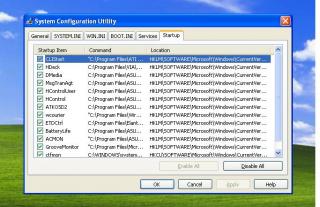
Currently im still in the middle to install the driver manuall thru device manager.. |
|
|
Aug 18 2009, 02:33 PM
|
|
Senior Member
7,558 posts Joined: Mar 2008 From: HornBill Borneo
|
well, nothing wrong with your start-up...you already done with cleaning right...maybe you can go to tab BOOT.INI in msconfig and try change the boot time from 30s to 3s..well, worth trying though..
|
|
|
Aug 18 2009, 02:34 PM
|

Junior Member
38 posts Joined: May 2009
|
finished installing xp on k50ab. having same problem for lifeframe. the image is flipped. i think its because no driver installed, cant find driver for the webcam
|
|
|
|
|
|
Aug 18 2009, 02:37 PM
|
|
Junior Member
38 posts Joined: May 2009
|
QUOTE(miahahaha @ Aug 18 2009, 03:33 PM) well, nothing wrong with your start-up...you already done with cleaning right...maybe you can go to tab BOOT.INI in msconfig and try change the boot time from 30s to 3s..well, worth trying though.. yup cleaning done after Astria advised me.will try.. as u can see karkadeeh also facing same problem as me.. at least i got friend out there..  This post has been edited by hasuji: Aug 18 2009, 02:37 PM |
|
|
Aug 18 2009, 02:37 PM
|
|
Senior Member
7,558 posts Joined: Mar 2008 From: HornBill Borneo
|
read few post back karkadeeh...sidefeast already gave a link for webcam driver for XP..
Added on August 18, 2009, 2:39 pmwell, of course there will be a problem installing XP in a Vista-made laptop...  This post has been edited by miahahaha: Aug 18 2009, 02:39 PM |
|
|
Aug 18 2009, 03:08 PM
|
|
Junior Member
6 posts Joined: Aug 2009
|
hi all,
Just got my k50ab from evernew yesterday. Whooho... Just installed Vista HP and all the drivers from the Asus CD except for the default VGA. Now I'm downloading DNA B3. but before i install the driver is there anything else I need before I do this? Thanks |
|
|
Aug 18 2009, 03:22 PM
|
|
Junior Member
38 posts Joined: May 2009
|
QUOTE(miahahaha @ Aug 18 2009, 02:37 PM) read few post back karkadeeh...sidefeast already gave a link for webcam driver for XP.. few post back, the driver cant be installed. i already have same driver installer.Added on August 18, 2009, 2:39 pmwell, of course there will be a problem installing XP in a Vista-made laptop... *thinking to revert back to vista ultimate * |
|
|
Aug 18 2009, 03:30 PM
|
|
Junior Member
38 posts Joined: May 2009
|
QUOTE(miahahaha @ Aug 18 2009, 03:33 PM) well, nothing wrong with your start-up...you already done with cleaning right...maybe you can go to tab BOOT.INI in msconfig and try change the boot time from 30s to 3s..well, worth trying though.. I tried to change already the boot time from 30s to 3s but yet nothing change..@karkadeeh how was your lappy dude? find any solution to resolve webcam issue? mine still same.. sigh...  |
|
|
Aug 18 2009, 03:45 PM
|

Senior Member
2,066 posts Joined: Oct 2007
|
QUOTE(J_hanm @ Aug 18 2009, 03:08 PM) hi all, the first page should be able to guide u??Just got my k50ab from evernew yesterday. Whooho... Just installed Vista HP and all the drivers from the Asus CD except for the default VGA. Now I'm downloading DNA B3. but before i install the driver is there anything else I need before I do this? Thanks its just some tweaks for ur comp.. as long as it works for u.. u wont have to do anything else.. |
|
|
Aug 18 2009, 04:30 PM
|
|
Junior Member
38 posts Joined: May 2009
|
OK! I managed to settled down the webcam issue.. Phewww..
well done to me  and last issue is about as below: 1. whenever i start windows for the first time, the Loading seems takes sometime to load ( i would say almost a minute) then only the hard disk can be detect. the pict below shows right after i loading windows and try to open My Computer 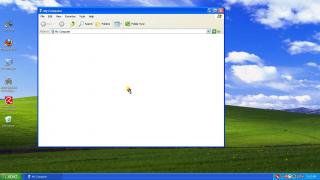
Come on gimme some idea / comment / solution guys.. This post has been edited by hasuji: Aug 18 2009, 04:31 PM |
|
Topic ClosedOptions
|
| Change to: |  0.0290sec 0.0290sec
 0.37 0.37
 6 queries 6 queries
 GZIP Disabled GZIP Disabled
Time is now: 2nd December 2025 - 09:48 PM |
 Quote
Quote